Structural Tables
 ZhengYX4k downloads
Merged cells, multi-row headers, and row headers for readable Markdown tables.
- Overview
- Scorecard
- Updates32
English · 简体中文 · 繁體中文 · 日本語 · 한국어 · Deutsch · Français · Español · Português (Brasil) · Русский · Tiếng Việt · العربية
Structural Tables adds merged cells, multi-row headers, row headers, and headerless tables to Obsidian's Markdown. Your notes stay in Markdown; simply viewing a table never rewrites its source.
Edit cells and rearrange tables in Live Preview, or read them without controls in Reading view. Tables can stay inside quotes, callouts, and lists. To convert one to an Obsidian Base, first move it outside those containers.
Screenshots
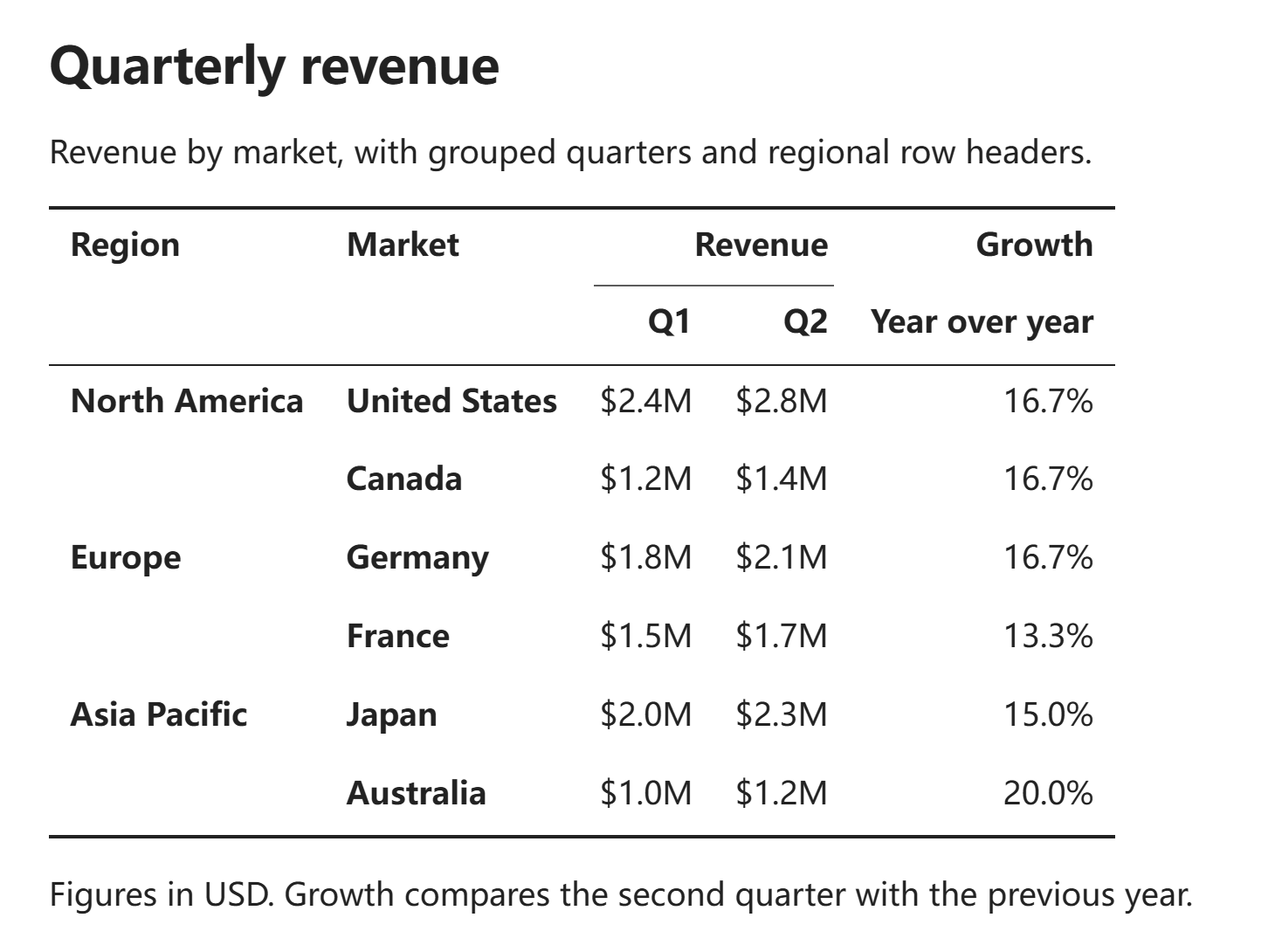
Three-line table in Reading view
Group columns under several header rows and merge repeated labels in the first columns. Three-line style shows separators for header groups without drawing borders around every cell.
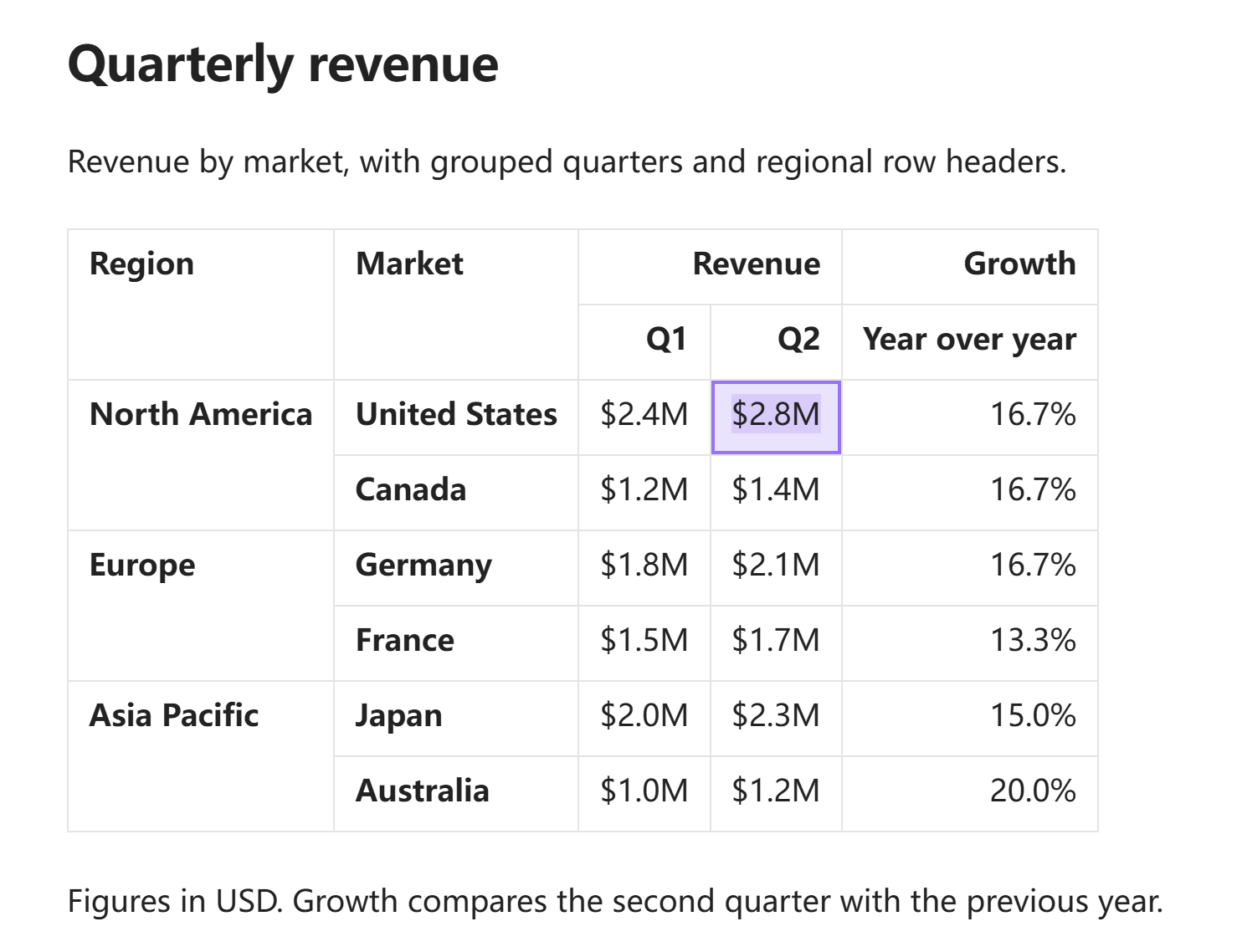
Live Preview
Edit cells directly in Live Preview while keeping merged headers visible. The same table is shown here with the optional grid style; click a cell on desktop, or double-tap it on touch screens, to edit it in place.
Appearance settings
Choose Follow theme, Grid, or Three-line table independently of table layout and density. General, Views, and Appearance keep the settings organized in three tabs.
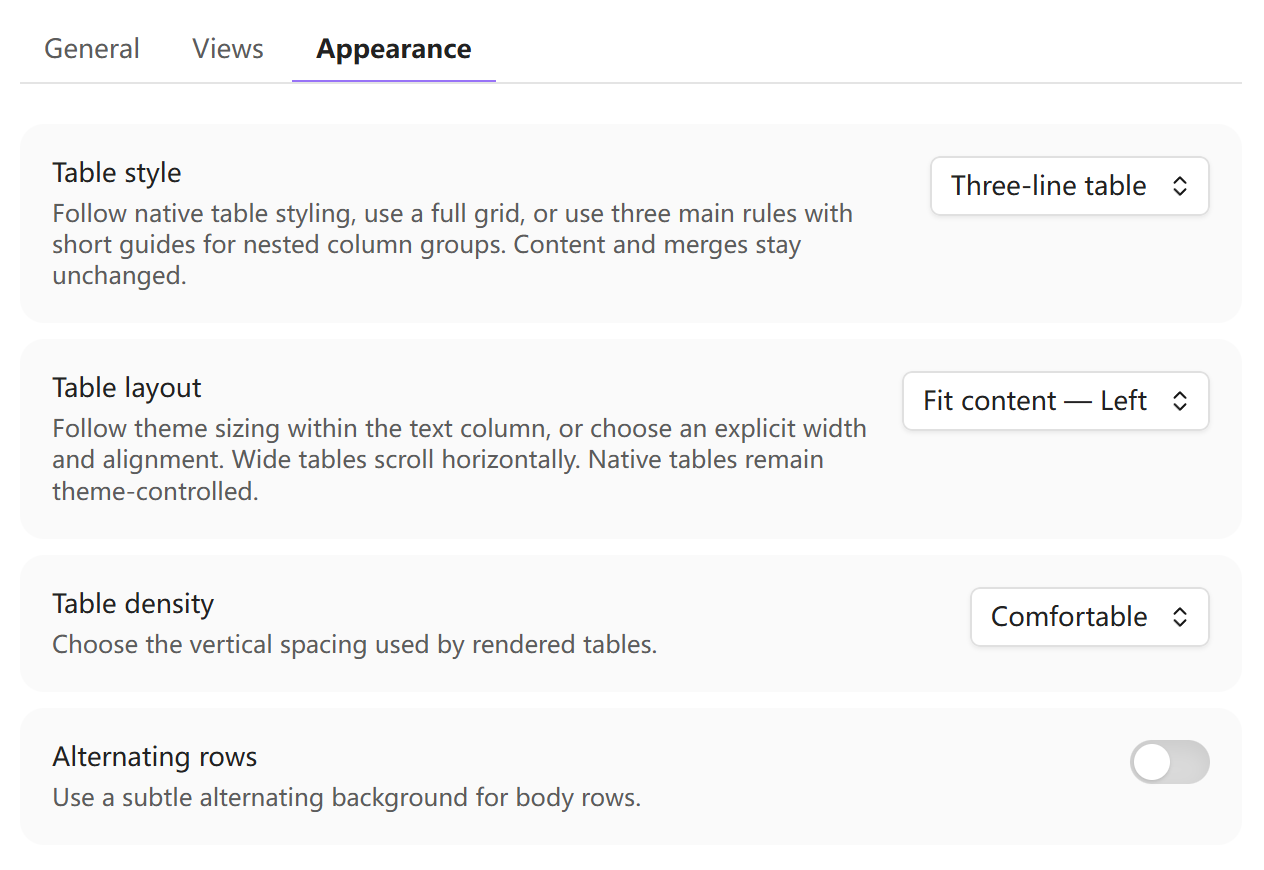
The Appearance image uses the actual settings and table components in a browser fixture, not an Obsidian host capture.
Features
- Merge cells with
<(previous source column) and^(above). Use||for row headers, several column-header rows, or no column headers. - Keep the same table structure in Reading view and Live Preview, including inside quotes, callouts, and lists.
- Edit cells in Live Preview; add, move, align, merge, split, or remove rows and columns through table controls.
- Transpose a whole table, keeping its headers and merged cells. Changes to column alignment or Markdown syntax require confirmation.
- Paste supported HTML tables from browsers, Excel, and Google Sheets with their row and column spans.
- Preview and convert supported Markdown tables to HTML and standalone HTML tables back to Markdown, with explicit warnings for unsupported content or lost styling.
- Copy or cut selected cells, paste compatible ranges, and copy whole tables as HTML, plain GFM, TSV, or CSV.
- Export a complete PNG on desktop, with a preview and options to copy the image or save it as a Vault attachment.
- Optionally edit ordinary GFM tables with Structural Tables controls; switching back to Obsidian's native UI does not alter Markdown.
- Turn a table into an Obsidian Base after previewing the generated record notes and Property mapping. Base membership survives moving those records.
- Protect hidden and unselected source content. Unsafe edits stop rather than dropping text; deliberate clearing and deletion remain available.
Requirements and compatibility
Structural Tables requires Obsidian 1.12.7 or later and supports desktop Obsidian and Android. Converting a table to a Base also requires Obsidian's Bases core plugin.
Inside a Structural Table, exact <, ^, and delimiter || tokens have special meanings. If another enabled table plugin is known to use the same syntax, Structural Tables shows a one-time conflict warning.
For Advanced Tables, FakeLink, and Markdown-based image exporters, see the compatibility notes. They cover the source-editing handoff, third-party sorting risks, and the Obsidian 1.13.7 separate-window workaround.
A note on table compatibility and an apology
2026-10-31
Like Number Suite, Structural Tables began as a small tool I made for my own niche needs while working with academic papers in Obsidian. I used only a small part of LaTeX, so extending Markdown a little seemed like a practical substitute. At first, I designed it around my own workflow without considering other users' needs or how the notes would work in other Markdown editors.
The original syntax for tables without column headers and for row headers does not follow GFM's table structure. As a result, some Markdown editors cannot recognize or display those tables correctly. That was an oversight in my design. I'm sorry for the difficulties this has caused when reading, sharing, or moving notes.
To address this, Structural Tables now offers conversion between Markdown and HTML tables. You can convert an extended Markdown table to HTML while keeping complex headers and merged cells, or convert a supported HTML table back to Markdown. When ordinary GFM can represent the structure, the converter uses it; otherwise it uses the existing Structural Tables markers. You can review the source and any content or formatting differences before replacing the table.
Installation
Install Structural Tables from Obsidian's Community plugins directory: open Settings → Community plugins → Browse, search for Structural Tables, select Install, and then enable the plugin.
For manual installation, download structural-tables-<version>.zip from the latest release and extract it into Vault/.obsidian/plugins/. The archive contains the structural-tables/ directory with main.js, manifest.json, and styles.css. Reload Obsidian, then enable Structural Tables under Community plugins.
Manual upgrades: Replace only main.js, manifest.json, and styles.css in the existing plugin folder with files from the same release. Keep data.json to preserve your settings.
Usage
Choose a workflow
- Edit in the note: use Live Preview. Reading view displays the table but does not edit it.
- Share with Word or another app: use the whole-table HTML copy command; PNG export is available on desktop.
- Need ordinary Markdown: preview a plain GFM conversion before copying or replacing the table. Merges and extra header roles will be flattened.
- Need an Obsidian Base: save the note and move any nested table to the top level, then review the conversion preview.
Quick start
- Place the cursor on an empty line with no text selected. Run Insert structural table from the command palette to insert a working example. This command writes the example at the cursor; it does not open a dialog.
- Put
<in a cell to merge with the previous source column,^to merge upward, or adjacent||in the delimiter row to mark row-header columns. - Move the source cursor outside the table in Live Preview, or switch to Reading view, to see the layout.
- Click a rendered cell in Live Preview to edit it, or right-click and choose Edit table source to return to Markdown.
Use the + controls, row/column handles, and context menu for structural changes. To import a supported HTML table, paste it into the note's Markdown editor. Reading view remains display-only.
If the table looks wrong, run Validate structural tables in current note from the command palette. It reports syntax problems without editing Markdown.
Advanced editing and safe deletion
Click a cell in Live Preview to edit it. If its rendered text has a unique position in Markdown (including links, bold, italic, code, and emoji), the caret follows your click. Otherwise it starts at the end of the cell rather than selecting and replacing everything. Alt-click a link label to edit it without following the link.
Enter saves and moves down one row, adding a row at the bottom. Shift+Enter inserts a line break, and Tab moves to the next visible cell. Up/Down crosses into the next cell only from the first or last displayed line. If line wrapping cannot be measured safely, the caret stays in the current cell.
Cmd/Ctrl+B and Cmd/Ctrl+I format the active draft. Typing, IME, paste, and formatting use draft-local undo/redo until you save. Use Edit table source for other Markdown formatting.
Shift+Arrow extends or shrinks a logical grid selection. With that selection focused, Delete/Backspace clears cell contents without removing rows, columns, header roles, or merges. For structural removal, right-click and choose Delete selected rows, Delete selected columns, or Delete table. Clearing or explicitly deleting is undoable in one step; non-empty rows do not need to be cleared first.
Click a row or column handle to select it, or hold and drag it in the same gesture to move it. Shift-click or tap another handle to extend the selection; dragging an already-selected handle moves the whole group. Merge and header boundaries stay protected.
Table syntax
A structural table can combine multiple column-header rows and row headers:
| Region  | Sales | <   |
| Quarter | Q1    | Q2  |
| ---     || ---  | --- |
| North   | 10    | 12  |
| ^       | 8     | 11  |
Rows immediately above the delimiter are column headers. The || divider does not add a column; it marks the source columns before it as row headers.
Tables follow the note’s text direction. In a right-to-left note, the first source column and row headers appear on the right. Changing the plugin language or typing Arabic in one cell does not reverse columns or change what <, ^, and || mean.
A delimiter can also come first, which creates a table with no column header:
| --- | --- |
| Alice | 10 |
| Bob   | 20 |
Select the complete column-header area and choose Remove column headers to keep the text but turn those rows into data. You can later select rows at the top and make them column headers again.
Merge markers must form one rectangle and cannot cross a header/data boundary. To show literal < or ^ text in a cell, write \< or \^.
Transpose a table
Finish or cancel any open cell edit, then right-click the table and choose Transpose whole table (swap rows and columns). You can also place the source cursor inside the table and run that command from the command palette. The command always affects the whole table, regardless of which cells are selected.
Rows become columns, column and row headers exchange roles, and merged cells turn with the table. A confirmation appears if different column alignments must be reset or an ordinary Markdown table needs Structural Tables syntax to keep its headers. Cancel leaves the table unchanged. After confirming, one Undo restores the whole table; typing before or after the transpose stays in a separate undo step.
If nearby pipe-separated text would become part of the transposed table, the command leaves the note unchanged. Add a blank line before and after the table, then try again.
Editing, line breaks, and math
Shift+Enter, the cell-editor menu, and multiline paste can insert a visual line break. Ordinary text is saved with canonical <br>; hand-written <br>, <br/>, and <br /> spellings are preserved when the table is only formatted.
Single-line TeX is kept as written when it can be stored safely. A bare pipe inside math, such as $|x|$ or $P(A|B)$, is ambiguous in a Markdown table, so the plugin refuses to save it automatically and keeps the draft open. For those two simple patterns, the cell menu can apply an explicit \lvert … \rvert or \mid rewrite. More complex expressions must be corrected manually.
Ordinary GFM tables
Ordinary Markdown tables continue to use Obsidian's native editor by default. Enable Take over ordinary Markdown tables if you want the same Live Preview controls on them; disable it to return immediately to Obsidian's native UI.
A body row can contain fewer or more cells than the header row. Missing cells display as empty. If a body row has more cells than the header, Obsidian hides the extra cells. Structural Tables keeps the table readable but blocks its editing commands to protect that hidden text. Choose Edit table source, then move the extra text into visible columns or add enough header columns to show it. When ordinary-table takeover is off, Delete/Backspace and table deletion use Obsidian’s own behavior.
Pasting and copying
Import an HTML table
When pasting into the note's Markdown editor with Preserve pasted HTML table spans enabled, a supported multi-column HTML table can be converted while keeping row and column spans and visual line breaks. HTML that cannot be converted safely is left to Obsidian, or uses the clipboard's complete plain-text form when that fallback is known to be safe.
For text with preserved spaces, tabs, line breaks or heading boundaries, the plugin uses the complete plain-text alternative. This keeps the text but may lose table layout or rich formatting. If no safe alternative is available, the paste is blocked and your current selection is kept.
A body-only HTML table stays headerless instead of having its first row turned into a header. Real thead/th markup is used when the source provides it.
Copy or cut selected cells
Select cells and choose Copy selected cells or Cut selected cells. To paste, either select a destination rectangle with the same merged layout, or select just one unmerged cell as the top-left anchor. A single-cell anchor can grow the table right/down. It overwrites only content completely inside the destination rectangle, never the outside of an existing merge; roles, existing alignments, unrelated cells and raw Markdown remain intact. Unsupported merges or unsafe source are refused. Copy never edits the note; Cut clears only after verified clipboard success. Paste is a single undoable change.
Range menu Copy/Cut needs platform clipboard-write support; menu Paste separately needs clipboard-read support. One may be available while the other is not. Plain text, ordinary HTML, or unrecognized range data cannot be pasted directly into a grid selection and never reaches the hidden Markdown source. To paste ordinary text, open a single cell for editing; to import an HTML table, paste in the note's Markdown editor. Edit table source also lets you work directly in Markdown.
On mobile, range Copy/Cut writes a plain Markdown table and checks that the system clipboard contains that exact text before Cut can clear anything. The plugin remembers the copied merge layout for the current session. Range Paste works while the clipboard still matches that copy; replacing the clipboard content or restarting Obsidian or the plugin makes that copied merge layout unavailable. Text copied elsewhere belongs in a cell editor or the note editor.
For other applications, range Copy also provides HTML and plain Markdown. Range HTML represents spans and shows the cell's Markdown as raw text. Plain Markdown uses the first copied row as a header and retains structural markers where representable; it does not guarantee the same merge layout in other applications, including vertical merges.
Copy the whole table
Use Copy whole table for Word / HTML from a source, Live Preview, native-table or Reading View menu, or run Copy current table as HTML for applications such as Word. The menu action keeps the table you opened it from and refuses to copy if that target changes. You can also copy as plain GFM, TSV, or CSV. The plain GFM preview lets you choose how header roles and orientation are converted.
Copied HTML records which headers belong to each data cell. Word may discard those associations when saving a DOCX, even if the table still looks correct. Tables with several row-header columns may therefore lose some header information.
On mobile, or when rich clipboard support is unavailable, the HTML copy commands copy tab-separated plain text and say that header structure and merged cells were flattened. Cell-internal line breaks and tabs become spaces; rich HTML formatting and merged-cell layout are unavailable in this fallback.
Convert to plain Markdown (GFM)
Right-click the table and choose Convert to plain GFM table…. In an editor, you can also place the source cursor inside the table and run Convert current table to plain GFM. The preview belongs to the table you opened it from, even if you later move the cursor to another table.
- Choose Keep rows and columns or Swap rows and columns. For a table with only row headers, swapping is recommended: those labels become the top header row that GFM supports.
- Check Result preview, switch to Markdown source, and review the listed changes. Merged-cell contents repeat across the formerly merged area. Multiple header levels are joined with
/; row-header roles that remain on the side become ordinary cells. Keeping a table without column headers adds an empty top header row and preserves every existing data row. - Choose Copy preview Markdown to use exactly this result elsewhere, or Replace table to replace the original table once. Reading View offers copying. One Undo restores an editor replacement; Close leaves the source unchanged. Finish any open cell edit first. If the original table or its file changes while the preview is open, reopen the preview.
For example, this table has only row headers:
| --- || --- | --- |
| Name | Alice | Bob |
| Age | 28 | 31 |
| City | Hangzhou | Shanghai |
The recommended result is ordinary GFM, with the labels retained as column headers:
| Name | Age | City |
| --- | --- | --- |
| Alice | 28 | Hangzhou |
| Bob | 31 | Shanghai |
Copy current table as plain GFM uses the recommended orientation directly. Use the preview when you want to choose the orientation. Neither option changes the source until you choose Replace table. If Obsidian hides extra source cells, the preview explains that they are absent from the copy and disables replacement; correct the source first to include them.
Convert between Markdown and HTML tables
Place the cursor in a Markdown table and run Convert current Markdown table to HTML…, or choose Convert to HTML table… from its source-editor context menu. Review the generated HTML and confirm to replace the table in one undoable edit. This is different from Copy current table as HTML: conversion writes HTML into the note.
To convert back, open the note in the Markdown editor, place the cursor inside a complete standalone <table>…</table> source block, and run Convert current HTML table to Markdown… (also available in the source-editor context menu). The preview shows ordinary GFM when sufficient, or the existing <, ^ and || markers when needed for headers and merges.
Only text, supported <br> breaks and representable table structure are converted. Markdown links, formulas and inline formatting are not silently flattened into HTML; rich HTML cell markup and ambiguous spans are refused. HTML colors, widths and other attributes may be lost when converting back: the preview names this difference and requires explicit acknowledgement. Source blocks in code fences or nested HTML, and conversions that could absorb neighboring text, are not replaced. Use the Markdown source editor to change the resulting HTML, or convert it back before using Structural Tables' visual cell editor.
Export a table image
On desktop, right-click a table and choose Export whole table as image…, or place the source cursor inside a table and run Export whole table as image from the command palette. The preview shows the final PNG. Copy image and Save PNG to Vault use the same image; image copy requires clipboard permission, and saving creates a new attachment at the Vault's configured location without overwriting files or inserting a note link. Ordinary GFM tables can also be exported from their native menu or the command palette.
The snapshot uses the current theme, background, table appearance and density. It includes the complete table, merged headers, rendered text, supported math and loaded local image attachments, without editing controls or selection marks. Long content expands the image instead of being cropped. Save or cancel any active cell draft first; the export excludes that draft and never changes Markdown. A source, theme, or table-direction change during generation requires a fresh export; a completed preview retains its original snapshot.
Images use a fixed 2× scale and stop at 8192 pixels per side or 16 megapixels. If the table is too large, required content cannot be loaded, or an interactive or note embed cannot be captured, export reports a failure and does not create an incomplete PNG. If the note already uses a fallback font, the image keeps that visible font. Cross-origin images may be blocked by browser security; use local attachments. Export is local and has no upload service. Mobile image export is unavailable; use the text copy commands there.
Convert to Base
Save the note and move a nested table to the top level before converting it to a Base. The preview shows the target folder, generated record notes, Property names, and any table structure that will be flattened.
New records are created under <note-folder>/_structural-table-records/<table-id>/ by default. That folder is only the initial creation location: moving or renaming a record note does not remove it from the Base. The structural-tables list Property keeps the association.
If conversion fails after creating files, the plugin leaves those files in place and reports their folder so you can inspect them. Restore table from current Base restores the original table snapshot from _promotion.json but deliberately keeps the generated notes.
Blank headers become column_n; non-empty headers, including numeric and leading-zero names, are kept as Property names when possible. Duplicate or reserved names receive a numeric suffix.
After conversion, place the cursor inside the Base block and run Create record for current Base to add a blank record. New records go into the current note's _structural-table-records/<table-id>/ folder, but their membership is not tied to that location. For Bases created by older plugin versions, Migrate legacy Structural Tables Base properties… previews a membership-property update before you confirm it.
Recovering an interrupted edit
A rejected cell edit stays open whenever possible. If an external change or view rebuild interrupts an unsaved draft, Structural Tables keeps a session-only recovery copy. Use Recover interrupted cell drafts to reopen the recovery dialog. Recovery copies disappear when Obsidian or the plugin restarts, so copy anything important before then.
Settings
The settings page has General, Views, and Appearance tabs.
Choose Follow Obsidian or select one of twelve interface languages: English, 简体中文, 繁體中文, 日本語, 한국어, Deutsch, Français, Español, Português (Brasil), Русский, Tiếng Việt, and العربية. Automatic selection follows Obsidian and falls back to English when the language is unavailable. Your choice changes the plugin's menus and messages, not your note contents or table direction.
- General: usage guide and issue-reporting links, language, HTML-table paste conversion, and conflict warnings.
- Views: Reading view, Live Preview, diagnostics, and the default-off Take over ordinary Markdown tables option.
- Appearance: Follow theme, Grid, or Three-line table; table width/alignment; comfortable or compact spacing; optional alternating rows.
Follow theme leaves borders, header colors, and typography to the active Obsidian theme, including the outer edges of tables without column headers. Grid gives semantic headers a consistent header band, with slightly thicker single lines below the complete column-header area and along the row-header divider declared by ||. Both boundaries remain visible even before data rows are added. These lines follow merged-cell edges; tables without headers keep a uniform grid. Three-line table uses top and bottom rules plus one rule below the complete column-header area, with no vertical body rules. A headerless Three-line table naturally has only the top and bottom rules.
Style and shading groups the style and alternating-row controls; Layout and spacing groups width/alignment and density. The sample below updates immediately, so you can compare settings before returning to your note. It uses fixed local text and neither reads nor edits a note. Settings still apply to rendered tables throughout the Vault and are saved automatically.
Appearance settings affect only rendering; they never change Markdown.
Export to Word: Structural Tables uses extra Markdown syntax for merged cells and header structure. For compatible DOCX conversion, DocWen Assistant can work with the separate local DocWen application. Enable the Structural Tables input extension in DocWen → Settings → Parse Markdown (and the output extension in Settings → Generate Markdown when converting back to Markdown). This optional Assistant workflow supports Windows and Linux; it is unavailable on macOS and mobile.
Limitations
Structural Tables is not a spreadsheet engine and does not calculate formulas. It does not support per-cell styling, captions, numbering, block-level Markdown inside cells, or true multiline Markdown cells.
Imported HTML cells are converted to plain text plus supported visual <br> breaks; rich HTML is not converted into Markdown formatting. Converting to a Base flattens table layout into Properties: multi-row column-header paths are joined with /, row headers become normal Properties, and merged row-header values repeat for the records they cover. A merged data cell must be split before Base conversion.
Restoring a converted table requires the generated _promotion.json file to remain at the path recorded in the Base block.
Privacy and security
Structural Tables processes tables locally and does not upload content or collect analytics. Cell contents are rendered by Obsidian, so remote images or embeds still follow Obsidian's own network behavior. Image export may read the active theme's font or decoration resources to embed them in the local PNG; offline export needs those resources available locally.
Simply rendering a table never changes its Markdown. Edits and menu commands are explicit and validated before replacement. Base conversion creates only the local files shown in its preview. If a conversion fails partway through, created files are kept for inspection rather than deleted automatically.
Development
Use Node 24.19.0 and npm 11.17.0.
npm ci
npm run check
Run npm run test:browser -- /path/to/chromium for the separate browser gate used by CI. It requires an installed Chromium and a loadable local font; the testing strategy explains focused suites and retained diagnostics. These local fixtures do not run Obsidian.
Developer references:
- Product requirements
- UX specification
- Architecture
- Testing strategy
- Changelog
- Contributing guide
- Security policy
Support
- Q&A: Usage and configuration questions.
- Ideas: Early feature and workflow ideas.
- Show and tell: Tips, workflows, and reference implementations.
- Use GitHub Issues for reproducible bugs and concrete feature requests. Include the Obsidian version, editing mode, theme, relevant table Markdown, expected result, and actual result.
- Report vulnerabilities only through GitHub's private vulnerability reporting; see the security policy for details.
Never post real private Vault paths, note content, credentials, or personal information publicly.
License
MIT © ZhengYX