Search...Search plugins and themes...
⌘K
Sign in
  • Get started
  • Download
  • Pricing
  • Enterprise
  • Account
  • Obsidian
  • Overview
  • Sync
  • Publish
  • Canvas
  • Mobile
  • Web Clipper
  • CLI
  • Learn
  • Help
  • Developers
  • Changelog
  • About
  • Roadmap
  • Blog
  • Resources
  • System status
  • License overview
  • Terms of service
  • Privacy policy
  • Security
  • Community
  • Plugins
  • Themes
  • Discord
  • Forum / 中文论坛
  • Merch store
  • Brand guidelines
Follow us
DiscordTwitterBlueskyThreadsMastodonYouTubeGitHub
© 2026 Obsidian

Sticky Notes

abdo-redaabdo-reda6k downloads

Create sticky notes popups.

Add to Obsidian
  • Overview
  • Scorecard
  • Updates10

This is a simple plugin that essentially builds on the popout functionality of obsidian. It adds a new popout window that resembles sticky notes that haves a much simpler look and adds a pin functionality.

You can open this popout window using the ribbon action, command, or context menus.

Demo
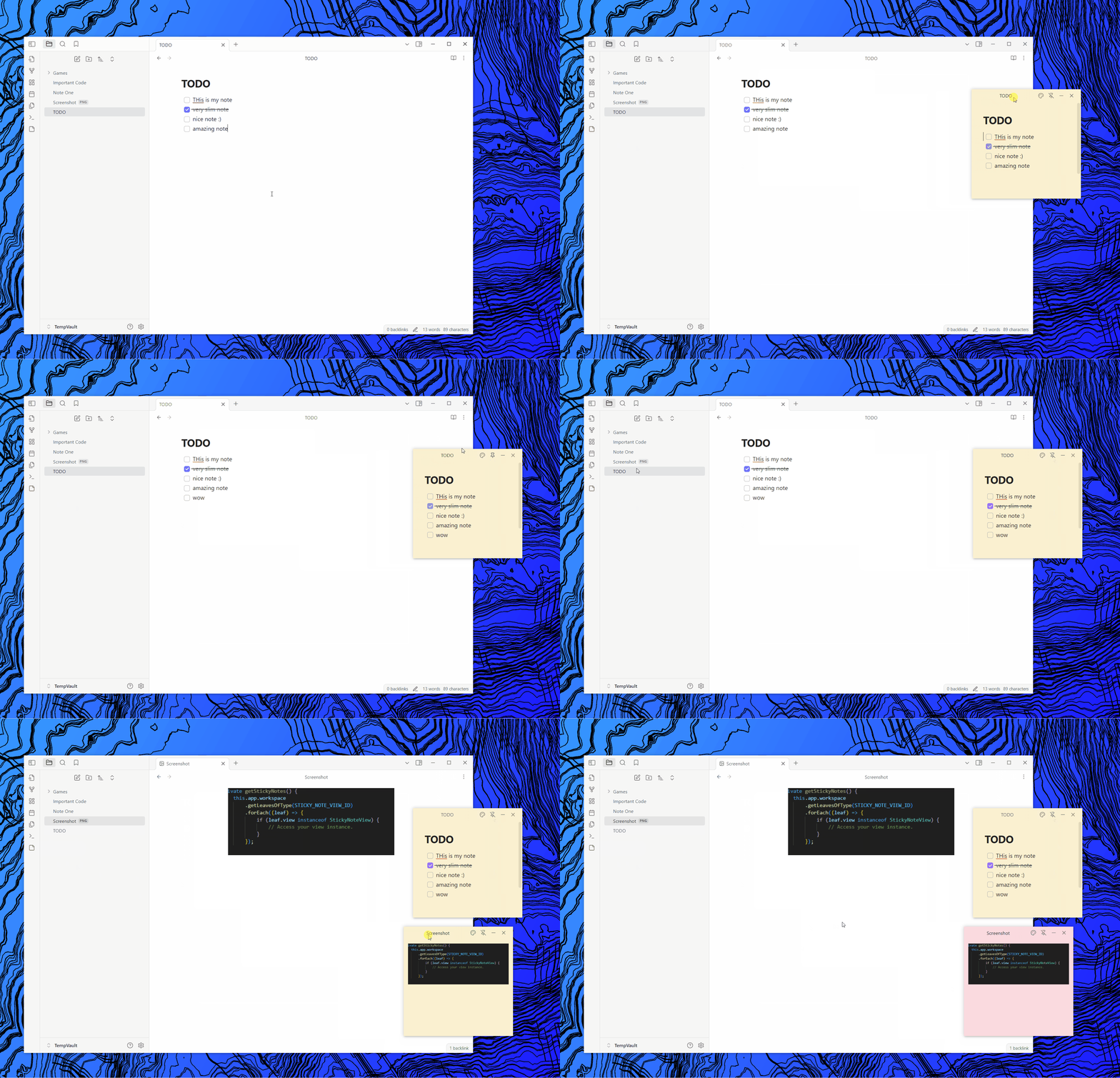
Demo Video

Possible Issues & Limitations.

  • Windows (sticky note windows) don't close themselves when obsidian shutsdown, and unfortunely reopen as normal popups when obsidian restarts. (hopefully can be fixed in a future release.)

  • There is no Color Settings yet:

    • Sticky Note default color: Yellow color (250, 240, 208)
  • The plugin relies on @electorn/remote to work, as the pin functionality and resizing require access to the node/main process apis. This is not the recommended approach, but the only one that worked with me after some research.

  • The plugin relies on customizing certain obsidian elements (like the titlebar) and relies on their classes, there is no guarentee that this will continue working in future releases of obsidian (if they ever decided to rename their classes for example).

Installation

  • Go to latest release.
  • Download the sticky-notes.zip file and extract it inside of your obsidian vault plugins folder <vault>\.obsidian\plugins.
  • Reload obsidian and make sure to enable the plugin in the community plugins section in vault settings.

[!WARNING]
Make sure to copy and backup your obsidian notes. This is a just a precaution, the plugin hopefully should be totally safe and no issues have been reported so far.

Version Workflow

Creating a Release

  • Bump Vesrion node version-bump.mjs <version>
  • Push Code.
  • Create Tag:
    • git tag -a <version> -m "<version>"
    • git push origin <version>
  • Edit and Publish Release Notes on Github.

ENHANCEMENTS

  • Add Support for different settings.
    • memorize sticky ntoes
  • Fix the bug where sticky notes don't reopen as sticky notes. (close them before obsidian closes, and memorize them in local storage maybe) //add settings for remember sticky notes
73%
HealthGood
ReviewCaution
About
Create sticky-note style popout windows with a minimalist look for quick reference. Pin them to stay on top, resize freely, and open popouts from the ribbon, commands, or context menus.
InterfaceAppearanceCommands
Details
Current version
0.9.1
Last updated
12 months ago
Created
Last year
Updates
10 releases
Downloads
6k
Compatible with
Obsidian 0.15.0+
Platforms
Desktop only
License
AGPL-3.0
Report bugRequest featureReport plugin
Author
abdo-redaabdo-reda
github.com/Abdo-reda
GitHubabdo-reda
  1. Community
  2. Plugins
  3. Interface
  4. Sticky Notes

Related plugins

Note Toolbar

Add customizable toolbars to your notes.

Hider

Hide interface elements such as tooltips, status bar, titlebar, and more.

Commander

Customize your workspace by adding commands everywhere, create macros and supercharge your mobile toolbar.

Tray

Run Obsidian from the system tray for customisable window management and global quick notes.

Lean Terminal

Embedded terminal panel powered by xterm.js and node-pty - no external windows.

Slash Commander

Customize the slash command list, assign each command an icon.

Disable Tabs

Disables having more than one tab open at a time.

Beautitab

Creates a customizable new tab view with beautiful backgrounds, quotes, search, and more.

Minimal Theme Settings

Control the colors and fonts in Minimal Theme.

Quick Switcher++

Enhanced Quick Switcher, search open panels, and symbols.