Search...Search plugins and themes...
⌘K
Sign in
  • Get started
  • Download
  • Pricing
  • Enterprise
  • Account
  • Obsidian
  • Overview
  • Sync
  • Publish
  • Canvas
  • Mobile
  • Web Clipper
  • CLI
  • Learn
  • Help
  • Developers
  • Changelog
  • About
  • Roadmap
  • Blog
  • Resources
  • System status
  • License overview
  • Terms of service
  • Privacy policy
  • Security
  • Community
  • Plugins
  • Themes
  • Discord
  • Forum / 中文论坛
  • Merch store
  • Brand guidelines
Follow us
DiscordTwitterBlueskyThreadsMastodonYouTubeGitHub
© 2026 Obsidian

Static FM

ashotisashotis8 downloads

Play seven-colour stereo noise with binaural tones, an adjustable pulse and a sleep timer in your sidebar.

Add to Obsidian
Static FM screenshot
  • Overview
  • Scorecard
  • Updates3

Play seven-colour stereo noise with binaural tones, an adjustable pulse and a sleep timer in your Obsidian sidebar.
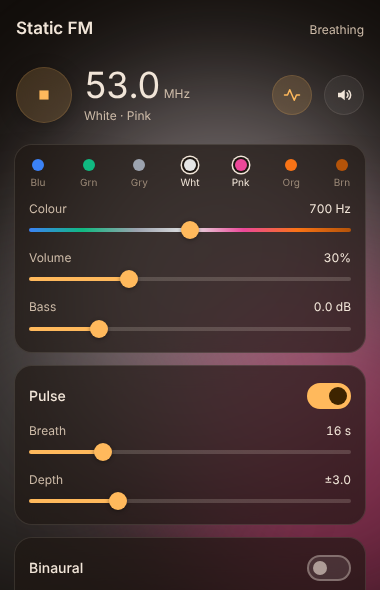
Static FM in the sidebar

Static FM tunes between seven colours of noise (blue, green, grey, white, pink, orange and brown) from one dial. The controls sit on glass cards over soft colour glows that drift slowly and take on the colour of the noise.

Features

  • Noise: two independent generators for a wide stereo field. One colour slider moves from bright blue noise down to deep brown, with volume, bass boost (−3 to +12 dB) and mute.
  • Pulse: slowly breathes the colour back and forth around where you left it. You can set the breath length (4–60 s) and depth.
  • Binaural tones: Delta (2 Hz), Theta (6 Hz), Alpha (10 Hz), Beta (18 Hz), Gamma (40 Hz) or Custom (beat 0.5–40 Hz, tone 60–500 Hz), with a mix level. Use headphones.
  • Sleep timer: 15, 30, 60 or 90 minutes, fading out gently at the end.
  • Status bar: shows the frequency, beat and time left while playing. Click it to stop.
  • Commands: start/stop, pulse, mute, binaural on/off, each preset and each timer. Assign your own hotkeys in Settings → Hotkeys.

Usage

  1. Click the waves icon in the left ribbon, or run Static FM: Open player from the command palette.
  2. Press the round play button. Choose a colour with the dots or the colour slider.
  3. Turn on Pulse, binaural tones or a sleep timer as you like.

In Settings → Static FM you can turn off the drifting background and hide the status bar item.

Privacy

Static FM makes no network requests and collects no data. All sound is generated on your computer with the Web Audio API. Settings are saved in the plugin's own data.json in your vault.

Desktop only

Static FM is marked desktop only, because background audio on mobile is unreliable.

Building from source

The plugin has no dependencies. src/ holds the readable source, and python3 build.py writes main.js, styles.css and manifest.json to dist/.

Support

If Static FM helps you focus or sleep, you can buy me a coffee. Questions or problems: open an issue, or email [email protected].

License

MIT © AshOtis

HealthExcellent
ReviewPassed
About
Play seven-colour stereo noise with binaural tones, an adjustable pulse and a sleep timer from the Obsidian sidebar. Control two independent stereo generators with a single colour slider (blue→brown), adjust volume and bass boost, mix binaural or custom beats, set pulse breathing, and view frequency and remaining time in the status bar.
AudioSidebarStatus bar
Details
Current version
2.0.2
Last updated
5 hours ago
Created
6 hours ago
Updates
3 releases
Downloads
8
Compatible with
Obsidian 1.4.0+
Platforms
Desktop only
License
MIT
Report bugRequest featureReport plugin
Sponsor
Buy Me a Coffee
Author
ashotisashotis
GitHubashotis
  1. Community
  2. Plugins
  3. Audio
  4. Static FM

Related plugins

Text to Speech

Hear your notes.

Notebook Navigator

A better file browser and calendar inspired by Apple Notes, Bear, Evernote and Day One.

Tag Wrangler

Rename, merge, toggle, and search tags from the tag pane.

Vertical Tabs

Offer an alternative view that displays open tabs vertically, allowing users to group and organize tabs for a better navigation experience.

Flexplorer

Enhance the file explorer with custom sorting, pinning, and hiding.

Checklist

Consolidate checklists across all files into a single view.

Recent Files

Display a list of recently opened files.

YTranscript

Easily fetch transcription for any YouTube video.

Longform

Helps you write and edit novels, screenplays, and other long projects.

Voice

Listen to your notes as natural speech with text-to-speech (TTS). Read notes aloud, play them like an audiobook in the voice player, download MP3 audio and listen offline hands-free on mobile.