Search...Search plugins and themes...
⌘K
Sign in
  • Get started
  • Download
  • Pricing
  • Enterprise
  • Account
  • Obsidian
  • Overview
  • Sync
  • Publish
  • Canvas
  • Mobile
  • Web Clipper
  • CLI
  • Learn
  • Help
  • Developers
  • Changelog
  • About
  • Roadmap
  • Blog
  • Resources
  • System status
  • License overview
  • Terms of service
  • Privacy policy
  • Security
  • Community
  • Plugins
  • Themes
  • Discord
  • Forum / 中文论坛
  • Merch store
  • Brand guidelines
Follow us
DiscordTwitterBlueskyThreadsMastodonYouTubeGitHub
© 2026 Obsidian

Smart Autocorrect

ZangetiZangeti255 downloads

Phone-style autocorrect and next-word prediction directly in your vault.

Add to Obsidian
Smart Autocorrect screenshot
  • Overview
  • Scorecard
  • Updates17

✍️ Smart Autocorrect for Obsidian

Phone-style autocorrect and next-word prediction, right inside your vault.

It runs completely offline, so your notes stay private and never leave your device.

 · 
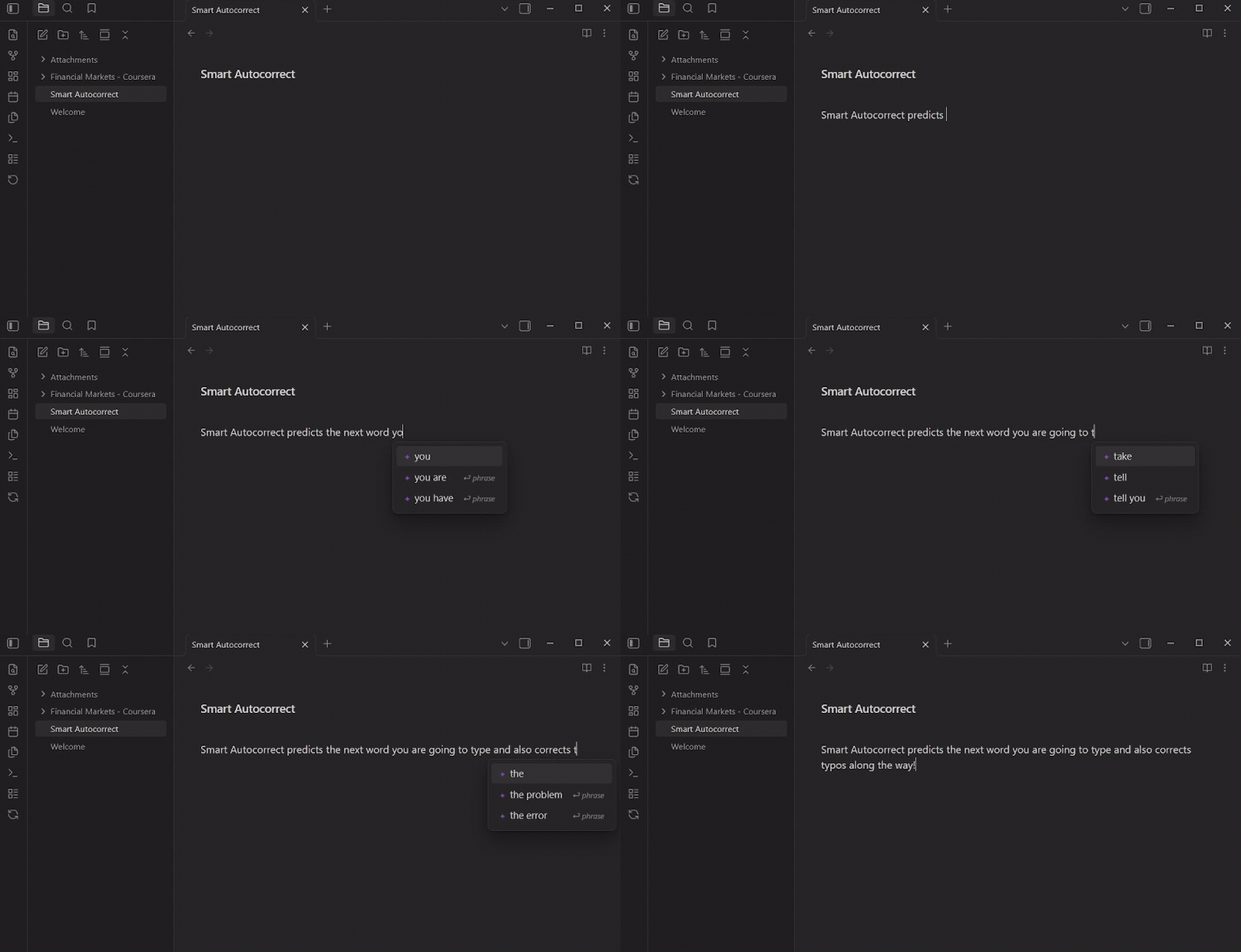
Smart Autocorrect predicting the next word as you type

⚡ As you type

  • Real-time autocorrect. Typos are fixed automatically as you write.
  • Next-word and phrase completion. A popup predicts what comes next. Press Tab to accept.
  • Contextual suggestions. It reads the sentence you're writing and your other notes.
  • 100% local. Everything runs on-device. No cloud, no telemetry, no account.

✨ Additional features

  • Suggest alternatives. Right-click any word for more eloquent wording (good becomes substantial, help becomes facilitate, big becomes immense).
  • Smart capitalisation. Sentence starts, names and places, and abbreviations like e.g. and U.S. are handled for you.
  • Learns your writing. Words from your own notes come up first. Made a wrong correction? Just undo with Ctrl/Cmd+Z: it restores your text, remembers the word, and stops correcting it.
  • Note links (experimental). Text that matches one of your notes gets underlined; hover to preview, click to link.
  • Writing stats. See keystrokes saved, typing time saved, and your daily streak.
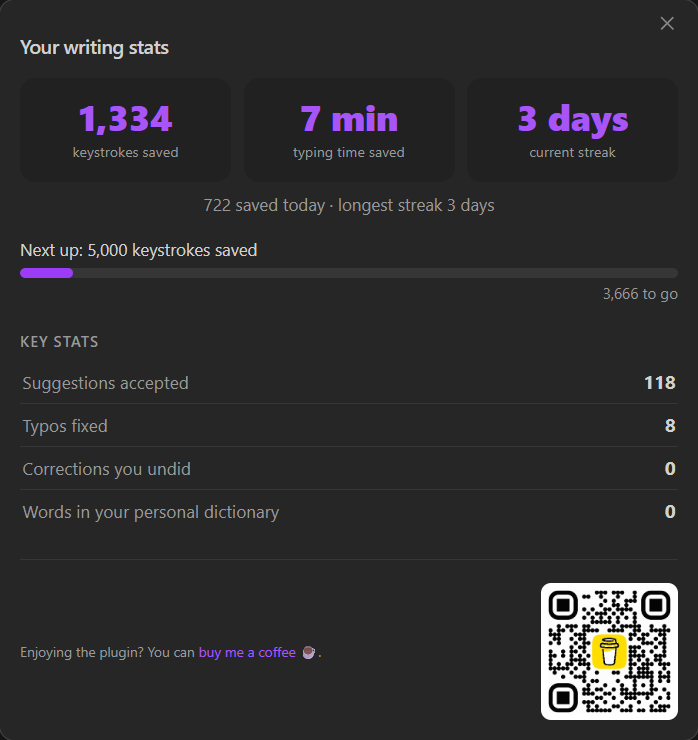
The writing stats dashboard, showing keystrokes saved, typing time saved and current streak

🚀 Getting started

  1. Install and enable the plugin.
  2. Accept the one-time model download (86 MB) when prompted.
  3. Start typing. There's nothing to configure; everything in settings is optional.

🔒 Privacy

100% local, with no telemetry and no cloud. The only network request is the one-time model download, which you can decline. Anything the plugin learns lives in personalization.json inside the plugin folder, so it travels with your vault and never touches your notes.

Supported languages: English only. If you'd like another language, please open an issue.

☕ Support

If this saves you time, you can buy me a coffee.

Credits

Started as a fork of Various Complements by Tadashi Aikawa, since rewritten around a local neural language model. MIT licensed.

HealthExcellent
ReviewPassed
About
Smart Autocorrect brings phone style autocorrection and next-word prediction directly to your vault. Recommendations are context aware powered by a neural engine. All running locally on your computer.
AutocompleteEditingMarkdown
Details
Current version
1.0.16
Last updated
4 days ago
Created
2 weeks ago
Updates
17 releases
Downloads
255
Compatible with
Obsidian 1.11.4+
Platforms
Desktop, Mobile
License
MIT
Report bugRequest featureReport plugin
Sponsor
Buy Me a Coffee
Author
ZangetiZangetizangeti
GitHubzangeti
  1. Community
  2. Plugins
  3. Autocomplete
  4. Smart Autocorrect

Related plugins

Various Complements

Complete words similar to auto-completion in an IDE.

Outliner

Work with your lists like in Workflowy or Roam Research.

Heading Shifter

Easily Shift and Change Markdown headings.

Shortcuts extender

Use shortcuts for input special symbols without language switching.

Easy Copy

Easily copy the text within inline code, bold text (and many other formats), or quickly generate an elegant link to a heading or block.

Importer

Convert your data to Markdown files you can use in Obsidian. Works with Apple Notes, OneNote, Evernote, Notion, Google Keep, and many other formats.

Advanced Tables

Improved table navigation, formatting, and manipulation.

Meta Bind

Make your notes interactive with inline input fields, metadata displays, and buttons.

Numerals

Turn any code block into an advanced calculator. Evaluate math expressions on each line of a code block, including units, currency, and optional TeX rendering.

Creases

Tools for effectively folding Markdown sections.