Simple Tap Timer
 gustipardo159 downloads
A minimal timer plugin with one-tap start/stop, note-level timer exclusivity, reports, and session logging.
- Overview
- Scorecard
- Updates2
Simple Tap Timer is an Obsidian plugin to run quick timers directly inside your notes.
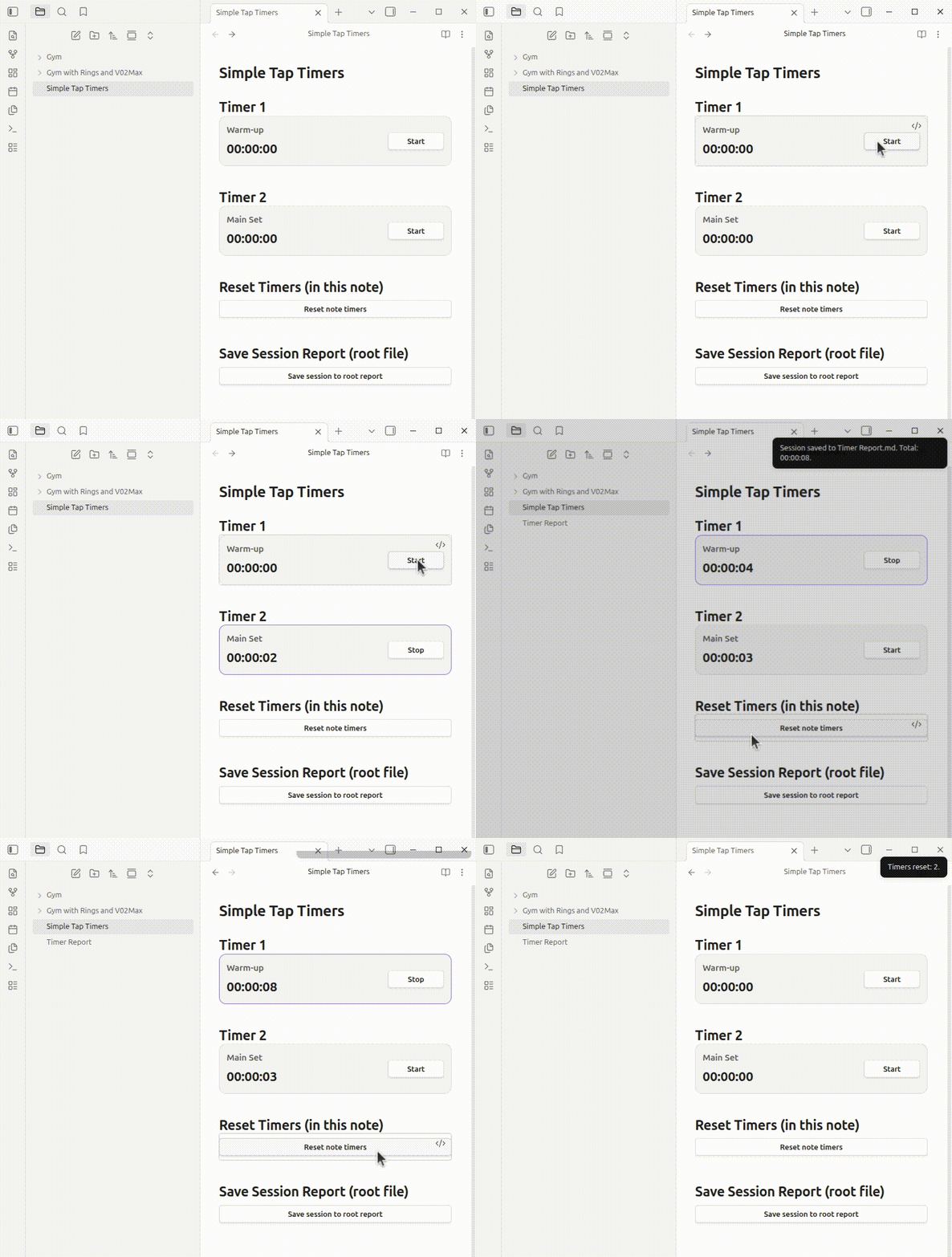
Demo
This demo shows timer usage, reset-all, and save-session flow.
What it does
- Render interactive timers from markdown code blocks.
- Start/stop each timer with one tap.
- By default, only one non-independent timer can run at a time in the same note.
- Generate a timer summary table in the note.
- Reset all timers in the note.
- Save a session log to any folder/file path in your vault.
Core timer block
Minimum usage (required only):
```tap-timer
```
Fully customizable example:
```tap-timer
title: Push-ups
id: pushups-timer
independent: false
startLabel: Start
stopLabel: Stop
errorNotice: Could not update timer.
```
Timer parameters
id: unique timer id (recommended).title: optional title shown above the timer.independent:true/false(defaultfalse).false: when started, other non-independent timers in the same note are paused.true: can run in parallel.
startLabel: start button label.stopLabel: stop button label.errorNotice: message shown if timer action fails.
Report block
Minimum usage (required only):
```tap-timer-report
```
Fully customizable example:
```tap-timer-report
button: Generate timer table
busyLabel: Generating...
missingNoteNotice: Could not identify the note to generate the table.
successNotice: Timer table generated/updated in the note.
errorNotice: Could not generate timer table.
reportTitle: Timer Summary
noteLabel: Note
updatedLabel: Updated
idHeader: ID
titleHeader: Title
valueHeader: Final Value
emptyLabel: (no timers)
```
This block inserts/updates a marked report section in the current note.
Reset-all block
Minimum usage (required only):
```tap-timer-reset-all
```
Fully customizable example:
```tap-timer-reset-all
button: Reset note timers
busyLabel: Resetting...
confirm: This will reset all timers in this note. Continue?
missingNoteNotice: Could not identify the note to reset timers.
successNotice: Timers reset: {count}.
errorNotice: Could not reset timers.
```
Save-session block
Minimum usage (required only):
```tap-timer-save-session
```
Fully customizable example:
```tap-timer-save-session
button: Save session
busyLabel: Saving...
confirm: This will save this session to the session log. Continue?
missingNoteNotice: Could not identify the note to save the session.
successNotice: Session saved to {log}. Total: {total}.
errorNotice: Could not save the session.
workout: Upper Body Day
folder: Logs
file: Sessions.md
historyTitle: # Timer Sessions History
sessionPrefix: Session
dateLabel: Date
dateIsoLabel: Date ISO
workoutLabel: Workout
noteLabel: Note
totalTimeLabel: Total time
sectionHeader: Section
idHeader: ID
timeHeader: Time
emptySectionLabel: (no timers)
```
Save path options
You can configure destination in two ways:
folder+file(recommended)logwith a full vault-relative path (legacy/explicit override)
If log is provided, it takes precedence over folder + file.
Notes for publishing and usage
- All defaults are in English.
- All user-visible labels/messages have generic defaults and can be overridden via block parameters.
- Legacy
next:is not used anymore.
HealthExcellent
ReviewPassed
About
Run interactive timers directly in notes from tap-timer code blocks and start or stop each timer with one tap; mark timers as independent to run in parallel or keep a single active timer per note. Generate an updatable timer summary table, reset all timers in a note, and save session logs to any file path in your vault.Details
Current version
1.0.1
Last updated
7 months ago
Created
7 months ago
Updates
2 releases
Downloads
159
Compatible with
Obsidian 1.4.0+
Platforms
Desktop, Mobile
License
Unlicense