Shadow Tree
 Johannes Kaindl28 downloads
Hides empty and irrelevant folders from the file explorer without deleting them: ignore patterns, per-folder pins, optional Sync exclusion.
- Overview
- Scorecard
- Updates2
🇬🇧 English · 🇩🇪 Deutsch
Hides empty and irrelevant folders from the file explorer without deleting them: ignore patterns, per-folder pins, optional Sync exclusion.
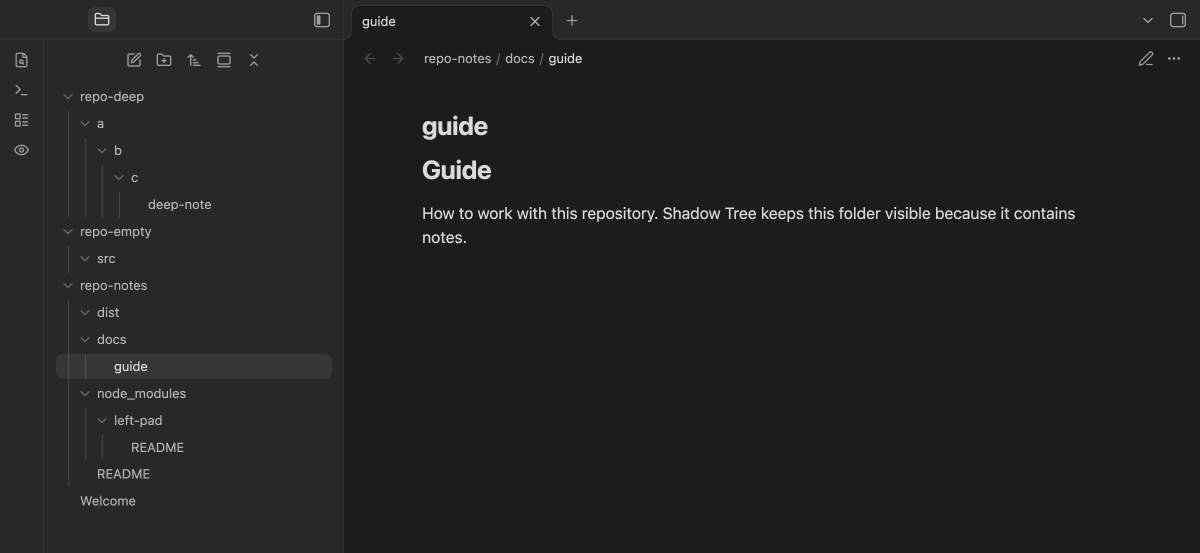
Open a folder full of code repositories as a vault and the file explorer fills up with node_modules, build output and folders that never held a note. Shadow Tree filters that view. A folder disappears from the file explorer when nothing below it counts as content (by default Markdown, Canvas and Base files) or when an ignore pattern in .gitignore style matches it. Notes inside a folder that a pattern hides do not count for its parents, so a repository whose only Markdown sits in node_modules disappears as a whole. Nothing is deleted, moved or renamed: the folders are still there, they are just not drawn. One click on the ribbon icon shows everything again.
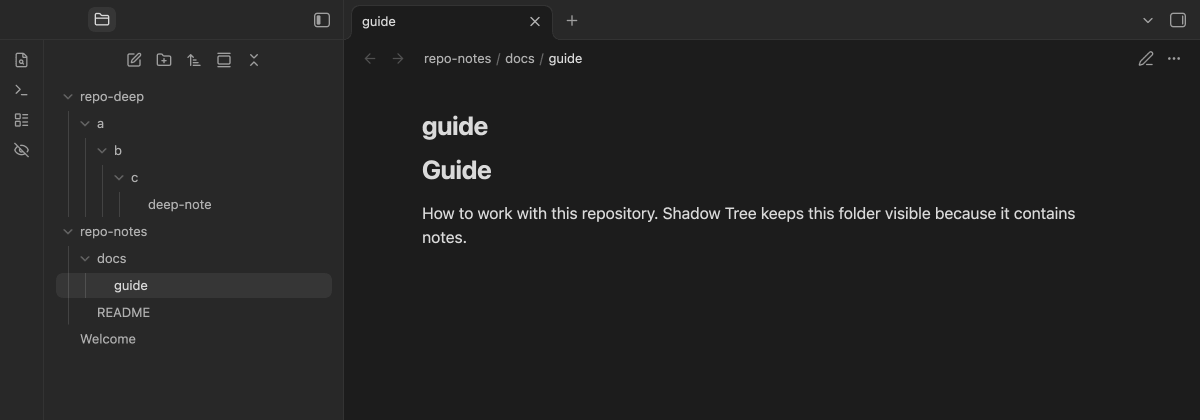
Features
- Empty folders vanish — a folder is empty when no file of a relevant type exists anywhere below it. Which types are relevant is a setting (
md, canvas, baseby default), so a folder that only holds images or code disappears. - Ignore patterns like a
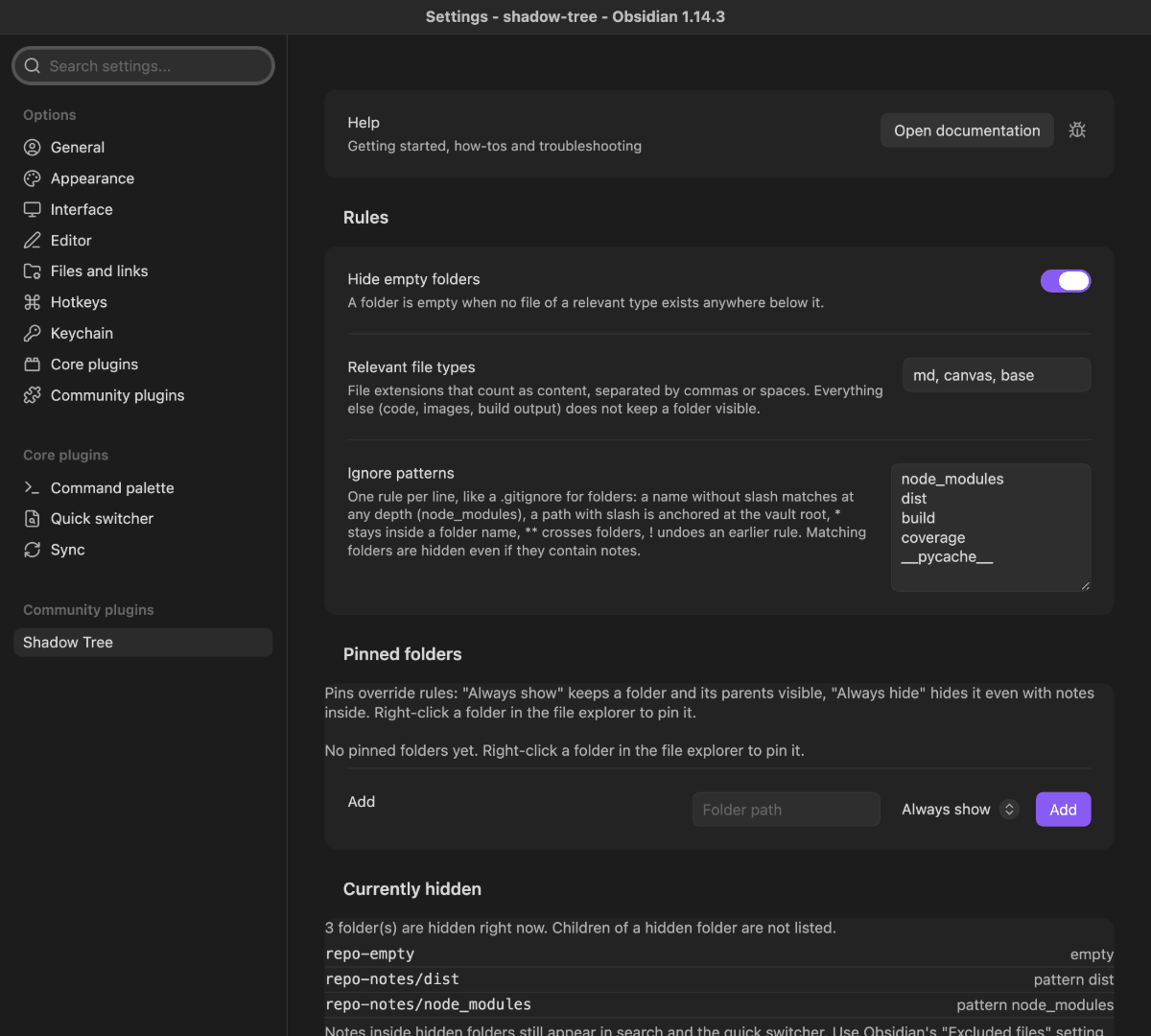
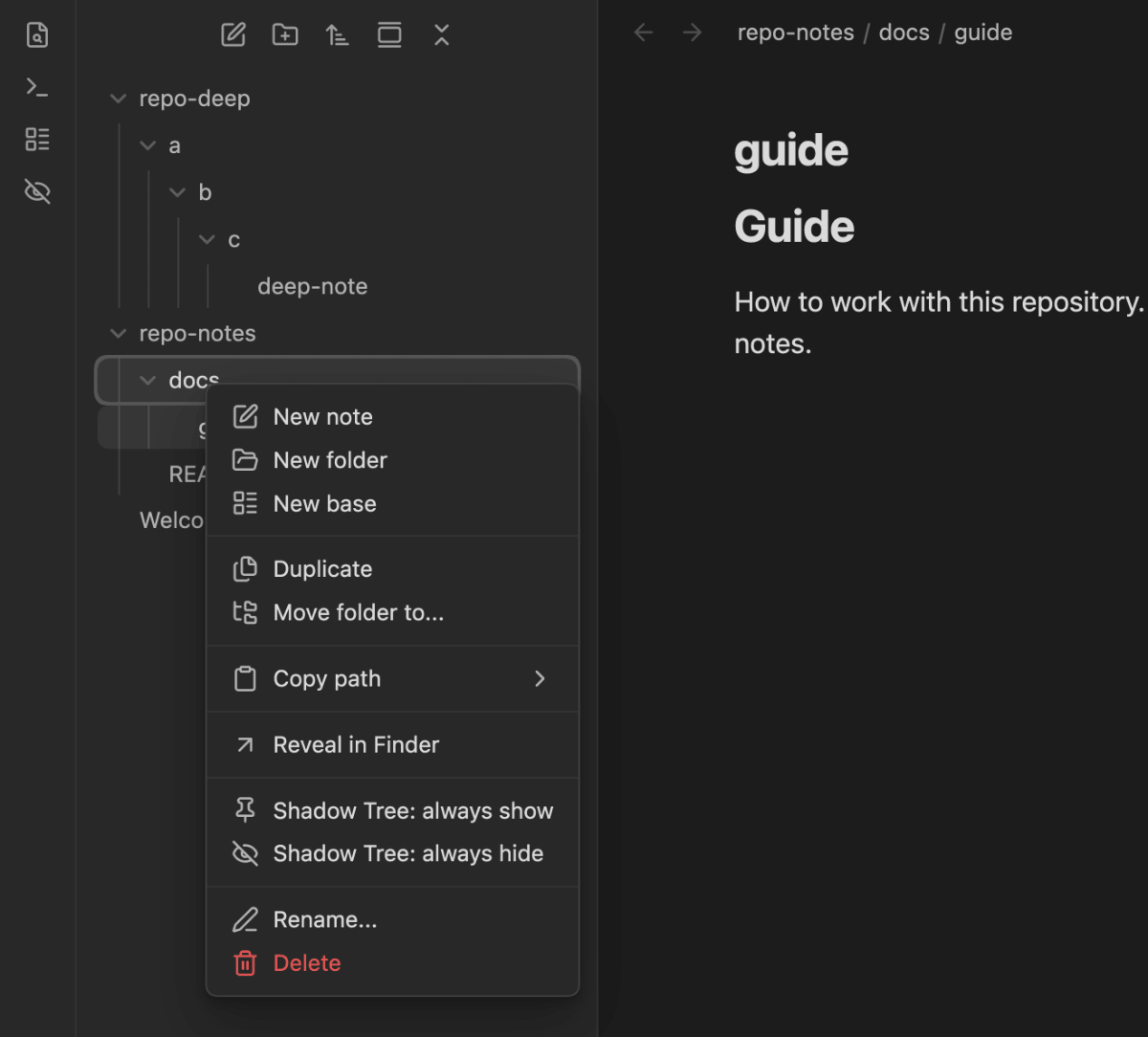
.gitignore— one rule per line:node_modulesmatches at any depth,repo-a/distis anchored at the vault root,*stays inside a folder name,**crosses folders,!undoes an earlier rule. Matching folders are hidden even if they contain notes. Defaults:node_modules,dist,build,coverage,__pycache__. - Pins per folder — right-click any folder and choose Shadow Tree: always show or always hide. "Always show" also keeps the folder's parents visible; pins beat every rule.
- One switch to see everything — the ribbon icon (or the command Toggle hidden folders) reveals all hidden folders for this session. The icon and its tooltip name the current state.
- You can see why — the settings tab lists what is hidden right now and why: empty, which pattern, or pinned.
- Optional: exclude from Obsidian Sync — an opt-in switch writes the folders hidden by a pattern or an "always hide" pin into Obsidian Sync's excluded folders and removes them again when they reappear. Folders that are merely empty are not excluded, and folders you excluded yourself are never touched.
Requirements
- Obsidian 1.11.4+, desktop and mobile. On iOS older than 16.4 the stylesheet cannot be applied and folders stay visible; the settings tab says so.
- Nothing else. The plugin makes no network requests and reads only your vault's folder tree.
Install
Plugin catalog (recommended)
Install AnySource Sideloader, add the catalog https://git.jkaindl.de/jkaindl/obsidian-catalog/raw/branch/main/catalog.json, then install Shadow Tree from it and enable it under Settings → Community plugins.
Manual
Download main.js, manifest.json and styles.css from the latest release, put them into <vault>/.obsidian/plugins/shadow-tree/, then enable Shadow Tree under Settings → Community plugins.
From source
git clone https://github.com/johannes-kaindl/shadow-tree
cd shadow-tree && npm install && npm run build
# copy main.js, manifest.json and styles.css into <vault>/.obsidian/plugins/shadow-tree/
Usage
- Enable the plugin. Folders without notes and folders matching the default patterns disappear from the file explorer right away.
- Click the eye icon in the ribbon (or run Shadow Tree: Toggle hidden folders) to see everything; click again to hide. This is a session switch: after a restart the folders are hidden again.
- Right-click a folder and pick Shadow Tree: always show or Shadow Tree: always hide. The same menu removes the pin later. Hidden folders cannot be right-clicked, so reveal them first or add the pin in the settings.
- Open Settings → Shadow Tree to change the relevant file types, edit the ignore patterns, manage pins, and read Currently hidden when you wonder where a folder went.
Configuration
| Setting | Effect | Default |
|---|---|---|
| Hide empty folders | Hides folders with no relevant file anywhere below them. | on |
| Relevant file types | Extensions that count as content, separated by commas or spaces. | md, canvas, base |
| Ignore patterns | One rule per line in .gitignore style; matching folders are hidden even with notes inside. See Ignore patterns. |
node_modules, dist, build, coverage, __pycache__ |
| Pinned folders | Per-folder overrides: Always show or Always hide. Added from the folder context menu or here. | none |
| Also exclude hidden folders from Obsidian Sync | Writes the folders hidden by a pattern or an "always hide" pin into Sync's excluded folders (per device) and removes them again later; folders hidden only because they are empty are left alone. Disabled when Sync is off or not connected to a remote vault. Turn it off before disabling the plugin. | off |
How it works
The plugin never touches the DOM of the file explorer. It reads the vault's folder tree through the Obsidian API, computes the topmost hidden folders, and installs one stylesheet (a Constructable Stylesheet on the main window) with one rule per hidden folder, keyed on the folder's data-path attribute. The tree is recomputed a quarter second after the last create, delete or rename. Because the plugin only hides, the worst case of an Obsidian update that changes the explorer's markup is that folders reappear; nothing is lost. The code layout is described in AGENTS.md.
Limits
- Search, quick switcher and graph still see notes inside hidden folders. Use Obsidian's own Files and links → Excluded files for that.
- Dot folders such as
.obsidianare never shown by Obsidian's file explorer; the plugin cannot reveal them. - Only folders are hidden, never single files.
- Sync exclusion is per device. Obsidian Sync keeps its excluded folders on each device; the plugin writes the list of the device it runs on. The exclusion list is an internal part of the Sync core plugin without a public API; if a future Obsidian version changes it, the switch is disabled and the status line says why, but entries already written stay in Sync's list until you remove them there. The same holds when you disable the plugin without turning the switch off first.
- Pop-out windows. The stylesheet is installed in the main window only; a file explorer moved into a pop-out window shows all folders.
- Patterns and pins are case-sensitive, matching Obsidian's own paths.
Documentation
- Documentation index
- Getting started — from installation to your first pin
- Ignore patterns — the syntax, with examples
- Troubleshooting — a folder is visible or hidden when it should not be
Contributing
Issues and pull requests on GitHub. Test-driven (npm run gate); see AGENTS.md and CONTRIBUTING.md.
License
- Code: AGPL-3.0-or-later (
LICENSE). - Docs/Text: CC BY-SA 4.0 (
LICENSE-DOCS).
Copyright © 2026 Johannes Kaindl.