Ontology Workspace
 pkulilboat|公众号:湖畔的赛博格49 downloads
Journal, page stream, and recent activity navigation in one workspace.
- Overview
- Scorecard
- Updates3

 | Scan the QR code to join our lifelong learning community and discussion groups. Let's exchange ideas about AI, knowledge management, and productivity tools. WeChat Official Account: 湖畔的赛博格 (same name). |
Ontology Workspace
English | 简体中文
Formerly Roam Workspace. The plugin ID remains roam-workspace, so existing settings and installation folders continue to work.
Bring linked notes and outlining workflows into Obsidian. If you work with Logseq, Roam Research, Orca Note, or SiYuan, Ontology Workspace brings a familiar way of working to your Obsidian vault: capture ideas in a journal, structure them in nested lists, connect related notes, and read or edit those notes side by side.
Combine continuous journals, Page Stream, configurable navigation, grouped bookmarks, and enhanced list-outline navigation while keeping your notes as editable Markdown in Obsidian.
Screenshots
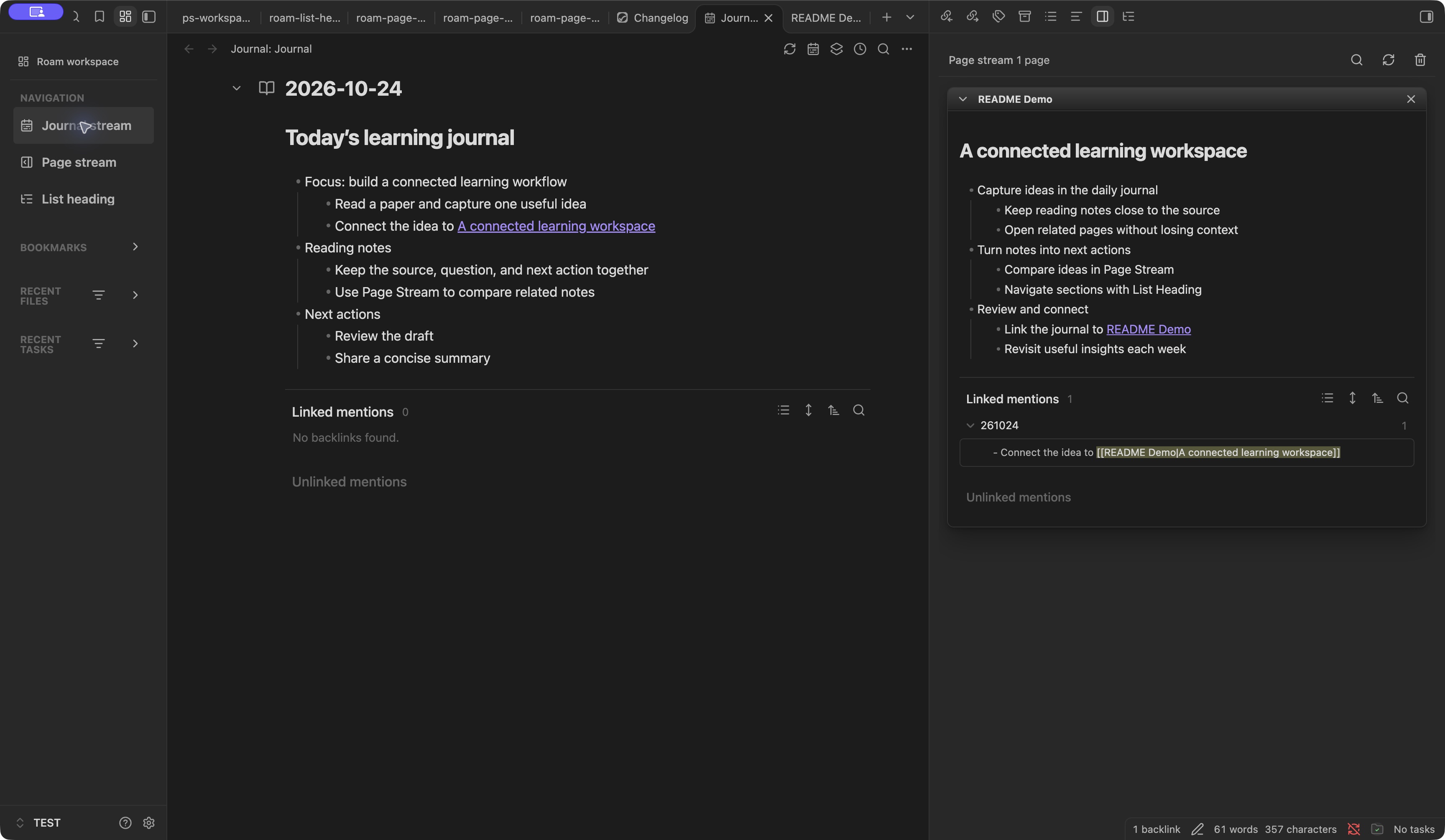
Journal and Page Stream: keep related pages beside the journal without losing reading and editing context.
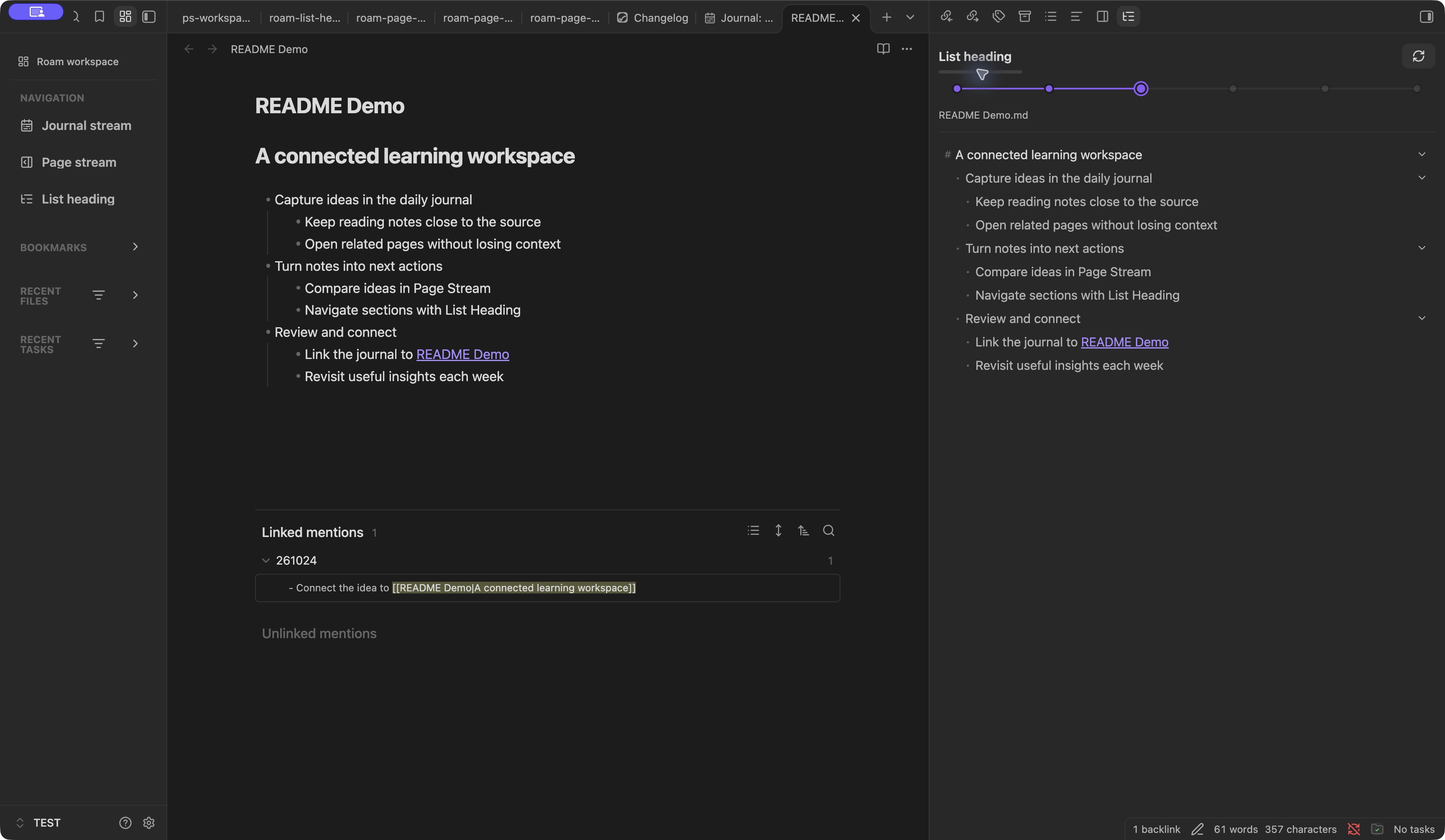
List Heading: navigate the actual hierarchy of a note's nested lists.
Captured in Obsidian 1.14.4 with the GitHub 0.1.0 release and sample notes in an isolated TEST vault.
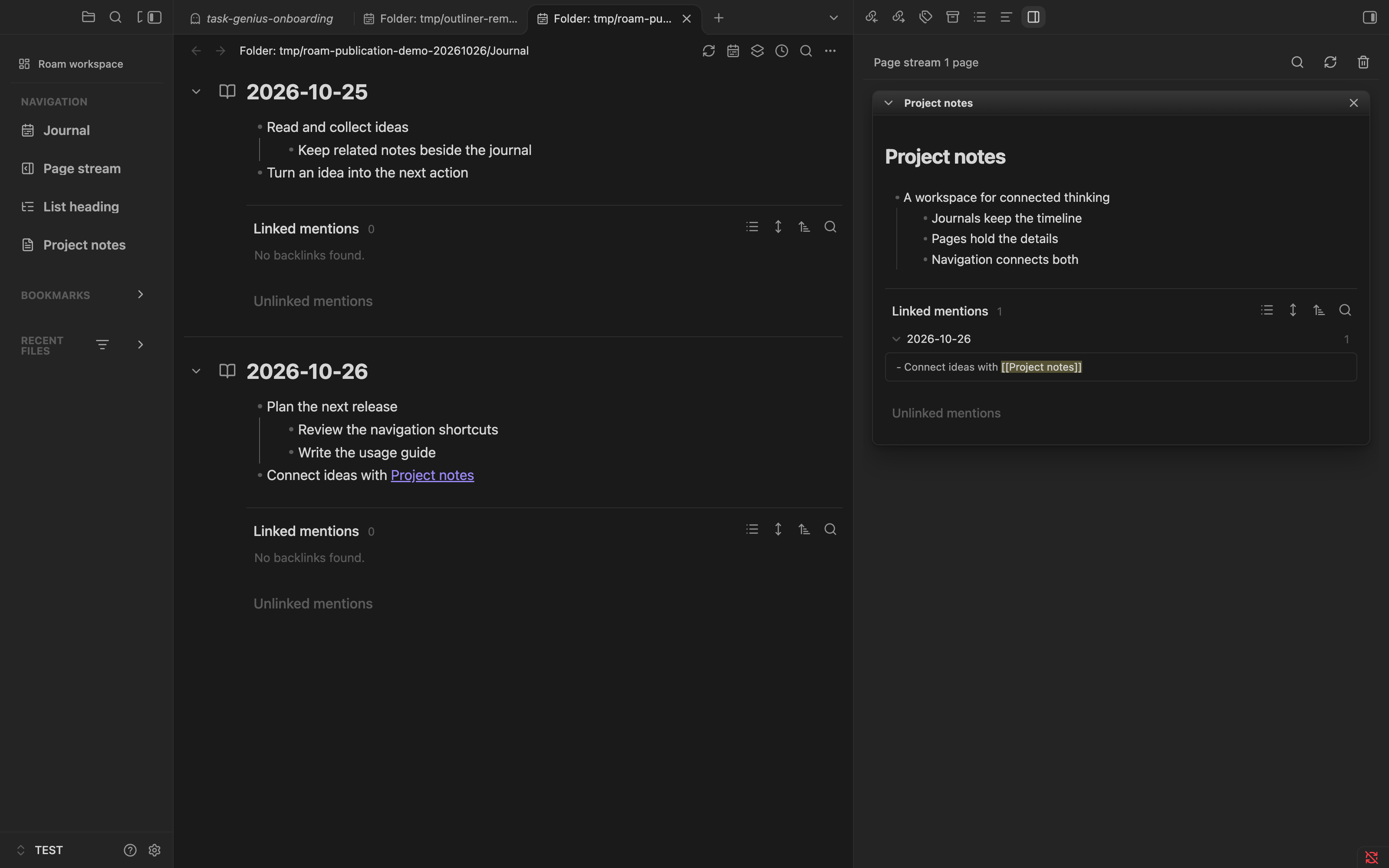
Updated navigation, Journal, and Page Stream in version 0.1.1, captured in the isolated TEST vault on Obsidian 1.14.4.
Features
- Journal: continuous daily-note or folder editing, date ranges, sorting, presets, and Markdown export.
- Page Stream: keep several connected pages together with embedded Markdown editors.
- Configurable navigation: add multiple Journal folders, note links, and website shortcuts; edit names, icons, visibility, and ordering in settings or from context menus. Advanced JSON configuration supports reusable setups.
- Grouped bookmarks: browse Obsidian’s existing bookmark hierarchy, including nested groups, folders, and files, alongside recent-file and recent-task filters.
- Enhanced list outlines: navigate headings and nested lists, use compact outline rows, and fold or expand an exact depth from the context menu. Scoped Outliner integration supports list editing.
Metadata Menu integration
Ontology Workspace works with Metadata Menu in the Navigation panel:
- Display a note's FileClass icon in file rows.
- Filter recent files by FileClass.
- Click the icon beside a note to open Metadata Menu's field editor for notes with a FileClass, or its FileClass selection action for notes without one. If a targeted action cannot be resolved, the integration falls back to Metadata Menu's context menu.
Install and enable both plugins in the same vault, configure your FileClasses in Metadata Menu, and wait for its indexing to finish. Then open Ontology Workspace: Open roam navigation.
Compatibility: the current adapter targets Metadata Menu 0.8.12 and checks its version and readiness before enabling these features. Other versions are not currently enabled by the adapter. Metadata Menu is optional: without a compatible, ready installation, Ontology Workspace uses a standard file icon and opens the note's native properties instead. This integration uses Metadata Menu's existing classes and field editor; configure field definitions in Metadata Menu.
Install
Download main.js, manifest.json, and styles.css from the latest release. Put all three files directly in <vault>/<configDir>/plugins/roam-workspace/ (configDir is usually .obsidian). Reload Obsidian, allow community plugins if needed, and enable Ontology Workspace. Source ZIP downloads do not contain main.js.
Back up an existing plugin folder before updating and preserve data.json. The plugin ID is roam-workspace; an older roam-in-ob or Daily Notes Editor installation is separate. Disable overlapping plugins when checking compatibility, and do not delete or migrate their data automatically.
Available in the Obsidian Community directory, or by manual installation from GitHub Releases. The manifest declares Obsidian 1.8.7 or newer and mobile support, but this snapshot has not been independently validated across minimum-version and mobile platforms. Start with a test vault.
Quick start and settings
Open the command palette and run Ontology Workspace: Open journal stream, Open page stream, Open roam navigation, or Open list heading. Choose the journal folder in plugin settings; the default is Journal. Settings also control startup behavior, date range, presets, source paths, frontmatter, backlinks, navigation filters, recent tasks, and Outliner scope. Recent tasks are disabled by default.
Privacy and AI
Notes and plugin settings stay in the vault. This plugin does not include an AI service, an AI account, or an MCP server. An external local AI assistant can help install the three files and edit settings; its own access and privacy policy are separate. Personal data.json, notes, and local deployment targets are not included in this release. The local multi-vault deployment list is intentionally empty in the public copy; installers should not run the author's deployment scripts.
Build
pnpm install --frozen-lockfile
pnpm run build
pnpm run test:journal
pnpm run test:compat-quality
pnpm run test:navigation
pnpm run lint
build includes Svelte/TypeScript checking and writes main.js, styles.css, and build fingerprints. Consult the release notes for actual check results. Runtime audit scripts are maintainer tools with a fixed local TEST-vault boundary, not general installation commands.
Provenance and license
Noncommercial use of PkuLilBoat's original contributions is permitted; commercial use requires PkuLilBoat's prior written permission. See the license for scope and terms. Commercial use includes internal business use, paid client work, resale, paid hosting, and paid product integration. Request authorization through GitHub Issues or the maintainer's contact information above; submitting a request is not permission. These are source-available terms, not an OSI-approved open-source license.
Noncommercial redistribution must retain the license and applicable notices, and clearly credit PkuLilBoat, name Ontology Workspace, and link to the original repository on the distribution page or in accompanying documentation. Modified versions must identify material changes and must not be presented as official releases by the original author.
Ontology Workspace is maintained by PkuLilBoat. The maintainer confirms that the earlier base implementation was subsequently fully rewritten. This replaces the previous description of the current project as inherited Daily Notes Editor code. The installation ID is roam-workspace.
The original-contribution license does not replace the terms of separately retained third-party components, including Hover Editor, Outliner, and dependencies. See third-party notices. Their attribution and licenses remain applicable.
Feedback
Share issues and suggestions through GitHub Issues.