Search...Search plugins and themes...
⌘K
Sign in
  • Get started
  • Download
  • Pricing
  • Enterprise
  • Account
  • Obsidian
  • Overview
  • Sync
  • Publish
  • Canvas
  • Mobile
  • Web Clipper
  • CLI
  • Learn
  • Help
  • Developers
  • Changelog
  • About
  • Roadmap
  • Blog
  • Resources
  • System status
  • License overview
  • Terms of service
  • Privacy policy
  • Security
  • Community
  • Plugins
  • Themes
  • Discord
  • Forum / 中文论坛
  • Merch store
  • Brand guidelines
Follow us
DiscordTwitterBlueskyThreadsMastodonYouTubeGitHub
© 2026 Obsidian

Ribbon Drawers

Bohdan RakBohdan Rak158 downloads

Organise the ribbon into folders.

Add to Obsidian
  • Overview
  • Scorecard
  • Updates1

Organise Obsidian's ribbon into collapsible folders.

Before After
Ribbon before Ribbon after

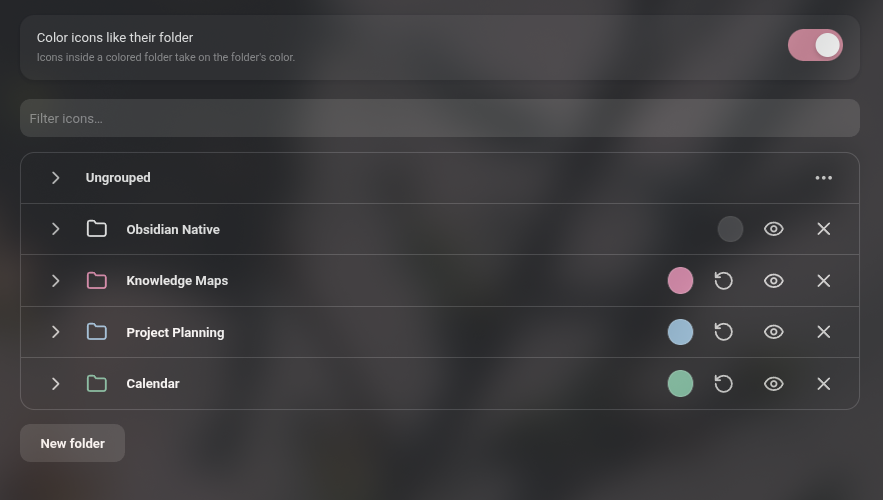
Options

Features

  • Group ribbon icons into folders.
  • Give each folder an optional color.
  • Drag icons directly in the ribbon to reorder them, move them between folders or out of a folder
  • Hide any icon, or a whole folder, from the ribbon.

Usage

Open Settings -> Interface -> Ribbon menu configuration, or right-click an empty part of the ribbon and choose Organise ribbon… There you can create, rename, color, hide and delete folders, and drag icons and folders into place.

While the plugin is enabled it manages the ribbon's order and visibility in place of Obsidian's built-in ribbon settings. Disabling it leaves the ribbon in the order you arranged, without folders.

IMPORTANT FOR REVIEW: This plugin overrides Obsidian's native functionality

Compatibility

Desktop only. Requires Obsidian 1.13 or later.

Installation

Install Ribbon Drawers from Settings -> Community plugins -> Browse, then enable it.

To install manually:

Copy main.js, manifest.json and styles.css from the latest release into <vault>/.obsidian/plugins/ribbon-drawers/.

HealthExcellent
ReviewSatisfactory
About
Organise Obsidian's ribbon into collapsible, colored folders to group and access commands. Drag icons directly in the ribbon to reorder them, move them between folders or out, and hide individual icons or whole folders. Preserve the arranged ribbon order when disabled.
SidebarInterfaceIcons
Details
Current version
1.0.0
Last updated
2 weeks ago
Created
2 weeks ago
Updates
1 release
Downloads
158
Compatible with
Obsidian 1.13.0+
Platforms
Desktop only
License
MIT
Report bugRequest featureReport plugin
Author
Bohdan RakBohdan Rakbsdbx
GitHubbsdbx
  1. Community
  2. Plugins
  3. Sidebar
  4. Ribbon Drawers

Related plugins

Iconic

Customize your icons and their colors directly from the UI, including tabs, files & folders, bookmarks, tags, properties, and ribbon commands.

Copy Inline Code

Easily copy the contents of an inline code element with a single click.

Hide Sidebars on Window Resize

Automatically hides the sidebars when your window is narrow on window resize.

Zen Mode

Hide most UI elements.

Notebook Navigator

A better file browser and calendar inspired by Apple Notes, Bear, Evernote and Day One.

Hider

Hide interface elements such as tooltips, status bar, titlebar, and more.

Meta Bind

Make your notes interactive with inline input fields, metadata displays, and buttons.

Tag Wrangler

Rename, merge, toggle, and search tags from the tag pane.

Editing Toolbar

The Editing Toolbar is modified from cMenu, which provides more powerful customization settings and has many built-in editing commands to be a MS Word-like toolbar editing experience.

Flexplorer

Enhance the file explorer with custom sorting, pinning, and hiding.