Search...Search plugins and themes...
⌘K
Sign in
  • Get started
  • Download
  • Pricing
  • Enterprise
  • Account
  • Obsidian
  • Overview
  • Sync
  • Publish
  • Canvas
  • Mobile
  • Web Clipper
  • CLI
  • Learn
  • Help
  • Developers
  • Changelog
  • About
  • Roadmap
  • Blog
  • Resources
  • System status
  • License overview
  • Terms of service
  • Privacy policy
  • Security
  • Community
  • Plugins
  • Themes
  • Discord
  • Forum / 中文论坛
  • Merch store
  • Brand guidelines
Follow us
DiscordTwitterBlueskyThreadsMastodonYouTubeGitHub
© 2026 Obsidian

Restore Tab Key

jrymkjrymk15k downloads

Restore tab key behavior: tab key inserts a tab, the way it should be.

Add to Obsidian
  • Overview
  • Scorecard
  • Updates25

Restore tab key behaviour: tab key inserts a tab, the way it should be.

To summarize, this plugin can make code blocks, or anywhere, behave like any IDE as you would expect, everything regarding tabs and indentation, which Obsidian does terribly.

By default, there is no way to insert a tab character in Obsidian without cutting and pasting, can you believe that?

Sure, tabs are pretty useless in Markdown, however, that can't be said in Markdown code blocks, the tab key behavior is just absolutely unreasonable, and this plugin should solve that.

Check out the forum thread that inspired this plugin: Feature Request: Option to disable tab to indent | Obsidian Forum

Restore Tab Key

Before

before

After

after


Braces Auto Indent

Before

before_braces

After

after_braces


Settings

Quick configuration for just code

  • Turn on Only activate in code blocks
  • Decide to use space or tabs by setting Use spaces instead of tab

ALL the settings image image


Indent using tabs

Select some text and press tab to indent, like just about any IDE.
The indent action is completely unaltered (native indentMore command), you can change "Indent using tabs" and "Tab indent size" in Editor settings to change that behavior.


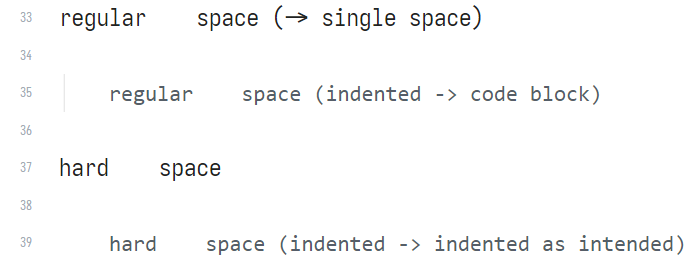
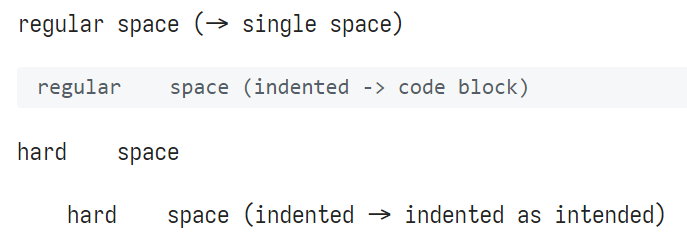
Hard space

Hard spaces (U+00A0) as tab allows you to insert wide blanks inside text. Without using hard spaces, repeated spaces (and tabs) will be rendered as one single space. You can toggle whether to use hard space instead of regular spaces.
You can insert hard spaces in the beginning of a line to act like indentation. You will have to move the cursor to the beginning and press tab to insert them though. Indenting (select text and press tab) will not insert hard spaces.

live preview/source view: (Yes, with hard spaces as indentation it still turns into a code block. Aaargh!)
after render (reading view):

Also comes in Chinese

image

设定页可选择显示语言,部分翻译内容和中国大陆在地化参考了 ACodeHX 的 fork。

71%
HealthGood
ReviewSatisfactory
About
Restore native Tab behavior so pressing Tab inserts a real tab character and performs IDE-like indentation in the editor and code blocks. Choose tabs or spaces, enable hard-space indentation, or restrict the behavior to code blocks.
EditingCodeMarkdown
Details
Current version
1.18.6
Last updated
Last year
Created
3 years ago
Updates
25 releases
Downloads
15k
Compatible with
Obsidian 0.15.0+
Platforms
Desktop, Mobile
License
GPL-3.0
Report bugRequest featureReport plugin
Author
jrymkjrymk
github.com/jrymk
GitHubjrymk
  1. Community
  2. Plugins
  3. Editing
  4. Restore Tab Key

Related plugins

Outliner

Work with your lists like in Workflowy or Roam Research.

Various Complements

Complete words similar to auto-completion in an IDE.

VSCode Editor

Edit Code Files like VSCode.

JS Engine

Run JavaScript from within your notes.

Code Space

Professional code file management with visual dashboard, syntax highlighting editor, and Markdown embedding.

Advanced Tables

Improved table navigation, formatting, and manipulation.

Templater

Create and use dynamic templates.

Importer

Import data from Notion, Evernote, Apple Notes, Microsoft OneNote, Google Keep, Bear, Roam, and HTML files.

Meta Bind

Make your notes interactive with inline input fields, metadata displays, and buttons.

Mermaid Tools

Improved Mermaid.js experience: visual toolbar with common elements and more.