Code Space
 unlinearity16k downloads
Professional code file management with visual dashboard, syntax highlighting editor, Markdown embedding, external folder mounts, and terminal integration.
- Overview
- Scorecard
- Updates20
Editing, embedding, external mounts, and terminal integration.
About the plugin
Code Space is available in the official Obsidian community plugin directory.🎉
Obsidian's native workflow is centered on Markdown notes, so its support for centralized code file browsing, management, editing, structural navigation, and exporting embedded code is limited. Code Space was created to fill that gap.
The five layers of "Space":
- Management space: Provides a unified index and management area for code files, so you can browse code files through a visual dashboard.
- Editing space: Opens code files in a dedicated environment for viewing and editing.
- Embedding space: Works with Obsidian's native features to support references, embedded code previews, and native PDF export as real code blocks.
- Mount space: Mount external folders into the Vault via system symlinks/junctions for cross-project code management.

- Terminal space: Run a real system shell (PowerShell, zsh, bash) inside the editor, on desktop.
Core features
1. Code file management space
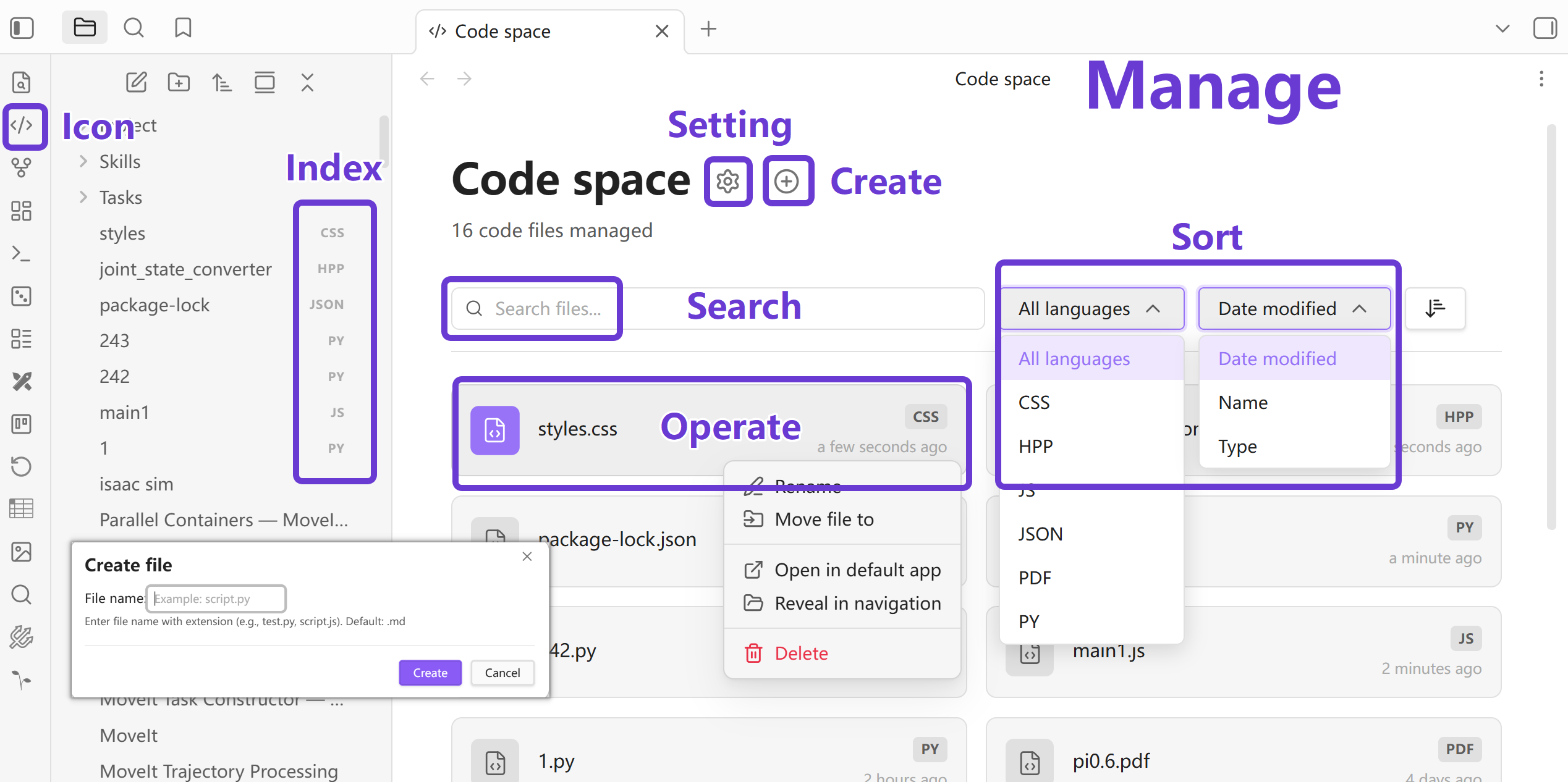
Provides a visual dashboard for unified indexing and management of code files within the vault.
- Visual dashboard: A management interface with grid layout and file status overview.
- Integrated management tools: The header provides quick access to Settings, Create file, and ignored item management.
- Multi-dimensional dynamic filtering: Filter by folder and extension, search by filename or path, and sort by modified date, name, or type.
- Standard file operations: Use Obsidian-supported operations such as rename, move, delete, reveal in navigation, and open in the default app.
- Dashboard state memory: Search, filter, and sort state is saved with the plugin settings for smoother repeated use.
2. Professional code editing space
Provides an IDE-like environment for code viewing and editing.
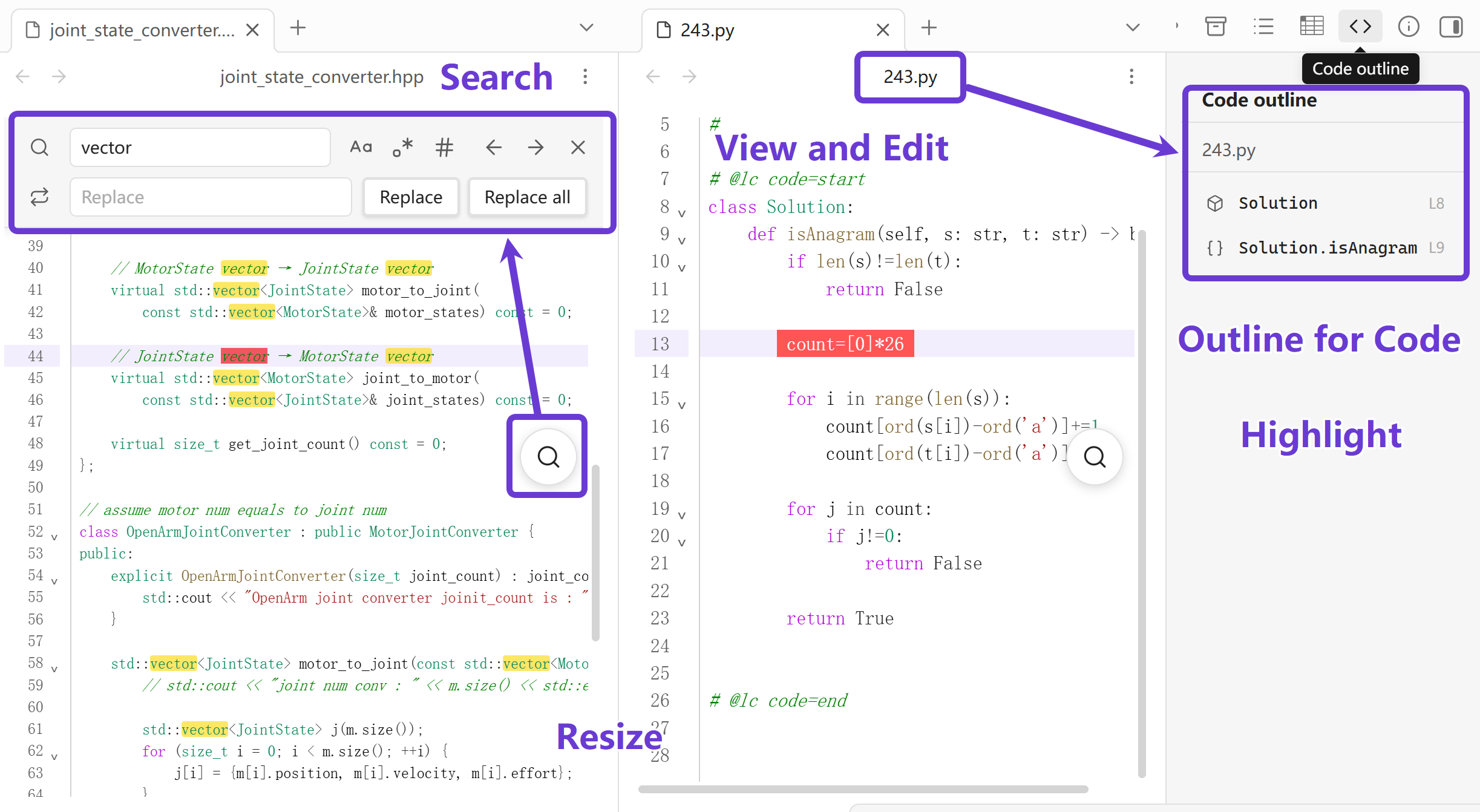
- Syntax highlighting: Powered by CodeMirror 6 with accurate highlighting for many languages.
- Structured navigation: Code outline view that parses classes, functions, and methods with click-to-jump navigation.
- Advanced search and replace: Dedicated search panel with regex, case sensitivity, whole-word matching, single replacement, and replace all.
- Manual save: Ctrl/Cmd+S manual save with unsaved-state feedback and cursor position protection to prevent viewport jumps.
- Basic editing helpers: Auto indentation, bracket matching, code folding, and line numbers.
- Interaction optimizations: Ctrl/Cmd+wheel font scaling and a floating search button for quick access.
3. Obsidian native embedding space
Embed and preview code in Markdown, including specific snippets from code files:
- File references: Link code files with
[[filename]]. - Code embedding: Embed previews in Markdown with
![[filename]]. - Line ranges: Specify start lines or line ranges to embed code snippets precisely.
- Quick preview: Hover links to preview code content.
- Open source files in several ways: Click the embed header to open the source file. Ctrl/Cmd+click opens it in a new tab, Ctrl/Cmd+Shift+click opens it in a new window, and Ctrl/Cmd+Alt/Option+click opens it in a split pane.
- Preview sync: When a source code file changes, related embedded previews are re-rendered.
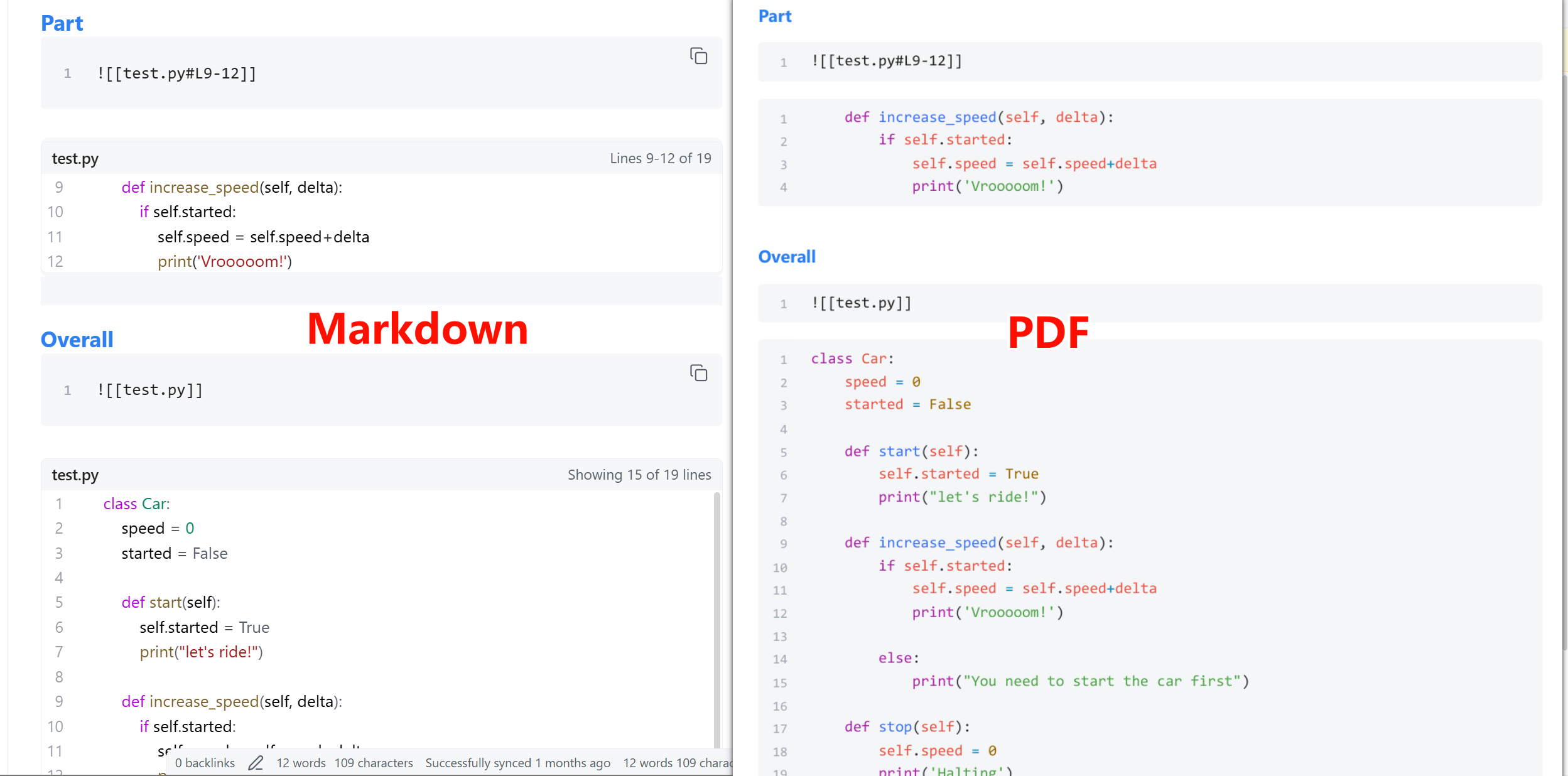
- Native PDF export: Use Obsidian's official Export to PDF and code file references are exported as real code blocks instead of gray file cards.
- Broader host compatibility: Embedded code previews behave more reliably in reading mode, pop-out windows, and other hosts that reuse Obsidian's Markdown render pipeline.
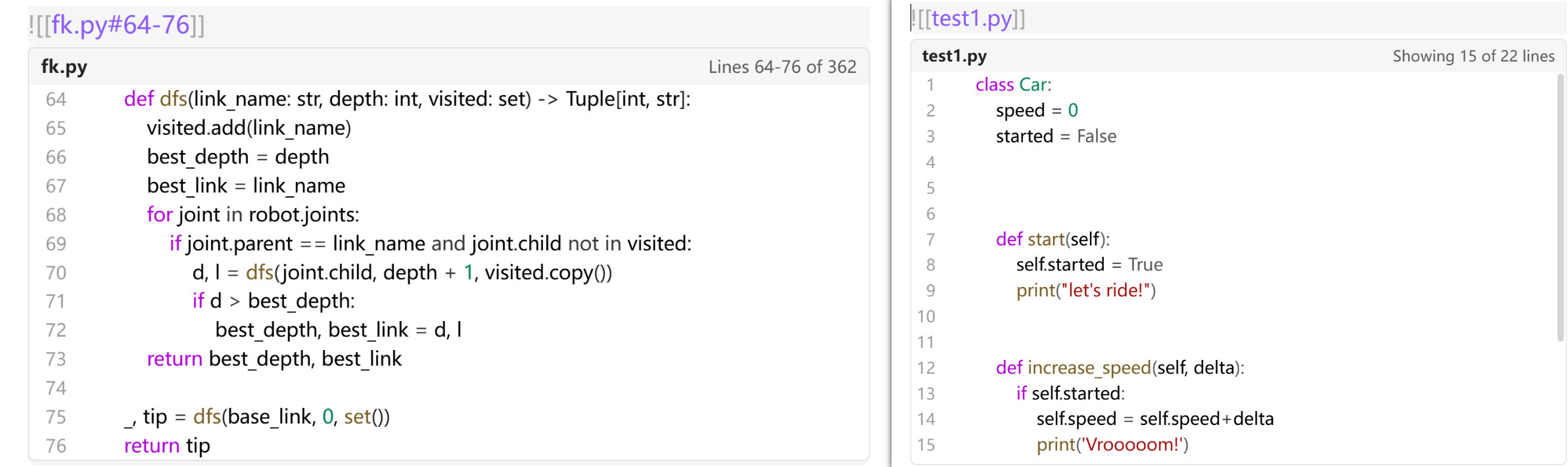
Supported embed syntax:
| Syntax | Description |
|---|---|
![[test.py]] |
Embed the entire file |
![[test.py#20]] |
Display from line 20 to end of file |
![[test.py#L20]] |
Same as above (GitHub-style with L prefix) |
![[test.py#20-40]] |
Display lines 20 to 40 |
![[test.py#L20-L40]] |
Same as above (GitHub-style) |
![[test.py#L20-40]] |
Mixed format also supported |
Line range features:
- In range mode, displays the full specified range ignoring the "Max embed lines" setting
- If end line exceeds file length, automatically truncates to end of file
- If end line is less than start line, automatically adjusts to single line display
- Line numbers are consistent with the original file
Tip: When a note contains code file embeds, export it with Obsidian's official Export to PDF. Code Space keeps those embeds as real code blocks in the final PDF while preserving Obsidian's native layout and pagination.
4. External mount space (desktop only)
Work across Vault boundaries to manage external project code.
- Symlinks/junctions: Create and manage symlinks (macOS/Linux) or directory junctions (Windows) from the settings page to mount external folders into the Vault
- Integrated workflow: Code files in mounted folders appear in the dashboard with Code Space functionality such as editing, embedding, and outline navigation
- Bidirectional sync: Edits made from either Obsidian or the external folder affect the same underlying files
- Cross-project work: Manage distributed code repositories directly without copying project code into the Vault
- Mount status management: View mount status, remove or relink mounts, and choose auto, symlink, or junction mode on Windows
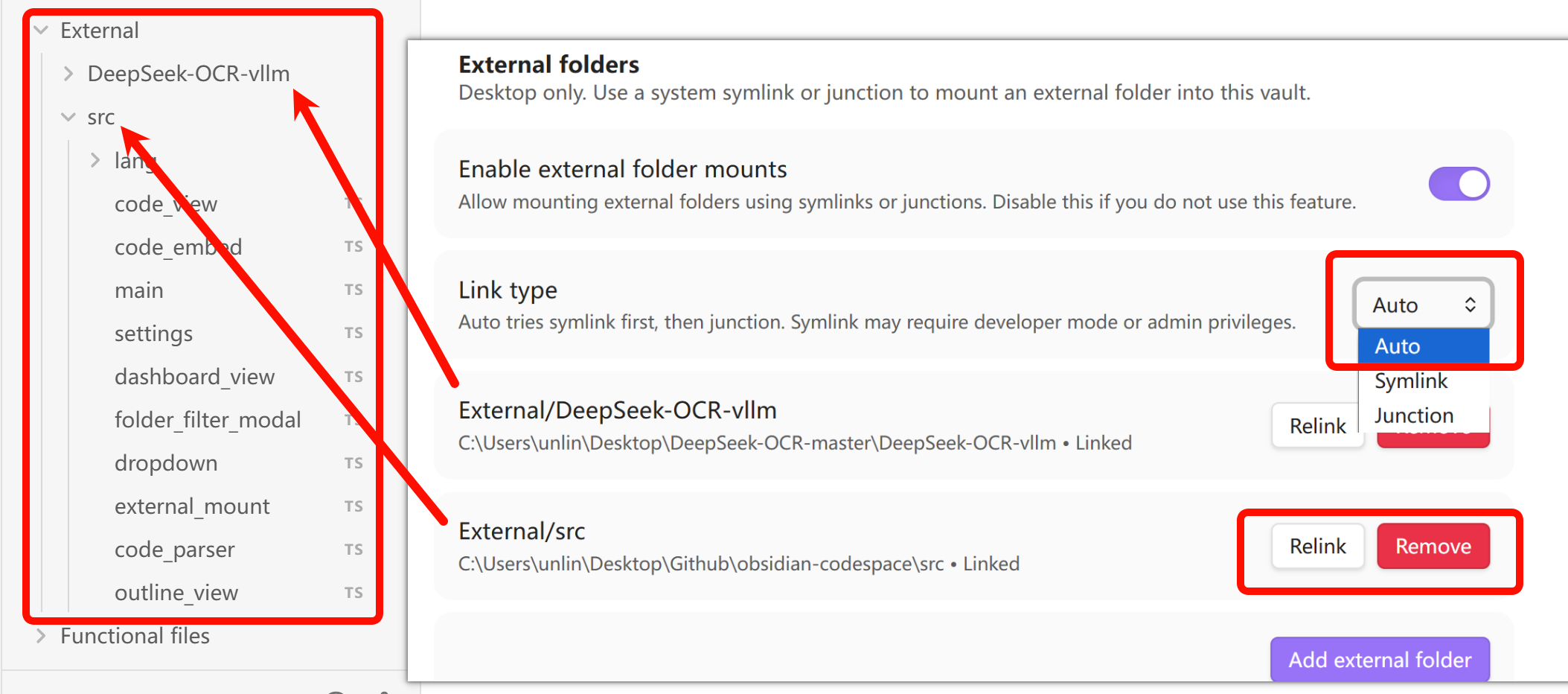
Usage:
- Open Settings > Community plugins > Code Space
- Enable External folders
- Click Add external folder, choose a source folder outside the Vault, and set its mount location inside the Vault
- Code Space creates the link, saves the configuration, and indexes code files inside the mounted folder
Important notes!
- Desktop only: External mounts are unavailable on iOS/Android due to sandbox restrictions
- Security risk: External mounts allow the plugin to access files outside the Vault. Only mount folders you trust
- Path validation: The source must be an absolute folder outside the Vault. Code Space rejects Vault self-mounts, parent/child cycles, and mount paths nested under another symlink or junction
- Safe removal: Code Space removes a mount only when the link still points to its configured source. A changed or user-created link is reported as a target mismatch and is left untouched
- Permission differences: On Windows, symlinks may require Developer Mode or administrator privileges. Auto mode tries symlink first, then falls back to junction
- Performance issues: You can use this for lightweight repositories or multi-repository coordination, but avoid mounting too many files or very large directories
- Path stability: Moving or renaming external folders will break the mount and require reconfiguration
- Sync issues: If external folders are in cloud-synced directories (e.g., Dropbox, OneDrive), ensure Obsidian and external folders are in sync to avoid conflicts
5. Integrated terminal (desktop only)
Run a real system shell inside Code Space, powered by xterm.js and node-pty.
- Real PTY terminal: Interactive programs, colors, job control, and paging work like a native terminal (ConPTY on Windows, Unix pty on macOS/Linux)
- Two hosts, one set of sessions: Toggle an embedded panel at the bottom of the code editor, or open a standalone terminal tab in the main area. Sessions keep running when panels or views close
- Multi-tab sessions: Create, switch, and close terminal sessions from the tab bar; exited sessions are marked and stay readable until closed
- Follows your context: New terminals start in the folder of the currently open file (external mounts resolve to their real on-disk location), falling back to the Vault root
- Theme aware: Colors and the monospace font follow your Obsidian theme, including in pop-out windows
- Resizable panel: Drag the grip above the embedded panel to adjust its height
Usage:
- Enable the terminal under Settings > Code Space > Terminal (disabled by default)
- Select Download next to "Support files" — Code Space downloads a small platform package (see notes below); the header button, commands, and remaining settings appear once it is ready
- Open a code file and select the terminal button in the editor header, or run Code Space: Toggle terminal panel
- Or run Code Space: Open terminal for a standalone terminal tab (every tab is one full-screen terminal)
- Close a terminal tab to stop that terminal, or run Code Space: Close all terminal sessions to stop everything
Important notes!
- Desktop only: The terminal is unavailable on iOS/Android
- Explicit download: A true PTY requires a native helper (
node-pty). Obsidian's plugin store only distributes JavaScript, so the helper is downloaded only when you select Download under Settings > Terminal: a prebuilt package (~1-3 MB) for your platform from this repository's GitHub releases, verified by SHA-256 checksum and stored under the plugin folder. Terminal commands and buttons never download anything by themselves - Supported platforms: Windows x64/ARM64, macOS x64/ARM64, Linux x64. Other Linux architectures are not supported yet
- Linux requirement: Installing the support package on Linux requires the
unziputility (preinstalled on most distributions) - Shell detection: PowerShell (
pwsh.exe→powershell.exe→cmd.exe) on Windows,$SHELL→zshon macOS,$SHELL→bashon Linux. Set an explicit executable in Settings > Terminal - Keyboard focus: While the terminal is focused, keys (including Ctrl/Cmd combinations) go to the shell, like VS Code. Select the editor to give keys back
- Security: The terminal runs with your user permissions and can access files outside the Vault. Treat pasted commands with the same care as in any system terminal
Configuration
Access configuration via Settings > Community plugins > Code Space:
- Managed extensions: Specify file extensions managed by Code Space (comma-separated). Changes refresh the managed file associations.
- Show line numbers: Toggle line numbers (default: on)
- Editor font size: Font size for the code editor (default: 18px, range: 9-36px)
- Embed font size: Font size for embedded code blocks in Markdown (default: 15px, range: 9-36px)
- Max embed lines: Maximum lines shown in embedded previews (default: 20, 0 for unlimited)
- Location for new code files: Create new code files in a custom folder or in the folder of the currently active file
- External folders (desktop only): Mount external folders into the Vault via system symlinks/junctions. You can enable or disable the feature, add, remove, relink, and inspect mounts.
- Terminal (desktop only): Enable the integrated terminal (disabled by default; enabling shows the terminal button and commands), pick a shell executable (empty for auto-detect), set font size, scrollback, and the maximum number of concurrent sessions, and manage the downloaded terminal support files (re-download or remove).
Note: External mounts allow access to files outside the Vault. Only mount folders you trust.
Supported languages (extensible)
1. Default supported extensions
| Language | Extensions |
|---|---|
| Python | .py |
| C/C++ | .c, .cpp, .h, .hpp, .cc, .cxx |
| JavaScript/TypeScript | .js, .ts, .jsx, .tsx, .mjs, .cjs, .json |
| Web Technologies | .html, .htm, .xhtml, .css, .scss, .sass, .less |
| Systems Programming | .rs, .go, .java, .cs |
| Data/Config | .sql, .yaml, .yml, .xml |
| Scripting | .php, .r, .rb, .sh |
You can add more extensions in plugin settings. Code Space can manage files with custom extensions.
- Text and code files open in the Code Space editor interface
- Binary files (e.g., images or PDFs) open with Obsidian's native viewer or the system default app. You can also use the dashboard to manage attachments like PDFs
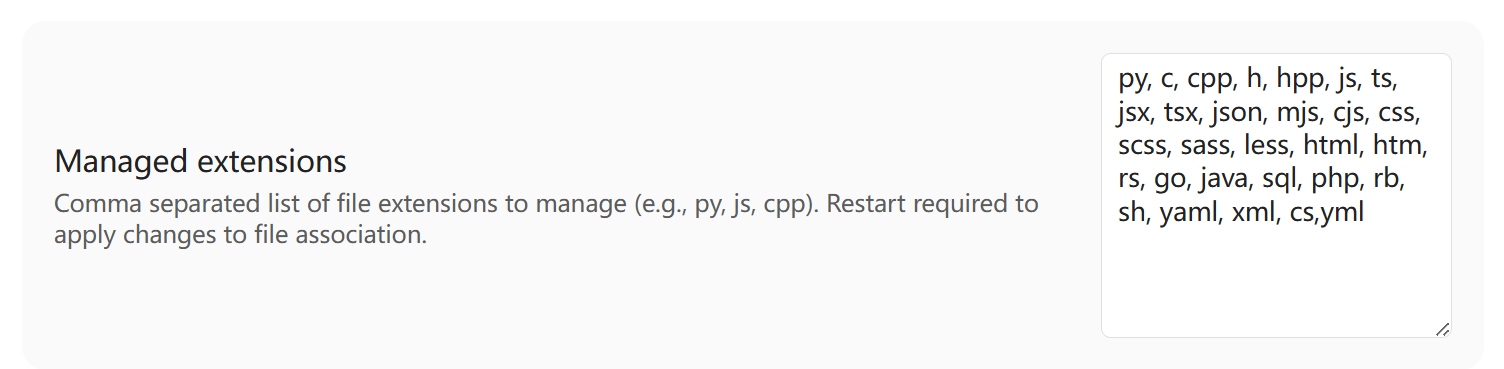
2. Additional text/code extensions with syntax highlighting
Add the following extensions in Settings > Code Space > Managed extensions to enable:
| Language | Extensions | Highlighting reused from |
|---|---|---|
| XML family | .xsd, .xsl, .xslt, .wsdl, .plist, .csproj, .vcxproj, .props, .targets, .config |
XML |
.urdf, .xacro |
XML | |
| C/C++ family | .ino, .pde, .nut |
C/C++ |
.cu, .cuh, .glsl, .vert, .frag, .hlsl, .mm, .swift |
C/C++ | |
| Java family | .kt, .kts, .scala, .groovy, .gradle |
Java |
| Frontend frameworks | .vue, .svelte, .astro |
JavaScript |
| JSON variants | .json5, .jsonc |
JavaScript |
| Python family | .pyx, .pxd, .pxi, .ipy |
Python |
| Config files | .toml, .ini, .cfg, .conf |
YAML |
| Shell scripts | .bash, .zsh |
Shell |
| PowerShell | .ps1, .psm1, .psd1 |
PowerShell |
| Fortran | .f, .for, .f90, .f95, .f03, .f08 |
Dedicated |
| Other languages | .cmake, .dockerfile, .diff, .patch, .lua, .pl, .pm, .erb, .m |
Dedicated |
3. Binary file support (opened with Obsidian native viewer)
If you add the following extensions to the managed list, these files can also be managed in the Code Space dashboard (rename, move, delete, etc.). They are not opened by the Code Space editor; they use Obsidian's native viewer or the system default app.
| Type | Extensions |
|---|---|
| Images | .png, .jpg, .jpeg, .gif, .webp, .svg, .bmp, .ico, .tiff, .psd |
| Documents | .pdf |
| Audio | .mp3, .wav, .ogg, .flac, .aac, .m4a, .wma |
| Video | .mp4, .avi, .mkv, .mov, .wmv, .flv, .webm, .m4v |
| Archives | .zip, .rar, .7z, .tar, .gz, .bz2, .xz |
| Office | .doc, .docx, .xls, .xlsx, .ppt, .pptx |
| Other | .exe, .dll, .so, .dylib, .bin, .dat |
Supported keyboard shortcuts
1. Plugin commands
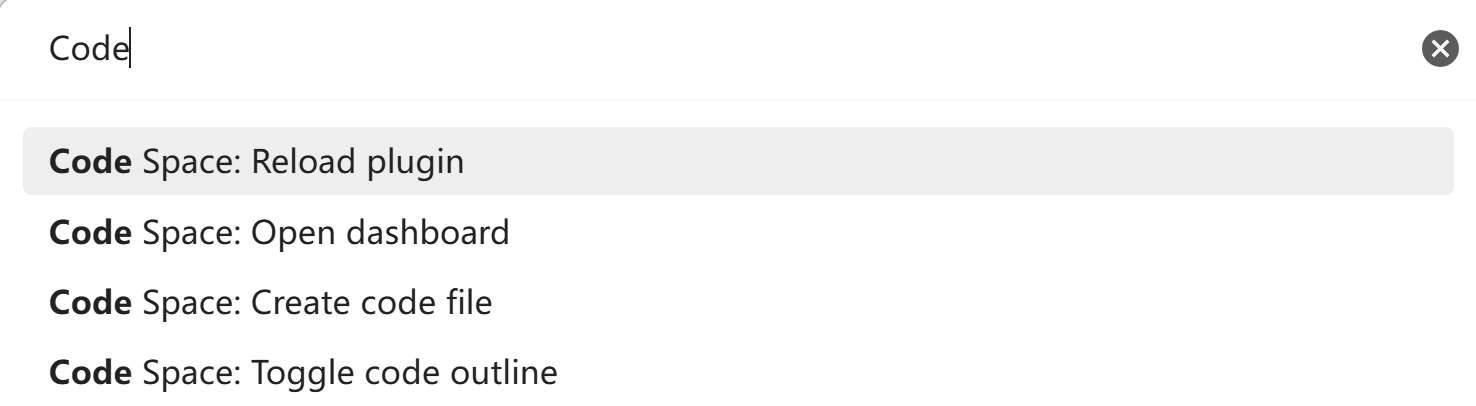
| Command path | Function |
|---|---|
Ctrl+P → "Open dashboard" |
Open the code management panel |
Ctrl+P → "Create code file" |
Create a new code file |
Ctrl+P → "Reload plugin" |
Reload the plugin |
Ctrl+P → "Toggle code outline" |
Toggle the code outline view |
Ctrl+P → "Search and replace" |
Open the search and replace panel in the current Code Space editor |
Ctrl+P → "Open terminal" |
Open a new terminal tab (available after enabling the terminal and downloading support files) |
Ctrl+P → "Toggle terminal panel" |
Toggle the embedded terminal panel in the current editor |
Ctrl+P → "Close all terminal sessions" |
Stop every terminal |
2. Basic operations
| Shortcut | Function |
|---|---|
Ctrl/Cmd+S |
Manually save the file |
Ctrl/Cmd+Mouse wheel |
Adjust font size (in the terminal: the focused terminal only) |
Ctrl/Cmd+F |
Search |
Ctrl+H / Cmd+Option+F |
Replace |
Ctrl/Cmd+C |
Copy selection |
Ctrl/Cmd+X |
Cut selection |
Ctrl/Cmd+V |
Paste content |
Ctrl/Cmd+A |
Select all |
Ctrl/Cmd+Z |
Undo |
Ctrl+Y or Ctrl/Cmd+Shift+Z |
Redo |
Tab |
Increase indent |
Shift+Tab |
Decrease indent |
Enter |
New line and preserve indent |
| Cursor navigation | Selection and editing | ||
|---|---|---|---|
↑ ↓ ← → |
Move cursor up/down/left/right | Shift+Arrow Keys |
Extend selection |
Home |
Jump to line start | Ctrl+Shift+← |
Select to word start |
End |
Jump to line end | Ctrl+Shift+→ |
Select to word end |
Ctrl+← |
Move left one word | Ctrl+Shift+Home |
Select to file start |
Ctrl+→ |
Move right one word | Ctrl+Shift+End |
Select to file end |
Ctrl+Home |
Jump to file start | Backspace |
Delete character before cursor |
Ctrl+End |
Jump to file end | Delete |
Delete character after cursor |
Page Up |
Page up | Ctrl+Backspace |
Delete word before cursor |
Page Down |
Page down | Ctrl+Delete |
Delete word after cursor |
Installation
Method 1: Install from Obsidian community plugins (recommended)
Code Space is available in the official Obsidian community plugin directory.
- Open Settings > Community plugins.
- If Obsidian asks, turn off Restricted mode.
- Click Browse.
- Search for "Code Space".
- Click Install and enable the plugin.
Method 2: Manual installation
- Visit Releases.
- Download
main.js,manifest.json, andstyles.css. Place them in your vault plugin directory:.obsidian/plugins/code-space/. If thecode-spacefolder does not exist, create it manually. - Reload and enable the plugin in Obsidian settings.
Method 3: BRAT
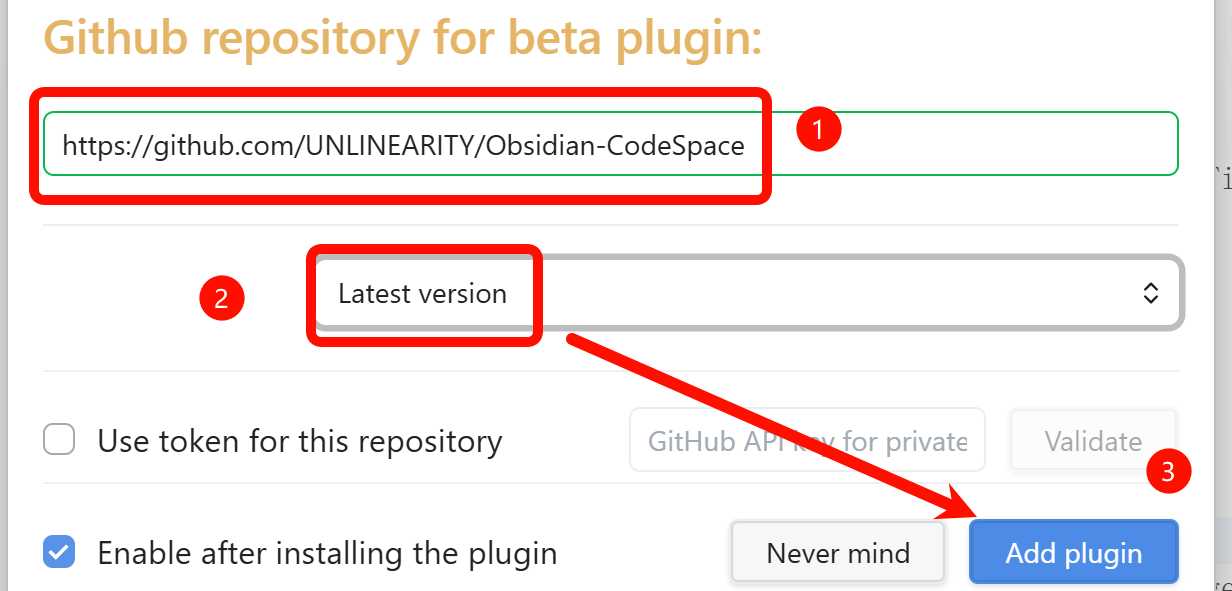
Use BRAT only if you want to test a development or prerelease build. Install the BRAT plugin first, then add this repository as a beta plugin: https://github.com/UNLINEARITY/Obsidian-CodeSpace, and select the latest version. Most users should install the community plugin version.
Development
Build requirements
- Node.js 18 or later (current LTS recommended)
- npm
Build commands
npm install          # Install dependencies
npm run dev          # Development build (file watching)
npm run build        # Production build
npm test             # Run unit tests
npm run lint         # Run ESLint
npm run dev:copy     # Copy built artifacts to the local Vault
npm run dev:copy uses C:\Nonlinear\ob and .obsidian by default. Set OBSIDIAN_VAULT_PATH or OBSIDIAN_CONFIG_DIR when your Vault uses different paths.
Release workflow
Update the version in package.json, run the validation pipeline, and push a SemVer tag such as 2.4.0. GitHub Actions then validates the tag, builds the release artifacts, creates provenance attestations, and publishes main.js, manifest.json, and styles.css to the GitHub release.
Project structure
obsidian-codespace/
├── src/
│   ├── main.ts                # Plugin entry: command registration, view mounting, and lifecycle management
│   ├── code_view.ts           # Editor core: CodeMirror 6 editing environment
│   ├── dashboard_view.ts      # Dashboard view: file indexing and management UI
│   ├── outline_view.ts        # Outline view: sidebar structured navigation
│   ├── code_parser.ts         # Syntax parser: multi-language structure analysis
│   ├── code_embed.ts          # Embed processing: reference and preview logic
│   ├── code_embed_markdown.ts # Code embed expansion for native PDF export and related flows
│   ├── scrollbar_visibility.ts # Scrollbar visibility state for editors and embeds
│   ├── native_pdf_export_patch.ts # Native Export to PDF integration and export-chain patch
│   ├── dropdown.ts            # UI components: dropdown/multi-select
│   ├── folder_filter_modal.ts # Folder filter modal
│   ├── ignore_manager_modal.ts # Ignored file/folder manager modal
│   ├── external_mount.ts      # External mounts: symlink/junction management
│   ├── settings.ts            # Settings panel: plugin configuration
│   ├── terminal/              # Integrated terminal (desktop only)
│   │   ├── types.ts           # Shared terminal types and local pty interface
│   │   ├── node_access.ts     # Runtime window.require access to Node APIs
│   │   ├── binary_manager.ts  # node-pty prebuild download/verify/extract
│   │   ├── conout_patch.ts    # Windows ConPTY renderer patch (node-pty)
│   │   ├── pty_host.ts        # PtyProcess wrapper: load node-pty, spawn/kill
│   │   ├── shell_detector.ts  # Platform default shell detection
│   │   ├── terminal_theme.ts  # Obsidian theme vars to xterm theme mapping
│   │   ├── terminal_component.ts # xterm.js wrapper: attach/detach/fit
│   │   ├── session_manager.ts # TerminalManager: global session lifecycle
│   │   ├── terminal_panel.ts  # Shared tab-bar panel (embedded + view hosts)
│   │   └── terminal_view.ts   # Standalone terminal ItemView
│   └── lang/
│       ├── helpers.ts         # Localization helpers
│       └── locale/
│           ├── en.ts          # English strings
│           └── zh-cn.ts       # Chinese strings
├── styles.css                 # Styles entry
├── manifest.json              # Plugin metadata
└── package.json               # Dependencies and scripts
Contributing
Contributions are welcome via Pull Request!
Please ensure:
- Code passes ESLint checks
- Follow the existing code style
- Commit messages are clear and descriptive
For issues or suggestions, please use GitHub Issues.
- Author: unlinearity
- Email: [email protected]
- AGPL-3.0-or-later - Copyright (c) 2026 unlinearity
Known limitations:
- Code file contents are currently not indexed by Obsidian's global search engine. Use the Code Space search and replace panel for the current file.
- The integrated terminal is desktop only; if the support-file download fails on Windows ARM64, please report it in an issue.
Acknowledgments
Code Space is also hosted on AtomGit, where you can browse the source code.

Thanks for the support
Thanks to everyone who reported issues and contributed pull requests.
If you find this plugin helpful or fun to use, you can buy me a bubble tea. ❤️ (WeChat tip QR code below)

Referenced projects
This project is built upon the following excellent projects:
- Obsidian API: Provides powerful plugin extensibility.
- CodeMirror 6: Flexible and modern code editor engine.
- Lezer: Efficient incremental code parsing system.
- xterm.js: Terminal frontend for the integrated terminal.
- node-pty: Pseudo-terminal backend by Microsoft; its Windows patch inside Obsidian is adapted from lean-obsidian-terminal.
- TypeScript: Provides robust type safety.
- esbuild: Extremely fast JavaScript bundler.
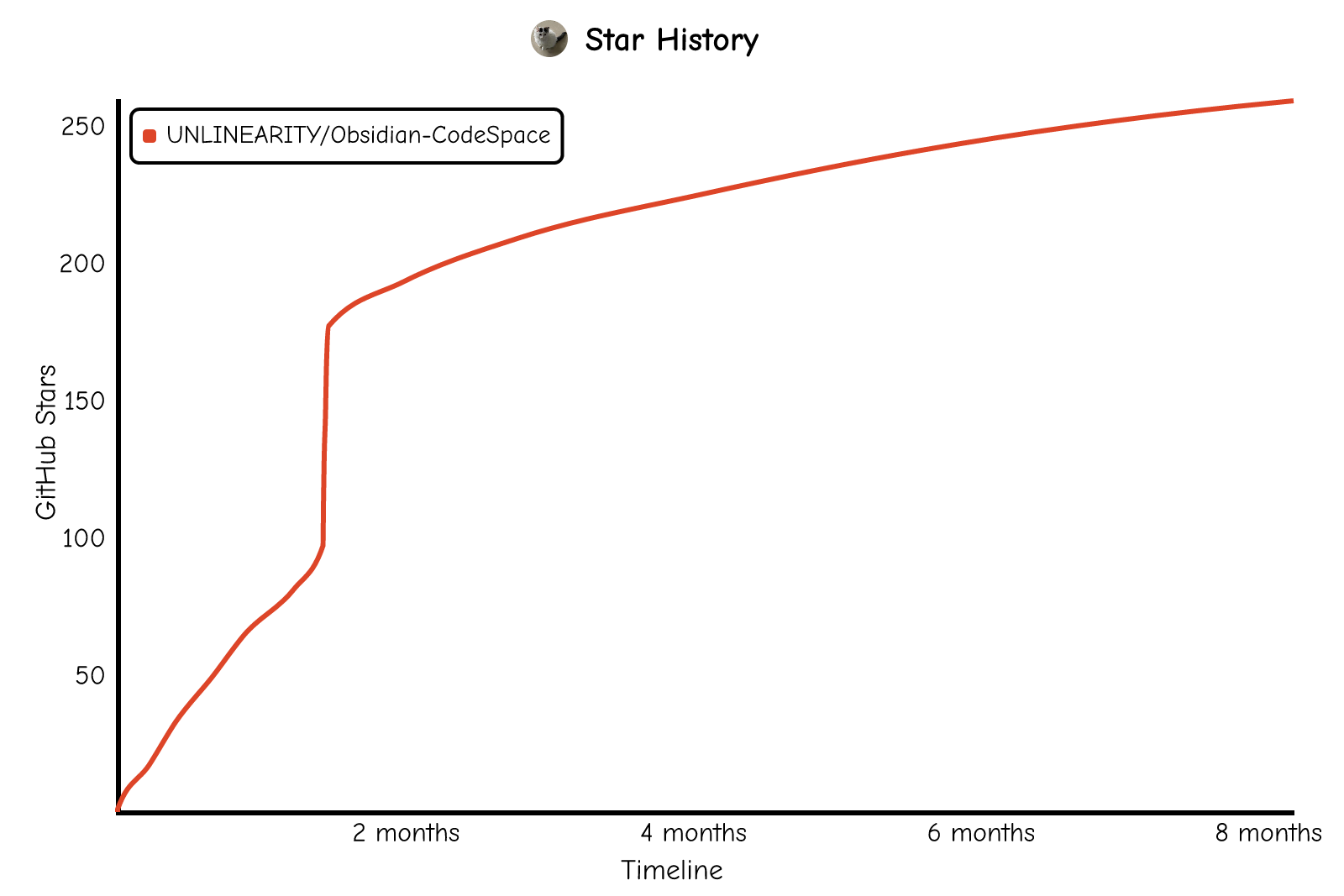
Star history
Make code management simple and efficient in Obsidian!