Qoderian
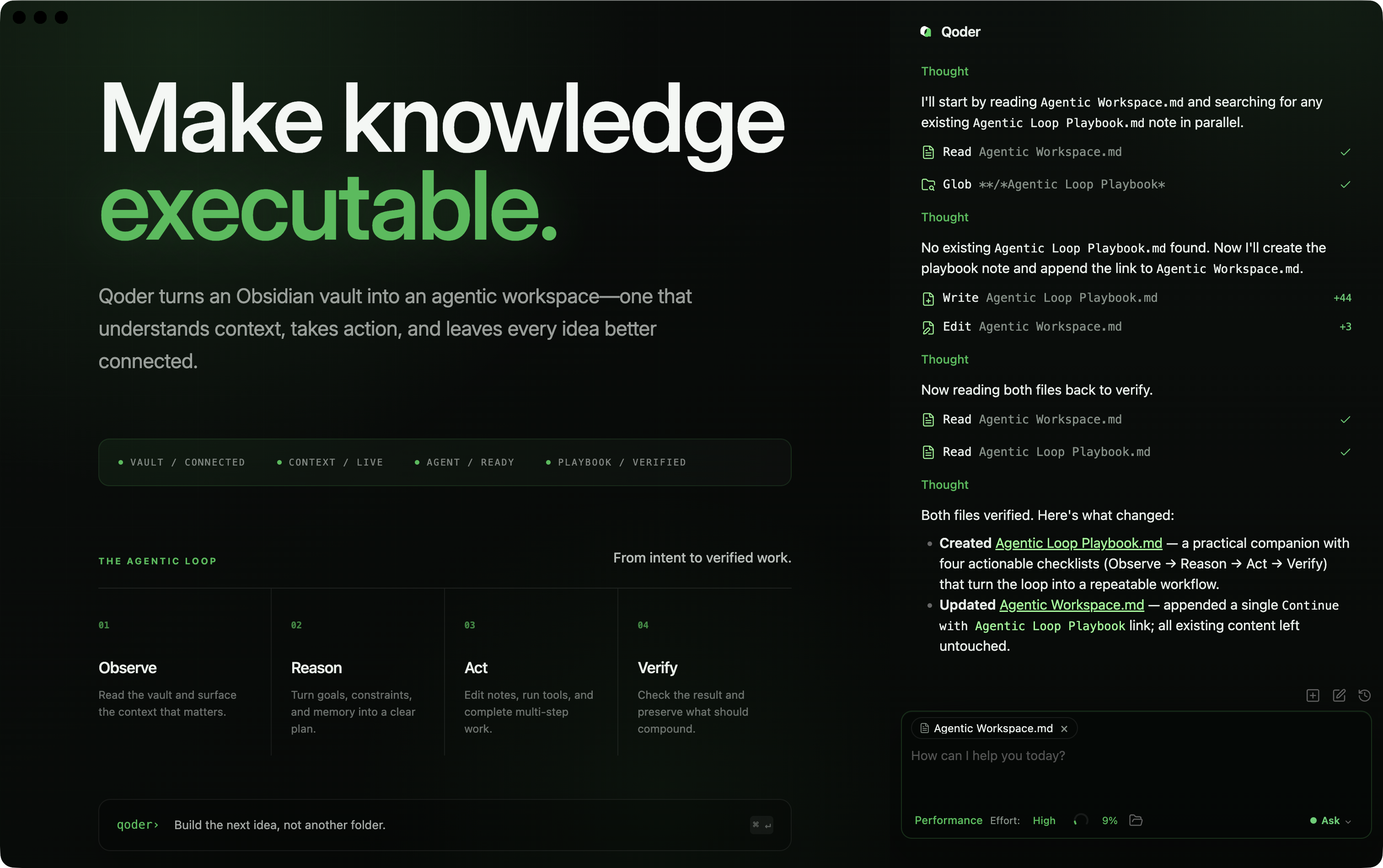
Embeds Qoder CLI as an AI collaborator in your vault. Your vault becomes the working directory, giving qodercli capabilities for file reads and writes, search, bash commands, and multi-step workflows.
- Overview
- Scorecard
- Updates13
An Obsidian plugin that embeds Qoder CLI (qodercli) in your vault. Your vault becomes the agent's working directory — file read/write, search, bash, and multi-step workflows all work out of the box.
Features
- Agentic chat — qodercli streams responses into the sidebar and reads, writes, edits, and searches files in your vault.
@mentions — Bring vault notes, the current selection, or external directories into context as removable chips.- Inline Edit — Rewrite selected note text in place, with a diff preview before you accept.
- Slash Commands & Skills —
/opens built-in and project-level commands; skills, agents, and hooks come from the same Qoder CLI project files as the terminal. - Permission Modes — Ask approval, Auto approval, or Full access from the chat toolbar.
#Instruction Mode — Write a custom instruction on an empty input; it is refined before being applied.!Bash Mode — Run a shell command in the vault directory; opt-in under Settings → Experimental.- Models & Effort — Model picker with per-model reasoning effort and context usage reported by the Qoder Agent SDK.
- MCP Servers — Connect external tools over the Model Context Protocol (stdio, SSE, HTTP), configured in-app.
- Tabs & History — Multiple chat tabs with their own histories, plus resume, fork, and rewind.
- Subagents — Nested agent runs grouped and rendered inline.
- Turn summaries — Finished turns fold their working steps into an expandable "Execution steps" line, and edited files collapse into a card that opens a read-only per-file diff modal.
Installation & Usage
Qoderian is desktop-only (macOS, Linux, Windows) and needs Obsidian v1.7.2+ plus a signed-in Qoder CLI.
1. Install and sign in to Qoder CLI
Install with the official script (recommended):
macOS / Linux
curl -fsSL https://qoder.com/install | bash
Windows — PowerShell (Windows Terminal recommended)
irm https://qoder.com/install.ps1 | iex
Windows — CMD
curl -fsSL https://qoder.com/install.cmd -o install.cmd && install.cmd
Or through npm (requires Node.js ≥ 20):
npm install -g @qoder-ai/qodercli
The installer puts qodercli on your PATH; Windows on arm64 is not supported. Then sign in from a terminal:
qodercli login
Sign-in is managed entirely by your local CLI; Qoderian never asks for an API key.
2. Install the plugin
From Obsidian Community Plugins (recommended)
- Open Obsidian → Settings → Community plugins → Browse
- Search for "Qoderian" and click Install
- Enable the plugin
From GitHub Release
- Download
main.js,manifest.json, andstyles.cssfrom the latest release - Create a folder called
qoderianin your vault's plugins folder:/path/to/vault/.obsidian/plugins/qoderian/ - Copy the downloaded files into that folder
- Enable the plugin in Obsidian: Settings → Community plugins → turn off Restricted mode → enable "Qoderian"
From source
- Clone the repository into your vault's plugins folder:
cd /path/to/vault/.obsidian/plugins git clone <repository-url> qoderian cd qoderian - Install dependencies and build:
This writesnpm ci npm run buildmain.jsandstyles.cssnext tomanifest.json, which is where Obsidian loads them from. - Enable the plugin in Obsidian
3. Start using
Open the chat sidebar from the ribbon icon or the command palette (Open Qoderian). Type a message and press Enter; qodercli streams its response back into the panel and works on your vault files just like the terminal CLI.
Development
# Watch mode; rebuilds on change
npm run dev

# Production build
npm run build

# Checks
npm run typecheck
npm run lint
npm run test
npm run test:coverage
npm run audit:prod
Copy .env.local.example to .env.local and set OBSIDIAN_VAULT to have development builds copied into a local vault automatically.
For SDK or qodercli lifecycle changes, run the initialization-only smoke check against a signed-in local CLI. It follows the official model-selection sample:
npm run smoke:qoder
# Optional when qodercli is not on PATH:
QODER_CLI_PATH=/absolute/path/to/qodercli npm run smoke:qoder
The smoke check starts an idle Query, reads runtime model metadata, and closes the Query without sending a user turn.
Configuration
Open Settings → Qoderian:
| Group | Contents |
|---|---|
| Setup | Qoder CLI edition and path to the qodercli executable (auto-detected by default) |
| Display | Chat view placement, maximum tabs, auto-scroll, deferred math rendering during streaming, and default expansion of file edits (the language selector sits above this group) |
| Conversations | Auto-generated titles and the model that writes them |
| Content | User name, custom system prompt, excluded tags, media folder |
| Input | Send-key behavior and vim-style navigation mappings |
| Safety | User Qoder settings loading and safe-mode permissions |
| Commands & Skills / Subagents / MCP Servers / Qoder Plugins | Inspect and edit the Qoder CLI project configuration stored in .qoder/ |
| Experimental | Bash mode (!) toggle |
Privacy & Data Use
- Sent to Qoder: Your input, attached notes and images, and tool results are sent to Qoder services through
qodercli. How that data is handled is governed by Qoder's terms of service and privacy policy. - Local storage: Qoderian settings and session metadata live in
vault/.qoderian/; Qoder CLI project files, commands, skills, agents, and MCP configuration live invault/.qoder/; native transcripts are managed by qodercli itself. Obsidian stores the open-tab layout in.obsidian/plugins/qoderian/data.json. - Credentials: Qoderian never bundles, generates, or asks for a Qoder API key — sign-in is managed by your local
qodercliand is never copied into your vault. Secrets may appear in third-party MCP configurations stored in.qoder/mcp.json; never commit or sync that file somewhere untrusted. - Environment variables: The qodercli subprocess inherits Obsidian's process environment. Qoderian does not persist environment-variable overrides in the vault.
- File and shell access: Depending on your permission mode and confirmations, qodercli may read, create, modify, or delete files and run shell commands. Understand the risks before enabling
YOLO, and keep backups or version control for an important vault. - Reach beyond the vault: External context and MCP servers may access files outside your vault or third-party network services, under those services' own rules.
- Feedback reports: Submitting feedback (the megaphone button in the composer bar, or the "Submit feedback" command) only ever happens when you choose it. It sends your note together with the plugin version and, when a chat is open, the active session id. By default it also lets
qodercli feedbackcollect the current vault's runtime state to help locate the problem; uncheck "Attach workspace diagnostics" in the dialog to send only your note. - Background activity: Qoderian runs no telemetry of its own — nothing is uploaded automatically or in the background. Network activity is limited to qodercli, the MCP endpoints you configure, and feedback reports you submit yourself.
Redact settings, logs, and screenshots before filing an issue.
Troubleshooting
qodercli not found
If you see spawn qodercli ENOENT, the plugin could not auto-detect your installation. This is common with Node version managers (nvm, fnm, volta), because GUI apps like Obsidian do not inherit your shell's PATH.
Leave the CLI path empty first so auto-detection can run. If it still fails, find the path and set it in Settings → CLI path:
| Platform | Command | Example path |
|---|---|---|
| macOS / Linux | which qodercli |
/Users/you/.local/bin/qodercli |
| Windows | where.exe qodercli |
C:\Users\you\AppData\Local\qodercli\qodercli.exe |
| npm install | npm root -g |
{root}\@qoder-ai\qodercli\cli.js |
On Windows, prefer the native executable over .cmd or .ps1 wrappers.
CLI and Node.js in different directories
If you installed the CLI through npm, check whether qodercli and node resolve to the same place:
dirname $(which qodercli)
dirname $(which node)
If they differ, Obsidian may find the CLI but not the Node.js runtime it needs. Prefer the native qodercli binary or install Node.js in a standard location visible to desktop applications, then restart Obsidian.
Process exit code 42
This usually means incompatible arguments. Qoderian filters and converts SDK-supplied arguments into a qodercli-compatible form; if it still happens, please open an issue with the error log.
Nothing happens after enabling the plugin
- Confirm Obsidian is 1.7.2 or later
- Confirm Restricted mode is off (Settings → Community plugins)
- Restart Obsidian
- Check the developer console (
Ctrl+Shift+I/Cmd+Option+I) for errors
Architecture
src/
├── main.ts                   # Plugin entry point
├── app/                      # Plugin lifecycle, settings, and Obsidian-level storage
├── core/                     # Stable app domain, runtime contracts, and host utilities
│   ├── runtime/                 # ChatRuntime boundary and turn contracts
│   └── ...                      # conversation types, settings, filesystem, context, markdown parsing
├── qoder/                    # qodercli and Qoder Agent SDK integration
│   ├── qoder-services.ts         # Qoder service composition root
│   ├── qoder-host-context.ts     # Narrow host contract; no dependency on main.ts
│   ├── runtime/                 # Sessions, message channel, CLI discovery, approval, process adapters
│   ├── stream/                  # SDK message types and stream transformation
│   ├── history/                 # Native transcript reading, resume, and forking
│   ├── tools/ mcp/               # Qoder tool vocabulary and SDK MCP option adapters
│   ├── services/                # Cold-start services: inline edit, refine, titles
│   ├── models/ config/          # Model catalog and Qoder settings
│   └── storage/                 # Commands, skills, agents, plugins, MCP config
├── features/
│   ├── chat/                    # Sidebar chat: tabs, controllers, renderers
│   ├── inline-edit/             # Inline edit modal and preview
│   └── settings/                # Settings shell and CLI settings UI (agents, plugins, commands)
├── shared/                   # Reusable UI components and modals
├── i18n/                     # Internationalization (10 locales)
└── style/                    # Modular CSS
Qoderian drives qodercli through @qoder-ai/qoder-agent-sdk@^1.0.41; custom-spawn.ts only handles Obsidian/Electron process compatibility. Qoder is the only integration, so there is no provider registry, capability matrix, or routing layer. See ARCHITECTURE.md for dependency rules and the SDK lifecycle conventions followed from the official TypeScript samples.
Releasing
# Bump the version (syncs package.json, both manifests, and versions.json)
npm version patch   # 1.0.0 → 1.0.1

# Verify the build output
npm run build
npm run release:check

# Push the tag to trigger the release workflow
git push --follow-tags
.npmrc sets npm's tag prefix to empty, so a 1.0.1 tag matches manifest.json exactly. The workflow builds from source and attaches main.js, manifest.json, and styles.css to the GitHub Release.
Acknowledgements
- Obsidian — a powerful knowledge base
- qodercli — AI coding assistant
- Claudian — Qoderian started from this MIT-licensed project; thanks to its author and contributors for the foundation
Contributing
Issues and focused pull requests are welcome. Please read the contribution guide before opening a pull request, and report security issues privately per SECURITY.md.
License
Qoderian source code is licensed under the MIT License. Use of the Qoder Agent SDK and Qoder services is governed by the Qoder Product Service Terms. Third-party and upstream attribution is listed in NOTICE.