Qiaomu Home
 向阳乔木322 downloads
A calm start page: search, create, and continue what you were reading, listening to, or asking.
- Overview
- Scorecard
- Updates11
乔木 Home
每天打开 Obsidian,都有一个想回来的地方。
A calm start page for your notes, daily tasks, and everything you want to return to.
中文 · English
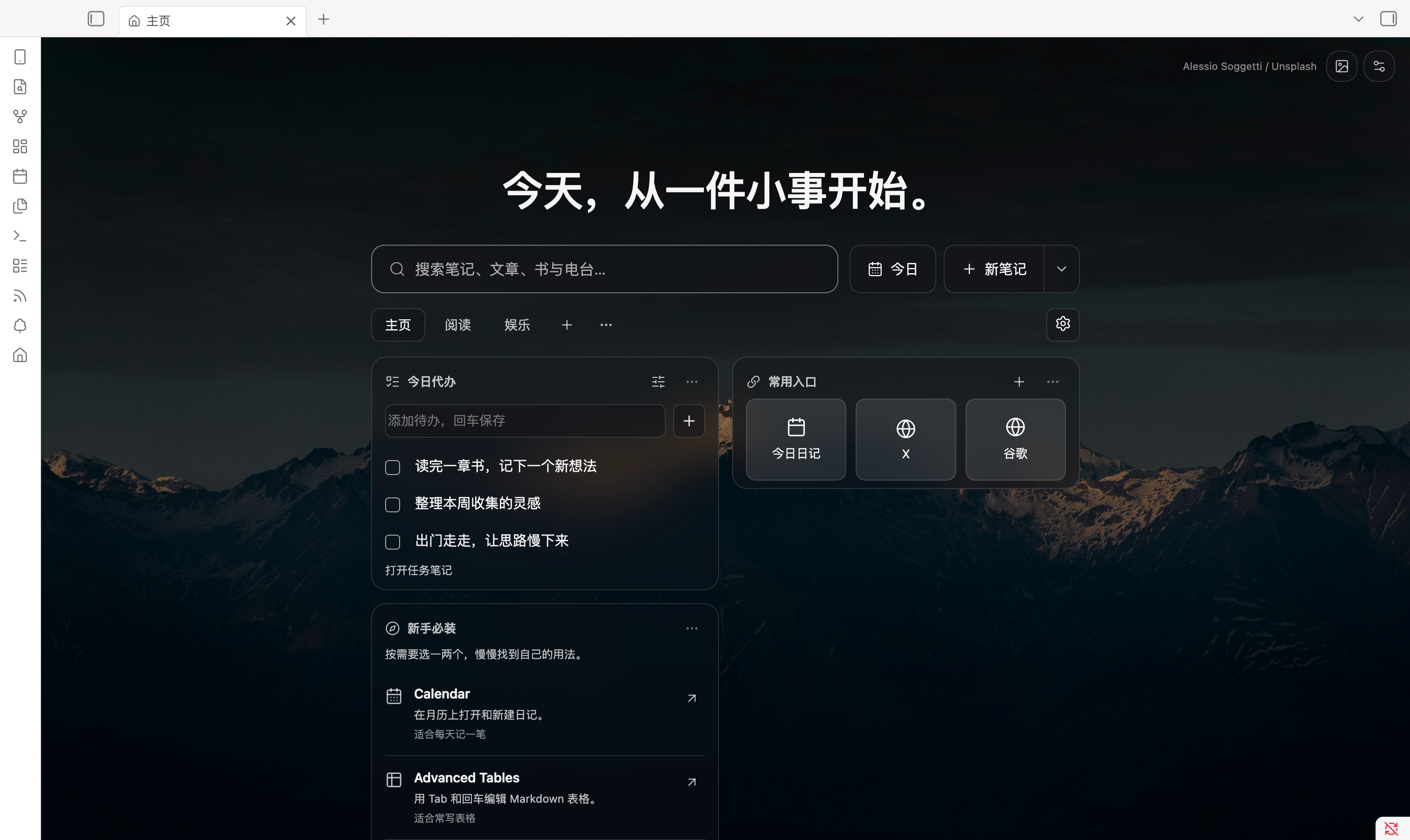
一个起点。记下一笔,完成一件事,接着读昨天的书。
乔木 Home 将启动页和空白新标签页变成你的个人起点:今天要做的事、常用笔记和网址、还没读完的内容,都放在顺手的位置。配上一张喜欢的壁纸,打开就能开始。
无需注册。基础功能独立可用。笔记和待办留在自己的 Obsidian 库里。
三步,拥有自己的主页
- 打开插件市场页面,或在 Obsidian 的「设置 → 第三方插件 → 浏览」搜索 Qiaomu Home。
- 点击 安装 → 启用,打开一个新标签页。
- 点击页签右侧的 齿轮 → 添加内容,放上你最常用的模块。
新安装预设 主页、专注、知识、阅读、娱乐、探索 六个页签,卡片已经放好,打开就能用。新增页签时可以选模板或从空白开始;内容、顺序、名称和壁纸都可以改。已有用户升级会保留自己的布局,也可以随时从模板添加页签。
手动安装 / 更新
从 最新 Release 下载同一版本的 main.js、manifest.json、styles.css,放进库的 .obsidian/plugins/qiaomu-home/,然后在 Obsidian 设置中启用插件。
更新时仅替换这三个文件,保留 data.json 和缓存,再重新加载插件。需要 Obsidian 1.11.4 或更高版本。
把首页布置成你的习惯
想放什么,自己选
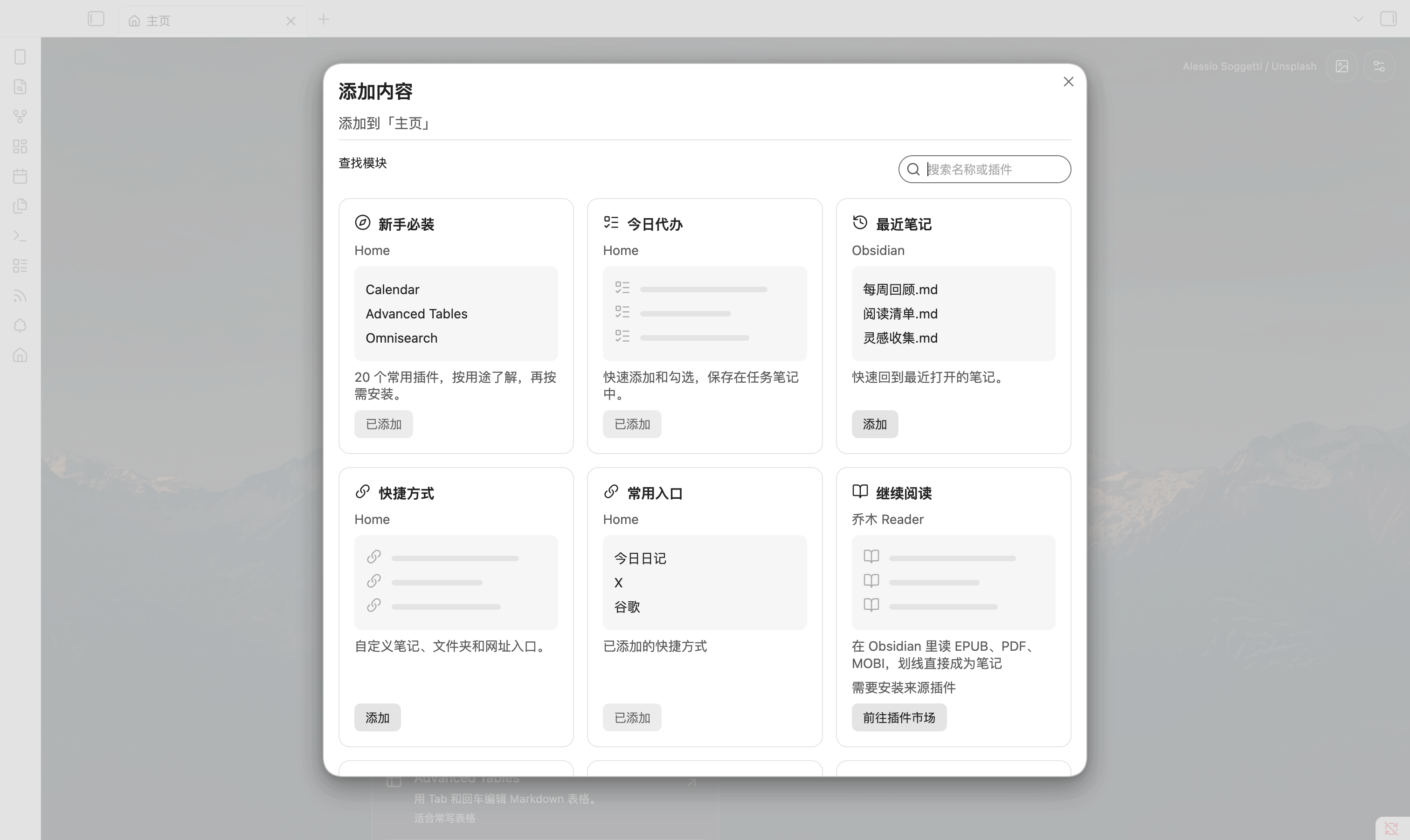
待办、最近笔记、快捷入口、继续阅读、未读文章……从模块库添加到当前页签。每个页签拥有独立布局;卡片默认显示 3 条,可以改为 1–6 条。
- 主页:安排今天,打开常用入口。
- 阅读:接着读书,浏览未读文章。
- 娱乐:打开电台,收藏喜欢的网站。
- 你的页签:写作、研究、项目……按自己的工作方式命名。
齿轮进入布置模式,拖动卡片和页签调整顺序;也可以通过菜单前移、后移。阅读和娱乐页签可以改名或删除,主页始终保留。缺少配套插件时,模块库会给出安装入口。
模块库现有 50 多张卡片,按用途分成 8 类,可搜索、按分类筛选、只看未添加,并在弹层里直接添加或移除:
| 分类 | 卡片 |
|---|---|
| 今天 | 今日日记、今日重点(可勾选完成)、快速记录、收件箱、本周回顾、日记日历、今日时间轴、今日习惯 |
| 任务与专注 | 今日待办、今日到期、逾期任务、项目下一步、近期里程碑、目标进度、专注计时(完成后可记入日记)、倒计时、日程(.ics) |
| 笔记与回顾 | 最近打开、最近修改、回顾一篇、固定笔记、笔记工作集、模板速建、搜索预设、每日一问、常用片段、视频笔记 |
| 整理知识库 | 常用标签、待连接笔记、待补全链接、笔记活动热力图 |
| 搜索与学习 | 多站搜索、找电子书、找视频与电影、Spotify 搜索、学 AI、找论文、查词、翻译、GitHub 待办 |
| 小工具 | 时间进度、世界时钟、天气、每日一句、专注白噪音 |
另有 插件联动 卡片:QuickAdd 动作、Dataview 查询、看板、Excalidraw 手绘、间隔复习和 Omnisearch 全文搜索。没装对应插件时,卡片会说明用途并给出安装按钮,装好后自动变成实时内容。GitHub 待办 可连接账号(令牌保存在 Obsidian 密钥库),直接列出待你审阅的 PR 和分配给你的 Issue。
页签右侧的方块按钮可以直接打开「添加内容」。所有新卡片在已有页签上默认关闭,按页添加。读写笔记的卡片都可以在设置里选择文件夹或笔记;Home 新建的笔记默认位置可在插件设置里统一指定。卡片菜单的「组件设置」可选择来源笔记、文件夹、显示的来源网站等。跨站卡片只在点击时打开来源网站;电子书下载、视频观看、音乐播放都由来源网站处理,Spotify 与 GitHub 卡片是入口,不读取账户数据。
今天的事,写在今天的日记里
在 今日待办 输入一件事,回车保存;做完直接勾选。
- 默认写入今日日记,沿用核心日记的目录、日期格式和模板。
- 以前没完成的任务,可以选择结转或全部移入今天;原日记保留指向目标日期的记录。
- 可选自动结转,默认关闭;也可以指定一篇固定任务笔记。
- 只检查最近几天的日记(默认 7 天,可选 1–30 天),旧任务不会一次性涌进今天。
- 勾选后可在提示里一键撤销;笔记里任务位置变了也能找到它。
- 任务是普通 Markdown 复选框,离开 Home 也能继续编辑。今日到期 卡片识别 Tasks 的 📅 / ⏳ / 🛫 和 Dataview 的
[due:: ];启用 Tasks 插件时,勾选会写入完成日期并生成重复任务的下一次,逾期任务可一键改到今天。 - 今日重点 最多三件,写在今日日记的
focus/focus_done属性里,第二天能看到昨天没完成的;习惯打卡 支持「喝水:8」这样的计次习惯和最近 7 天记录。
通过 常用入口 或 今日日记 卡片打开今天的日记;不存在时自动创建。
常用入口,一下就到
笔记、文件夹、网址(含 obsidian:// 链接)、Obsidian 命令和动态今日日记,都能成为快捷入口。默认提供 今日日记、X、谷歌,你可以编辑、排序或删除,也能建立多个分组。
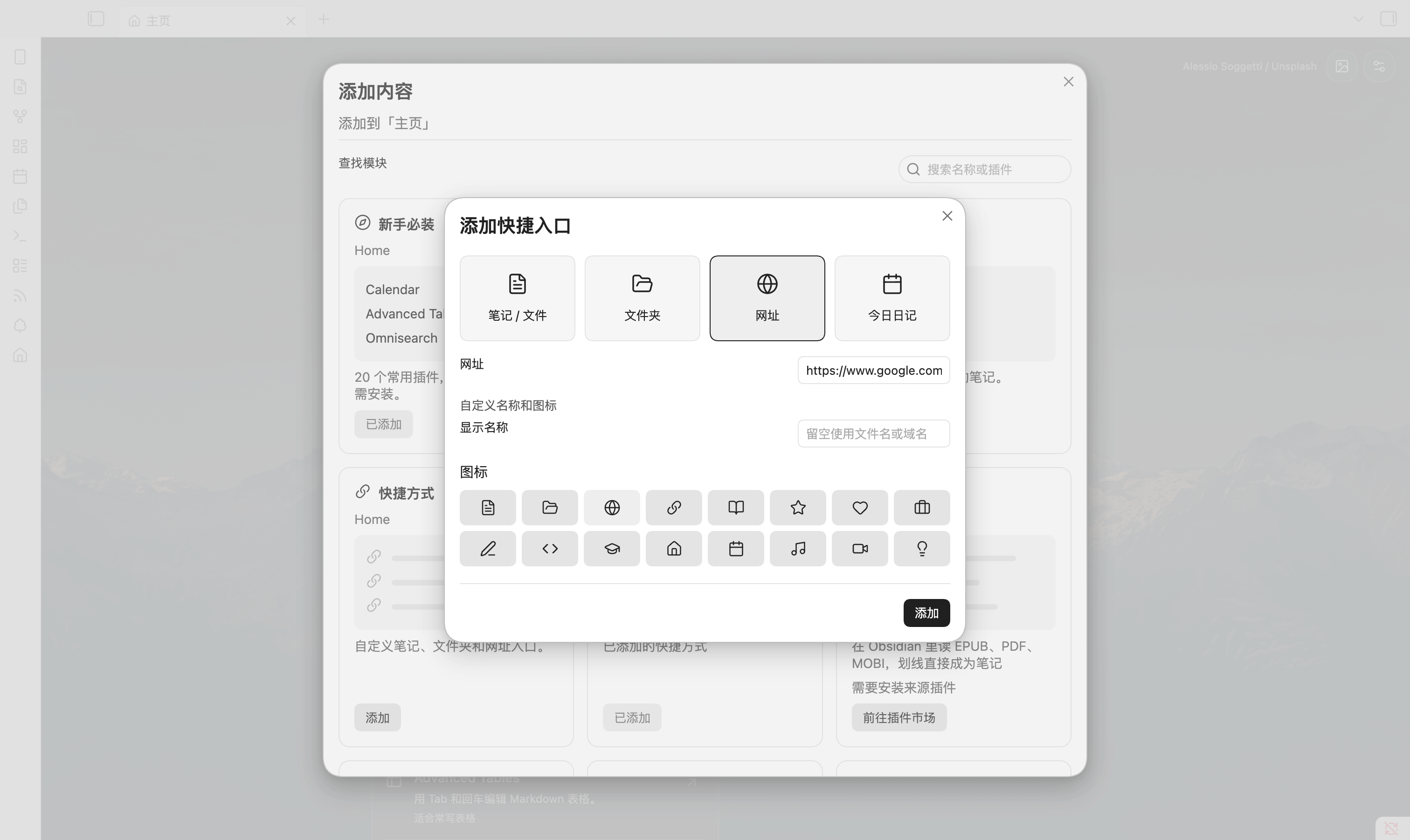
先选类型,再填写目标;名称和图标需要时再展开。库内文件改名会更新目标,日记入口始终指向当天。网址入口自动显示网站图标(取不到时退回地球图标);也可以改用内置图标,或填任意 Lucide 图标名。
一张壁纸,一句属于你的话
50 张 Unsplash 精选壁纸,也能使用库内图片,或配置自己的 Unsplash Key 按关键词找图。支持每天更换、每次打开更换或手动更换,当前壁纸会缓存在本地。
顶部可以显示 时间与问候,或换成 自定义文本。设置和弹窗采用克制的黑白灰控件,支持浅色与深色外观。
刚开始用 Obsidian?少走一点弯路
新手必装 模块精选 20 个常用社区插件,默认展示 3 个,可展开更多。每个都解释「能做什么、适合谁」,点击进入官方详情,再决定是否安装。
从 Calendar、Advanced Tables、Omnisearch 开始,按自己的需要选一两个即可。完整清单与选取依据 →
以上为桌面端真实界面截图,使用示例任务和笔记;壁纸、自定义文字和布局均可调整。
一个搜索框,把动作变短
| 想做的事 | 怎么做 |
|---|---|
| 找一篇笔记 | 输入名称、别名或路径,Enter 打开;可转到 Obsidian 全文搜索 |
| 先记下一点想法 | 输入后按 Shift + Enter,追加到今日日记(沿用日记目录、日期格式和模板) |
| 开始写一篇新笔记 | 点击「新笔记」,或在搜索无结果时新建同名笔记 |
| 创建白板、数据库或文件夹 | 打开「新笔记」旁的菜单 |
| 问 AI | 安装乔木 Agent 后,搜索框 ⌘ / Ctrl + Enter 提问 |
还可以把常用的 Obsidian 命令放进新建菜单,隐藏不用的动作。
阅读、收集、聆听,都能接着来
Home 独立可用。装上相应的乔木插件后,主页还能显示它们的内容和快捷动作。
| 配套插件 | 你在 Home 上得到什么 |
|---|---|
| 乔木 Reader | 书的封面与阅读进度,继续阅读、添加图书、搜索书名 |
| 乔木 RSS | 未读文章与数量,打开文章、添加订阅、搜索文章 |
| 乔木电台 | 最近电台、播放状态,直接播放或暂停 |
| 乔木 Agent | 最近对话、新对话,从搜索框直接提问 |
也欢迎其他插件接入:公开协议与示例。协议文件独立采用 MIT 许可。
你的内容,仍然属于你的库
- 无需账号,没有遥测。 设置保存在本库插件数据中,待办和快速记录写入 Markdown。
- 搜索在本地执行。 只有主动调用 Agent 时,问题才交给它按你的配置处理。
- 外部图片按需加载。 壁纸来自
images.unsplash.com;自选 Unsplash 搜索使用api.unsplash.com,密钥存在 Obsidian 密钥库。关于页二维码来自radio.qiaomu.ai。网址快捷入口的图标从icons.duckduckgo.com获取,只发送网站域名;改用内置图标后不再请求。 - 联网卡片需要你先设置。 天气卡片在你选择城市后才向 Open-Meteo 查询;日程卡片只有填写订阅地址时才请求该地址,本地 .ics 文件不联网。白噪音在本机生成。
- GitHub 与社区列表按需联网。 连接 GitHub 后,GitHub 待办卡片用你的令牌请求
api.github.com(每 5 分钟最多一次);「添加内容 → 社区」只在打开该分类时从raw.githubusercontent.com读取社区组件列表。 - 插件安装由你决定。 推荐模块只打开市场或设置入口,不会自动安装、启用其他插件。
使用说明与兼容性
桌面端已在真实 Obsidian 测试库验证;移动端尚未完成真机验收。核心日记未启用时,待办使用固定任务笔记。其他启动页插件可能接管同一入口,建议只让一个插件负责启动页。
遇到问题?请在 Issues 附上版本、系统、复现步骤和去除私人信息的截图。版本更新记录 可查看每次发布的变化。
社区组件
任何人都可以为乔木 Home 做组件:在「添加内容 → 社区」复制开发提示词交给你的 AI Agent,做好后提交到社区,审核通过后所有用户都能在「社区」分类里找到它。详见 用 AI 开发组件 和 社区组件目录。
开发与参与
npm ci
npm run check # lint、测试、类型检查和构建
将生成的 main.js、manifest.json 和 styles.css 复制到测试库的插件目录,即可加载。欢迎报告问题、提出使用场景或提交 PR;涉及交互的变更请附截图和验证步骤。
许可证: GPL-3.0-only,另见 商业授权说明。独立协议文件采用 MIT 许可;壁纸遵循 Unsplash License,在界面内标注摄影师。
找到乔木
乔木 · 博客 · 工具推荐 · X @vista8 · GitHub
微信公众号:向阳乔木推荐看。关注与支持二维码也可在插件「设置 → 关于」找到。
English
Make Obsidian a place you want to return to
Qiaomu Home turns startup and empty new tabs into a personal start page. Bring together daily tasks, favorite notes and websites, recent work, and optional reading or media cards. Choose a wallpaper and start with the next small thing.
Install from the Obsidian community directory · Latest release · Report an issue
Install in three steps
- In Obsidian, open Settings → Community plugins → Browse and search for Qiaomu Home, or use the directory link above.
- Install and enable the plugin, then open a new tab.
- Select the gear → Add content to arrange your page.
Requires Obsidian 1.11.4 or newer. For manual installation, download main.js, manifest.json, and styles.css from the same release into your vault's .obsidian/plugins/qiaomu-home/ directory. Preserve data.json and caches when upgrading.
Built around everyday use
| Feature | What it gives you |
|---|---|
| Independent pages | Home, Focus, Knowledge, Reading, Entertainment, and Explore presets on new installs; start new pages from a template or a blank page. Existing layouts survive upgrades. |
| Module library | Preview modules, add them to a page, and configure their visibility and item count. Cards default to three items. |
| Optional cards | 50+ opt-in cards in eight categories — today, tasks & focus, notes & review, vault upkeep, search & learning, utilities, shortcuts and integrations — including weekly review, flashcards, snippets, video notes, an .ics agenda, weather, world clock, time progress and ambient noise. Filter by category, show only cards not yet added, and add or remove in place. |
| Daily tasks | Add and complete plain Markdown tasks in today's daily note, or a fixed note. Move unfinished tasks forward manually; automatic carry-forward is optional and off by default. |
| Personal shortcuts | Open a note, folder, website, or today's daily note. Choose names and icons and reorder your entries. |
| Search and capture | Find local notes by name, alias, or path. Shift+Enter appends text to today’s daily note using your Daily notes folder, date format, and template. |
| Appearance | Choose from 50 credited Unsplash wallpapers, use a local image, or configure Unsplash search. Show a clock and greeting or your own text. |
| Starter plugins | Discover 20 useful community plugins through short explanations. Show three by default, expand for more, and open official details before installing. |
| Optional integrations | Continue books, RSS articles, radio, and conversations through Qiaomu Reader, RSS, Radio, and Agent. Home also works on its own. |
The screenshots above are actual desktop UI with sample content, a custom heading, and a configured layout. Website shortcuts use selectable icons rather than fetching favicons. The Todo module does not currently integrate with Tasks.
Privacy and compatibility
No account or telemetry. Settings stay in the vault's plugin data; tasks and captures remain editable Markdown. Search runs locally. Text is handed to Agent only when you explicitly invoke it, and Agent then follows its own configuration.
After you connect GitHub, the GitHub card calls api.github.com with your token (at most every five minutes); the Community category in Add cards fetches its list from raw.githubusercontent.com only when opened. The weather card queries Open-Meteo only after you choose a city; the agenda card fetches a subscription URL only if you enter one (local .ics files stay offline). Wallpaper images load from images.unsplash.com. Website shortcuts show the site's icon, fetched from icons.duckduckgo.com with only the host name; pick a built-in icon to avoid the request. Optional Unsplash search uses api.unsplash.com and a key stored in Obsidian SecretStorage. About-page QR images load from radio.qiaomu.ai when that page is opened. Recommended plugins are never installed or enabled automatically.
Desktop behavior has been checked in real Obsidian test vaults. Mobile has not been verified on a physical device. Daily tasks fall back to a fixed task note when the core Daily Notes plugin is disabled. If another plugin manages your startup page or new tabs, configure only one to own that entry point.
Build, extend, and get help
Run npm ci followed by npm run check for lint, tests, type checking, and a production build. Load the three generated plugin files into a test vault. For bugs, include your OS, Obsidian and plugin versions, reproduction steps, and a screenshot without private data.
Other plugins can integrate through the Qiaomu Home protocol. The plugin is GPL-3.0-only, with a separate commercial licensing option; standalone protocol files are MIT licensed. Photos follow the Unsplash License and retain photographer attribution.