Pulsewright
 yhjes201918 downloads
本地知识脉冲:贡献分、年度热力图、知识地层、月相日历、年度画像、知识复盘、笔记地图、笔记洞察、分享卡。全部本地计算,无授权校验.
- Overview
- Scorecard
- Updates4

Pulsewright · 知识脉冲
Obsidian 插件 · 全本地计算 · 没有授权校验 · 只读你的笔记
中文 | English
为什么会有这个东西
我自己的库写到第三年,开始有一些回答不了的问题:这个月到底写了多少东西?哪几周是完全空着的?那篇写了三千字的长文,是不是写完就再也没打开过?
Obsidian 自带的反向链接和图谱解决不了这些。市面上的同类面板我也试过,多数要么要注册账号,要么得联网校验一下,要么不开源——我不太想把整个笔记库的统计交给一个看不见内部的东西。
所以就有了这个。它的目标很窄:把库里的 Markdown 读一遍,算出一堆关于你的数字,画出来,然后闭嘴。
**1.0.3 换了首页的出发点。**前三版都在回答「我写了多少」,那是个看一眼就完的问题——数字好不好,第二天都一样。这一版改成回答另外三件事:今天怎么样、有没有哪条线是我说要在意却断了的、现在能动手做哪一件。分数从门面上撤下来,想看还在数据页。详细清单在 CHANGELOG.md。
它不发请求。不是「默认关闭」那种不发,是代码里压根没有发请求的那几行——main.js 全文只有一句 require('obsidian'),没有 fetch、没有 XMLHttpRequest、没有 requestUrl,也没有任何一个 http 地址。断网照常用。
它也不校验授权。装上就是全功能,没有试用期、没有设备指纹、没有激活码。
数据只落在你自己库里:data.json 加一个 Pulse/ 目录。不想要了,删掉就行。
有件事想先说清楚:这插件是写给我自己天天用的,所以很多决定是按「我会不会一直开着它」来做的。图表必须能悬停看数,改一个设置不该卡三秒,翻月份不该整页闪一下。这些不在功能列表上,是我自己烦过的地方。

里面有什么
打开就是一个页面,不是一个菜单。
左上角那个 今天 ▾ 点开是四栏:现在 / 时间 / 内容 / 做事。常用的两页在第一栏,其余收在下面,不占视线;不点它的时候,你看不到任何页签。
一共十一个页面。
今天 —— 默认页,也是我每天唯一会看的一页。三个数字:今天写了多少字、动过哪几篇、连着写了几天。每个数字底下跟一行参照(比昨天多/少多少、近七天日均、最长连了几天),不让你对着一串数字猜好坏。
再往下是两条带子:一条 12 周的时间带(哪天写过就亮一格,带月份刻度),一条最近七天的柱子,右边写着上周总共多少字、比前一周涨了还是跌了百分之几。
最下面一张卡只做一件事:给你一篇现在就能动手的笔记。优先挑「写过 50 词以上、超过 30 天没动」的旧账;库里没有旧账,就推最近在写的那篇。两个按钮:「接着写」直接打开,「先放着」换下一篇并记住。放下的都算今天放下过——按钮底下会出现一行「今天放下了 N 篇 · 恢复」,点一下全放回来;全放下之后它会说「今天挑完了」,明天再给你看。
卡片再往下是回声:一年前、一个月前、三年前的同一天附近各挑一篇,摘第一句话放在这里,点标题跳回原文。库里还没有够老的笔记时,这一块会自己说「等它长大一点」,不会硬凑。
惦记 —— 你自己说要在意的几件事。一行一条 名称 | 匹配 | 每周几次,它画成一条 12 周的时间带:哪天动过就亮一格,缺一块就是那几天没碰。某条线超过自己节奏的两倍时间没动,底下会出一张小卡片,除了告诉你安静了几天,还给你两个出口——「打开那篇」,或者「记一笔推迟」(直接写进速记)。被催着和被提醒着,是两种感觉。
第一次打开这一页是一块预填好的文本框,里面是它从你库里扫出来的、最常见的几个目录。改成你真在意的事,点「开始」就行。不想配也可以,其余页面照常能用。
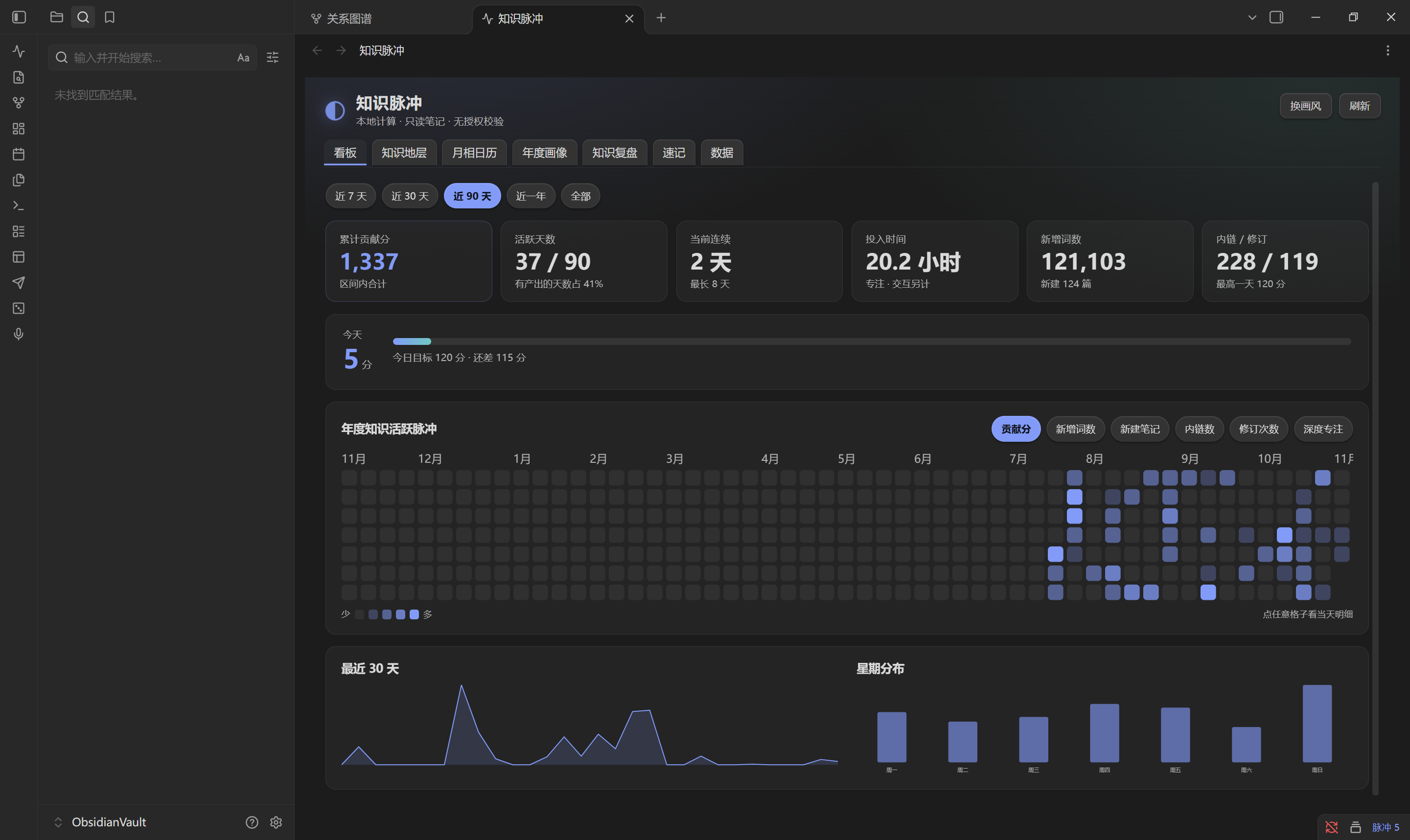
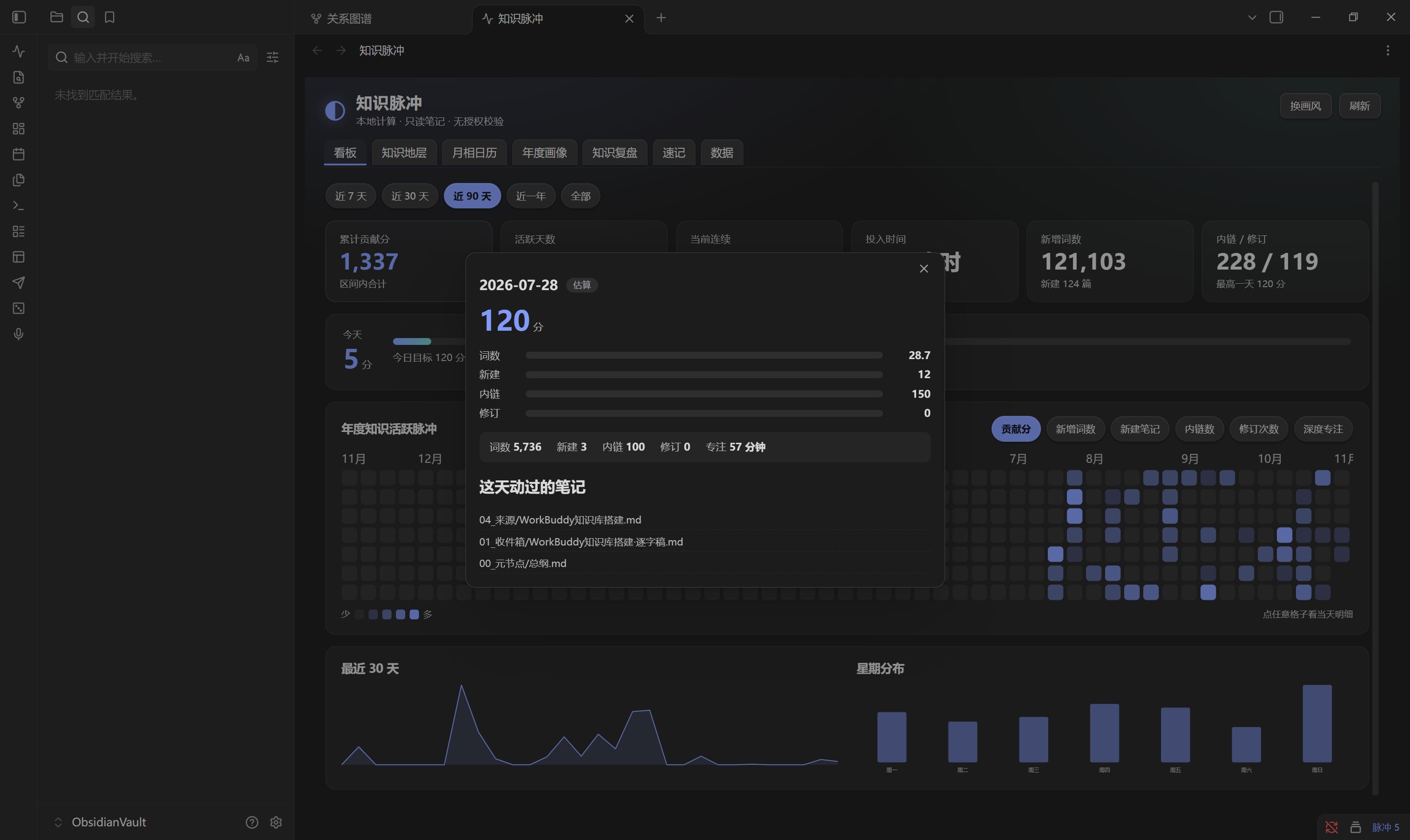
概览 —— 全量数字。五档时间范围(近 7 天 / 30 天 / 90 天 / 一年 / 全部),五张指标卡(活跃天数、当前连续、投入时间、新增词数、内链与修订),一张年度热力图(六种指标可切:新增词数、新建笔记、内链数、修订次数、深度专注、贡献分——贡献分排在最后),近 30 天曲线和星期分布。
首页不再用分数当门面。原来那张「累计贡献分」的大卡挪到了数据页。
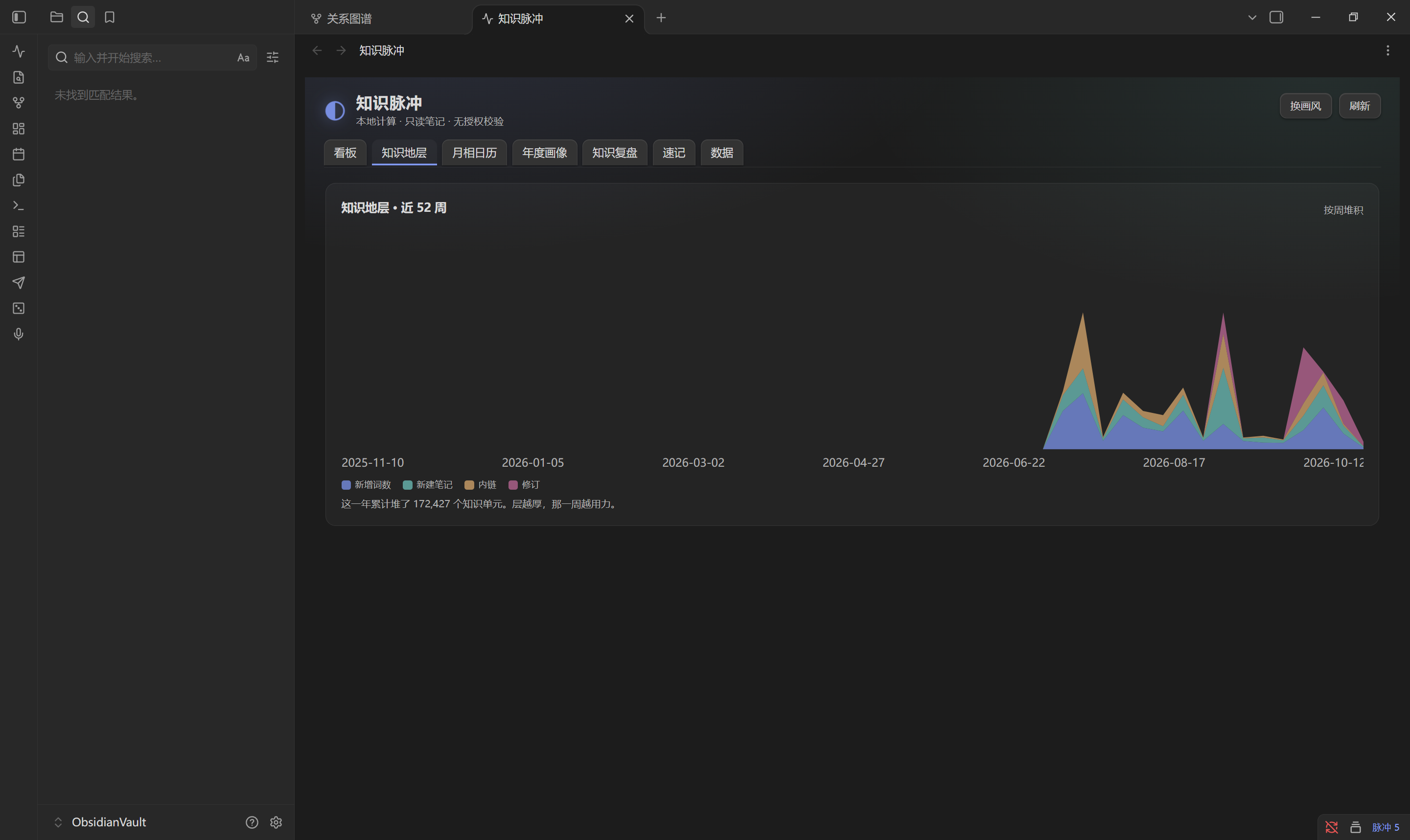
知识地层 —— 按周堆起来的四层面积图(词数、新建、内链、修订)。我想看的是形状:哪几周塌下去了,塌的时候是只停了写,还是连链接都不加了。四层各自归一化再叠,不然词数会把另外三层压成一条线。库里数据不够一年时,图会自动从第一周有数据的地方开始画,标题里的周数跟着变。
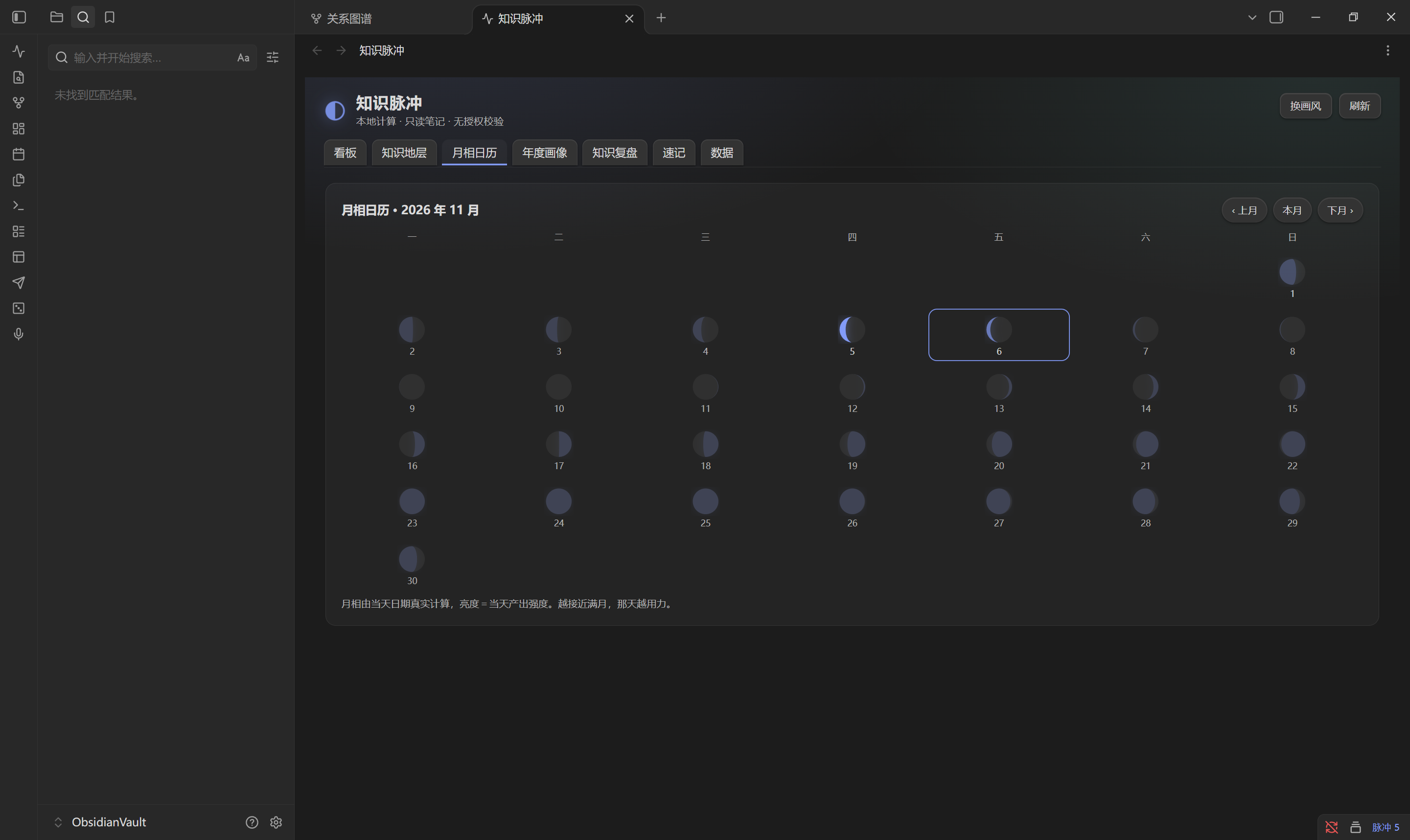
月相日历 —— 每天一个月亮,亮的部分就是当天的产出强度。接近满月就是高产日。可以翻上月、本月、下月。
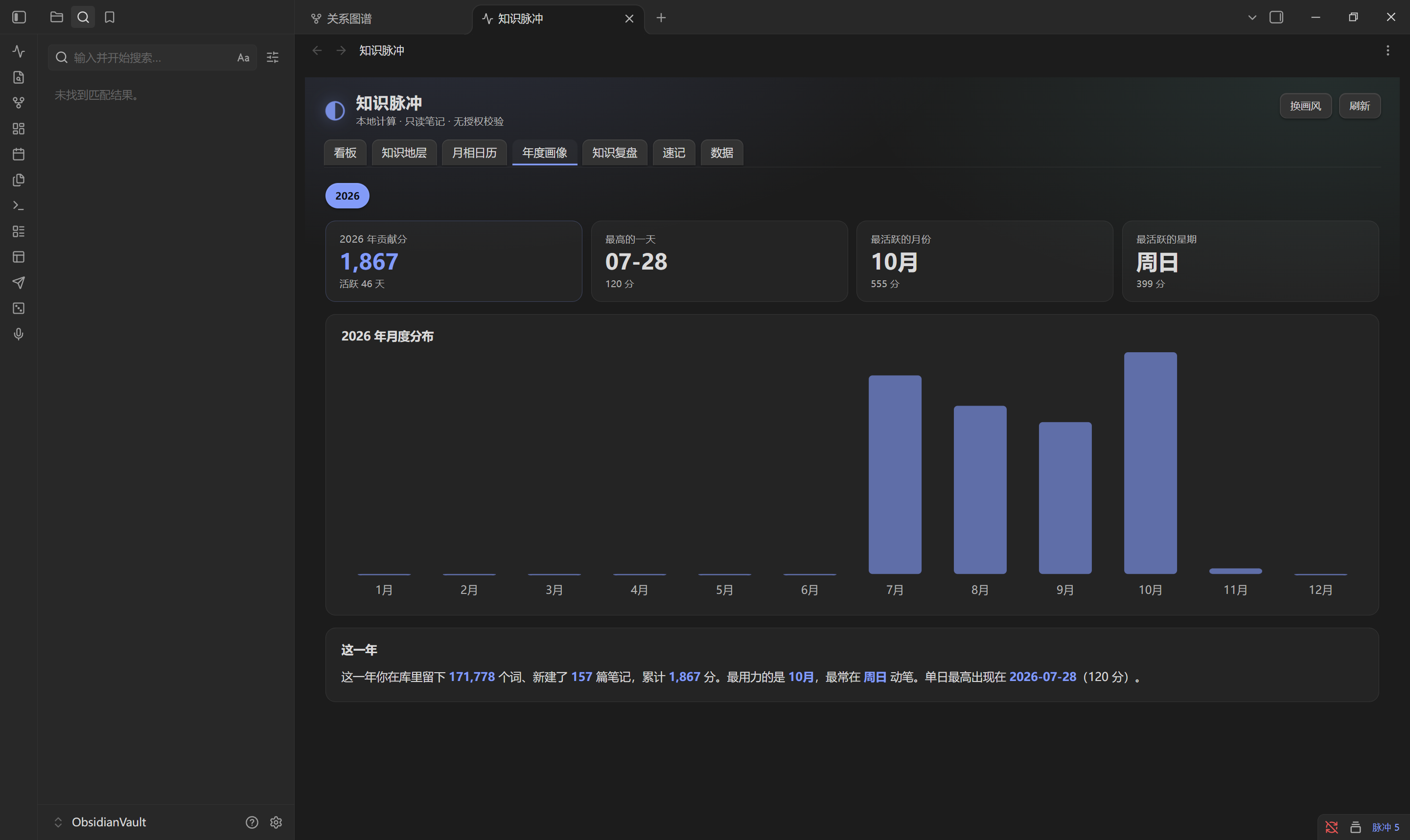
年度画像 —— 年度总分、最高的一天、最活跃的月份和星期,加一张月度柱状图,再下面一句「这一年」的总结。最底下的库档案记四件事:第一次动笔是哪天、平均每天多少字、一共多少篇、最长的一篇是哪篇。旁边一个「导出年报」按钮,生成一份只含数字、不含任何笔记正文的 Markdown。
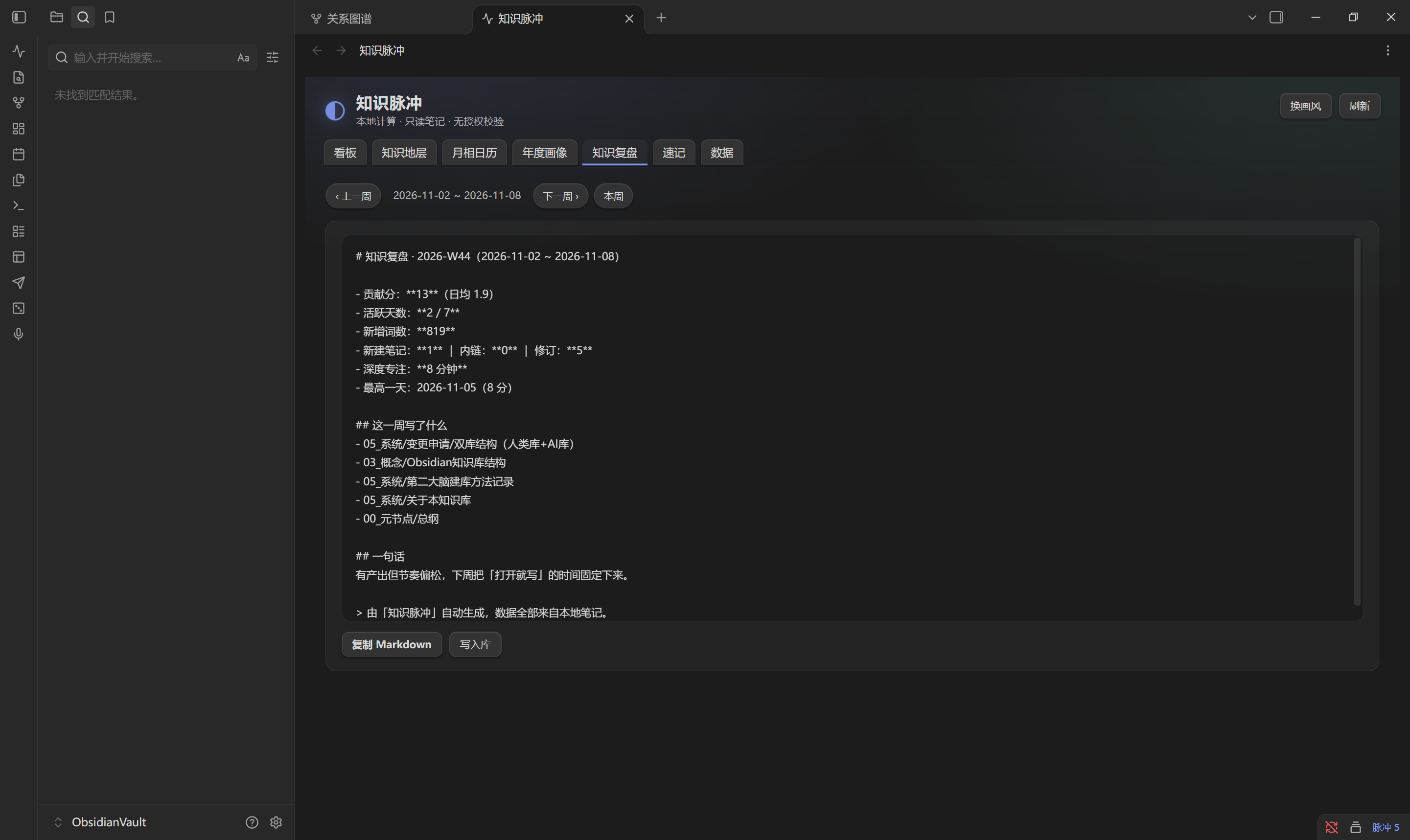
知识复盘 —— 本周和上周并排,四项指标各自涨跌。可以一键生成周报 Markdown,复制走或者直接写进库里。
笔记地图 —— 标签云、目录分布、孤儿笔记(没有任何笔记链进来)、断链(链到不存在的标题)、久未更新(阈值可设),加上按标题或路径搜笔记。整张地图可以导出成 Markdown 存回库里。
洞察 —— 这块回答的是「我怎么写的」而不是「我写了多少」。写作时段是个 7×24 的网格,能看出你是夜猫子还是早起型;笔记健康度分 A/B/C/D 四档;还有近似重复的标题、标签共现。这一页原来算得慢(两百篇要 150 毫秒),现在相似标题的比较算法重写过,快了 3.5 倍,结果也会缓存。
速记 —— 随手记一行,回车追加到 Pulse/速记.md。能搜、能逐条改、能删、能一次导出。
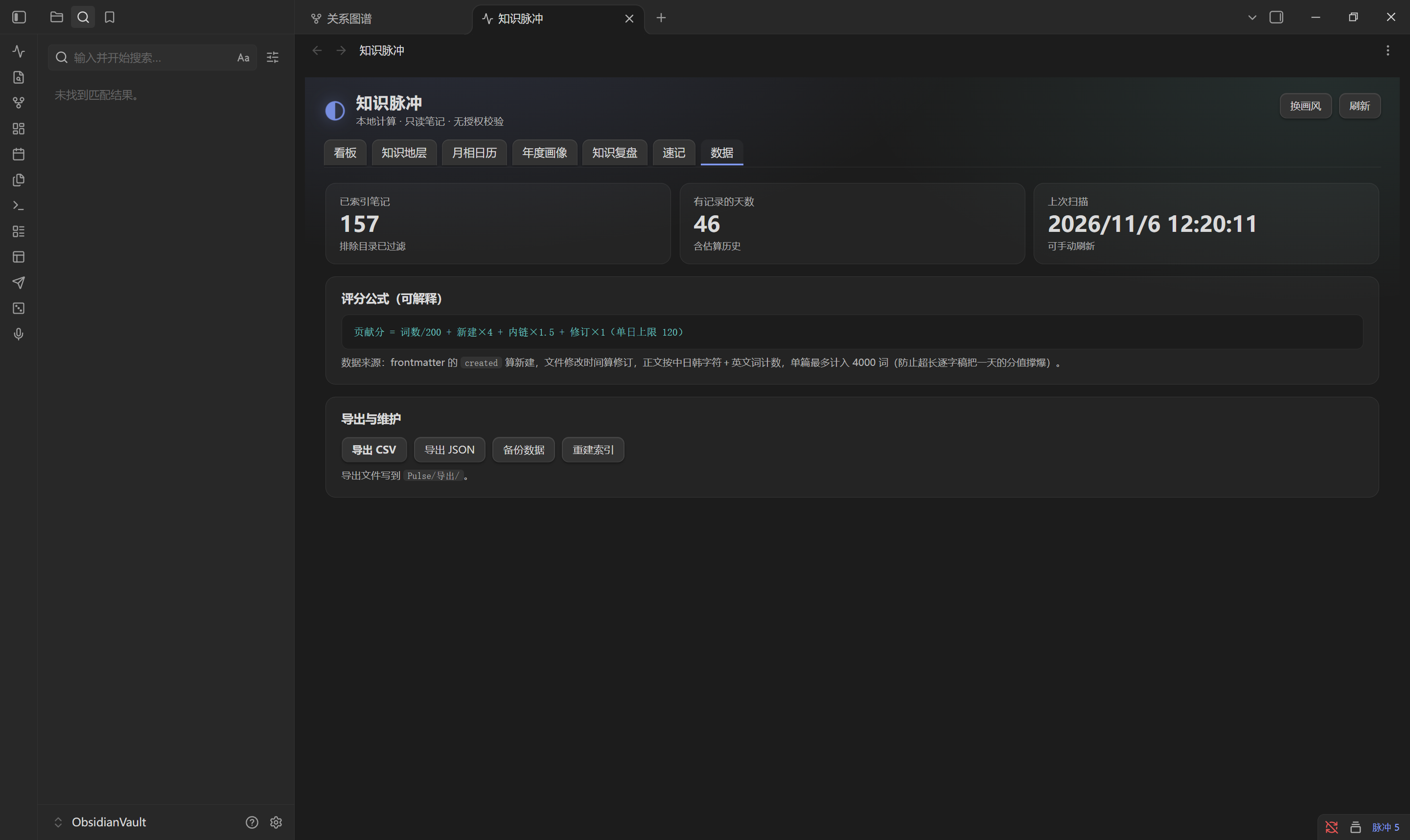
数据 —— 已索引多少篇、多少天有记录、上次扫描花了多久、累计贡献分(只有这一页看得到)、评分公式、导出 CSV / JSON / 完整备份、重建索引,以及分享卡。
外观上有三样可以调:画风(像素 / 水墨 / 极简 / 星图)、面板材质(实心 / 毛玻璃 / 亚克力)、每一页有自己的主色(今天用青、惦记和时间类用蓝、复盘地图洞察用紫、速记和数据用琥珀)。主色是贯穿的,页签、标题前的小点、柱子、当天那格、主按钮都跟着走,翻页时整块的调子会变。
更多截图
知识地层
月相日历
年度画像
知识复盘
数据页
每日明细(点热力图任意一格)
分享卡
数据页最底下那张卡可以导出:一张 1080×1440 的 PNG,加一份同版 SVG,落在 <数据目录>/导出/。也可以只复制文案,粘到哪儿都行(剪贴板拿不到的时候会退化成写一个 .txt)。
卡片上只有八个数字:区间名和截止日、累计贡献分、活跃天数、新增词数、新建笔记、当前连续、每日节奏柱状图、最好的一天。
没有一条笔记的标题,也没有一句正文。分享出去的是你的节奏,不是你的内容——这点我特意这么设计的,否则这功能我不敢做。
PNG 是拿 canvas 现转的,不用装任何东西。万一某个环境里拿不到 canvas,SVG 会留下来并提示你一句。
装
已经上架 Obsidian 社区市场,直接在「设置 → 第三方插件 → 浏览」里搜 Pulsewright 就能装。想手动装也行,两种包都在 Releases 里。
Windows 最省事:跑安装程序。 下载 Pulsewright-Setup-1.0.3.exe 双击。它会读出你机器上所有登记过的库列出来,选一个点「安装到这个库」就完事。列表里没有你的库,就点「浏览其他库…」自己选文件夹。
装完打开 Obsidian → 设置 → 第三方插件 → 关掉「安全模式 / 受限模式」→ 启用 Pulsewright。如果 Obsidian 本来就开着,Ctrl + R 重新加载一下。
安装器没有数字签名,Windows 的 SmartScreen 大概率会拦一下,点「更多信息」→「仍要运行」就行。它只做一件事:把三个文件复制进你选的库的 .obsidian/plugins/pulsewright/。不写注册表,不装服务,不改系统设置。
其他系统:解压压缩包。 下载 pulsewright-1.0.3.zip,解压出一个 pulsewright 文件夹,里面是插件本体和一份《安装说明.txt》。然后:
- 找到你的库目录,就是放
.md文件的那个文件夹 - 进
.obsidian/plugins/(没有plugins就自己建一个) - 把整个
pulsewright文件夹拖进去,最后应该是<你的库>/.obsidian/plugins/pulsewright/manifest.json这个路径 - 回 Obsidian 里启用
.obsidian 是隐藏文件夹,Windows 要在资源管理器里勾「显示隐藏的项目」,macOS 在 Finder 里按 Cmd + Shift + .。如果整个库连 .obsidian 都没有,先在 Obsidian 里点开一次「设置 → 第三方插件」,它会自己建出来。
想自己拉源码也行:
git clone https://github.com/yhjes2019/pulsewright.git
cp -r pulsewright <你的库>/.obsidian/plugins/pulsewright
目录名必须是 pulsewright,跟 manifest.json 里的 id 对上,不然 Obsidian 不认。PowerShell 里就是:
Copy-Item -Recurse .\pulsewright "$env:USERPROFILE\Documents\你的库\.obsidian\plugins\pulsewright"
不需要 npm install,也没有任何第三方运行时依赖——main.js 就是能直接跑的源码。仓库里有个 npm run build,只是把三个文件拷进 dist/ 并核对版本号,不做打包。
装了 BRAT 的话,添加 yhjes2019/pulsewright 就行,以后更新走 BRAT 的检查更新。
卸载:设置里禁用插件,然后把 .obsidian/plugins/pulsewright/ 整个删掉。笔记一篇都不会少——插件对 .md 只有读操作,写出去的只有 data.json 和 Pulse/ 目录,这两处你想手动删也可以。
怎么打开
左侧 ribbon 上有个图标,点它。或者命令面板里执行 Pulsewright: 打开 Pulsewright 面板。状态栏上会常驻一个「脉冲 N」,N 是今天的分数,扫一眼就知道今天动没动手。
插件加载后每 15 分钟自动重扫一次;库内文件有变动时(trackLive 开着)会即时更新当天记录。
第一次打开会全库扫一遍。几百篇的库一两秒,一千篇以上大概几秒到十几秒,扫的时候面板上写着「扫描中…」。
分数是怎么算的
贡献分 = 词数 / 200 + 新建 × 4 + 内链 × 1.5 + 修订 × 1 (单日上限 120)
四个部分:
词数 —— 中日韩字符一个算一个,英文和数字按词算。单篇最多计 4000 词,所以「词数」是「计入字数」而不是真实字数,一篇三万字的逐字稿在这里只值 4000。
新建 —— 当天新建了几篇。日期优先取 frontmatter 的 created,没有就退回 date,再没有就用文件创建时间。这样从别处导入的笔记也能落到对的那天,不然你迁移一次库,全天的分就爆了。
内链 —— 正文里 [[wikilink]] 的数量,单条最长匹配 200 个字符。
修订 —— 当天修改过几篇,按文件的修改时间算。
单日封顶 120 分,防止某天批量导入把曲线拉成一根针。四个权重都能在设置里改,改完立即全库重算,数据页上显示的公式串会同步跟着变——公式是可核对的,不会哪天悄悄漂了。
专注时长有两个来源,每日明细弹窗里会标出来是哪个:
- 实测:插件运行的时候监听库里的编辑事件,把间隔小于「编辑会话间隔」(默认 5 分钟)的连续编辑并成一段,算出真实跨度。这是你真正坐在那写的时间。
- 估算:没有会话数据的日期,按
词数 × 0.6 秒反推,上限 6 小时;交互时间按新建×180 + 修订×90 + 内链×60秒算。插件没运行时产生的编辑没法补记,只能估。
导出的 quality 列会写 measured 或 estimated,跟弹窗里的徽标是一回事。
能调的东西
设置 → Pulsewright 里,这些都能改:
- 惦记的几条线 —— 一行一条,
名称 | 匹配 | 每周几次。匹配写tag:练琴、folder:项目或path:巴赫;每周几次写 0 表示不设节奏,只看上次动是几天前 - 单日贡献分上限 —— 默认 120
- 单篇计入词数上限 —— 默认 4000
- 排除目录 —— 默认
.obsidian, .trash, templates,逗号分隔,按路径前缀匹配 - 排除 frontmatter 字段 —— 默认空。带上这些字段的笔记不计入统计,键名大小写不敏感,值是
false/0/no/ 空就算没设 - 历史保留天数 —— 默认 0 表示永久。填正整数就只留最近 N 天,扫描结束时把更早的日条目和会话段裁掉
- 久未更新阈值 —— 默认 90 天。笔记地图里「久未更新」按这个数划线,改完下次扫描生效
- 编辑会话间隔 —— 默认 5 分钟,用来切分实测会话
- 评分权重 —— 默认
200 / 4 / 1.5 / 1,就是上面公式里那四个数 - 数据目录 —— 默认
Pulse,CSV、JSON、复盘、速记、导出都写在这 - 画风 —— 像素 / 水墨 / 极简 / 星图,面板头部的「换画风」按钮也能切
- 面板材质 —— 实心 / 毛玻璃 / 亚克力。实心最稳,毛玻璃透出一点背景,亚克力更厚也更亮;浏览器不支持
backdrop-filter时自动退回实心 - 导出 JSON 时包含设置项 —— 默认关
- 备份时包含速记正文 —— 默认关
后两个默认都是关的,导出默认脱敏。这个我改过一次才定下来——之前默认带上设置,结果一份导出文件里躺着我本机的目录路径。
旧版的 historyDays 会自动迁到 retentionDays(那个键以前只存不读,等于摆设),data.json 升到 schema 2,历史数据不丢。
命令
命令面板里一共七条:
| 命令 | 面板上显示 |
|---|---|
pulsewright:open |
Pulsewright: 打开 Pulsewright 面板 |
pulsewright:rescan |
Pulsewright: 重新扫描知识库 |
pulsewright:export-csv |
Pulsewright: 导出 Pulsewright CSV |
pulsewright:export-json |
Pulsewright: 导出 Pulsewright JSON |
pulsewright:memo |
Pulsewright: 速记一条 |
pulsewright:map |
Pulsewright: 打开笔记地图 |
pulsewright:insight |
Pulsewright: 打开洞察 |
前缀是 pulsewright:,因为 manifest.json 的 id 是这个。
文件都写到哪去了
| 路径 | 是什么 |
|---|---|
.obsidian/plugins/pulsewright/data.json |
每日记录、笔记缓存、速记、设置。已在 .gitignore 里排除,里面有你的本地路径,别提交 |
<数据目录>/复盘/复盘-<周标签>.md |
写进库的周报 |
<数据目录>/导出/Pulsewright-<YYYYMMDD>.csv |
日度明细,带 UTF-8 BOM,Excel 直接开不乱码 |
<数据目录>/导出/Pulsewright-<YYYYMMDD>.json |
完整数据导出 |
<数据目录>/导出/Pulsewright-备份-<stamp>.json |
手动备份 |
<数据目录>/导出/Pulsewright-分享-<YYYYMMDD>.png |
分享卡,1080×1440 |
<数据目录>/导出/Pulsewright-分享-<YYYYMMDD>.svg |
分享卡矢量版,PNG 转失败时留这个 |
<数据目录>/导出/Pulsewright-分享文案-<YYYYMMDD>.txt |
剪贴板不可用时的降级落盘 |
<数据目录>/速记.md |
速记追加文件,自动建,带 id/name/type/created frontmatter |
CSV 的列是 date,score,words,notes,links,revisions,focus_sec,interact_sec,quality。
数据目录整个默认从索引里排除。这条很关键——不排除的话,你导出的 CSV 和复盘 md 会被当成「今天新写的笔记」再算一遍,分越算越高,而且是滚雪球式的。
关于隐私,我能保证的
这几条是硬承诺,你对着代码就能核。
不联网。 main.js 里只有一行 require('obsidian'),没有 fetch、没有 XMLHttpRequest、没有 requestUrl,全文也找不到一个 http(s):// 地址。断网照常用,功能一个不少。
不上传任何东西。 没有遥测,没有崩溃上报,没有匿名统计。
不写你的笔记正文。 对 .md 只有 cachedRead 一种操作。写的地方只有 data.json 和上面那张表里的路径。速记是追加到 Pulse/速记.md,不会碰你别的笔记。
不读非 Markdown 文件。 索引只走 vault.getMarkdownFiles()。
没有授权校验。 不存在设备指纹、license 验签、试用期,也没有任何「联网激活后才能用」的功能。装上就是全部十一个页面。
随时可以删。 禁用插件、删目录,库就回到干净状态。
我知道它有哪些毛病
老实列出来,省得你以为是 bug:
- 实测时长要求插件在线。 你关掉 Obsidian 之后写的字,那段时间只能估。弹窗里会标「时长估算」,不会假装是实测。
- 月相是天文近似。 用平均朔望月
29.53058853天和参考点2000-01-06 18:14 UTC推的,不是精确历表。看趋势够用,当农历看不行。 - 热力图依赖
data.json。 删了它历史日度统计就没了,得重新扫描。重建之后「新建 / 修订」会按 frontmatter 和 mtime 复算回来,但回不到删除前那一份快照。 - 安装包不会被自动下载。 社区目录只拉
main.js、manifest.json、styles.css三个文件,Release 里挂的.exe和.zip它不管。想要安装程序得自己去 Releases 页拿。 - 单篇 4000 词截断。 所以词数总量不是真实字数。
- 首次扫描会卡一下。 15 分钟那次自动重扫是全量的,库特别大(几千篇)的话建议关掉
trackLive,只用「刷新」按钮手动扫。 - 历史保留期裁剪不可逆。 填了正整数,超出天数的旧数据直接删,不弹确认。想留全量就保持
0。 - 「最厚重的笔记」是个启发式。 按词数加内链估的,不代表内容价值。想按别的口径排,改
topNotes里的weight就行。 - 分享卡 PNG 靠 canvas 现转。 桌面和移动端都有 canvas,正常情况下没问题;万一某个环境拿不到,会保留同版 SVG 并提示,不会静默失败。
常见问题
会不会把我的笔记改坏?
不会。对 .md 只有读操作,写只落在 data.json 和 Pulse/ 目录里。
我的分怎么这么低?
先看这四条:笔记是不是在排除目录里(templates、.trash、.obsidian 默认排除);frontmatter 的 created 是不是写成了别的日期;是不是单篇超了 4000 词被截断;是不是撞了单日 120 的上限。
热力图一片空白。
要么首次扫描还没跑完,要么 data.json 被删过。去设置里点「立即扫描」。
能多个库共用一份数据吗?
不能。每个库独立一份 data.json,互不相通。
手机能用吗?
能,isDesktopOnly 是 false。面板在手机上会折行,图表可读性一般,但功能都在。
装两个会怎样?
一个库装一个就够了。两份实例会互相覆盖同一份 data.json。
数据能导进 Excel 或 Notion 吗? CSV 带 BOM,Excel 双击就开。JSON 是完整结构,想转 Notion 自己写个脚本,不难。
想改代码的话
npm test      # 289 项单测,跑的是纯函数和生命周期,用 fake obsidian 模块
npm run check # node --check 语法检查
npm run build # 三个文件拷进 dist/,并校验 manifest 与 package 版本一致
改完把 main.js / manifest.json / styles.css 拷进 .obsidian/plugins/pulsewright/,Obsidian 里「设置 → 第三方插件 → 重载」就生效。
几个我踩过、你可能也会踩的坑:
- 纯函数统一挂在
PURE上,最后module.exports.PURE = PURE,测试全靠它 setInterval/setTimeout用裸的,别加window.前缀,否则 Node 测试里直接window is not defined.kp-shell必须box-sizing: border-box,不然面板右缘会被切掉一截- 知识地层每层要各自归一化再叠,用绝对值的话词数会把另外三层压平
- 月相
moonPath在 p = 0 / 0.25 / 0.5 / 0.75 / 1 这几个边界上不能出 NaN isExcluded()必须先把数据目录排除,否则Pulse/复盘/*.md会被自己索引
测试是怎么跑起来的:tests/kp_test.js 用 Module._load 劫持了 require('obsidian'),返回一套 FakeElement / FakePlugin / FakeItemView / FakeModal / FakeSetting / FakePluginSettingTab / FakeNotice / FakeTFile。所以不用真开 Obsidian 就能测生命周期。断言函数是 ok(name, cond, detail)。
CI 在 .github/workflows/test.yml,ubuntu-latest + Node 20,跑 node --check main.js 和 npm test,push 到 main 和开 PR 都触发。
贡献流程、代码风格、提交信息格式在 CONTRIBUTING.md;版本变更在 CHANGELOG.md;安全问题怎么报在 SECURITY.md。
版本与环境
当前 1.0.3。最低 Obsidian 1.6.0(manifest.json 的 minAppVersion)。桌面和移动端都能跑。运行时用的是 Electron 内置的 Node,你本机不需要装 Node——只有想跑测试的时候才需要,>=18。
零运行时依赖,package.json 里没有 dependencies 这一节。main.js 约 177 KB,styles.css 约 50 KB。
我在 Obsidian 1.15.0(Electron 43 / Chromium 150)上把十一个页面都过了一遍,截图是在 Windows、175% 缩放下拍的。
界面是简体中文,代码注释也是中文,没有 i18n 框架——没有语言切换,也不跟随 Obsidian 的语言设置。想要英文界面得改 main.js 里的字符串,欢迎提 PR 做正经的 i18n。
许可
MIT,全文见 LICENSE。
Copyright (c) 2026 Luo
大白话:商用、改、再发布、自己留着用,都行,只要保留版权声明和许可证文本。软件按现状提供,不担保。它不是 GPL 也不是「署名-非商业」,没有传播性,你改完可以不开源。
English
Pulsewright is a local-only analytics dashboard for your Obsidian vault. It reads your Markdown files, turns them into a set of numbers about how you have been writing, and draws them. That is the whole job.
There is no account, no licence key, no trial, no telemetry, and no network code at all. The plugin's only require is require('obsidian') — no fetch, no XMLHttpRequest, no requestUrl, no URL string anywhere in main.js. It works with the machine offline. Your .md files are read, never modified; the only writes go to data.json and a Pulse/ folder inside the vault.
I built it for my own vault after three years of notes, because I could not answer questions like "how much did I actually write this month", "which weeks were completely empty", or "that 3,000-word essay — did I ever open it again". Backlinks and the graph view do not answer those, and the dashboards I tried wanted a sign-up or a licence check first. This one computes locally and then gets out of the way.
What is in it
Eleven pages, but you only ever see one at a time. The Today ▾ control at the top left opens four columns — Now / Time / Content / Do — instead of a strip of tabs.
Today (the default) — three numbers, each with a reference line underneath (versus yesterday, seven-day average, longest streak); a 12-week band and a seven-day bar chart with a week-over-week delta; then one card that hands you a single note to act on — an old debt written 50+ words ago and untouched for 30+ days, or failing that the most recently edited one. Two buttons: open it, or set it aside. Set-aside is remembered and reversible ("set aside N today · restore"). Below that, echoes: one note from around a year ago, a month ago and three years ago, first sentence only, with a link back.
Lanes — the things you say you care about. One line each, name | match | times per week, drawn as a 12-week band. When a lane falls to twice its own rhythm it surfaces one card with two exits: open the note, or write a postponement into the memo file.
Overview — the old dashboard, no longer the landing page: five ranges, five KPIs, a year heatmap with six switchable metrics, a 30-day trend and a weekday distribution.
Strata — the last N weeks as a four-layer stacked area chart (words, new notes, wikilinks, revisions). Each layer is normalised before stacking, otherwise word count flattens the other three. The window shrinks automatically when the vault is younger than a year.
Moon — one moon per day, lit in proportion to that day's output.
Year — annual total, best day, most active month and weekday, monthly bars, a one-line summary, and a "library record" block: first day written, average words per active day, note count, longest note. One button exports a Markdown annual report containing numbers only.
Review — this week against last week, four metrics with deltas, plus a one-click Markdown weekly report.
Map — tag cloud, folder breakdown, orphan notes, broken links, stale notes, search by title or path, and a Markdown export of the whole map.
Insight — hour-of-week grid, A/B/C/D health grades, near-duplicate titles, tag co-occurrence. The near-duplicate pass was rebuilt in 1.0.3 (3.5× faster, 67 ms → 19 ms on 214 notes) and its result is cached until the vault changes.
Memo — a scratch pad appended to Pulse/速记.md, searchable and editable in place.
Data — indexed notes, days with records, last scan cost, the lifetime score (the only place it is shown now), the formula, CSV / JSON / backup export, index rebuild, and the share card.
Three appearance controls: scene (pixel / ink / minimal / star), material (solid / frosted / acrylic, falling back to solid where backdrop-filter is unavailable), and a per-page accent colour that carries through the nav, section dots, bars, today's cell and the primary button.
Share card
The bottom of the Data tab exports a 1080×1440 PNG plus a matching SVG into <data folder>/导出/, or copies the text to the clipboard (falling back to a .txt file when the clipboard is unavailable). The card carries eight numbers: range and end date, total score, active days, new words, new notes, current streak, a daily-rhythm bar chart, and the best day. Not one note title, not one line of body text — what you share is your rhythm, not your content.
Scoring
score = words / 200 + new_notes × 4 + wikilinks × 1.5 + revisions × 1 (daily cap 120)
Words count CJK characters individually and Latin tokens by word, capped at 4000 per note. New notes use the created frontmatter field, falling back to date and then to file ctime, so imported notes land on the right day. Weights are editable in settings (defaults live in WEIGHTS), and changing them recomputes the whole vault immediately, so the formula stays auditable.
Focus time comes from two sources, labelled in the day-detail modal: measured (edits merged into sessions by a configurable gap) and estimated (words × 0.6s, capped at 6 hours). The exported quality column carries measured / estimated.
Install
From the community plugin directory: open Settings → Community plugins → Browse, search for "Pulsewright", install and enable.
Manually: grab main.js, manifest.json and styles.css from Releases and drop them into <your-vault>/.obsidian/plugins/pulsewright/. A Windows installer and a zip are attached to the same release if you prefer those.
From source:
git clone https://github.com/yhjes2019/pulsewright.git
cp -r pulsewright <your-vault>/.obsidian/plugins/pulsewright
Then enable Pulsewright in Settings → Community plugins. Requires Obsidian 1.6.0+; works on desktop and mobile (isDesktopOnly: false). Also installable via BRAT using yhjes2019/pulsewright.
Settings
Fourteen options, all in the plugin's own settings tab: the lanes you care about, scene, material, data folder, live tracking, session gap, daily score cap, words per note cap, history retention, stale threshold, the four scoring weights, frontmatter fields to exclude, excluded folders, and whether exports include settings or memos.
Privacy
- No network: the only
requireinmain.jsisrequire('obsidian'); there is nofetch,XMLHttpRequest,requestUrl, or any URL. - No upload, no telemetry, no crash reporting.
- Your
.mdfiles are read-only to this plugin. Writes go only todata.jsonand thePulse/data folder. - No license verification, no device fingerprint, no trial period.
- Clipboard use is write-only, in two places: copying the share text and copying an exported report. Nothing is ever read from the clipboard.
- Vault enumeration is inherent to the feature set — computing per-folder and per-tag breakdowns requires listing the files. Paths never leave the machine.
Known limitations
Measured time needs the plugin running, so edits made while Obsidian is closed can only be estimated. Lunar phases use an average synodic month (29.53058853 days) rather than an ephemeris. History retention is destructive once you set a non-zero day count. The "heaviest notes" ranking is a heuristic on words and wikilinks. The moon calendar and the hour grid are both approximations of "effort" — they measure output, not thinking.
Development
npm test       # 289 unit tests against a fake obsidian module
npm run check  # node --check main.js
npm run build  # copy the three release files into dist/ and verify the version
The plugin is dependency-free: main.js is plain JavaScript with no bundler and no runtime packages. npm run build only copies main.js, manifest.json and styles.css into dist/ and checks that the version in manifest.json matches package.json; it does not transform the code. Tests run against a hand-written fake obsidian module injected through Module._load, so no Obsidian install is needed.
See CONTRIBUTING.md, CHANGELOG.md and SECURITY.md.
MIT — take it, change it, ship it. PRs welcome.