Gantt Calendar
 Sugar15k downloads
A powerful visual task management plugin. Visualize and manage tasks created by the Tasks plugin, supporting both emoji and Dataview task formats. Support Feishu Task syncing.
- Overview
- Scorecard
- Updates32
A powerful visual task management plugin for Obsidian.
Multi-View Calendar — Task / Year / Month / Week / Day / Gantt — six views with seamless switching
Festival Display — Solar festivals, lunar festivals, and 24 solar terms
Data Visualization — Task heatmap, daily task counts, 8 gradient palettes
Smart Task Management — Global filter, priority tags, 6 date fields, time precision (HH:mm), smart write-back with line drift protection
Timeline Canvas — Continuous minute-positioned timeline in Week/Day/Sidebar views: click-to-create, edge resize (15-min snap), WYSIWYG drag with landing preview
Mobile Ready — Long-press menus as bottom sheets, touch drag, swipe paging, responsive layouts
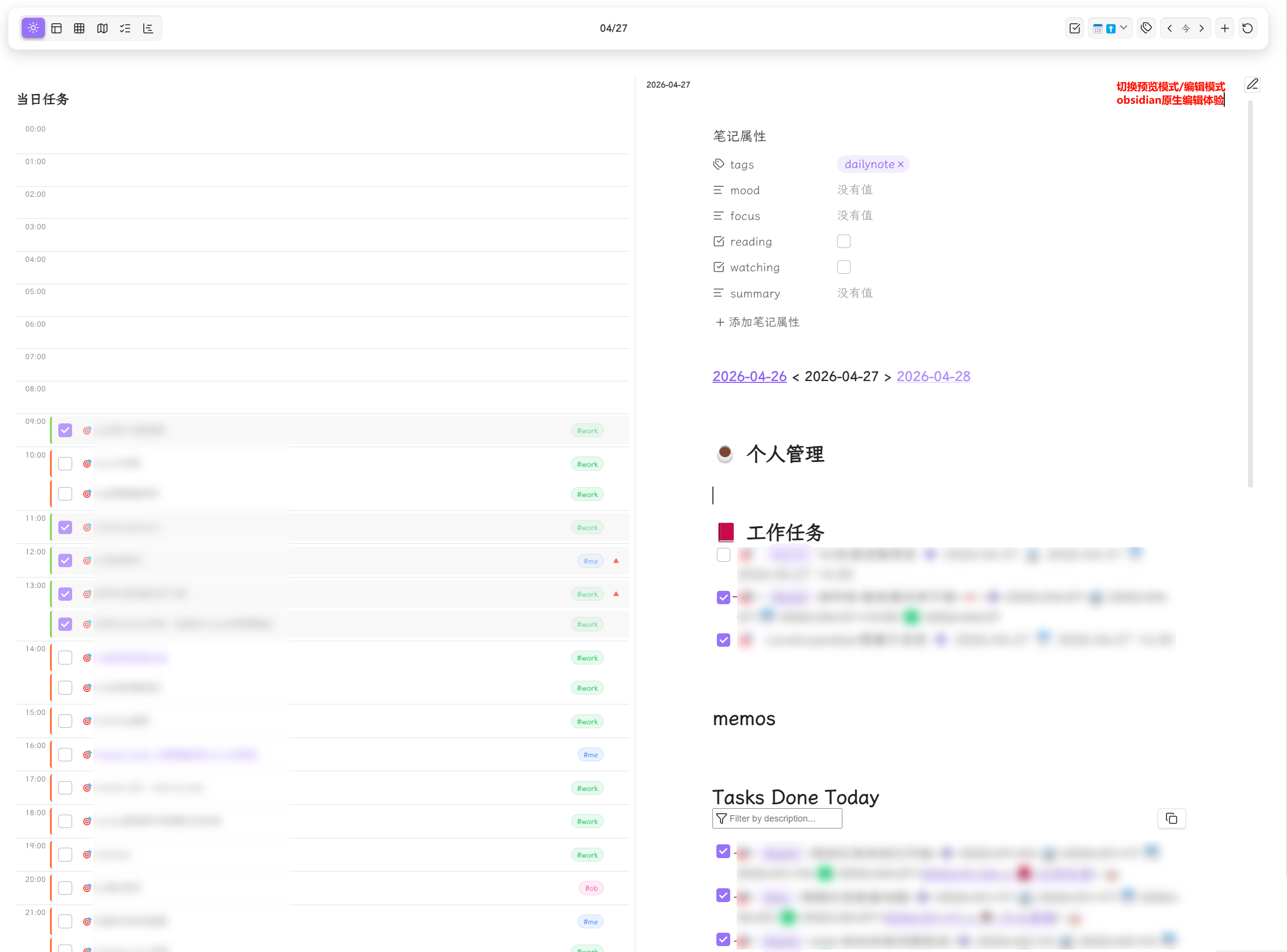
Daily Note Integration — Embedded editor with edit/preview mode toggle
Sidebar View — Task search, filter & sort + daily timeline
Highly Customizable — Festival colors, heatmap palettes, task display count, and more
Dual Format — Full support for Tasks plugin (emoji) and Dataview plugin (inline field) formats
Recurring Tasks — daily/weekly/monthly/yearly repeat with virtual instances shown across all views (Year/Month/Week/Day/Task/Gantt)
Feishu Sync — Bidirectional task sync with Feishu (Lark) via OAuth 2.0
Screenshots
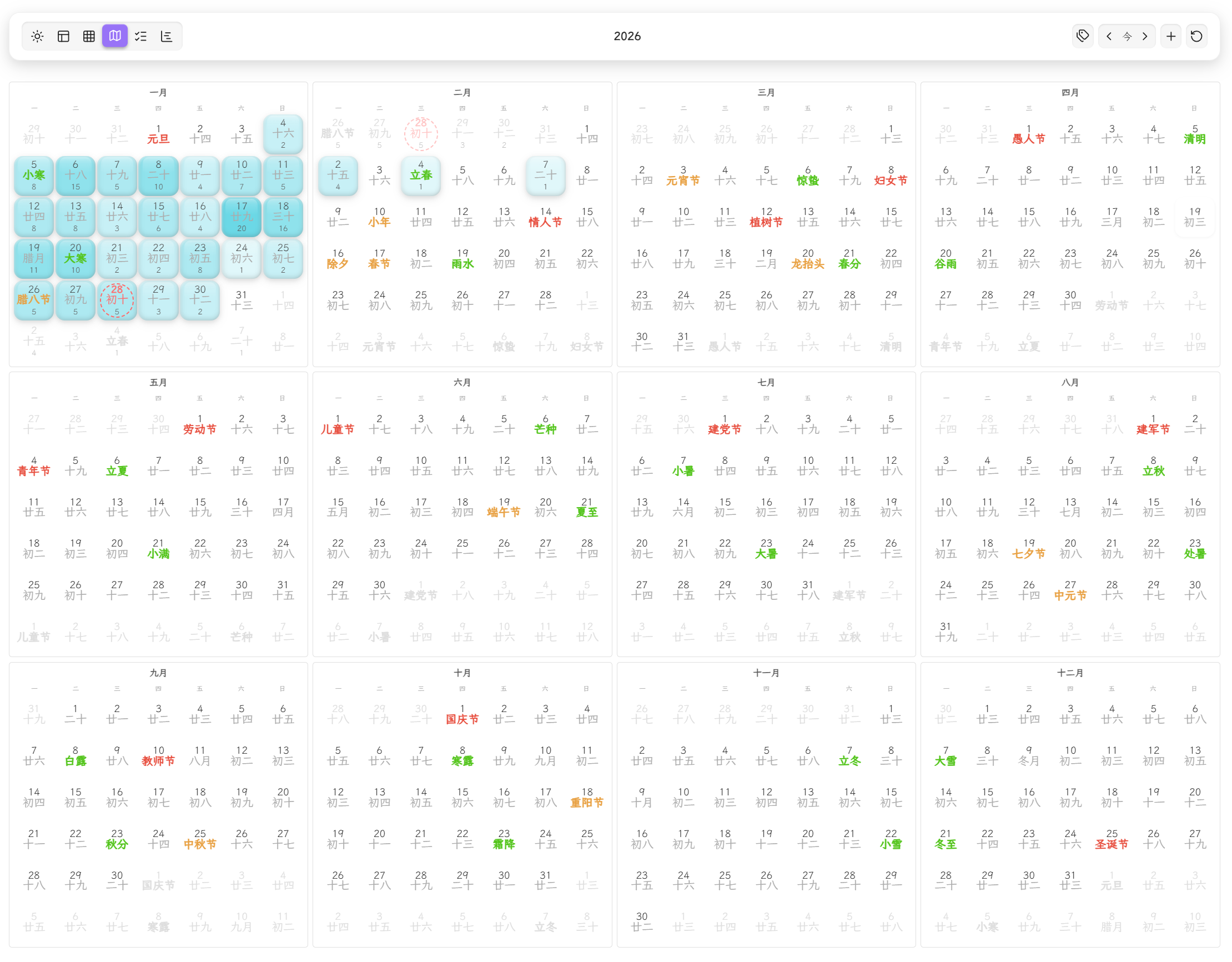
Year View
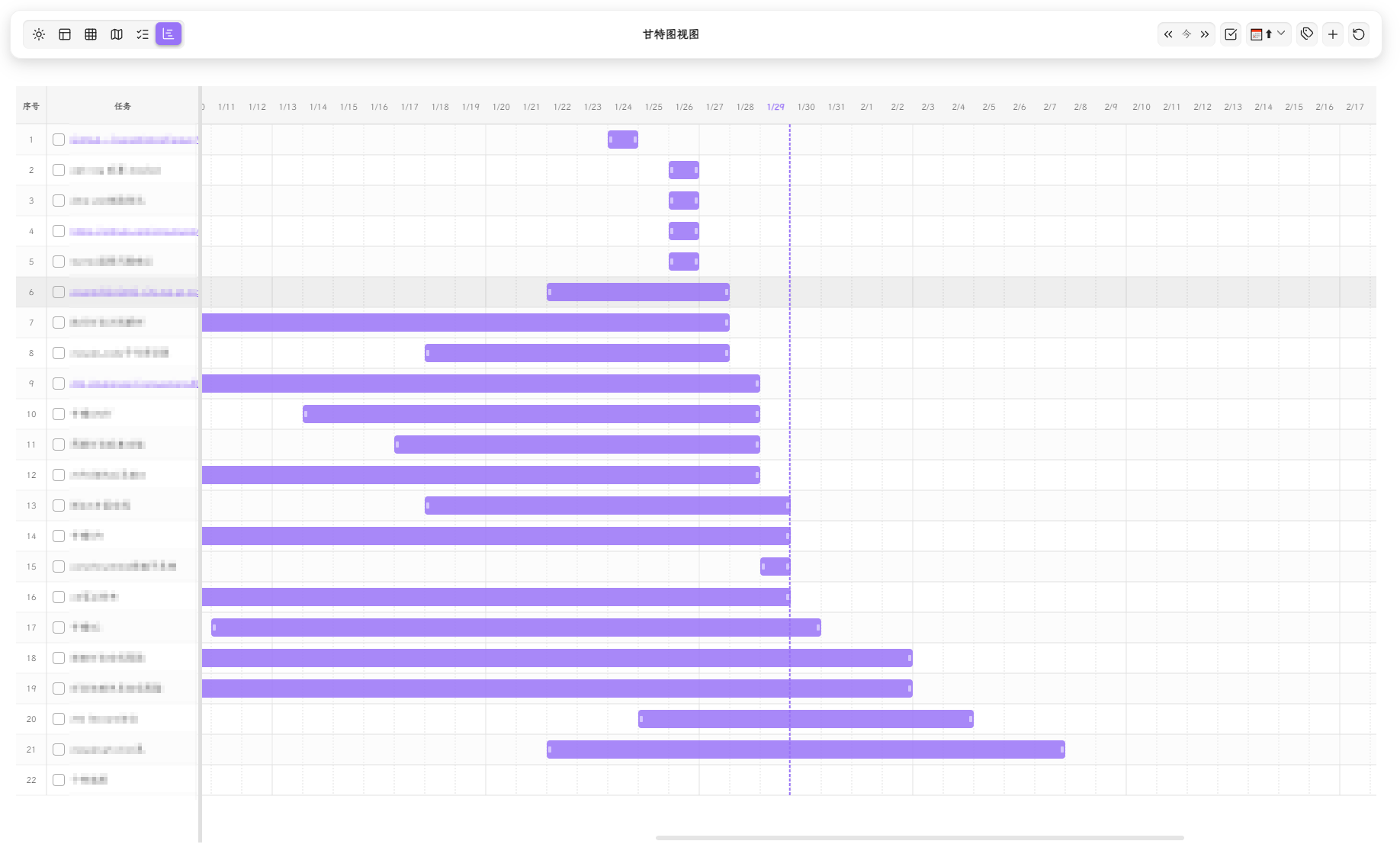
Gantt View
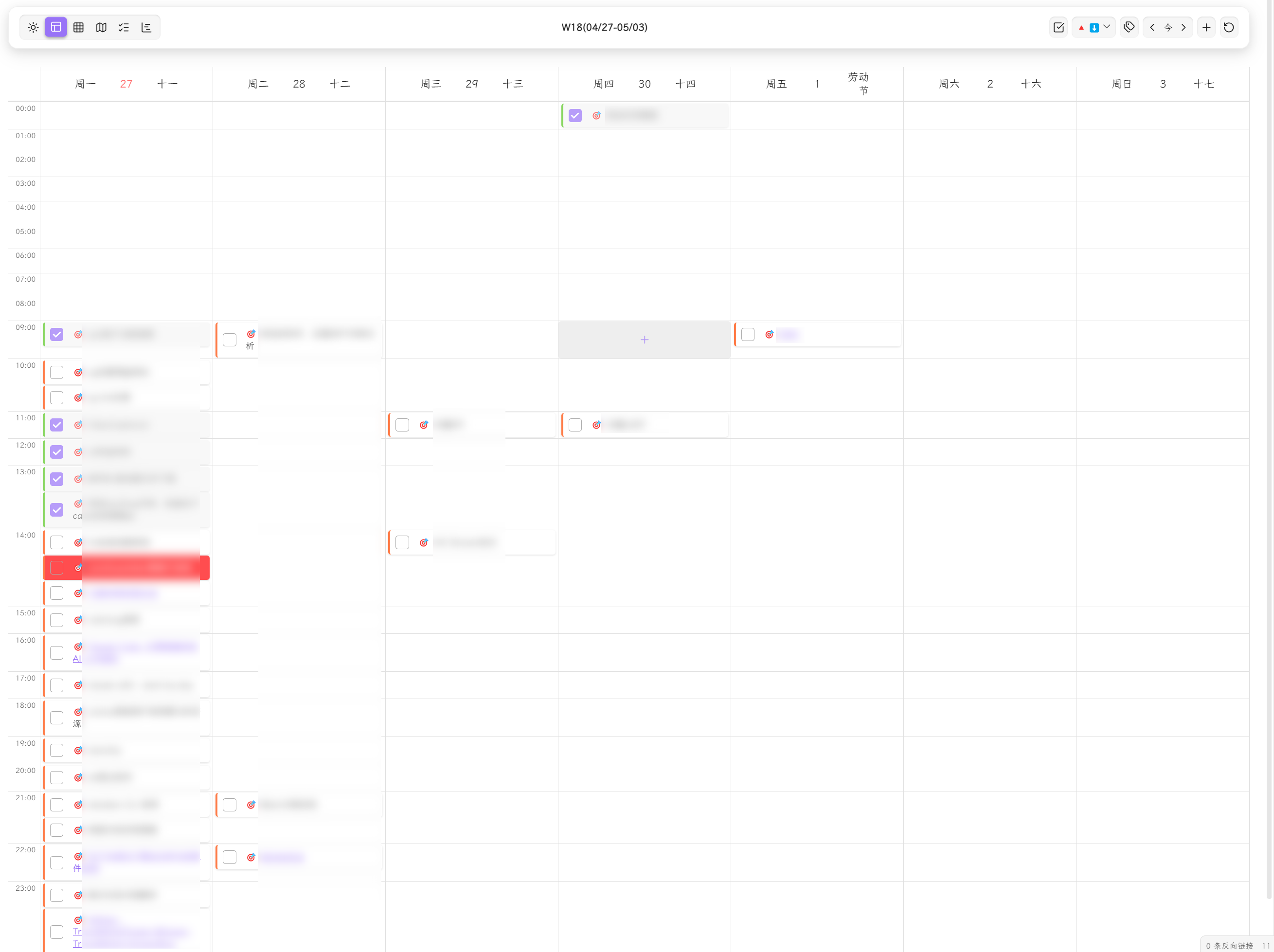
Week Timeline View
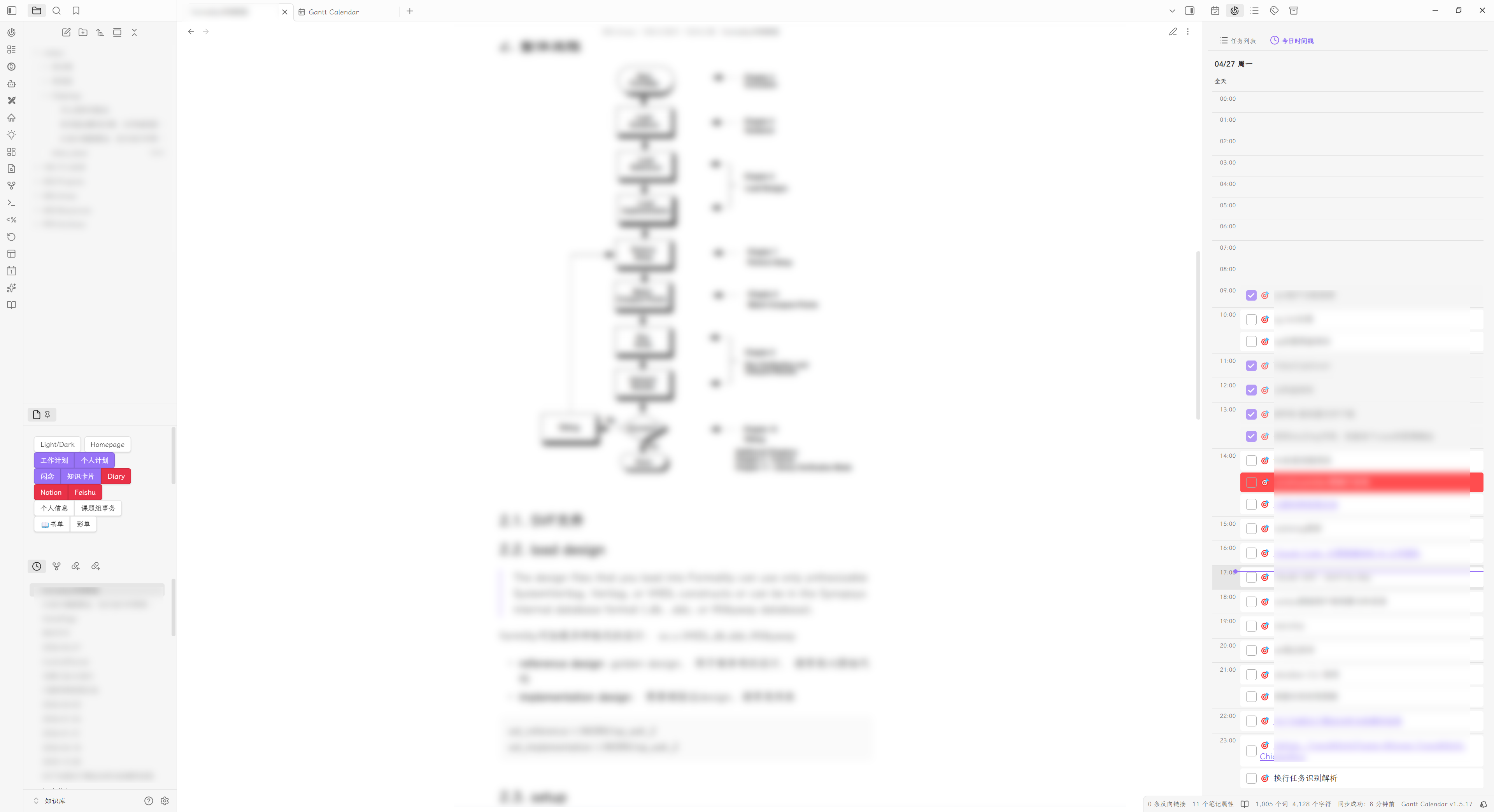
Sidebar View (Task List + Daily Timeline)
Day View with Embedded Editor
Installation
Via BRAT
- Install and enable the community plugin BRAT
- Run the command
BRAT: Add a beta plugin for testing - Enter the repository URL:
https://github.com/sustcsugar/obsidian-gantt-calendar
Manual
- Download the latest Release
- Extract and copy the folder to
<your-vault>/.obsidian/plugins/ - Restart Obsidian and enable the plugin in Settings
Quick Start
Open the View
- Click the sidebar icon to open the main calendar view
- Use the view switcher in the toolbar to switch between views
Create Tasks
Use the Add Task button in the toolbar, or manually write tasks in any Markdown file:
- [ ] 🎯 Complete project documentation 📅 2025-12-20
Refresh the plugin and the task will appear in the calendar and task list.
Features
Layout
The plugin uses a toolbar + content area layout:
- Toolbar Left — View switcher (6 views)
- Toolbar Center — Current date range / title
- Toolbar Right — Functional buttons (navigation, sort, filter, add task, etc.)
Task Formats
Tasks Plugin Format (Emoji)
- [ ] 🎯 Complete project documentation ⏫ ➕ 2025-01-10 📅 2025-01-15
| Emoji | Meaning | Emoji | Meaning |
|---|---|---|---|
🎯 |
Global filter marker | 🔺 |
Highest priority |
⏫ |
High priority | 🔼 |
Medium priority |
🔽 |
Low priority | ⏬ |
Lowest priority |
➕ |
Created date | 🛫 |
Start date |
⏳ |
Scheduled date | 📅 |
Due date |
✅ |
Completion date | ❌ |
Cancelled date |
🔁 |
Recurring task | - | - |
Dataview Plugin Format (Inline Fields)
- [ ] 🎯 Complete project documentation [priority:: high] [created:: 2025-01-10] [due:: 2025-01-15]
| Field | Meaning | Field | Meaning |
|---|---|---|---|
priority:: |
Priority | created:: |
Created date |
start:: |
Start date | scheduled:: |
Scheduled date |
due:: |
Due date | completion:: |
Completion date |
cancelled:: |
Cancelled date | repeat:: |
Recurrence rule |
Time Precision
- Date:
YYYY-MM-DD(e.g.,2026-04-27) - Time:
YYYY-MM-DD HH:mm(e.g.,2026-04-27 14:00) - Tasks with time automatically display in timeline layout
Recurring Task Syntax
🔁 every day              # Every day
🔁 every 3 days           # Every 3 days
🔁 every week on Monday   # Every Monday
🔁 every month on 15      # Every month on the 15th
🔁 every year on 01-01    # Every year on Jan 1
🔁 every weekday          # Every weekday
🔁 when done              # Restart after completion
Year View
- Year Overview — 12 month cards showing full-year task distribution
- Task Heatmap — 5-level color gradient for task density
- 8 palette options: blue / green / red / purple / orange / cyan / pink / yellow
- 3D heatmap effect (off / slight / prominent)
- Responsive Layout — Auto-switches between 4×3 / 3×4 / 2×6 / 1×12 grids
- Task Count — Optional per-day task total display
- Lunar Calendar — Chinese lunar dates in month cards
- Click Navigation — Click a date to switch to Day View
Month View
- Monthly Calendar — Standard month grid layout with daily tasks
- Week Numbers — ISO week numbers shown in the first column
- Task Display Limit — Configurable per-day task count (1–10) with "+N more" overflow
- Task Popup — Click a date to view all tasks for that day
- Festival Display — Solar/lunar/solar-term festivals with distinct colors
- Drag & Drop — Drag task cards between days to reschedule
- Recurring Tasks — Virtual instances for repeating tasks
- Week Start — Configurable Monday or Sunday start
Week View
- Continuous Time Canvas — Always-on 24-hour timeline (no more list/timeline mode switching); task blocks positioned by the minute (1h = 50px), hour + half-hour grid lines
- Smart Task Blocks — Blocks sized by actual duration:
- Single-time tasks render as 1-hour point blocks anchored by field role (start-field → forward
[t, t+60), due-field → backward[t-60, t)) - Same-day intervals render at true size; overnight intervals (<24h) span columns with continuation arrows
- Multi-day tasks (≥24h) move to the all-day row as spanning bars with time annotations (
"22:00 → 18:00") - Text wraps to multiple lines within block bounds (block is master, text is servant)
- Single-time tasks render as 1-hour point blocks anchored by field role (start-field → forward
- All-Day Row — Date-only tasks + ≥24h spanning bars, unlimited lane rows with
+Ncollapse beyond 3 - Click-to-Create — Click any empty canvas spot to create a task at that time (15-min snap); drag vertically to pre-select a range
- Edge Resize — Drag block top/bottom edges to adjust start/end (15-min snap, Alt = 5-min fine-tune); resizing a point task upgrades it to an interval
- WYSIWYG Drag & Drop — Landing anchored to block edges (not cursor) with drop preview; dropping a point task writes both start & end
- Overlap Lanes — Up to 3 side-by-side columns; 4th+ stacks with shadow
- Mobile — 3-day sliding window with horizontal swipe
- Today Highlight — Current day emphasized; current time indicator line
- Lunar Info — Lunar dates and festivals in day headers
Day View
- Continuous Time Canvas — Same timeline semantics as Week View (minute-positioned blocks, edge resize, click-to-create, drop preview, multi-line text)
- All-Day Section — Date-only tasks + ≥24h spanning bars with time annotations; drop here to convert to all-day
- Drag & Drop — Block-edge-anchored with landing preview; point tasks upgrade to intervals on drop
- Current Time Indicator — Red line at the current time
- Daily Note Integration
- Embedded full editor (WorkspaceSplit mode)
- Edit / Preview mode toggle
- Auto-loads daily note for the selected date
- Supports Obsidian core daily notes, Periodic Notes plugin, and custom paths
- Resizable Split — Draggable divider between task and note panes (horizontal or vertical layout)
- Lunar Info Bar — Lunar date, festivals, and solar terms
Task View
- Task List — Centralized display of all tasks
- Date Range Filter — All / Today / This Week / This Month / Custom range
- Time Field Selector — Filter by any of 6 date fields
- Multi-dimensional Filtering — Status, priority, and tags (AND/OR/NOT operators)
- Sorting — 7 sort fields with asc/desc toggle
- Persistent State — Filter and sort settings persist across refreshes
- Recurring Tasks — Virtual instances for repeating tasks are expanded and sorted by date
Gantt View
- Interactive Gantt Bars — Custom SVG rendering engine
- Drag entire bar to shift dates
- Drag endpoints to adjust start/end dates
- Drag to change progress percentage
- Click to open task edit modal
- Navigation — Jump to today / scroll left / scroll right
- Incremental Refresh — Fingerprint-based diff (O(1) events) + immediate drag-write-back (no delay)
- Tag & Status Filtering — Filter gantt bars by tags and status
- Configurable Fields — Choose which date fields map to gantt start/end
- Time-Aligned — Day-granularity grid aligned with calendar view semantics; touch-friendly handles (22px hit area); bar-end time annotations
Sidebar View
Two-tab sidebar for quick task access:
Task List Tab
- Keyword search (debounced)
- Multi-dimensional filters: status, priority, tags (OR/AND), date range
- Sort by: priority / due date / start date
- Click a task card to jump to the source file or open the edit panel (Settings → General → Task Card Click)
Daily Timeline Tab
- 24-hour timeline for timed tasks (defaults to today)
- Date navigation on the right of the title row (previous / today / next)
- All-day task section
- Current time indicator line
- Drag & drop to adjust time
- Quick create on empty slots
Context Menu
Right-click any task for:
- Edit Task — Full edit modal (description, priority, dates, repeat, tags)
- Create Note — Generate a wiki-linked note from the task (same name or alias)
- Set Priority — 6 levels: highest / high / medium / normal / low / lowest
- Set Status — Custom statuses (important, question)
- Postpone — Delay 1/3/7 days (from due date or from today)
- Cancel / Restore — Toggle cancelled state
- Delete — Remove task from markdown file
Feishu (Lark) Sync
- Bidirectional Sync — Push local tasks to Feishu and pull Feishu tasks to Obsidian
- OAuth 2.0 — Secure authentication with automatic token refresh
- Push Filters — Filter by file paths, completion status, and date
- Conflict Resolution — Multiple strategies: local-wins, remote-wins, newest-wins, manual
- Auto Sync — Configurable automatic sync interval
- Sync Result Modal — Detailed per-task sync results with statistics
Roadmap
Task Parsing
- Tasks and Dataview dual-format parsing
- Global filter markers
- Task tags
- Task description
- 6 priority levels
- 6 date fields with time precision (HH:mm)
- Recurring task recognition and display
- Recurring task virtual instances across all views (Year/Month/Week/Day/Task/Gantt)
- Smart write-back (line drift protection, file-level locking, mixed-format preservation)
- Nested tag recognition
- Multi-line task recognition
- Sub-task recognition
- Task dependency relationships
Views
- Day View with Daily Note integration (embedded editor)
- Day View timeline layout
- Week View dual mode (list + timeline)
- Week/Month View drag & drop
- Year View heatmap and task count
- Task View (multi-dimensional filter + date range + recurring task virtual instances)
- Gantt View (drag + incremental refresh + navigation + recurring task virtual instances)
- Sidebar View (task list + daily timeline)
Toolbar
- View switcher
- Tag / status / priority filtering
- Date navigation buttons
- Time field selector
- Add task button
Interactions
- Task cards (description, tags, priority)
- Context menu (edit, create note, priority, status, postpone, cancel, delete)
- Hover tooltips
- Quick create on empty time slots
Future Plans (v2.0.0)
- Third-party calendar subscription (Feishu Calendar, Outlook Calendar)
- Microsoft To Do sync
- Google / Apple Calendar via CalDAV
Contributing
Issues and Pull Requests are welcome!
License
Found a bug or have a suggestion? Open an Issue
Enjoying the plugin? Give it a ⭐!