Promptuary
 MeganZhang325 downloads
Quickly leave revision comments and click one button to export multiple revision comments for external AI or Agent to perform the revisions.
- Overview
- Scorecard
- Updates5

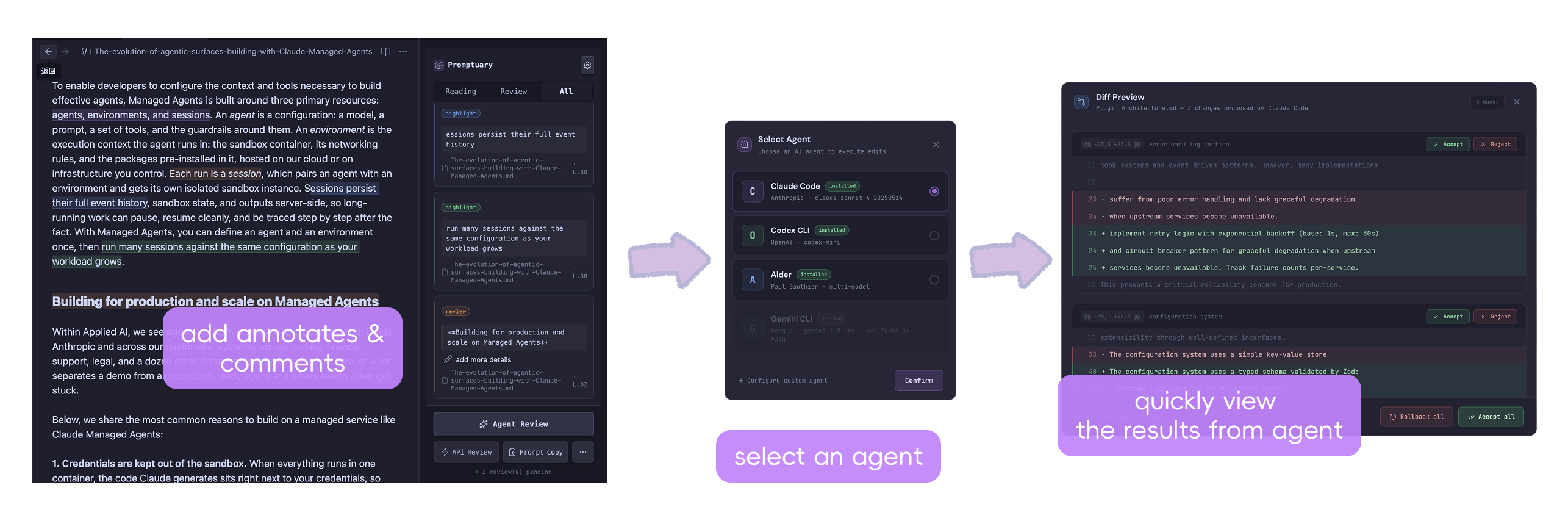
An Obsidian plugin for reading annotations and AI-powered batch review. Highlight and take notes while reading, leave review comments, then hand them off to external AI agents for execution — all in one click.
Target Users & Scenarios
Who is it for
- Product managers / Editors / Writers: Review product docs, proposals, weekly reports — lots of small tweaks, but don't want to edit each one manually
- Researchers: Mark key points and add thoughts while reading papers / reports
- Team leads: Give revision feedback on team members' documents
- Developers: Review tech docs, READMEs, PRDs — high overlap with CLI Agent users
What problem does it solve
When reading and reviewing documents in Obsidian, ideas and revision notes end up scattered across your mind or chat windows. It's hard to capture them at low cost, aggregate them, and hand them to AI for batch execution. Existing highlight / note plugins stop at "annotation recording" — none bridge the gap from reading annotations → review comments → external AI modification.
Key Features
Reading Mode
- 4-color highlights: Select text → click a color → instant highlight, no modification to the original file (stored in sidecar JSON)
- Reading notes: Select text → click Note to expand the input area → add text notes, bound to the original text
Review Mode
- Strikethrough (Delete): One click to mark text as "strongly delete / merge" intent
- Natural language review comments: Click Note to expand the input area, write things like "make this more conversational" or "add an example here" — no forced categorization
- Sidebar review list: All comments aggregated, with jump / edit / delete support
Floating Toolbar
Select text and a floating toolbar appears with a vertical three-section layout:
- Mode capsule: Top [Reading] / [Review] quick switch
- Button row: Reading mode → 4 color highlights + Note; Review mode → Delete + Note
- Note expansion area: Click Note to expand downward, with color marker + label + input field + Save
AI Execution (Four Paths)
| Path | Priority | Platform | Description |
|---|---|---|---|
| Export review file | P0 | All | Generate Markdown instruction file, uploadable to any AI |
| Copy Prompt | P0 | All | Original text + review comments copied to clipboard in one click |
| CLI one-click execution | P1 | Desktop | Call Claude Code / Codex / Aider / Gemini CLI etc., auto-launch terminal |
| API Key direct call | P2 | Desktop | BYOK direct connect to Anthropic / OpenAI / DeepSeek / Gemini / custom endpoint, closed loop within plugin |
Diff Preview & Auto-Reanchoring (Desktop)
After AI or API modifies a file, the plugin automatically compares differences and offers Accept All / Accept by Chunk / Rollback.
After confirmation, annotation positions are automatically re-anchored:
- Strategy B (Diff re-anchor): Compute old offset → new offset mapping based on LCS diff, precise update
- Strategy A (fuzzy locate fallback): Edit distance + trigram similarity sliding window, auto-repair drifted annotations
- Executed review comments are automatically removed; invalid reading annotations auto-cleaned
Getting Started
1. Installation
Obsidian Community Plugins (Recommended)
Promptuary is available on the Obsidian Community Plugins marketplace:
- Open Settings → Community plugins
- Turn off Restricted mode if you haven't already
- Click Browse → search for "Promptuary"
- Click Install, then Enable
Manual install (for pre-release / development builds):
git clone https://github.com/meganjjzhang/Promptuary
cd Promptuary
npm install
npm run build
Copy main.js, manifest.json, and styles.css to your Vault's .obsidian/plugins/promptuary/ directory, then restart Obsidian and enable the plugin under Settings → Community plugins.
2. Reading Annotations
- Open any Markdown file
- Click the highlighter icon in the left Ribbon, or search "Open Promptuary Sidebar" in the Command Palette
- Select the Reading capsule at the top
- Select text → floating toolbar appears with mode capsule + color buttons → click a color to highlight
- Click Note to expand the input area, add text notes, then click Save
3. Reviewing Documents
- Switch the floating toolbar or sidebar top capsule to Review
- Select the text you want to revise
- Click Delete to toggle strikethrough (click again to remove), or click Note to expand the input area and write review comments
- All comments are aggregated in the sidebar review list
4. Export for AI Execution
Method A: Export File / Copy Prompt (All platforms)
Click "Export Review File" or "Copy Prompt" at the bottom of the sidebar, then upload the generated Markdown instruction file to any AI tool like ChatGPT, Claude Web, etc.
Method B: CLI One-Click Execution (Desktop)
First install any Agent CLI:
npm i -g @anthropic-ai/claude-code   # Claude Code
npm i -g @openai/codex               # Codex CLI
pip install aider-chat               # Aider
npm i -g @google/gemini-cli          # Gemini CLI
Click an Agent button at the bottom of the sidebar → select an installed Agent → confirm command → terminal auto-executes → Diff preview pops up after completion.
Uninstalled Agent buttons appear grayed out; clicking copies the command to clipboard for manual execution.
Method C: API Key Direct Call (Desktop)
No CLI tools needed — call model APIs directly from within the plugin.
- Open Settings → API Direct Call
- Select Provider (Anthropic / OpenAI / DeepSeek / Gemini / Custom Endpoint)
- Enter API Key and model name
- Click "Test" to verify the connection
- Search "API Key Direct Call Execute" in the Command Palette (
Cmd+P) or use the sidebar button - Confirm the privacy notice → plugin calls API → Diff preview auto-pops up
5. Diff Preview & Confirmation
After AI executes modifications, the plugin displays line-by-line differences:
- Accept All: Keep all AI modifications
- Accept by Chunk: Select which modification chunks to keep
- Rollback: Restore original text, discard all changes
After confirmation, annotations are automatically re-anchored and executed review comments are removed.
Settings
General
| Setting | Description | Default |
|---|---|---|
| Default mode | Sidebar initial state (Reading / Review / All) | Reading |
| Context length | Characters saved before and after annotation, used for anchor positioning | 50 |
| Sidecar directory | Annotation JSON storage location | .promptuary/annotations |
| Export directory | Review file save location | .promptuary/exports |
| Include reading notes on export | Export reading notes as reference context alongside review comments | No |
Agent & Terminal (Desktop)
| Setting | Description | Default |
|---|---|---|
| Terminal app | Terminal used for CLI execution on macOS | Terminal |
| Custom command rules | User-defined Agent CLI command templates | — |
Predefined Agents (5):
| Agent | Detection command | Install method |
|---|---|---|
| Claude Code | which claude |
npm i -g @anthropic-ai/claude-code |
| Claude Internal | which claude-internal |
Internal version |
| Codex CLI | which codex |
npm i -g @openai/codex |
| Aider | which aider |
pip install aider-chat |
| Gemini CLI | which gemini |
npm i -g @google/gemini-cli |
Available template variables: {{vaultPath}} {{instructionFile}} {{filePath}} {{fileName}} {{prompt}}
API Direct Call (Desktop)
| Setting | Description | Default |
|---|---|---|
| Provider | Anthropic / OpenAI / DeepSeek / Gemini / Custom | Anthropic |
| API Key | Stored locally only, never uploaded | — |
| Model | Leave empty for default | Varies by provider |
| Custom endpoint URL | OpenAI-compatible format (Custom mode only) | — |
| Max output tokens | Maximum tokens for API response | 4096 |
| Test connection | Send minimal request to verify API Key validity | — |
Supported AI Tools
| AI Tool | Access method |
|---|---|
| Claude Code | CLI one-click execution |
| Claude Internal | CLI one-click execution |
| Codex CLI | CLI one-click execution |
| Aider | CLI one-click execution |
| Gemini CLI | CLI one-click execution |
| Custom Agent CLI | CLI one-click execution |
| Anthropic API | API Key direct call |
| OpenAI API | API Key direct call |
| DeepSeek API | API Key direct call |
| Google Gemini API | API Key direct call |
| Custom OpenAI-compatible endpoint | API Key direct call |
| ChatGPT Web / Claude Web | Export file / Copy Prompt |
Platform Support
| Feature | Desktop | Mobile |
|---|---|---|
| Reading highlights / notes | ✅ | ✅ (bottom toolbar) |
| Review comments | ✅ | ✅ (bottom toolbar) |
| Sidebar | ✅ | ✅ |
| Export review file | ✅ | ✅ |
| Copy Prompt | ✅ | ✅ |
| CLI one-click execution | ✅ (full on macOS, copy command on Win/Linux) | ❌ |
| API Key direct call | ✅ | ❌ |
| Diff preview & confirmation | ✅ | ❌ |
| Auto-reanchoring | ✅ | ❌ |
Mobile uses a bottom toolbar (BottomToolbar) instead of the desktop floating toolbar to avoid conflicts with iOS/Android system selection menus.
Data Storage
Annotations are stored as sidecar JSON in the .promptuary/annotations/ directory — original Markdown files are never modified.
vault/
├── .promptuary/
│   ├── annotations/    # Annotation data (one JSON per file)
│   └── exports/         # Exported review instruction files
├── your-doc.md         # Original file is untouched
Annotation JSON structure (AnnotationFile):
{
  "version": 1,
  "filePath": "path/to/doc.md",
  "baselineHash": "sha256...",
  "annotations": [
    {
      "id": "ann_xxx",
      "type": "highlight | note | review",
      "selectedText": "selected text",
      "contextBefore": "...",
      "contextAfter": "...",
      "lineHint": 5,
      "occurrenceIndex": 0,
      "highlightColor": "yellow | blue | green | purple",
      "noteText": "reading note content",
      "reviewText": "review comment content",
      "strike": false
    }
  ]
}
API Keys are stored only in Obsidian's local plugin data (this.saveData()), never uploaded, never proxied.
Anchor Positioning
Annotations do not store offsets (from/to); positions are computed dynamically at load time via text search:
- Exact match:
selectedTextis unique in the document → direct positioning - occurrenceIndex + lineHint disambiguation: Repeated paragraphs use occurrence sequence + line hint
- Fuzzy locate (fuzzyLocate): Edit distance + trigram similarity sliding window
- Drift detection:
baselineHashcomparison, auto-alert when document changes - Auto-repair: After Agent Diff confirmation, auto-reanchor (Strategy B + Strategy A fallback)
Version Roadmap
| Version | Status | Key Features |
|---|---|---|
| v0.1 | ✅ Done | Reading highlights, review comments, export file, copy Prompt |
| v0.2 | ✅ Done | CLI one-click execution, Diff preview, auto-reanchoring |
| v0.3 | Planned | Vault-wide annotation view, cross-file search, JSON export |
| v0.4 | ✅ Done | API Key direct call (Anthropic / OpenAI / DeepSeek / Gemini / Custom) |
| v0.5 | Planned | MCP Server, annotation collections, migration from other plugins |
Command Palette Shortcuts
| Command | Description |
|---|---|
| Open Promptuary Sidebar | Open the right sidebar |
| Highlight (Yellow) | Quick yellow highlight for selected text |
| Add Note | Add a reading note for selected text |
| Add Review Comment | Add a review comment for selected text |
| Export Review File | Export review comments for the current file |
| Copy Prompt | Copy to clipboard in one click |
| Execute with Claude Code | CLI one-click execution |
| Execute with Codex CLI | CLI one-click execution |
| Execute with Aider | CLI one-click execution |
| Execute with Gemini CLI | CLI one-click execution |
| Copy Agent Command | Copy command to clipboard |
| API Key Direct Call Execute | Call model API directly from plugin |