Power Bases
 Power Plugins1k downloads
Add board, calendar, timeline, chart, gallery, and table views to Bases, with inline editing, colors, rollups, field types, formulas, and CSV import.
- Overview
- Scorecard
- Updates16
Six extra views for Obsidian's core Bases plugin: a kanban board, a calendar, a Gantt-style timeline, a chart, an image gallery, and a much richer table.
Your rows stay ordinary notes and the data stays in ordinary frontmatter, so nothing is locked in and everything syncs and works on mobile. Built to stay fast in big vaults: 20,000 notes is where it is used daily, and there is no row limit anywhere.
What you get over stock Bases
Core Bases ships Table, Cards, and List. Power Bases adds six more views and reworks the table, all riding the native engine, so stock and Power views live side by side in the same base.
| Need | Stock Bases | Power Bases |
|---|---|---|
| Table | Grid with columns and inline edits | Ten extra field types, a Notion-style column menu, formulas with a live editor, number and date formats, bars, rings and stars, rollups, subtotals, and value colors |
| Kanban | Cards in a static grid | Drag between lanes to change a property, manual order, swimlanes, WIP limits, lane rules, and lane totals |
| Calendar | Not available | Month and week, drag to reschedule, double-click a day to create |
| Gantt | Not available | Drag to move or resize bars, dependencies with late warnings, milestones, progress fills |
| Charts | Not available | Bar, line, and donut over any grouping |
| Gallery | Cards | Covers from a property or the first image in the note, three sizes |
| Getting data in | Type into cells | CSV import that works out the column types, plus starter templates |
| Safety net | Undo per note | Every change is one undoable batch, with an Undo link on the toast |
Requirements
Obsidian 1.10.2 or newer with the Bases core plugin turned on. Open any base, click the view switcher, and the six Power views appear next to the built-in ones.
Getting started fast
Right-click any folder and choose New Power base here. A ready-made database appears beside your notes with board, table, calendar, and timeline views already set up. Any folder of notes becomes a database in one click.
You can also Import CSV here to turn a spreadsheet into a base, or start from a template: Tasks Tracker, Project Roadmap, Feature Requests, or Contacts. Each lands as a folder of example notes with its column types already set, so you can see the shape and swap in your own rows.
From inside a note, Insert new base here drops a database into the page you are writing. Its rows live in a folder of their own, so they stay searchable without cluttering your file tree, exactly the way a Notion database hides its row pages.
Power Board
Pick a property to Group by and every value becomes a lane. Drag a card to another lane and the property is written into the note. Click a card to open it, right-click for the full menu, and use "+ New page" at the bottom of a lane to create a note already tagged for that lane.
- Manual order: drops between cards stick, and the order is real data, so it syncs and can sort other views too.
- Lane rules: properties written whenever a card enters a lane, so a Done lane can stamp today's date by itself.
- WIP limits turn a lane's count red when it is overloaded, and lane totals put a running sum in the lane header.
- Swimlanes: add a second property and the board becomes a grid. Dropping a card sets both values at once.
- Bulk select: Alt+click to gather cards, then move them all in one go.
- Touch: hold a card to lift it, then drag.
Calendar
Pick a Date property and your pages land on their day. Month mode is a familiar grid; week mode lays timed pages out over hour rows, which is the shape meeting notes want. Drag a chip to another day to reschedule it, and double-click any day to start a page already dated.
Power Timeline
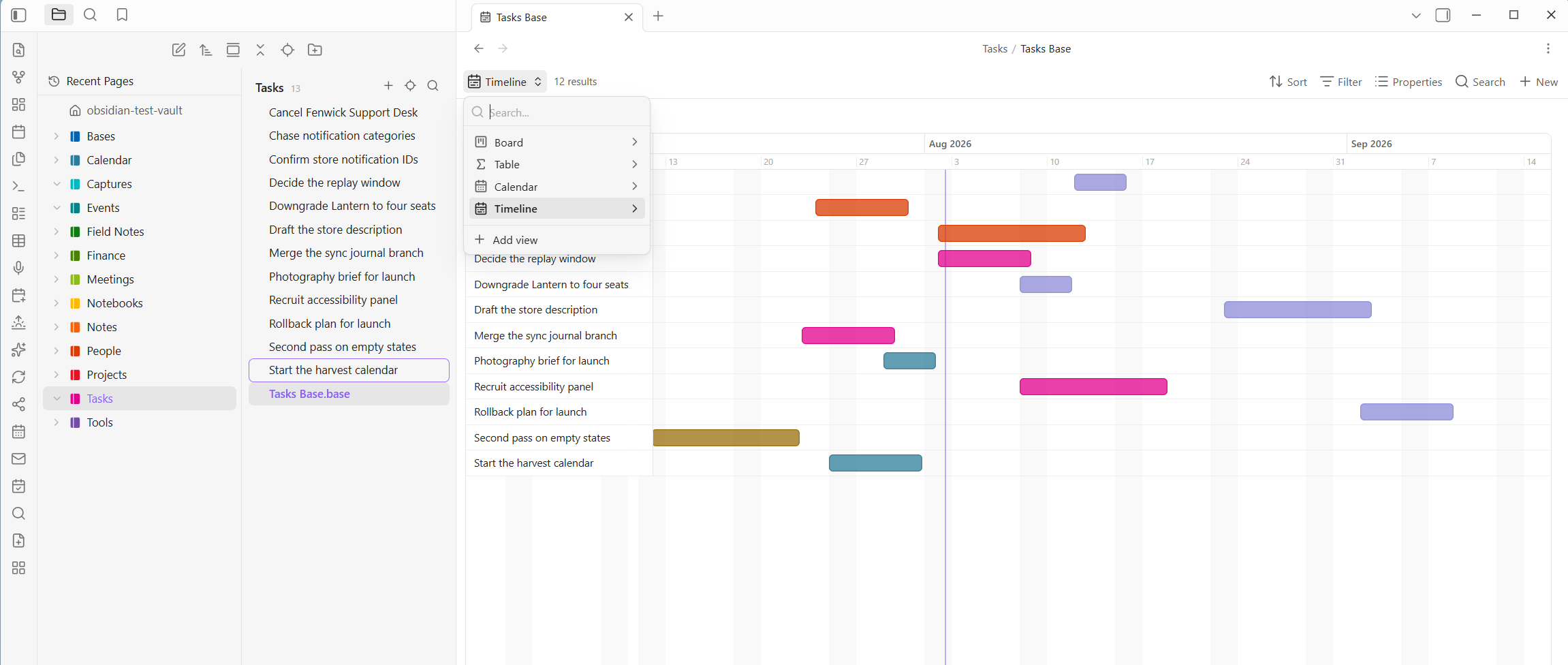
Release planning without leaving your vault. Pick a start date property, optionally an end date, and every page becomes a bar on a day-scaled axis.
Drag a bar to move it, drag its edges to change its dates, and every change writes straight back to the note. Color bars by any property, group them into sections, mark milestones as diamonds, and fill each bar to show progress. Set a Depends-on property and it draws arrows between bars, turning both red when a predecessor finishes too late.
Pages with no start date wait in a strip at the top until you drag them onto the axis.
Power Chart
Pick something to group by and something to measure, and get a bar, line, or donut chart drawn as plain SVG with no library. Count by status, total estimates by project, pages per month. Embed it in any note and it stays live.
Power Gallery
A light board for folders full of images. Each card shows a cover, taken from an image property or the first image in the note. Covers load as you scroll, so a thousand cards stay cheap. Three sizes, and up to three properties under each title.
Power Table
The Bases table with a great deal more, and it edits in place.
- Type into any cell. The editor matches the property: number fields, a date field with a calendar button, checkboxes that toggle in place, and multi-select popovers with colored chips.
- It works like a spreadsheet. Tab and the arrow keys move between cells, Ctrl+D fills down, and pasting a block copied from Excel fans out across rows and columns, creating rows as needed. Moving past the last cell creates a new row.
- Column menu: rename, set the type, filter, sort, calculate a summary, freeze, wrap, insert, duplicate, hide, or delete. Renaming a column renames the property across every row, as one undoable change.
- Reorder and resize columns by dragging the header or its edge. Both stick.
- Manual row order: hover a row for its grip and drag.
- Select rows and act in bulk: set a property across every selected row, duplicate, or delete, all as a single undoable change.
- Summary row and group subtotals: sum, average, min, max, filled, or empty per column.
- Column colors: a hue per distinct value, or a scale across a number column.
- Rollups, Notion style: follow a link property and sum, average, or count a property on the notes it points at. It works in both directions, so a Projects base can total up the tasks that point at each project.
- Number and date formats: currencies, decimals, percentages, and dates in the style you like. Numbers can show as a bar, a ring, stars, or a traffic light. It is display only, so the stored values stay exact.
- Export as CSV writes exactly what you see, filters and formatting included.
Field types
Obsidian's own property types stop at text, number, date, checkbox, and list. Power Bases adds ten more, the way Notion has them, on top of ordinary frontmatter. Right-click a column header to pick one. It is remembered by property name, so once email is an Email it renders as one in every base.
- URL, Email, Phone: click to open the site, the mail composer, or the dialer. A URL can show a friendly label instead of a long address.
- Place opens in Google Maps and can show a short name instead of the full address. Typing an address suggests real ones, which is the plugin's only network feature and can be turned off.
- Person shows names as colored chips.
- ID hands out identifiers in order, so
TASK-007begetsTASK-008. - Button runs an action on click: write properties to that row, open a link, or both.
- Verification is a badge that flips to Expired on its own once a date passes.
- Image and Files show the picture in the cell, or hold attachments that open on click. Both pick from your vault or upload from your computer.
Formula columns
Bases has a real formula engine. Power Bases adds the editor it is missing: an expression box, a live preview on a sample row, and a clickable function reference.
Reference properties with note["Property"], reuse another formula with formula.other, and use everyday functions like round, if, concat, and min. A yearly total is just (formula.mo_rent + formula.mo_dues) * 12.
What you save goes into the base's own file, so the column shows up in the built-in Table view too, and there is nothing to lose if you stop using Power Bases.
Undo, and who changed what
Every write the plugin makes lands as one undoable change, from a drag to a bulk edit. A toast appears with an Undo link, and the Undo last Power Bases change command walks back the last thirty, restoring the exact previous values.
For shared vaults, set your name in settings and turn on Stamp changes with your name. Changes made through a Power view then record who made them, in plain frontmatter. Off by default.
Built for big vaults
Cost scales with what is on screen, not with vault size. Big boards, tables, and galleries render a batch at a time and add more as you scroll, so a lane with thousands of pages opens instantly. Every view has a type-to-filter box.
Two operations are honest exceptions, because they touch real files: renaming or deleting a column rewrites one note per row, and reverse rollups sweep frontmatter once per repaint. Both only run when you use them.
Privacy and network use
Power Bases works entirely offline except for one opt-in feature. No telemetry, no analytics.
- Address autocomplete (Place fields): as you type an address, that text is sent to OpenStreetMap to fetch matches. Nothing else about your vault is sent, and nothing at all is sent until you type in a Place editor. Turn it off and Place fields stay fully offline.
Everything else, including all views, formulas, colors, rollups, and CSV import, runs locally.
What the catalog's scan reports
The community catalog scans a plugin for what it is capable of, which is not the same as what it does with it. Power Bases reports one thing.
| What the scan reports | What it is | Where |
|---|---|---|
| Vault enumeration | Listing your notes, which is what a base is built from: gathering the notes a view covers, resolving links between them, and offering files in the pickers. Only paths and frontmatter a view already displays are read, and the list stays inside Obsidian. | src/main.ts, the view builders and file pickers |
Power Bases never touches your clipboard, starts no processes, and reads no files outside your vault. There is no eval, no Function constructor, no innerHTML, and no code fetched and run at runtime. Its one network call is the address autocomplete above, made through Obsidian's own requestUrl; there is no fetch in the built main.js at all.
More Power Plugins
Each one works on its own, and they fit together when you have more than one.
- Power Assistant: record and summarize meetings, capture anything from a link, and ask your notes questions.
- Power Connect: sync your vault through your own Dropbox, OneDrive, or Google Drive.
- Power Desk: your calendars and your mail, inside your vault.
- Power Editor: a formatting toolbar, drag-and-drop blocks, and WYSIWYG editing.
- Power Explorer: arrange files by hand, and search a huge vault instantly.
- Power Extract: reads the text inside images so you can search it.
- Power Tables: colors, live formulas, and sorting for Markdown tables.
Build from source
npm install
npm run build     # type-check + bundle main.js
npm test          # pure-logic unit tests (Node)
Support
Power Bases is built and maintained by one person. If it earns a place in your daily vault, you can buy me a coffee. Nothing in the plugin is held back either way.