Search...Search plugins and themes...
⌘K
Sign in
  • Get started
  • Download
  • Pricing
  • Enterprise
  • Account
  • Obsidian
  • Overview
  • Sync
  • Publish
  • Canvas
  • Mobile
  • Web Clipper
  • CLI
  • Learn
  • Help
  • Developers
  • Changelog
  • About
  • Roadmap
  • Blog
  • Resources
  • System status
  • License overview
  • Terms of service
  • Privacy policy
  • Security
  • Community
  • Plugins
  • Join the community
  • Discord
  • Forum / 中文论坛
  • Merch store
  • Brand guidelines
Follow us
DiscordTwitterBlueskyThreadsMastodonYouTubeGitHub
© 2026 Obsidian

Pomodoro Widget

gvvimgvvim7k downloads

Provides a widget based on a pomodoro kitchen timer. It's designed to be haptic, and has a constant ticking sound, and an alarm sound that can be toggled.

Add to Obsidian
  • Overview
  • Scorecard
  • Updates3

This is a plugin for Obsidian (https://obsidian.md), which adds a pomodoro clock widget to the application. It's based off of the original pomodoro kitchen timer which needs to be wound to set the time and ticks constantly while active to keep you focused, though this widget can also be set with a button and resets automatically. Also provides a stopwatch. You can customize whether the widget toggle appears in the ribbon or status bar, or only as a command. Dragging the widget to a corner will anchor it to that corner so you can resize the window.

Theme support

This plugin uses the official style names so the widget will adapt to any theme.

Some examples:
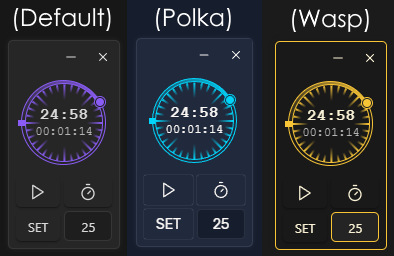
Theme examples

If you want to customize it refer to styles.css for the class names. All names start with 'pomo-'.

Installing the plugin

  • Download main.js, styles.css, manifest.json, from the releases page and add them to the .obsidian/plugins/pomodoro-widget/ folder in your vault.

For plugin devs

I've separated the widget functionality from the clock so you should be able to use the widget class in your own plugins without much hassle, just make sure you copy the relevant styles ('pomo-hidden, pomo-widget-*').

Building from source

  • Clone the repo into the .obsidian/plugins/ folder in your vault.
  • Make sure your NodeJS is at least v16 (node --version).
  • npm i or yarn to install dependencies.
  • npm run build to generate the main.js file.

Contributing

This project is open to contributions, simply submit a pull request.

76%
HealthGood
ReviewCaution
About
Add a pomodoro clock widget to Obsidian that mimics a wind-up kitchen timer, supports manual winding or button-set timers, and resets automatically. Start a stopwatch, drag and anchor the widget to window corners for resizing, and place the toggle in the ribbon, status bar, or as a command while styling adapts to your theme.
TasksStatus barTheming
Details
Current version
1.0.2
Last updated
6 months ago
Created
2 years ago
Updates
3 releases
Downloads
7k
Compatible with
Obsidian 1.4.16+
License
MIT
Report bugRequest featureReport plugin
Author
gvvimgvvim
github.com/gvvim
GitHubgvvim
  1. Community
  2. Plugins
  3. Tasks
  4. Pomodoro Widget

Related plugins

Day Planner (OG)

Day planning from a simple task list in a Markdown note (bare bones, preserves the features and behavior of the original plugin).

Workspaces Plus

Quickly switch and manage workspaces.

Completed Task Display

Controls for displaying or hiding completed tasks.

Pomodoro Timer

Manage your daily focus using the Pomodoro Technique.

Minimal Theme Settings

Control the colors and fonts in Minimal Theme.

Hider

Hide interface elements such as tooltips, status bar, titlebar, and more.

Day Planner

Day planning from a task list in a Markdown note with enhanced time block functionality.

Tasks

Track tasks across your vault. Supports due dates, recurring tasks, done dates, sub-set of checklist items, and filtering.

Style Settings

Adjust theme, plugin, and snippet CSS variables.

Reminder

Manage Markdown TODOs with reminder.