Search...Search plugins and themes...
⌘K
Sign in
  • Get started
  • Download
  • Pricing
  • Enterprise
  • Account
  • Obsidian
  • Overview
  • Sync
  • Publish
  • Canvas
  • Mobile
  • Web Clipper
  • CLI
  • Learn
  • Help
  • Developers
  • Changelog
  • About
  • Roadmap
  • Blog
  • Resources
  • System status
  • License overview
  • Terms of service
  • Privacy policy
  • Security
  • Community
  • Plugins
  • Themes
  • Discord
  • Forum / 中文论坛
  • Merch store
  • Brand guidelines
Follow us
DiscordTwitterBlueskyThreadsMastodonYouTubeGitHub
© 2026 Obsidian

Card Bookmark

wanda1993wanda1993235 downloads

Create rich card-style bookmarks for links and files.

Add to Obsidian
  • Overview
  • Scorecard
  • Updates1

Card Bookmark 是一个 Obsidian 插件,用于把链接和文件路径制作成卡片式书签

它主要有以下三个功能:

  • 链接书签:将一个 URL 插入代码块,并渲染为卡片
  • 文件书签:将一个基于 vault 的相对路径插入代码块,并渲染为卡片
  • 文件栏打开事件拦截:指定文件类型阻止其打开事件类型

使用方法

链接书签

  1. 打开命令面板。
  2. 执行 Add a link bookmark
  3. 输入可选标题和一个有效的 URL
  4. 将生成的 link_bookmark_block 代码块插入笔记

示例:

```link_bookmark_block
link: https://example.com
title: Example
```

Link bookmark example

文件书签

  1. 打开命令面板。
  2. 执行 Add a file bookmark
  3. 输入可选标题和一个基于 vault 的相对路径
  4. 将生成的 file_bookmark_block 代码块插入笔记

示例:

```file_bookmark_block
path: Projects/notes/example.md
title: Example note
```

File bookmark example

文件栏打开事件拦截

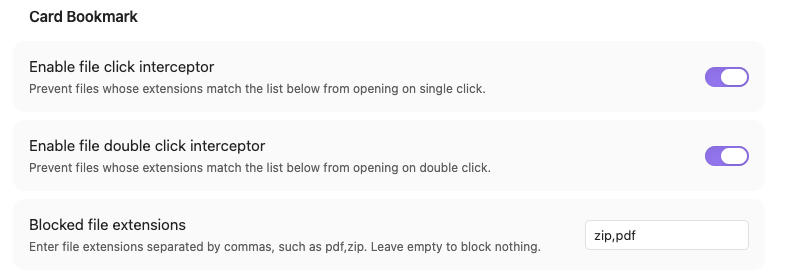
插件可以根据文件类型阻止其文件栏中的打开行为

  • 开启单击拦截后,可阻止单击打开事件
  • 开启双击拦截后,可阻止双击打开事件
  • 扩展名使用英文逗号分隔,例如 pdf,zip,apk

File interceptor example

提示

  • 快捷键:给两种书签设置指定的快捷键,可以大幅提升创建效率
  • 文件书签:文件书签只支持 vault 内部的文件,当根据路径无法找到对应文件时,会提示"invalid path"
  • 复制文件路径:右键点击文件 - Copy path - from vault folder,即可快速复制文件路径
  • 拦截功能:单击文件、双击文件、文件类型都支持配置

项目结构

  • src/main.ts:插件生命周期和功能注册
  • src/link_bookmark.ts:链接书签命令与渲染
  • src/file_bookmark.ts:文件书签命令与渲染
  • src/file_click_interceptor.ts:文件栏点击拦截
  • src/settings.ts:设置模型和设置页
  • src/modal.ts:书签创建弹窗
  • src/assets/:插件使用的静态资源
95%
HealthExcellent
ReviewSatisfactory
About
Insert URL or vault-relative file paths as code blocks that render into card-style bookmarks for links and notes. Intercept file-pane open events by extension to block single- or double-click opens and prevent unwanted file opening.
LinksFilesSidebar
Details
Current version
1.0.0
Last updated
2 months ago
Created
2 months ago
Updates
1 release
Downloads
235
Compatible with
Obsidian 0.15.0+
Platforms
Desktop only
License
Apache-2.0
Report bugRequest featureReport plugin
Author
wanda1993wanda1993
github.com/WanDa1993
GitHubwanda1993
  1. Community
  2. Plugins
  3. Links
  4. Card Bookmark

Related plugins

Notebook Navigator

A better file browser and calendar inspired by Apple Notes, Bear, Evernote and Day One.

Recent Files

Display a list of recently opened files.

Flexplorer

Enhance the file explorer with custom sorting, pinning, and hiding.

Advanced URI

Control everything with URI.

Custom File Explorer sorting

Manual or automatic config-driven reordering and sorting of files and folders in File Explorer.

Note Refactor

Extract note content into new notes and split notes.

Novel word count

Display a word count, page count, creation date, or other statistics for each file, folder and vault in the File Explorer pane.

Reveal Active File Button

Add a button to the top of the File Explorer, to reveal the active file.

File Explorer Note Count

See the number of notes in each folder within the file explorer.

File Tree Alternative

An alternative file tree view with separate folder and file panes.