
- Overview
- Scorecard
- Updates16
An Obsidian plugin for managing image assets across your vault — scanning, deduplication, comparison, and batch operations.
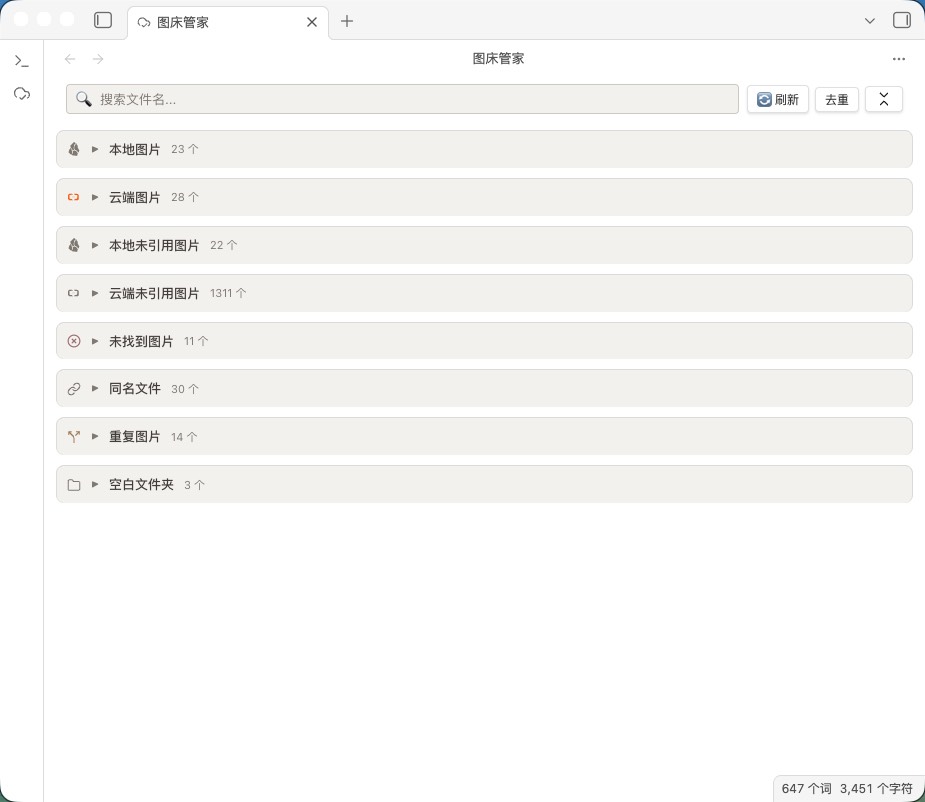
Main panel: eight-panel overview
Install
Community plugin store (recommended)
Open Obsidian → Settings → Community plugins → Browse → search "PicLinker" → Install → Enable.
Manual install
Download main.js, manifest.json, and styles.css from Releases, place them in .obsidian/plugins/PicLinker/, and enable the plugin.
Core features
- Vault-wide scanning with real-time response — recognizes three image reference formats (skipping code blocks):
![](),![[path]],<img>. Incremental scanning (mtime cache, concurrency 20) speeds up large vaults. Six events are registered (create / modify / delete / rename, metadataCache resolution, active-leaf switching) with 500 ms debounce for real-time accuracy. - Eight-panel view — separate views for referenced vs. unreferenced images, missing links, same-name files, duplicates, and empty folders, each independently collapsible with search filtering and counts.
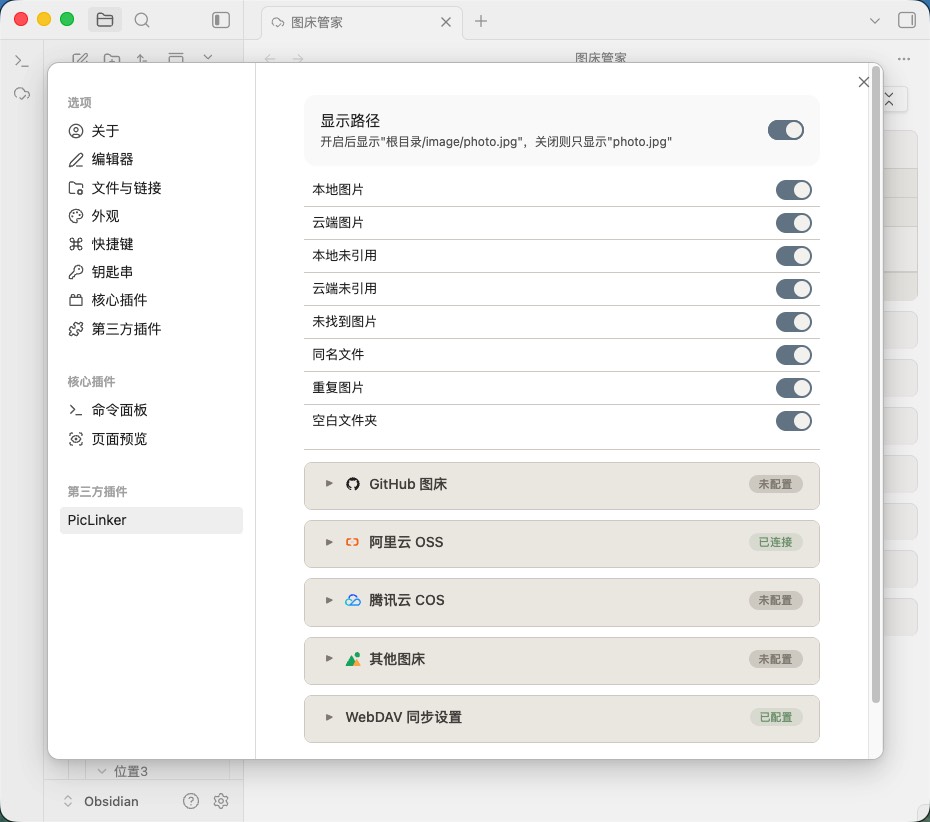
- Four image hosts — Aliyun OSS (V4 signature), Tencent COS (V1 signature), GitHub, and SM.MS, cross-checked against actual references, with frontmatter path prefixes and bare-path image fields (cover / banner, etc.) auto-detected.
- Smart deduplication — SHA-256 content hashing across local×local, cloud×cloud, and local×cloud. Dedup is not automatic during scanning: trigger it via the toolbar "Dedup" button (single-click for selected, double-click for the whole vault). The keeper is the highest-scored unselected item (cloud +1000 weight). After deletion, all note references are updated automatically — zero broken links.
- Batch operations — batch delete (trash-recoverable), delete cloud files, delete reference lines (tag-level), copy Markdown/HTML links, download. A confirmation modal shows the affected count and asks once before executing.
- Security — AES-GCM + PBKDF2 encrypted credential storage (v1→v2 auto-migration); desktop uses the Node.js request layer and mobile falls back to
requestUrl, both bypassing CORS. - WebDAV sync — share image-host configs across devices with three-way conflict detection (local mtime / remote mtime / last sync time); supports Nutstore (坚果云) and NextCloud.
- Mobile support — single-finger drag to pan, pinch to zoom, tap overlay to close; thumbnail sizes auto-tighten (28×28); toolbar and action area stack at 768 px, settings stack at 600 px; notch safe-area adapted.
Eight-panel view
| Panel | Description |
|---|---|
| Local images | Files present in the vault and referenced by notes |
| Cloud images | Hosted on an image host and referenced by notes |
| Local unreferenced | Present in the vault, no note references |
| Cloud unreferenced | Hosted but not referenced by any note |
| Missing images | Referenced by notes but absent both locally and in the cloud (broken links); grouped by referencing note since 1.3.0 |
| Same-name files | Local and cloud files sharing a filename, or multiple local files with the same name |
| Duplicate images | File groups with identical SHA-256 hashes |
| Empty folders | Directories containing no files or subfolders |
Source badges: same-name and duplicate entries are prefixed with a purple "Local" or blue "Cloud" badge.
Configuration
See CONFIG.md for detailed image-host setup (GitHub / Aliyun OSS / Tencent COS / SM.MS), WebDAV sync, and general settings.
Settings panel
Supported image syntax
 <!-- Standard Markdown -->
![[image.png|500]] <!-- Wikilink with size (wikilink-only; Markdown  does not support `|size`) -->
![[image.png]] <!-- Wikilink -->
<img src="image.png"> <!-- HTML -->
Remote URLs are recognized too. Code blocks are skipped automatically.
Frontmatter
---
image-bed: aliyun       # image host (GitHub / aliyun / tencent / other)
image-path: blog/2026/  # cloud path prefix
---
Beyond image-bed / image-path config keys, top-level bare-path image fields (such as cover, banner, thumbnail, whose value ends with an image extension) are auto-detected and included in reference stats and dedup comparison. Config keys are excluded from scan results.
Commands
| Command | Description |
|---|---|
打开图床管家 (Open PicLinker) |
Open the main view |
刷新图片扫描 (Refresh image scan) |
Rescan the whole vault |
运行诊断测试 (Run diagnostics) |
Run functional diagnostics |
Development
See DEVELOPMENT.md for the project structure, build setup, and contribution guide.
License
MIT © PicLinker