Search...Search plugins and themes...
⌘K
Sign in
  • Get started
  • Download
  • Pricing
  • Enterprise
  • Account
  • Obsidian
  • Overview
  • Sync
  • Publish
  • Canvas
  • Mobile
  • Web Clipper
  • CLI
  • Learn
  • Help
  • Developers
  • Changelog
  • About
  • Roadmap
  • Blog
  • Resources
  • System status
  • License overview
  • Terms of service
  • Privacy policy
  • Security
  • Community
  • Plugins
  • Themes
  • Discord
  • Forum / 中文论坛
  • Merch store
  • Brand guidelines
Follow us
DiscordTwitterBlueskyThreadsMastodonYouTubeGitHub
© 2026 Obsidian

Papertrail

ankitchouhan1020ankitchouhan102047 downloads

Browse all notes from the sidebar with excerpts, modified dates, search, quick create, and the File Explorer context menu.

Add to Obsidian
Papertrail screenshot
  • Overview
  • Scorecard
  • Updates7

Browse every markdown note from the sidebar — compact cards with title, excerpt, and modified date; a footer with search and quick-create; and a right‑click menu aligned with the File Explorer.

Requires Obsidian 1.5.0+.
Repository: github.com/ankitchouhan1020/papertrail
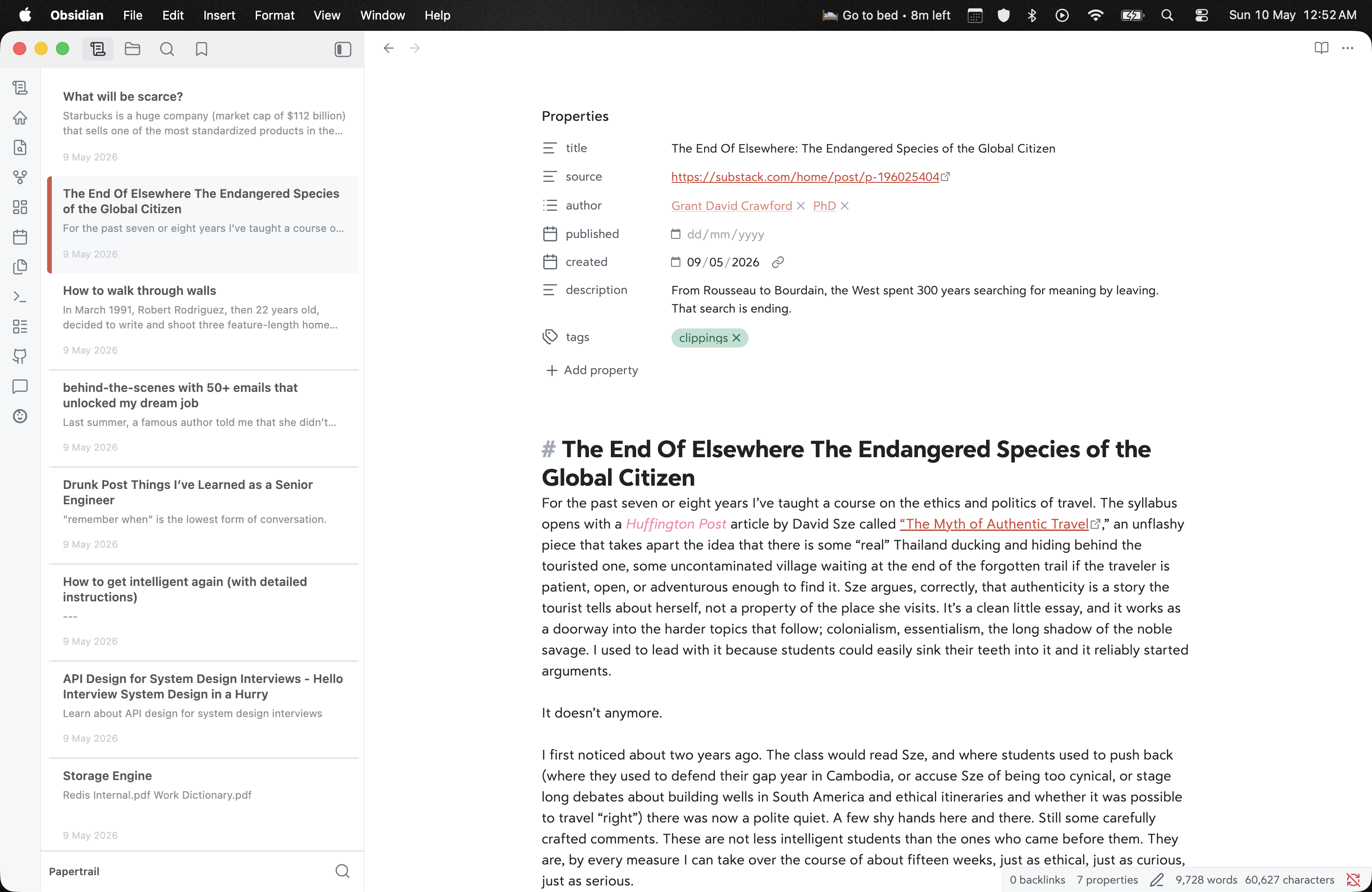

Obsidian with Papertrail: note list in the sidebar (titles, excerpts, dates, active row with accent bar), Papertrail footer, and the open note with properties in the editor

Sidebar list beside the editor — pick a note, open it, keep context.


Install

Channel How
Manual From Releases, put main.js, manifest.json, and styles.css in <Vault>/.obsidian/plugins/papertrail/, then enable the plugin
BRAT Add ankitchouhan1020/papertrail

Usage

  • Ribbon / command “Open Papertrail” — open or focus the view.
  • Footer — filter the list; + creates a note in the vault’s default location.
  • Right‑click a row — open in new tab, rename, delete, reveal in navigation when available, plus other file menu entries from Obsidian and plugins.

Settings

Setting Description
Sort order By modified date, title, or path.
Hide excluded paths Also hide paths with a . segment (in addition to Obsidian excluded files and .obsidian).

Development

Use Obsidian’s Build a plugin flow with a dev vault, not your primary notes.

  1. Clone into <dev-vault>/.obsidian/plugins/papertrail/.
  2. npm install (installs Git hooks via prepare; pre-commit runs npm run build).
  3. npm run dev — watch src/main.ts and rebuild main.js on change.
  4. Enable Papertrail and reload when files change (or use Hot-Reload).

Production bundle: npm run build. Edit src/main.ts only — root main.js is generated.

Releasing

See COMMUNITY_PLUGIN_CHECKLIST.md. Bump versions in manifest.json / versions.json, tag a GitHub release with main.js, manifest.json, and styles.css.

License

MIT — see LICENSE.

85%
HealthExcellent
ReviewSatisfactory
About
Browse every Markdown note from the sidebar as compact cards showing title, excerpt, and modified date, keeping the list beside the editor so you don't lose context. Use the footer to filter or quick-create notes and right-click rows for File Explorer actions like open in new tab, rename, delete, and reveal.
SidebarFilesSearch
Details
Current version
1.2.1
Last updated
2 days ago
Created
2 weeks ago
Updates
7 releases
Downloads
47
Compatible with
Obsidian 1.7.2+
Platforms
Desktop, Mobile
License
MIT
Report bugRequest featureReport plugin
Author
ankitchouhan1020ankitchouhan1020
github.com/ankitchouhan1020
GitHubankitchouhan1020
  1. Community
  2. Plugins
  3. Sidebar
  4. Papertrail

Related plugins

Notebook Navigator

A better file browser and calendar inspired by Apple Notes, Bear, Evernote and Day One.

Recent Files

Display a list of recently opened files.

Omnisearch

Intelligent search for your notes, PDFs, and OCR for images.

Flexplorer

Enhance the file explorer with custom sorting, pinning, and hiding.

Custom File Explorer sorting

Manual or automatic config-driven reordering and sorting of files and folders in File Explorer.

Tag Wrangler

Rename, merge, toggle, and search tags from the tag pane.

Novel word count

Display a word count, page count, creation date, or other statistics for each file, folder and vault in the File Explorer pane.

Home tab

A browser-like search tab for your local files.

Reveal Active File Button

Add a button to the top of the File Explorer, to reveal the active file.

File Explorer Note Count

See the number of notes in each folder within the file explorer.