Title Serial Number Plugin
 yalvhe20098k downloads
Add serial numbers to your Markdown title.
- Overview
- Scorecard
- Updates4
A powerful Obsidian plugin that automatically adds customizable serial numbers to your markdown headings.
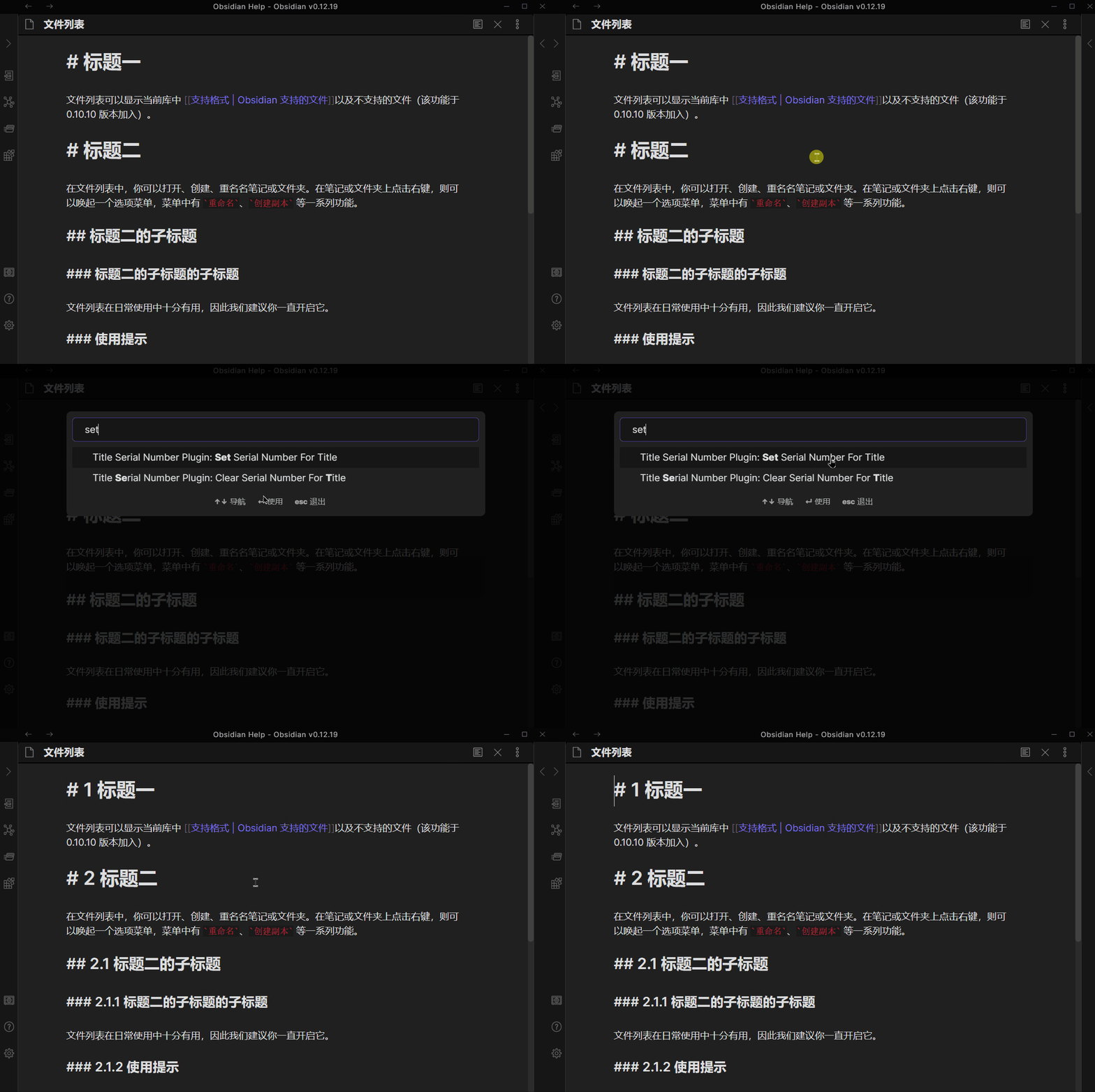
Features
Multiple Number Styles: Support for 7 different numbering styles
- Arabic numerals (1, 2, 3...)
- Chinese lowercase (一, 二, 三...)
- Chinese uppercase (壹, 贰, 叁...)
- Roman uppercase (I, II, III...)
- Roman lowercase (i, ii, iii...)
- Alphabetic uppercase (A, B, C...)
- Alphabetic lowercase (a, b, c...)
Flexible Level Configuration: Choose which heading levels (H1-H6) to apply numbering
Per-Level Style Customization: Set different number styles for each heading level
Custom Separator: Configure the separator between numbers (e.g.,
.,-,/)Live Preview: See how your serial numbers will look in real-time while configuring
Commands
| Command | Description |
|---|---|
Set Serial Number |
Add serial numbers to all headings in the current document |
Clear Serial Number |
Remove all serial numbers from headings in the current document |
Configuration
Access the plugin settings through Settings → Community Plugins → Title Serial Number Plugin.
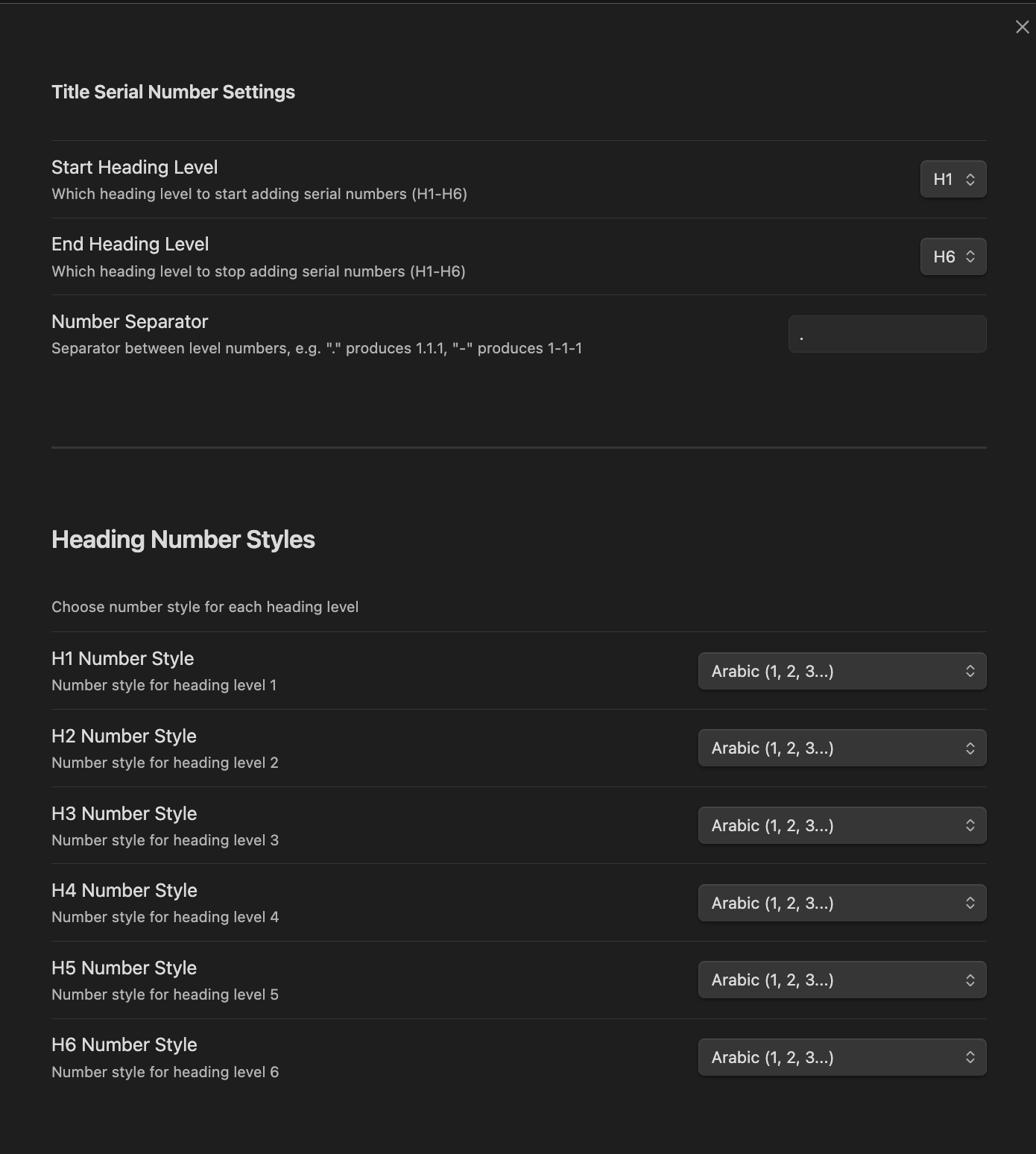
Settings Options
| Option | Description |
|---|---|
| Start Heading Level | Which heading level to start adding serial numbers (H1-H6) |
| End Heading Level | Which heading level to stop adding serial numbers (H1-H6) |
| Number Separator | Separator between level numbers (default: .) |
| H1-H6 Number Style | Choose the numbering style for each heading level |
Example
Input
# Introduction

## Background

### History

### Current State

## Methods

### Approach A

### Approach B

# Conclusion
Output (with default settings: Arabic, separator .)
# 1 Introduction

## 1.1 Background

### 1.1.1 History

### 1.1.2 Current State

## 1.2 Methods

### 1.2.1 Approach A

### 1.2.2 Approach B

# 2 Conclusion
Output (with mixed styles: H1=Roman, H2=Arabic, H3=Alpha lowercase)
# I Introduction

## I.1 Background

### I.1.a History

### I.1.b Current State

## I.2 Methods

### I.2.a Approach A

### I.2.b Approach B

# II Conclusion
Installation
From Obsidian Community Plugins
- Open Obsidian Settings
- Go to Community Plugins and disable Safe Mode
- Click Browse and search for "Title Serial Number"
- Install and enable the plugin
Manual Installation
- Download the latest release from GitHub Releases
- Extract the files to your vault's
.obsidian/plugins/obsidian-title-serial-number-plugin/folder - Reload Obsidian and enable the plugin in Community Plugins settings
License
MIT License - see LICENSE for details.
HealthGood
ReviewCaution
About
Add serial numbers to Markdown headings with seven styles including Arabic, Roman, Chinese, and alphabetic. Choose which heading levels to number, set per-level styles and a custom separator, preview changes live, and apply or clear numbers across a document.Details
Current version
1.1.0
Last updated
8 months ago
Created
5 years ago
Updates
4 releases
Downloads
8k
Compatible with
Obsidian 0.15.0+
Platforms
Desktop, Mobile
License
MIT
Author