Search...Search plugins and themes...
⌘K
Sign in
  • Get started
  • Download
  • Pricing
  • Enterprise
  • Account
  • Obsidian
  • Overview
  • Sync
  • Publish
  • Canvas
  • Mobile
  • Web Clipper
  • CLI
  • Learn
  • Help
  • Developers
  • Changelog
  • About
  • Roadmap
  • Blog
  • Resources
  • System status
  • License overview
  • Terms of service
  • Privacy policy
  • Security
  • Community
  • Plugins
  • Join the community
  • Discord
  • Forum / 中文论坛
  • Merch store
  • Brand guidelines
Follow us
DiscordTwitterBlueskyThreadsMastodonYouTubeGitHub
© 2026 Obsidian

QuickShare

mcndtmcndt29k downloads

Securely share your notes with one click. Notes are end-to-end encrypted. No API keys or configuration required.

Add to Obsidian
  • Overview
  • Scorecard
  • Updates15

Obsidian QuickShare - Securely share your Obsidian notes with one click

Host Obsidian notes over the internet using end-to-end encryption. Requires zero configuration and no account.

I built this service mainly to use for myself, as I got sick of finding third-party services to quickly share some Markdown notes I wrote in Obsidian. Because I believe that others might find this useful too, I decided to release it as a public service.

How it works

Your notes are stored securely using strong AES-256-CBC encryption. The decryption key is never sent to the server, so not even the server can open your notes.

By default, notes are stored on my companion project, Noteshare.space. It is a simple storage service that caches your encrypted notes for 31 days and hosts a web application for viewing them. Both the server and frontend are open source under the MIT license. Users are free to host an instance of the storage service at their own domain.
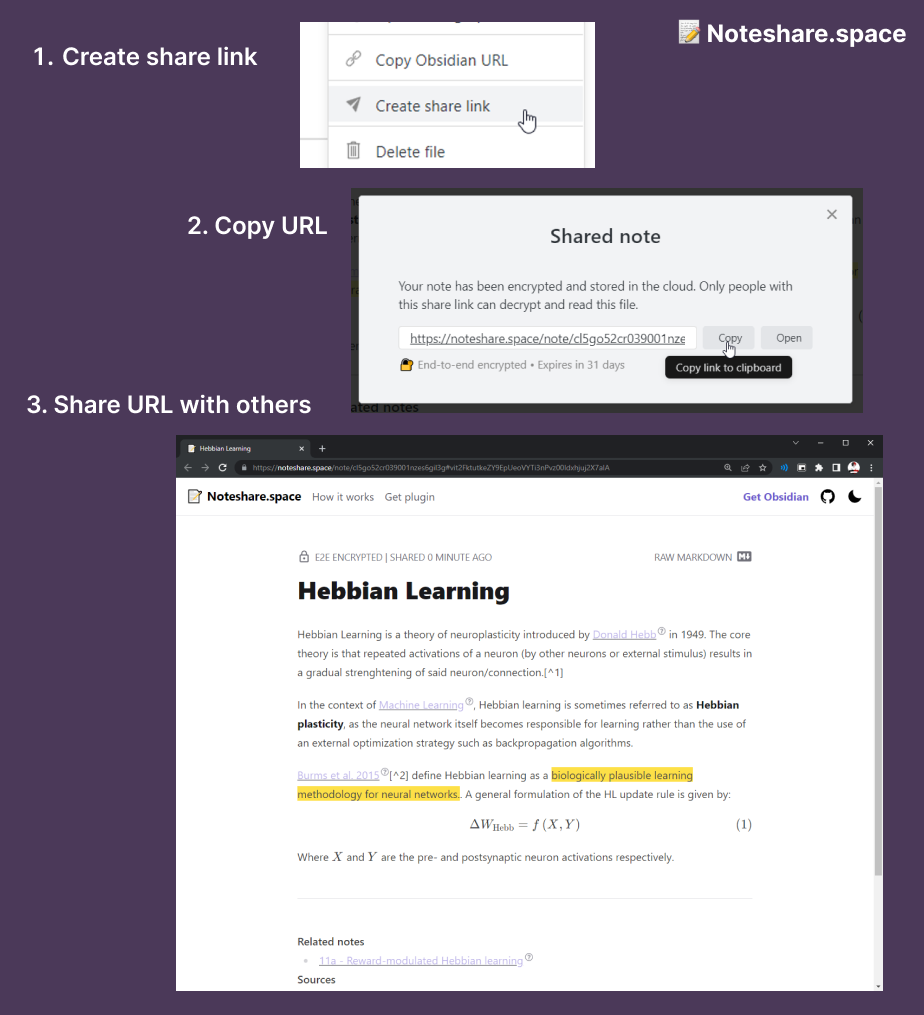
Explainer

Functionality

  • AES-256-CBC encryption with single-use encryption keys
  • Requires no account or external API keys
  • Use Noteshare.space to share notes for free, or host your own instance to gain full control.

Installing

Both the plugin and Noteshare.space are currently in beta. To beta test, you can install the plugin using BRAT (see BRAT > Adding a beta plugin for further instructions).

Feedback

The preferred way to report bugs or request new features for the web app or the Obsidian plugin is via the GitHub issues page.

If you want a more interactive way to discuss bugs or features, you can join the Discord server.

Support

If you like this plugin and want to support me, you can do so via Buy me a Coffee:

66%
HealthFair
ReviewCaution
About
Share Obsidian notes securely with one click using end-to-end AES-256-CBC encryption and single-use keys. Send encrypted notes to Noteshare.space or host your own storage to share without accounts while keeping decryption keys local.
PublishingExportIntegrations
Details
Current version
1.3.1
Last updated
3 years ago
Created
4 years ago
Updates
15 releases
Downloads
29k
Compatible with
Obsidian 0.13.25+
License
MIT
Report bugRequest featureReport plugin
Author
mcndtmcndt
mcndt.github.io/
GitHubmcndt
  1. Community
  2. Plugins
  3. Publishing
  4. QuickShare

Related plugins

WordPress

Publish to WordPress.

Yanki

Sync flashcards from a folder in your vault to Anki. Pure Markdown syntax. No fuss.

Digital Garden

Publish your notes to a digital garden for others to enjoy.

BRAT

Easily install a beta version of a plugin for testing.

Zotero Integration

Insert and import citations, bibliographies, notes, and PDF annotations from Zotero.

Maps

Adds a map layout to bases so you can display notes as an interactive map view.

Smart Composer

AI chat with note context, smart writing assistance, and one-click edits for your vault.

LanguageTool Integration

advanced spell/grammar checks with the help of language-tool.

Readwise Official

Sync highlights from Readwise to your vault.

MCP Tools

Securely connect Claude Desktop to your vault with semantic search, templates, and file management capabilities.