
- Overview
- Scorecard
- Updates25
This plugin aims to make highlight import from Kobo devices easier.
How to use
Once installed, the steps to import your highlights directly into the vault are:
- Connect your Kobo device to PC using a proper USB cable
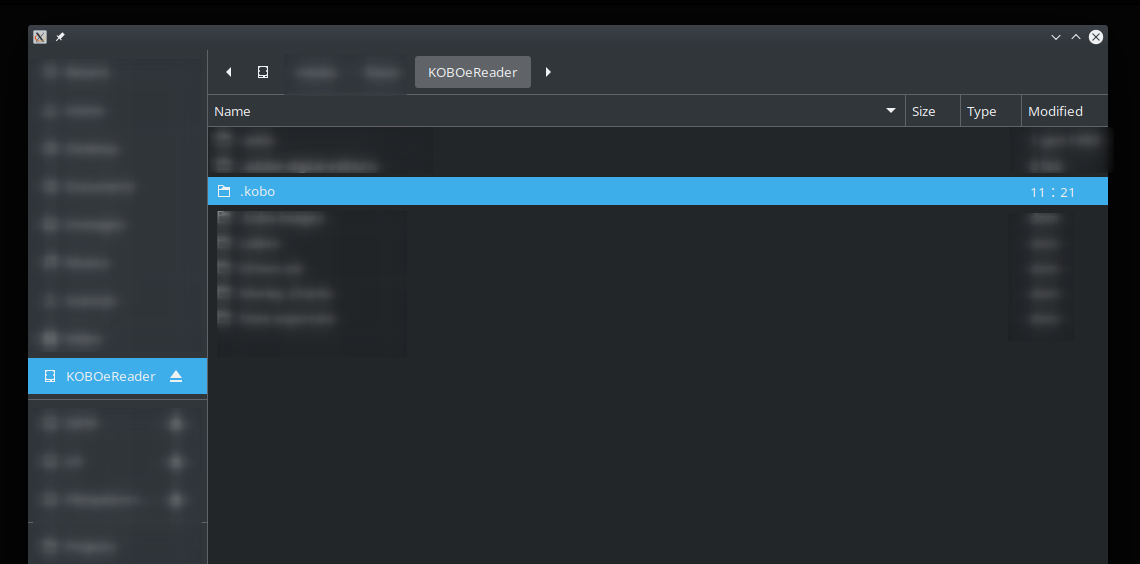
- Check if it has mounted automatically, or mount it manually (e.g. open the root folder of your Kobo using a file manager)
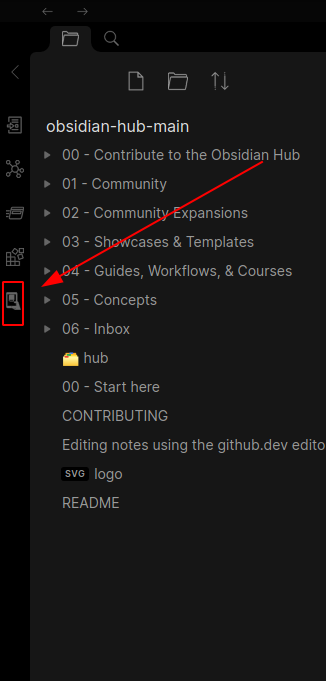
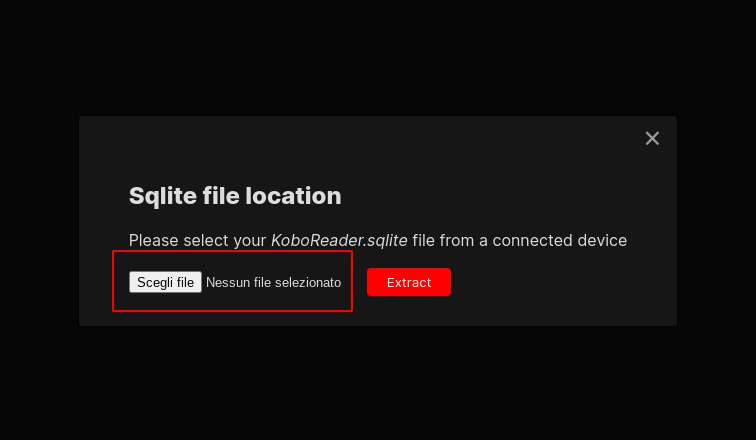
- Open the import window using the plugin button
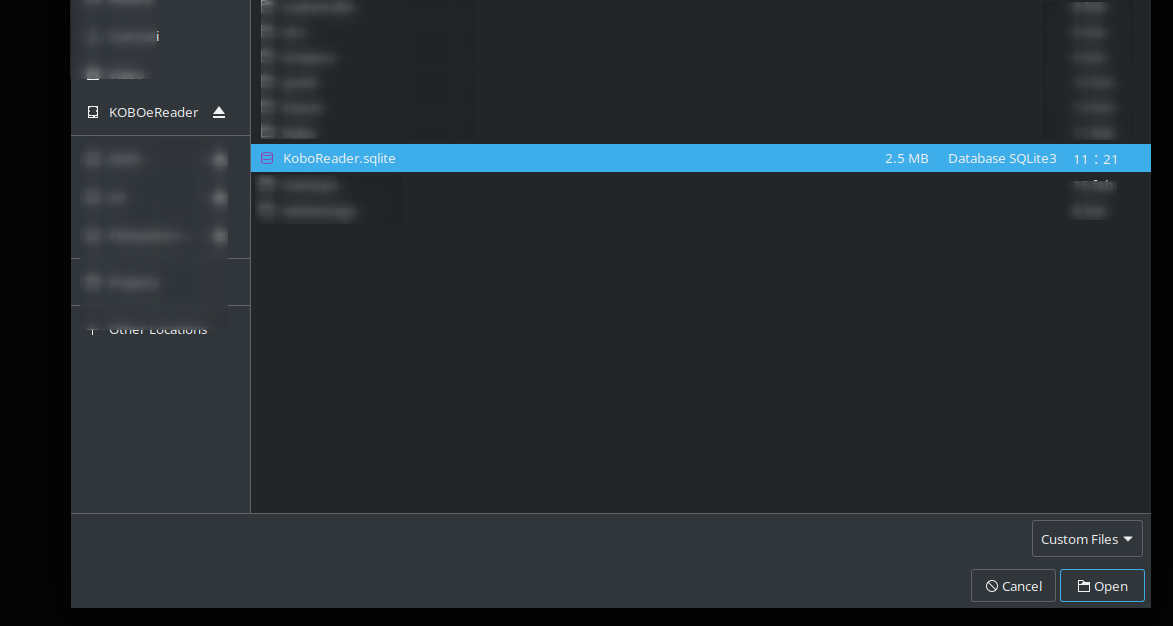
- Locate KoboReader.sqlite in the .kobo folder ( this folder is hidden, so if you don't see it you should enable hidden files view from system configs )
- Extract
Templating
The plugin uses Eta.js for templating. You can fully customize the output using Eta's template syntax. See the Eta.js template syntax documentation for details.
The default template is:
---
title: "<%= it.bookDetails.title %>"
author: <%= it.bookDetails.author %>
publisher: <%= it.bookDetails.publisher ?? '' %>
dateLastRead: <%= it.bookDetails.dateLastRead?.toISOString() ?? '' %>
readStatus: <%= it.bookDetails.readStatus ? it.ReadStatus[it.bookDetails.readStatus] : it.ReadStatus[it.ReadStatus.Unknown] %>
percentRead: <%= it.bookDetails.percentRead ?? '' %>
isbn: <%= it.bookDetails.isbn ?? '' %>
series: <%= it.bookDetails.series ?? '' %>
seriesNumber: <%= it.bookDetails.seriesNumber ?? '' %>
timeSpentReading: <%= it.bookDetails.timeSpentReading ?? '' %>
---

# <%= it.bookDetails.title %>

## Description

<%= it.bookDetails.description ?? '' %>

## Highlights

<% it.chapters.forEach(([chapterName, highlights]) => { -%>
## <%= chapterName.trim() %>

<% highlights.forEach((highlight) => { -%>
<%= highlight.text %>

<% if (highlight.note) { -%>
**Note:** <%= highlight.note %>

<% } -%>
<% if (highlight.dateCreated) { -%>
*Created: <%= highlight.dateCreated.toISOString() %>*

<% } -%>
<% }) -%>
<% }) %>
Variables
The following variables are available in your template:
| Variable | Type / Structure | Description |
|---|---|---|
bookDetails |
Object | Book metadata: title, author, publisher, dateLastRead, readStatus, percentRead, isbn, series, seriesNumber, timeSpentReading, description |
chapters |
Array of [chapterName, highlights] |
Each highlights is an array of bookmarks for that chapter |
ReadStatus |
Enum mapping | Maps read status values to their string labels |
highlight |
Object | Each highlight/bookmark: - bookmarkId: Unique ID- text: The raw highlight text- contentId: Content identifier- note: Optional note/annotation (if any)- dateCreated: Date when the highlight was created- color: Optional color of the highlight (if any) (0 for yellow, 1 for red, 2 for blue, 3 for green) |
Example usage
<% it.chapters.forEach(([chapterName, highlights]) => { -%>
## <%= chapterName %>
<% highlights.forEach(h => { -%>
<%= h.text %>
<% if (h.note) { -%>
**Note:** <%= h.note %>
<% } -%>
<% if (h.dateCreated) { -%>
*Created: <%= h.dateCreated.toISOString() %>*
<% } -%>
<% }) -%>
<% }) %>
Date formatting examples
<!-- YYYY-MM-DD format -->
*Created: <%= h.dateCreated.getFullYear() %>-<%= String(h.dateCreated.getMonth() + 1).padStart(2, '0') %>-<%= String(h.dateCreated.getDate()).padStart(2, '0') %>*

<!-- Localized date -->
*Created: <%= h.dateCreated.toLocaleDateString() %>*

<!-- Localized date and time -->
*Created: <%= h.dateCreated.toLocaleString() %>*
For more advanced syntax, see the Eta.js template syntax documentation.
Template example using Obsidian callouts to display color of highlights
---
title: "<%= it.bookDetails.title %>"
author: <%= it.bookDetails.author %>
publisher: <%= it.bookDetails.publisher ?? '' %>
dateLastRead: <%= it.bookDetails.dateLastRead?.toISOString() ?? '' %>
readStatus: <%= it.bookDetails.readStatus ? it.ReadStatus[it.bookDetails.readStatus] : it.ReadStatus[it.ReadStatus.Unknown] %>
percentRead: <%= it.bookDetails.percentRead ?? '' %>
isbn: <%= it.bookDetails.isbn ?? '' %>
series: <%= it.bookDetails.series ?? '' %>
seriesNumber: <%= it.bookDetails.seriesNumber ?? '' %>
timeSpentReading: <%= it.bookDetails.timeSpentReading ?? '' %>
---

# <%= it.bookDetails.title %>

## Description

<%= it.bookDetails.description?.replace(/<[^>]*>/g, '') ?? '' %>

## Highlights

<% it.chapters.forEach(([chapterName, highlights]) => { -%>
### <%= chapterName.trim() %>

<% highlights.forEach((highlight) => { const calloutMap = {'1': 'failure', '2': 'info', '3': 'success'}; const calloutType = calloutMap[highlight.color] ?? 'quote'; const calloutText = highlight.text.split('\n').map(line => '> ' + line).join('\n'); -%>
> [!<%= calloutType %>]
<%= calloutText %>

<% if (highlight.note) { -%>
**Note:** <%= highlight.note %>

<% } -%>
<% }) -%>
<% }) %>
Helping Screenshots
Contributing
Please feel free to test, send feedbacks using Issues and open Pull Requests to improve the process.
HealthGood
ReviewCaution
About
Import highlights and notes from a Kobo device's KoboReader.sqlite directly into your vault. Customize output with Eta.js templates to include book metadata, chapters, creation dates and personal notes, and generate Markdown-ready files for each book.Details
Current version
5.0.0
Last updated
7 months ago
Created
4 years ago
Updates
25 releases
Downloads
12k
Compatible with
Obsidian 0.15.9+
Platforms
Desktop only
License
MIT