Search...Search plugins and themes...
⌘K
Sign in
  • Get started
  • Download
  • Pricing
  • Enterprise
  • Account
  • Obsidian
  • Overview
  • Sync
  • Publish
  • Canvas
  • Mobile
  • Web Clipper
  • CLI
  • Learn
  • Help
  • Developers
  • Changelog
  • About
  • Roadmap
  • Blog
  • Resources
  • System status
  • License overview
  • Terms of service
  • Privacy policy
  • Security
  • Community
  • Plugins
  • Themes
  • Discord
  • Forum / 中文论坛
  • Merch store
  • Brand guidelines
Follow us
DiscordTwitterBlueskyThreadsMastodonYouTubeGitHub
© 2026 Obsidian

Highlight Public Notes

dennisseideldennisseidel6k downloads

Warn that a note is public (based on a frontmatter attribute) by coloring the note red.

Add to Obsidian
  • Overview
  • Scorecard
  • Updates9

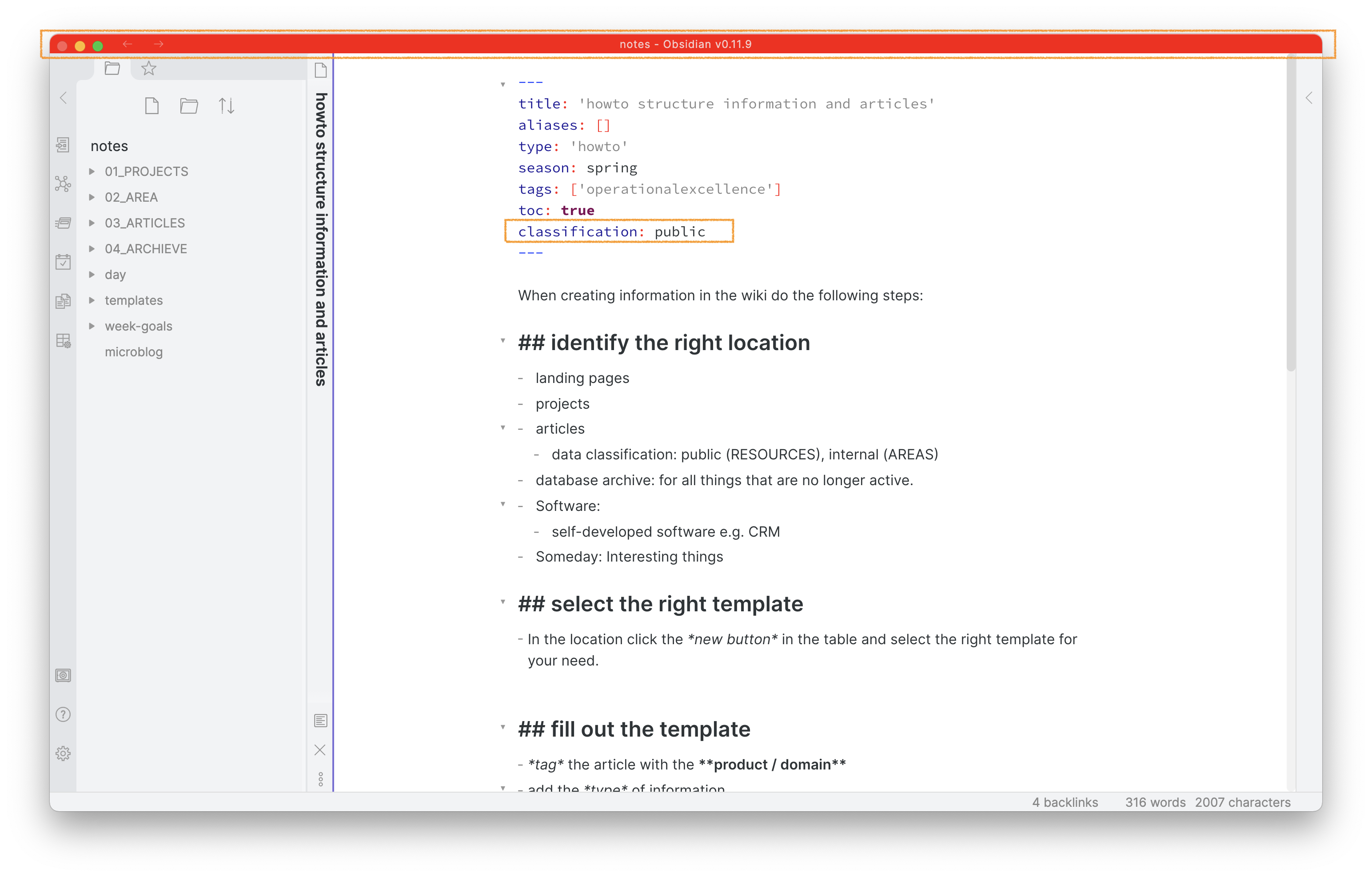
This plugin for Obsidian highlights the titlebar of notes that you classify as public in the frontmatter or that is contained in a specific folder. This prevents you from writing confidential data into notes you later publish e.g. through a script.
screenshot-full

Usage

After enabling the plugin in the settings menu, configure if you want to highlight notes in a specific folder (e.g. 03_ARTICLES) or highlight a frontmatter attribute and value (e.g. classification: public). You can update the attribute the plugin checks as well as the value. Close the menu and add a note either to the highlighted folder or add the classified frontmatter attribute. As the plugin only performs the highlight check when you load the file you need to reload the file to see the higlighted titlebar imidiately. You can reload the file by switching to another note and back. You see on load of the page the plugin check the frontmatter e.g. classification: public or the path and highlights the titlebar red.

Alternative: cssclasses

Obsidian has a cssclasses build-in. Combining a custome css snippet with the cssclass: attribute in the frontmatter provides a similar functionality.

Compatibility

obsidian-highlightpublicnotes-plugin currently requires Obsidian v0.9.12 or above to work properly.

Installation

You can install the plugin via the Community Plugins tab within Obsidian. Just search for "highlight public notes".

Changes

You find the full changelog here.

60%
HealthFair
ReviewSatisfactory
About
Highlight titlebars of notes marked as public via frontmatter or placed in a specified folder. Show a red visual warning to prevent accidentally adding confidential or sensitive data to notes you plan to publish.
AppearancePropertiesFolders
Details
Current version
1.6.0
Last updated
4 years ago
Created
5 years ago
Updates
9 releases
Downloads
6k
Compatible with
Obsidian 0.9.12+
Platforms
Desktop, Mobile
Report bugRequest featureReport plugin
Author
dennisseideldennisseidel
dennisseidel.de
GitHubdennisseidel
  1. Community
  2. Plugins
  3. Appearance
  4. Highlight Public Notes

Related plugins

Pretty Properties

Makes note properties look more fun: adds side image, banners, list property colors and allows to hide specific properties.

Multi Properties

Add properties to multiple notes at once. Either right-click a folder or select multiple notes and right-click the selection.

Colored Bases Properties

Color property lists and formula properties in Bases.

File Name History

Store file name or folder name change history into note properties.

Advanced Canvas

Supercharge your canvas experience. Create presentations, flowcharts and more.

Minimal Theme Settings

Control the colors and fonts in Minimal Theme.

Hider

Hide interface elements such as tooltips, status bar, titlebar, and more.

Meta Bind

Make your notes interactive with inline input fields, metadata displays, and buttons.

Style Settings

Adjust theme, plugin, and snippet CSS variables.

Flexplorer

Enhance the file explorer with custom sorting, pinning, and hiding.