File Cooker
 PageClear17k downloads
Deal batch notes from search results,current file, or Dataview query string.
- Overview
- Scorecard
- Updates33
Cook your notes like a chef: pick the ingredients, fire the pan, confirm before it's served ✅
File Cooker
File Cooker is an Obsidian plugin for batch file operations. Treat a batch of files (from search results, clipboard, current file links, Dataview / Bases queries …) as ingredients, then run a single command to move, rename, edit properties, delete, merge, sync to flomo, or add to Canvas — like cooking them in one pan.
- 🧺 Any source: clipboard · current file · search results · Dataview query · Bases query · context menu
- 🍳 Rich operations: move / rename / edit properties / delete / merge / create / sync to flomo / copy links / add to Canvas
- 🛡️ Confirm before acting: every operation shows a confirmation modal; destructive ones (delete) are highlighted in red
- 📱 Mobile friendly: not desktop-only (
isDesktopOnly: false)
✨ Features
- Batch edit properties: add / modify / delete frontmatter properties;
tags/alias/cssclassessupport comma-separated multi-value edits and-prefix to remove a single value; no MetaEdit plugin needed (built-in since v1.8.0) - Batch move / rename: organize selected files into a target folder or rename them in one go
- Batch merge: merge multiple files into one target file (YAML ignored)
- Batch create: materialize unresolved links of the current file into real files
- Sync to flomo: sync file links, file content, or current selection (requires flomoAPI)
- Copy links: copy Dataview / Bases result links to the clipboard
- Add to Canvas: batch-add files, text / selection, or Dataview tasks into a target canvas
- ⭐ Bases integration (new in v2.0.0): run file operations directly on Bases query results
- ⭐ Context menu (new in v2.0.0): right-click access from editor and file explorer
- Presentation mode (new in v1.9.0): one-click larger font and wider editor for screen sharing
📸 Screenshot
Demo: search results + clipboard + Dataview query — all sources share the same "Select → Cook → Confirm" flow.
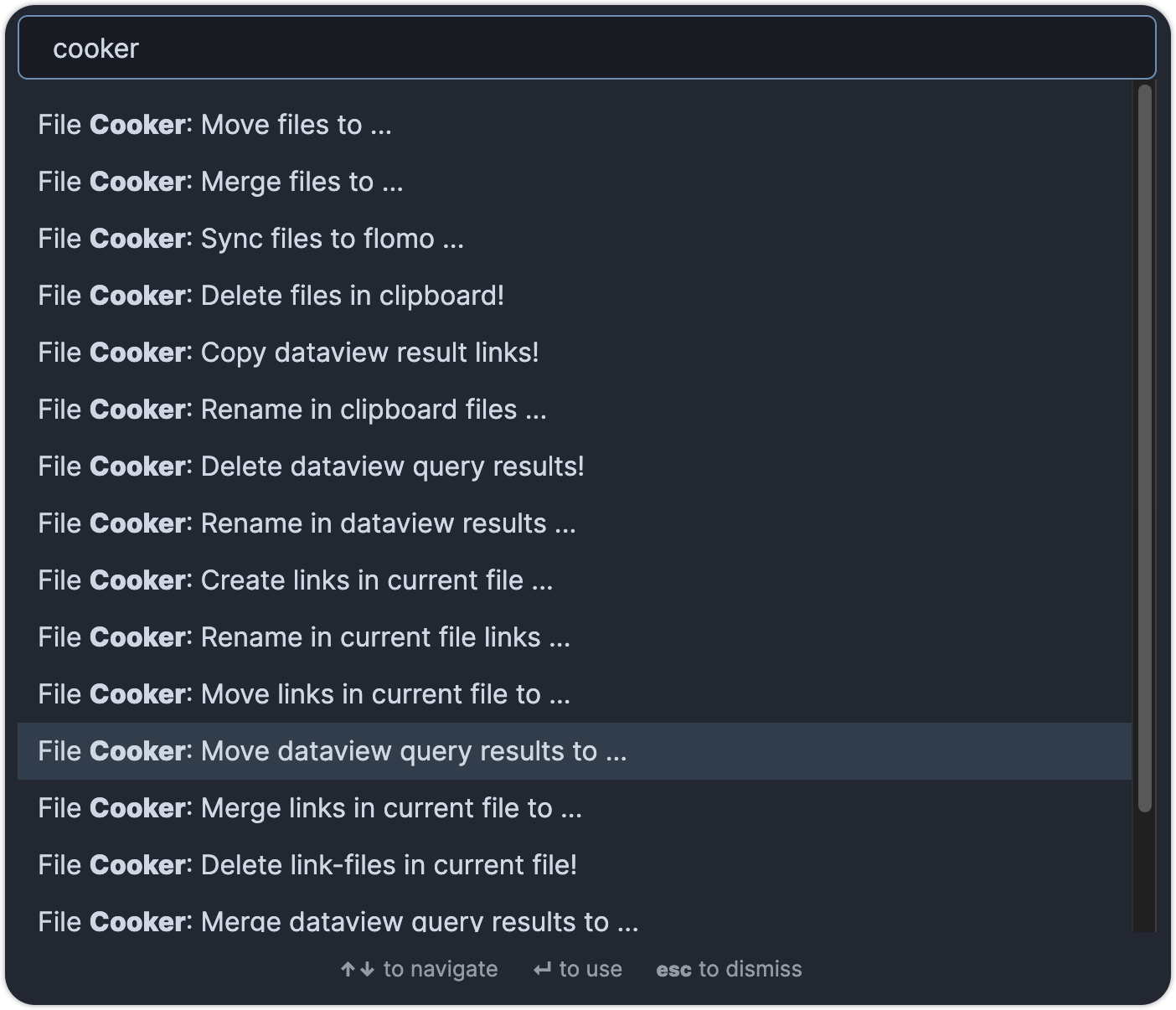
🍳 How it works: Select → Cook → Confirm
- Select: pick a batch of files from any supported source
- Cook: run the matching operation command
- Confirm: review the targets in the confirmation modal, then execute
Supported input sources
| Source | How to use | Notes |
|---|---|---|
| 📋 Clipboard | Copy file links (e.g. search results) first, then run clipboard commands | Plain text content can also be added to Canvas |
| 📄 Current file | Open a file, then run current-file-link commands | Reads links / unresolved links / content / selection |
| 🔍 Search results | Open the Obsidian search panel, then run search results commands | Operates directly on the results in the panel |
| 📊 Dataview query | Select a DQL or DataviewJS query in the editor, then run Dataview commands | Requires the Dataview plugin; DataviewJS supported since v1.7.1 |
| 🗄️ Bases query | Open a Bases view, then run Bases commands | New in v2.0.0; only rows mappable to real files are processed |
| 🖱️ Context menu | Right-click in the editor or file explorer | New in v2.0.0 |
Supported operations
| Operation | Example command | Notes |
|---|---|---|
| 📁 Move | Move ... to folder | Batch move to a target folder |
| ✏️ Rename | Rename ... | Batch rename |
| 🏷️ Edit properties | Edit Properties ... | Add / modify / delete frontmatter, multi-value supported |
| 🗑️ Delete | Delete ... ! | Destructive — highlighted red in the confirmation modal |
| 🔗 Merge | Merge ... to ... | Merge into a target file |
| 🆕 Create | Create links ... | Create files from unresolved links |
| 📤 Sync to flomo | Sync ... to flomo | File links / content / selection |
| 📋 Copy links | Copy ... links! | Copy result links to the clipboard |
| 🖼️ Add to Canvas | Add ... to canvas | Files / text / tasks |
Bases integration (new in v2.0.0)
When a Bases data source is available, File Cooker provides a Bases command group aligned with the Dataview file commands (move / rename / edit properties / delete / merge / sync to flomo / copy links / add to canvas / add task).
Behavior boundaries:
- File-only mapping: only rows that can be mapped to real vault files are processed
- Ignore non-file rows: unmapped rows are skipped, and a notice reports the ignored count
- No row writes: File Cooker does not modify Bases row fields in this flow
Context menu (new in v2.0.0)
- Editor context menu:
File Cooker > Selection: sync the selection to flomo / add it to a canvas (only when a selection exists)File Cooker > Current file links: run link-based batch operations from the current file
- File explorer context menu:
File Cooker > Target file: rename / edit properties / delete the right-clicked file
Notes: destructive actions (like delete) still require confirmation. If no active file exists, current-file-link operations are safely blocked with a notice.
🛟 Backup & Undo (new)
Every batch write operation — edit properties / move / rename / delete / merge / create — now takes a snapshot before applying, so you can undo a whole batch or revert selected files individually afterwards.
- Automatic snapshots: applied operations create a persistent backup record (content + paths); canceled or failed operations leave no residue
- Undo history:
Undo last batch operation ...opens history and focuses the most recent record;Open backup & undo history ...lists all records (time / type / file count / status) - Per-file revert: expand a record, check the files you want to restore, and revert — move/rename are reversed via Obsidian's rename (links auto-updated), deletes are rebuilt from the snapshot, created/copied files are trashed
- Drift protection: if a file was modified after the operation, it is marked modified and disabled — enable force override to overwrite it explicitly; nothing is ever silently overwritten
- Retention: keeps the most recent
Nrecords (default 20) and cleans up older backups automatically
Backup folder: backups are stored inside your vault (default
.file-cooker/backups). The dot prefix hides it from the file explorer by default; you can also add it to Settings → Files and links → Excluded files (e.g..file-cooker) to keep it out of search and graph. Out of scope: Canvas operations and flomo sync are not backed up (they write through internal APIs / the network and don't touch vault files).
⚙️ Settings
| Setting | Purpose | Default |
|---|---|---|
| Limit | Maximum number of files processed per batch | 300 |
| flomoAPI | flomo API endpoint, used to sync notes to flomo | empty |
| Enable backup | Create a snapshot for every batch write so it can be reverted | on |
| Backup folder | Vault folder where backups are stored (dot-prefix hides it) | .file-cooker/backups |
| Retention | Number of recent backup records to keep | 20 |
flomo sync commands will notify "Please config flomoAPI first!" when the API is not configured.
📦 Installation
Method 1: Community plugins (recommended)
- Settings → Third-party plugin → turn off Safe mode
- Click Browse, search for File Cooker
- Click Install, then enable the plugin
Method 2: Manual installation
- Download the latest release
- Extract the
obsidian-file-cookerfolder into<vault>/.obsidian/plugins/Note: on some machines the
.obsidianfolder is hidden. On macOS pressCommand+Shift+Dotto reveal it. - Reload Obsidian and enable the plugin in Settings
Requirements
- Obsidian ≥ 1.12.3 (since v2.0.0)
- Dataview plugin: only needed for the "Dataview query" source
- flomoAPI: only needed for "Sync to flomo" commands
- Everything else works out of the box with no extra dependencies
🛡️ Safety & limits
- Always confirm: every command opens a confirmation modal before any change is made
- Delete is highlighted: delete commands are marked in red in the confirmation modal
- Backup before apply: every batch write takes a snapshot first and can be reverted from history; drifted (mid-edited) files are never silently overwritten
- Batch limit: a single batch is limited to 300 files by default (adjustable in Settings)
- Visible failures: no files, no active file, missing config, etc. are always reported via Notice — never silently
💬 Feedback & support
Questions or suggestions? Feel free to add me on WeChat: IvyOdds, or open an issue on GitHub Issues.
If File Cooker helps you, please share it with your Obsidian friends 🙏
📜 License
- MIT License — see LICENSE
- Issues and pull requests are welcome
📝 Changelog
2.2.0
- New Backup & Undo: every batch write (properties / move / rename / delete / merge / create) is snapshotted and can be reverted per-file from history; drift detection prevents silent overwrites
- New settings: backup toggle, backup folder, retention
2.0.0
- New Bases query source for batch file operations (file-only rows; no Bases field writes)
- New context menu entries (editor: selection / current file links; file explorer: target file)
- Upgraded Obsidian dependency to 1.12.3
1.9.0
- New presentation mode: one-click larger font and wider editor for screen sharing
1.8.1
- Multi-value property editing:
tags/alias/cssclassesbatch add/remove via comma-separated values
1.8.0
- Built-in batch property editing — no MetaEdit plugin required
1.7.8
- New search results commands, operate directly on the search panel results
1.7.7
- Add Dataview tasks to Canvas
1.7.6
- Add text to Canvas
1.7.1
- Support DataviewJS page queries
1.7.0
- Batch-add files to Canvas
1.0 ~ 1.6
- Core capabilities: move, rename, merge, delete, create from unresolved links, sync to flomo, copy links
☕ Buy me a coffee