Search...Search plugins and themes...
⌘K
Sign in
  • Get started
  • Download
  • Pricing
  • Enterprise
  • Account
  • Obsidian
  • Overview
  • Sync
  • Publish
  • Canvas
  • Mobile
  • Web Clipper
  • CLI
  • Learn
  • Help
  • Developers
  • Changelog
  • About
  • Roadmap
  • Blog
  • Resources
  • System status
  • License overview
  • Terms of service
  • Privacy policy
  • Security
  • Community
  • Plugins
  • Themes
  • Discord
  • Forum / 中文论坛
  • Merch store
  • Brand guidelines
Follow us
DiscordTwitterBlueskyThreadsMastodonYouTubeGitHub
© 2026 Obsidian

Bellboy

shakedlokitsshakedlokits4k downloads

Opinionated file structure manager.

Add to Obsidian
  • Overview
  • Scorecard
  • Updates8

Bellboy is built to be an opinionated file structure manager for Obsidian.
Aiming keeping a clean and readable knowledge management file system while turning meanial tasks of note renaming and organizing redundant.

Features

File naming scheme

Bellboy looks up for the first header in you file, converts it to kebab-case and renames your file to match it.

In addition, if an icon frontmatter is added, this icon would be added to the name as well, so you could find your files more easily.
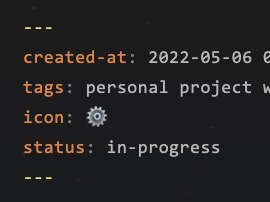
Renamer

But Why?

Wishing to maintain a file system agnostic naming scheme for files, I chose to use kebab-case as our main naming convention style.
And to support a better visual flare I've also added frontmatter icons(!) that are integrated into the file names.

File structure

Bellboy attempt to implement the Idea Processor method guidelines that aims at improving your output by automatically managing your idea's process and letting you focus on the execution. It does this by looking up your metadata status when you update it and moving the file to a folder corresponding it current state.
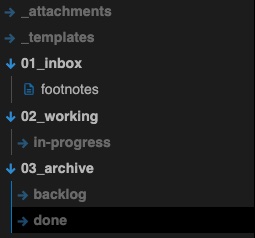
Structure

Idea Processor

It is a method based on R&D ideation process, where every idea goes from the inbox, and through a validation process to either it's execution or abandoment. Used in multiple professional domains and aims at optimizing the execution output, maximizing our potential.

Below we can find the general status flow in the process, futrher reading materials will be added soon.

flowchart LR
    waiting --> working
    archive <--> waiting
    working --> archive

    subgraph waiting
        inbox
    end
    
    subgraph working
        direction LR
        
        planning
        in-progress
        blocked
        
        in-progress <--> planning <--> blocked
    end
    
    subgraph archive
        direction LR
        done
        backlog
        
        backlog --> done
    end

Contributuion

How to report bugs

As this is an experimental plugin, bugs are expected to occur. Kindly open an issue in this repository and describe in detail what bug you encountered.

How to run locally

  • Clone this repo.
  • npm i or yarn to install dependencies
  • npm run dev to start compilation in watch mode.

Manually installing the plugin

  • Copy over main.js, styles.css, manifest.json to your vault VaultFolder/.obsidian/plugins/obsidian-bellboy/.

API Documentation

See https://github.com/obsidianmd/obsidian-api

HealthFair
ReviewCaution
About
Rename notes to the kebab-case of their first header and add frontmatter icons to filenames for easier discovery. Move notes automatically between inbox, waiting, working, and archive folders based on metadata status using the Idea Processor workflow.
FilesAutomationFolders
Details
Current version
1.0.10
Last updated
4 years ago
Created
4 years ago
Updates
8 releases
Downloads
4k
Compatible with
Obsidian 0.12.0+
Platforms
Desktop, Mobile
License
MIT
Report bugRequest featureReport plugin
Author
shakedlokitsshakedlokits
github.com/shakedlokits
GitHubshakedlokits
  1. Community
  2. Plugins
  3. Files
  4. Bellboy

Related plugins

Advanced URI

Control everything with URI.

Quick Explorer

Perform file explorer operations (and see your current file path) from the title bar, using the mouse or keyboard.

QuickAdd

Quickly add new notes or content to your vault.

Flexplorer

Enhance the file explorer with custom sorting, pinning, and hiding.

Waypoint

Easily generate dynamic MOCs in your folder notes using waypoints. Enables folders to show up in the graph view and removes the need for messy tags!

Custom File Explorer sorting

Manual or automatic config-driven reordering and sorting of files and folders in File Explorer.

Multi Properties

Add properties to multiple notes at once. Either right-click a folder or select multiple notes and right-click the selection.

GridExplorer

Browse and organize note files visually in a flexible grid layout.

Notebook Navigator

A better file browser and calendar inspired by Apple Notes, Bear, Evernote and Day One.

Templater

Create and use dynamic templates.