MindBraid
 soren-ac423 downloads
Turn Markdown notes into interactive, editable mind maps (思维导图) with layouts, themes, search, import, and export.
- Overview
- Scorecard
- Updates5

MindBraid
Turn Markdown notes into interactive, editable mind maps (思维导图).
简体中文 · Report an issue · Releases
MindBraid is a desktop-only Obsidian plugin for seeing, organizing, and reshaping the note you are already writing. Your Markdown remains the source of truth; MindBraid gives it a focused visual workspace without sending your notes anywhere.
Product tour
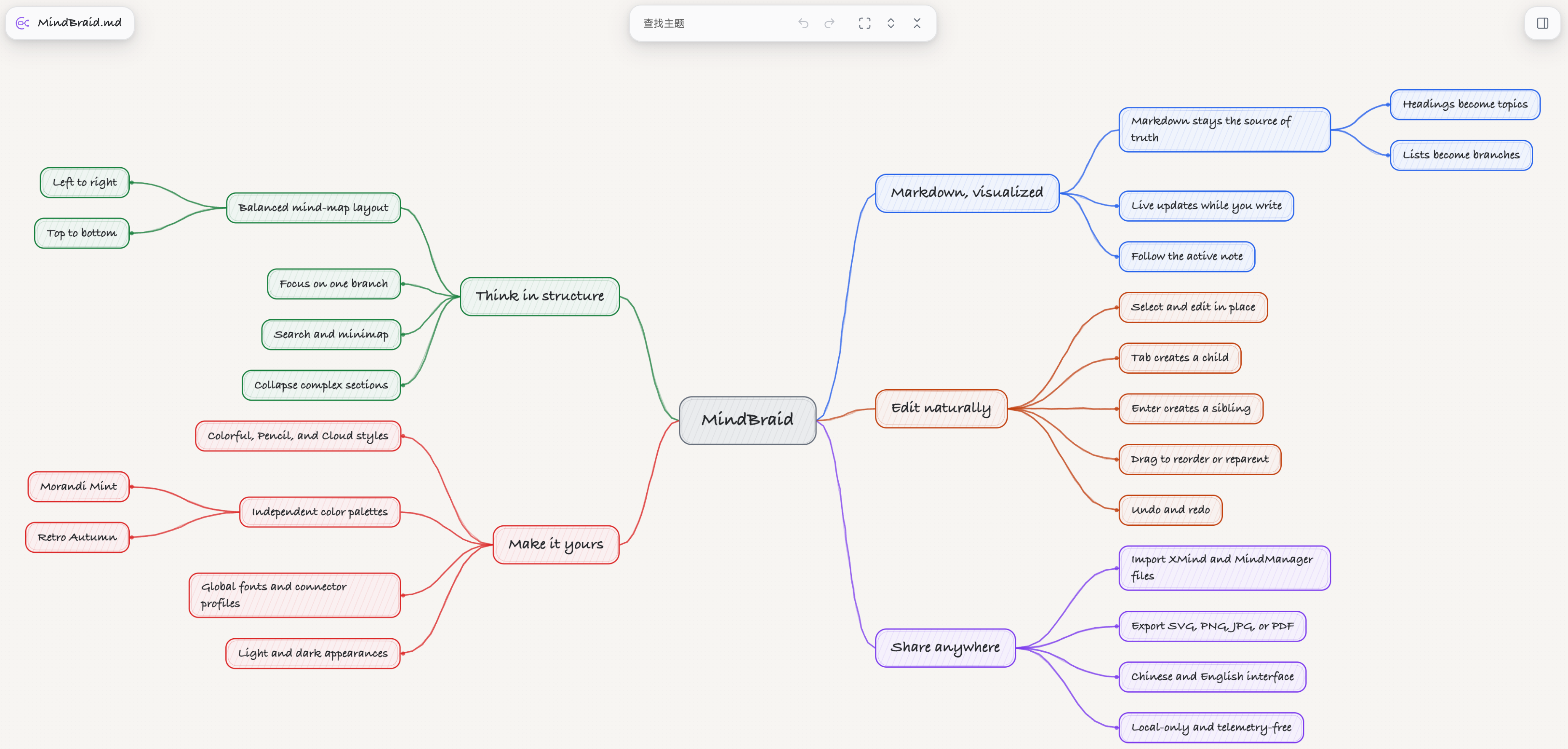
The map can use a hand-drawn treatment while keeping the same Markdown-backed structure and interactions.
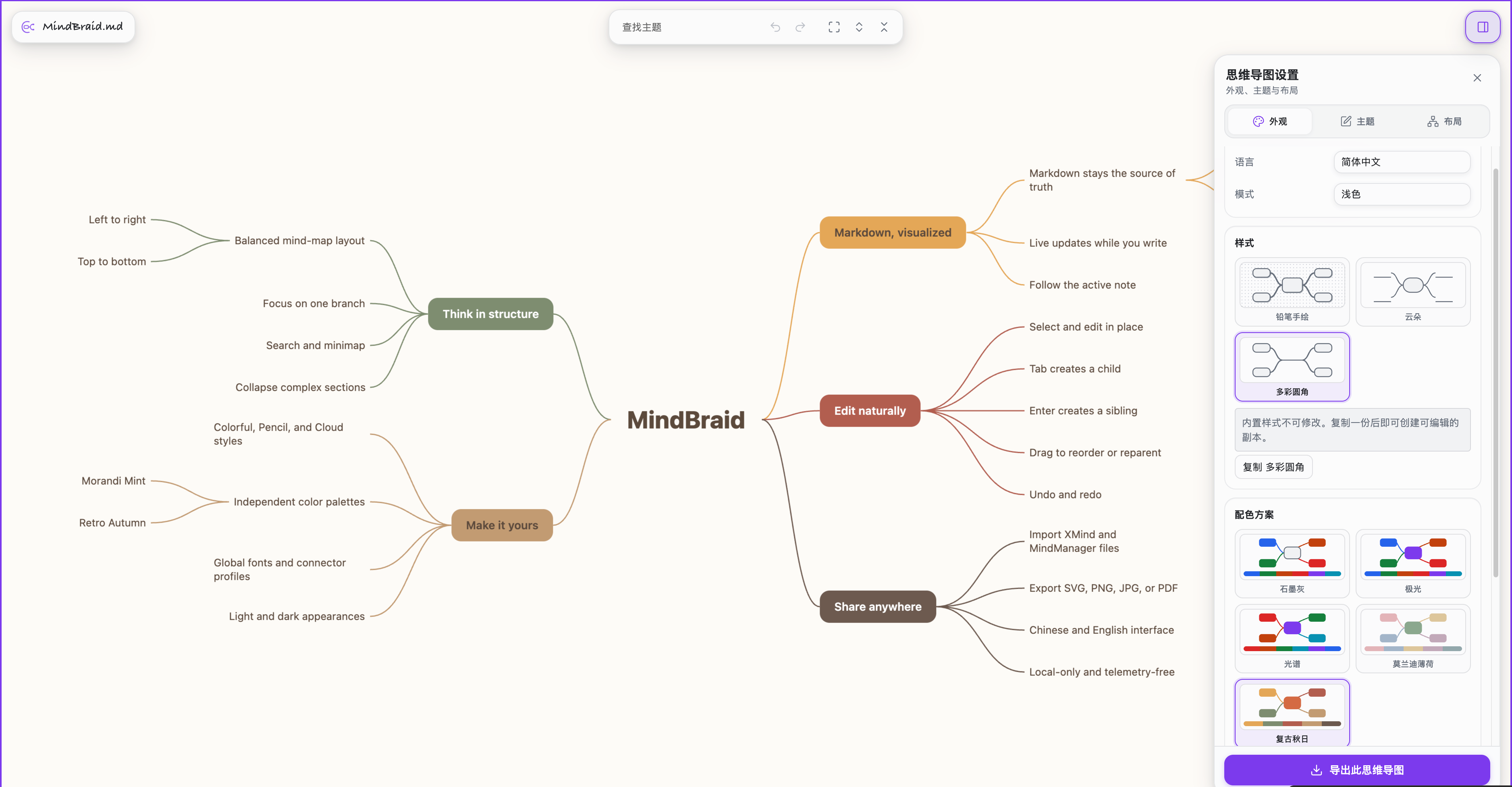
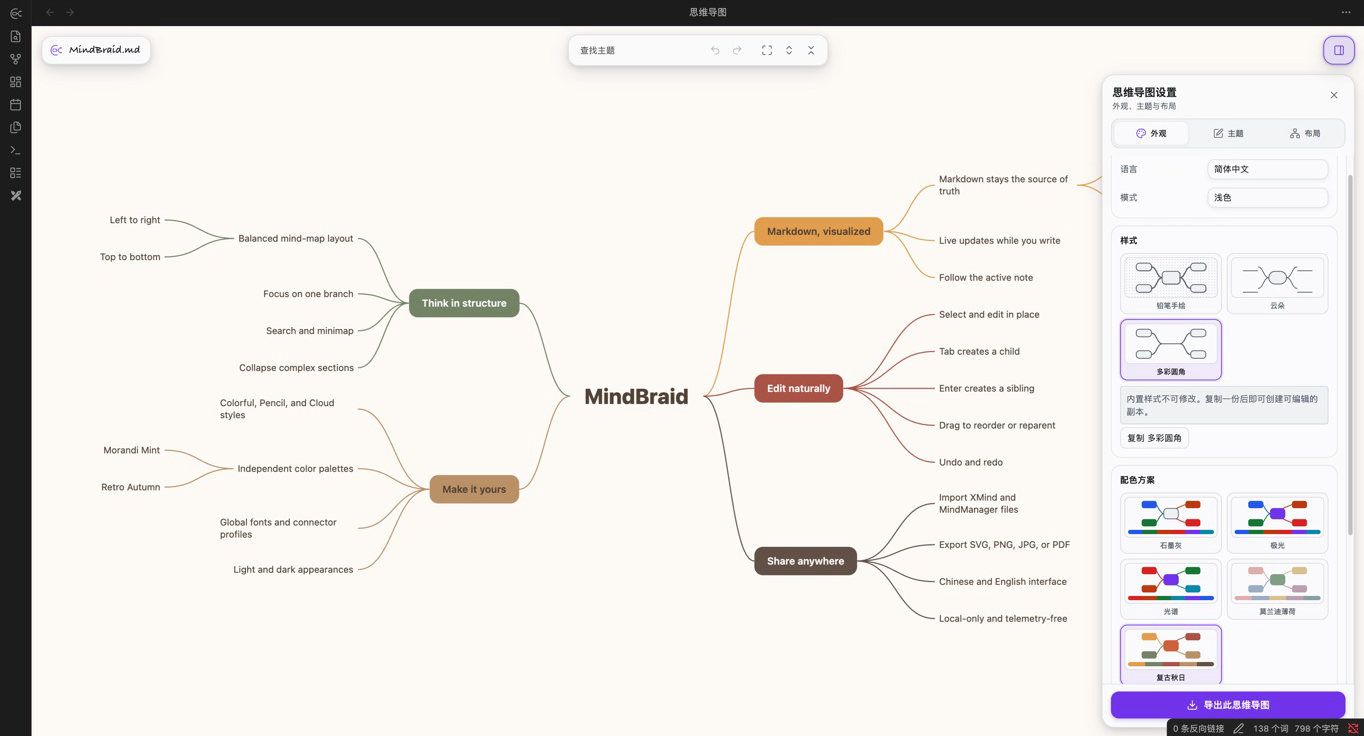
Styles control geometry and visual treatment; palettes change color only. The two axes can be combined independently from the sidebar.
Why MindBraid
Markdown-native
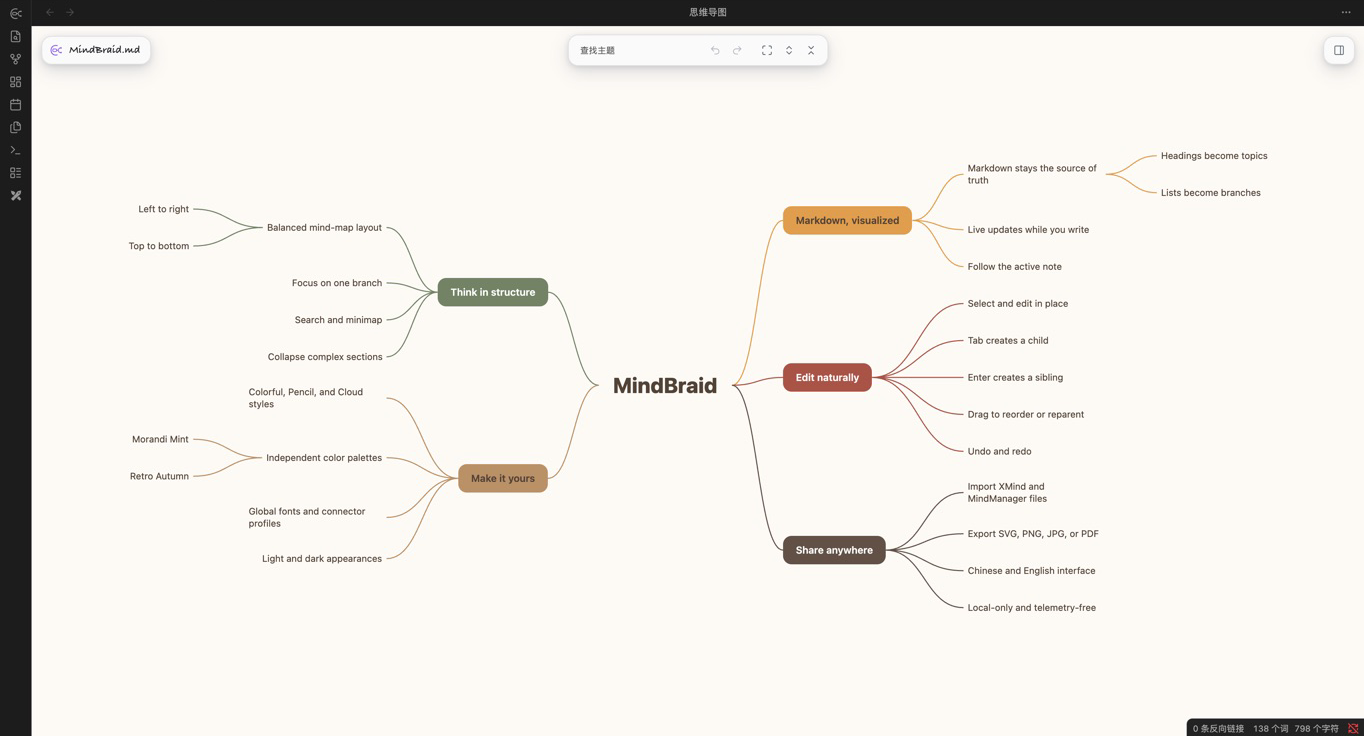
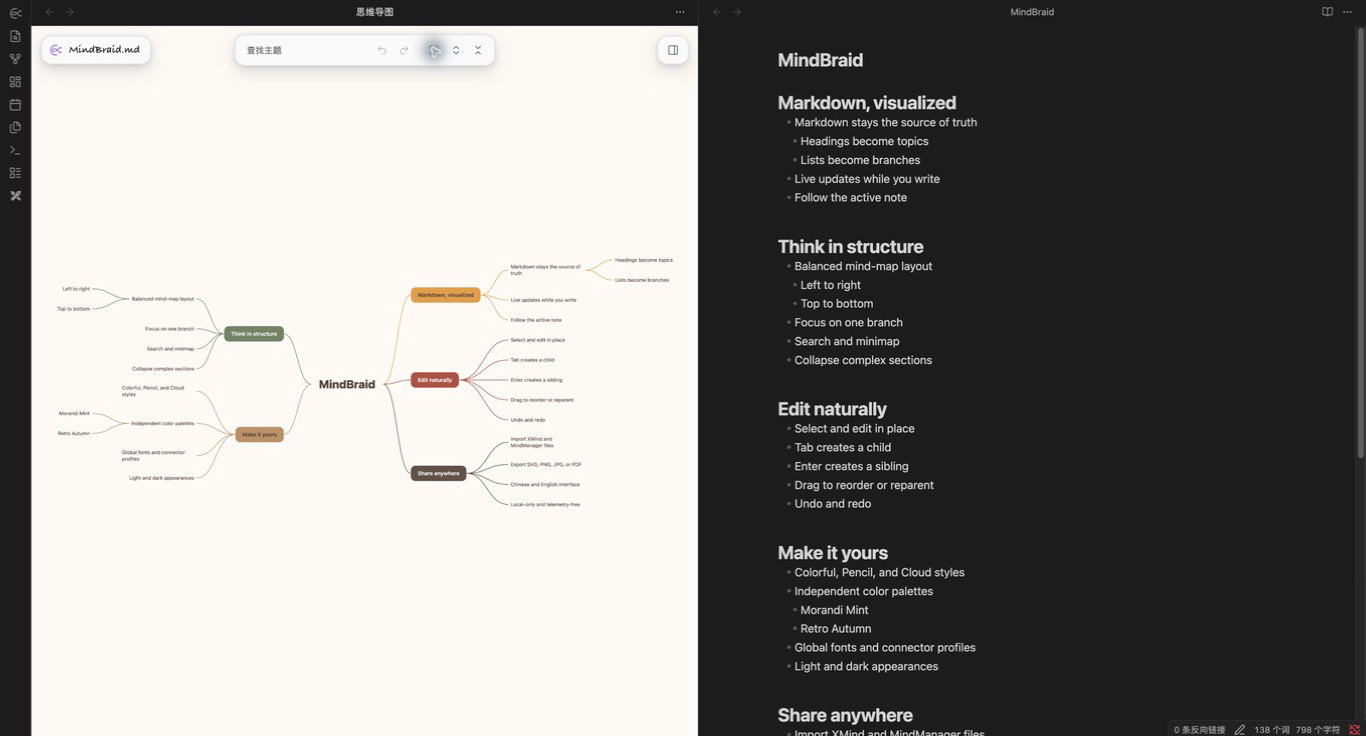
Open a mind map for the active note and MindBraid turns its ATX headings and nested ordered or unordered lists into topics. The map follows the active Markdown file and refreshes while you write, so there is no second document to keep in sync.
Edit in context
Use the map as a working view, not just a diagram:
- Select a topic with one click; click it again or double-click to edit in the topic itself.
- Press
Tabfor a child andEnterfor a sibling. Newly created topics open directly in editing mode. - Drag a branch to reorder it or make it a child of another compatible topic. The destination is previewed before any Markdown changes.
- Collapse a branch, pan and zoom the canvas, search the current note, focus a branch, or use the minimap when the map becomes dense.
- Use familiar topic actions for task checkboxes, copy, cut, paste, delete, outdent, parent insertion, and checked undo/redo.
- Undo or redo visual changes from the settings sidebar without touching the separate Markdown content history.
Make it yours
Choose a map layout independently from its visual treatment. MindBraid includes balanced and one-sided layouts with four directions, plus independent Style and Palette selectors. Colorful, Pencil, and Cloud styles can be paired with the built-in palettes, then refined with a global font, connector width and connector profile. Per-topic formatting, icons, markers, labels, boundaries, summaries, and relationships are available when you need more structure.
Keep control of your notes
- MindBraid parses only the note currently needed for the map. It does not scan your Vault.
- It does not access the network and includes no telemetry.
- Changing appearance, layout, collapse state, viewport, or other map presentation choices stores plugin data, not hidden Markdown metadata.
- Markdown is changed only after an explicit action such as committing an inline edit, creating or moving a topic, toggling a task, or running an explicit topic command. Selection, navigation, previews, refreshes, and presentation changes never write to your note.
More ways to work
Find your way — Search visible topics in the current note, navigate the tree with the keyboard, follow a Vault-local link, or open the source note at a topic's line.
Present the right level of detail — Collapse individual branches, focus on one branch with breadcrumbs, limit visible depth, and use a tab-local minimap. Unusually large maps open with a safe depth projection and an explicit Show all action, keeping the initial tab responsive without changing the note or its saved presentation.
Move work in and out — Import a locally selected .xmind, .mind, or
.mmap file through a preview, then explicitly create a new Markdown note.
Export an explicit snapshot as SVG, PNG, JPG, or PDF. Import never overwrites
an existing note; export does not alter Markdown, the live map, or its state.
Fit Obsidian — MindBraid follows Obsidian's appearance or can use a light or dark appearance inside its own views. Its interface is available in Simplified Chinese and English; new installs use Simplified Chinese by default.
Install
MindBraid requires Obsidian 1.7.2 or newer on desktop. Mobile support has not
been implemented or tested.
From Obsidian Community Plugins (recommended)
- Open Settings → Community plugins in Obsidian and select Browse.
- Search for MindBraid.
- Select Install, then enable MindBraid.
MindBraid is available in the official Community Plugins directory. This route keeps updates inside Obsidian and is the recommended installation method.
Manual install from a GitHub release
- Download
main.js,manifest.json, andstyles.cssfrom the latest release. - Create
<your-vault>/.obsidian/plugins/obmind/. - Put all three files in that directory.
- Reload Obsidian, then enable MindBraid under Settings → Community plugins.
Start a map
- Open a Markdown note.
- Use the MindBraid button in the left ribbon, or run MindBraid: Open mind map for current note from the Command Palette.
- A new MindBraid tab opens for the current note. Drag blank canvas to pan, use the mouse wheel to zoom, and use the toolbar for fit, layout, search, and other controls.
Every open MindBraid tab follows the active Markdown file. A non-Markdown file shows an explanatory state instead of attempting to parse it.
Markdown support
The filename becomes the central topic. MindBraid currently displays:
- ATX headings from
#to######, including skipped levels. - Unordered list items beginning with
-,*, or+. - Ordered list items beginning with
1.(and other numbers). - Nested list structure derived from indentation.
Lists attach to the closest preceding heading, or to the document root when there is none. YAML frontmatter, ordinary prose, block quotes, fenced or indented code, and unsupported Markdown structures stay out of the map.
Limits to know
- MindBraid is a desktop plugin. It is not a mobile-ready mind-map experience.
- It supports a practical Markdown subset, not every CommonMark construct: Setext headings, complex list continuation lines, lazy block quotes, and HTML block semantics are not represented as topics.
- Inline topic editing is deliberately conservative. It preserves supported inline Markdown where the source mapping is unambiguous; otherwise it safely writes escaped visible text for that topic.
- Very large maps use an initial tab-local depth guard and viewport culling. Choosing Show all can still make layout slower because layout currently runs on the main thread.
Privacy and source changes
MindBraid is local-first. It does not upload notes, request network resources, or collect telemetry. The plugin avoids whole-Vault scans and works from the current note.
Visual choices are saved as MindBraid plugin data rather than injected into your Markdown. By contrast, an explicit topic edit, creation, structural drop, task toggle, or supported topic command intentionally updates the source note. Before a write, MindBraid validates the current source mapping to avoid applying a stale operation. Root-topic renames rename the Markdown file through Obsidian; depending on your Obsidian link-update preference, Obsidian may update links to that file.
Help and contributing
Please report reproducible issues in the issue tracker. Include the MindBraid and Obsidian versions, operating system, a minimal Markdown sample, and the smallest reliable reproduction. Do not attach unrelated private Vault content.
For implementation and frontend-extension details, see the frontend contract. Third-party notices are available in THIRD_PARTY_NOTICES.md.
License
MindBraid is available under the MIT License. Notices for bundled open-source software are listed in THIRD_PARTY_NOTICES.md.