Vault Disk Usage (obdu)
 markuslitz16 downloads
Analyze vault disk usage in an ncdu-style interface with attachment attribution, reference inspection, and orphan detection.
- Overview
- Scorecard
- Updates2
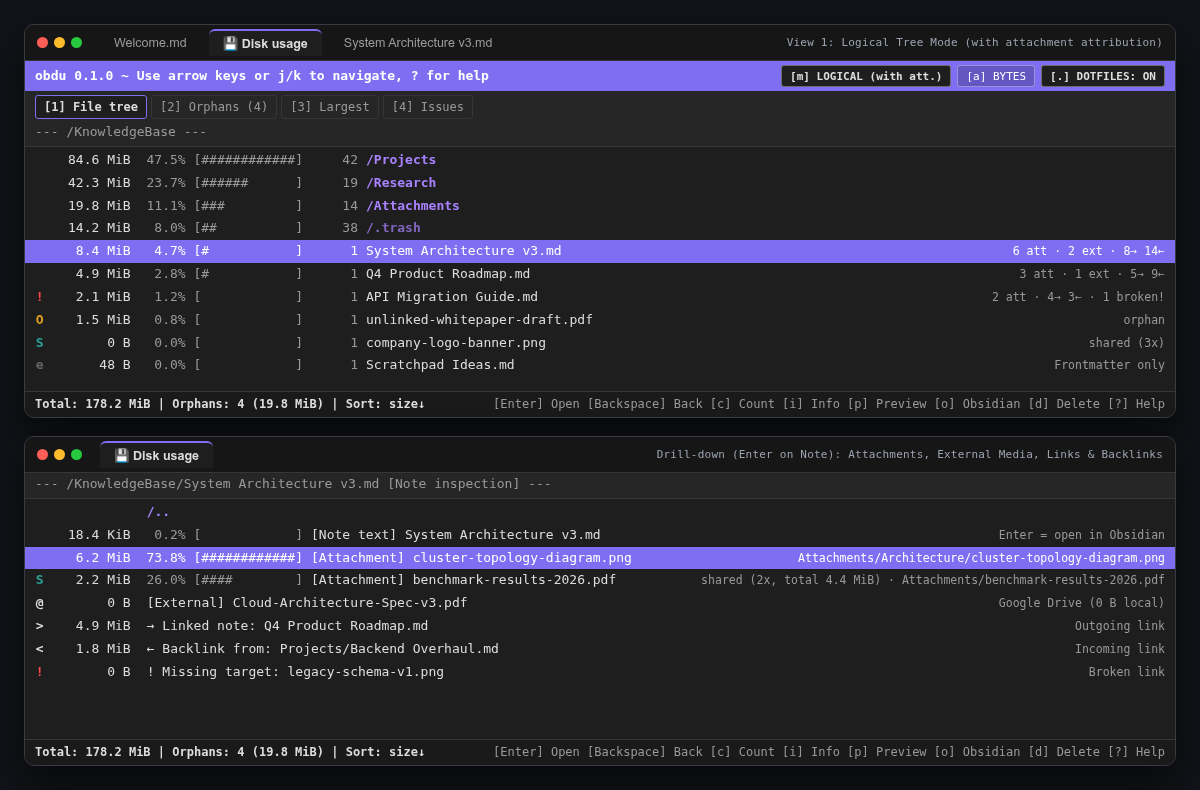
A lightweight Obsidian plugin (0 runtime dependencies, compatible with Desktop & Android) inspired by Linux ncdu, built to understand notes, embedded attachments, references, orphaned files, and .trash.
It makes it effortless to spot which notes, folders, and embedded attachments consume the most storage space in your vault—whether you want to see raw file sizes in place or attribute referenced attachments directly to the notes that embed them.
Looking for a standalone terminal CLI? Check out the companion command-line version:
obduCLI (MarkusLitz/obdu).
Features
- Authentic
ncduexperience in a dedicated tab: Fully keyboard-driven (↑/↓,j/k,Enter/→/l,Backspace/←/h,s/n/C/M,c,g,m/Tab,a,./e,1–4,/,i,o,f,p/Space,d,r,?,q) with full mouse and Android touch support. - Two size attribution modes (
m/Tab):- Physical: Exact file and folder sizes at their physical location (including
.obsidian&.trash). - Logical (with Attachments, byte-neutral): Attributes referenced local attachments proportionally to their owning notes (
Sflag on shared files), while leaving only unreferenced orphaned files with weight inside attachment folders—conserving total vault size to the exact byte.
- Physical: Exact file and folder sizes at their physical location (including
- Drill-down into Notes & Attachments (
Enter): Opening a note reveals its own text weight, referenced local attachments, external Google Drive / web media embeds (0 Blocally), outgoing note links (→), incoming backlinks (←), and broken references (!). Opening an attachment lists all notes referencing it, allowing instant multi-hop navigation. - Global diagnostic views (
1–4): Switch instantly between1File Tree,2Orphans sorted by size (toggleable acrossAttachments/Notes/Allviat),3Largest Files across the vault, and4Broken Links & Empty Items. - Smart Delete (
d): Safely moves items to.trash/<relative-path>preserving folder structure (with optional permanent delete), offers cascade deletion of exclusive attachments (cleaning up newly emptied per-note attachment subfolders), protects shared attachments, and warns before breaking incoming backlinks.
Keyboard Shortcuts
| Key(s) | Action |
|---|---|
↑ / ↓, k / j, PgUp / PgDn, Home / End |
Navigate rows |
Enter, →, l |
Open directory, inspect note references, or inspect attachment owners |
Backspace, ←, h |
Navigate back in history / parent folder |
m, Tab |
Toggle Physical ↔ Logical (with Attachments) size mode |
a |
Toggle Apparent Size (bytes) ↔ Disk Blocks (4 KiB) |
., e |
Show / hide system & dot folders (.obsidian, .trash, .git) |
c |
Show / hide item-count column |
g |
Cycle bar display ([% + #####] → [#####] → [%] → Hidden) |
s / n / C / M |
Sort by Size, Name, Item Count, or Modified Time (press again to reverse) |
1 / 2 / 3 / 4 |
Switch view (1 Tree · 2 Orphans · 3 Largest · 4 Issues) |
t (in View 2) |
Cycle orphan filter (Attachments → Notes → All) |
/ |
Live substring filter (Esc clears filter) |
i |
Item & reference info modal |
p, Space |
Quick preview modal (images, PDFs, Markdown/text) |
o |
Open selected file in a new Obsidian tab |
f |
Reveal in system file manager / Finder (Desktop) |
d |
Smart Delete dialog |
r / ? / q |
Rescan vault / Keyboard help / Close tab |
Development & Build
npm test
npm run build
HealthExcellent
ReviewPassed
About
Analyze vault storage to spot which notes, folders, and embedded attachments that consume the most space, offering physical and logical size modes that attribute referenced attachments to their owning notes while preserving total bytes. Drill into notes and attachments, browse orphans, largest files, broken links, and safely move items to .trash or delete permanently.Details
Current version
0.1.1
Last updated
3 days ago
Created
4 days ago
Updates
2 releases
Downloads
16
Compatible with
Obsidian 1.8.7+
Platforms
Desktop, Mobile
License
MIT
Author