Note Bundler
 jrockwar249 downloads
Export bundles of notes into a single markdown file.
- Overview
- Scorecard
- Updates2
Export filtered Obsidian notes into consolidated Markdown files. Perfect for preparing LLM context, documentation packages, or curated note collections.
Features
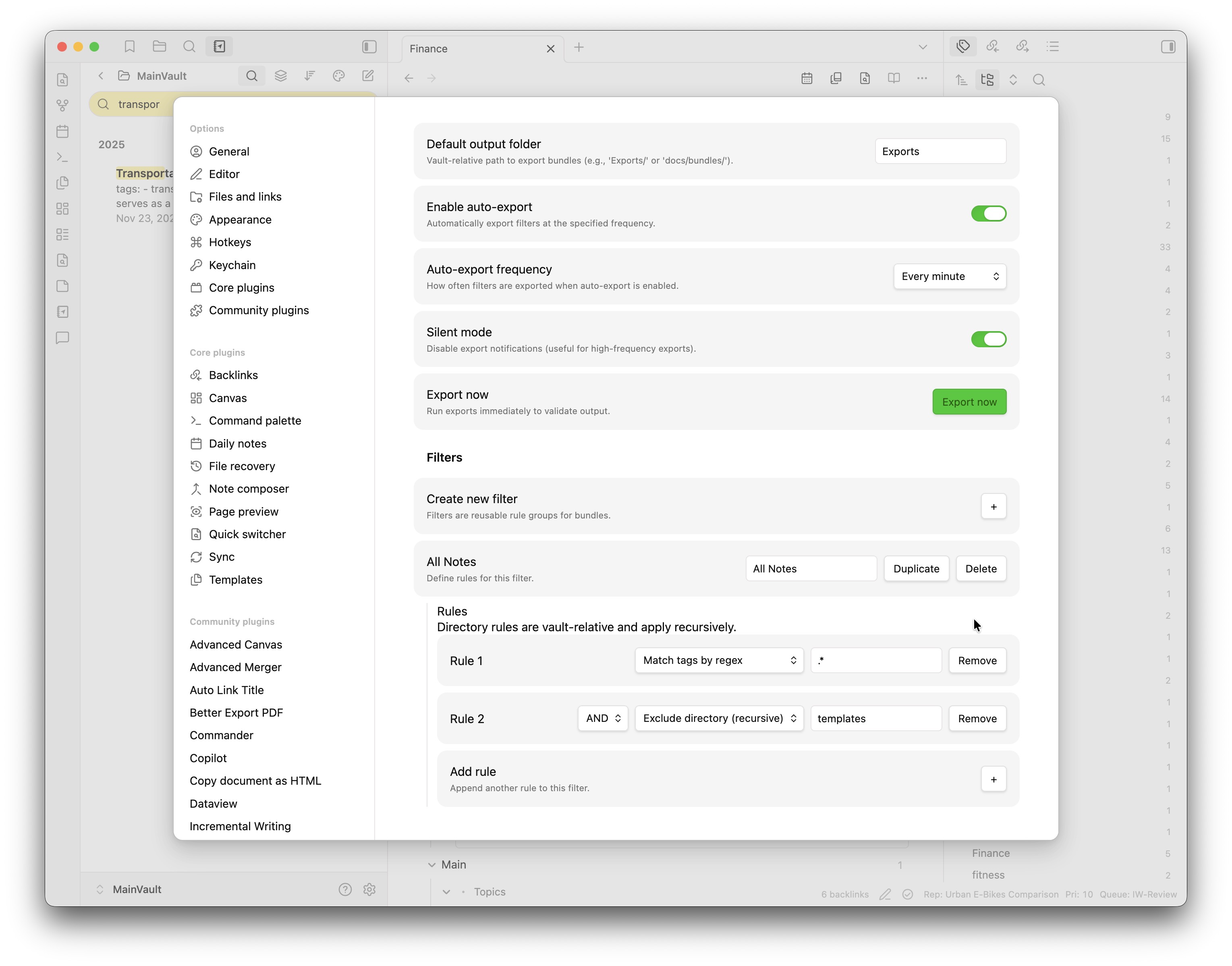
- Tag-based filtering with regex support (include/exclude patterns)
- Directory include/exclude rules (recursive, vault-relative)
- AND/OR logic to combine multiple rules
- Manual and scheduled auto-exports (minute/hour/day intervals)
- Vault-relative or absolute output paths (desktop only)
- Cross-platform compatibility
- Device-specific settings (independent configs per device)
Installation
- Clone this repository
npm install && npm run build- Copy
main.jsandmanifest.jsonto.obsidian/plugins/note-bundler/in your vault - Enable in Obsidian → Settings → Community plugins
Development: Symlink the repo folder into .obsidian/plugins/note-bundler and run npm run dev.
Usage
1. Configure Output Location
Settings → Note Bundler → Default output folder
Use vault-relative paths like Exports/ or docs/bundles/. On desktop, you can also use absolute paths like /Users/john-doe/Documents/NoteBundles/.
2. Create Filters
- Click Create new filter
- Name it (e.g., "Project Notes")
- Add rules:
- Match tags by regex - Include matching notes
- Exclude tags matching regex - Exclude matching notes
- Include directory (recursive) - Include notes inside a vault-relative folder
- Exclude directory (recursive) - Exclude notes inside a vault-relative folder
- Combine rules with AND/OR operators
Tag regex examples:
#project- exact tag#project.*- tags starting with #project#(important|urgent)- multiple tags
N.B. Tags are not treated as case-sensitive (e.g., #Project and #project are the same), so you don't need to worry about case in the regex - it will pick up both.
Directory rule examples (vault-relative):
journals/- everything injournals/and subfoldersProjects/ClientA- only that subtree (case-sensitive)
3. Export
Manual: Click Export now in settings
Auto: Enable auto-export and choose frequency (minute/hour/day)
Output Format
# Notes combined on: 2026-01-19 12:00:00

---

# Note title: Project Overview

Project overview content with **formatting** and [[links]] preserved.

---

# Note title: Research Notes

Research findings and citations...
Device-Specific Settings
Each device maintains independent plugin settings automatically - no sync conflicts. Configure different export paths and schedules per device without any setup.
Development
Symlink the repo folder into .obsidian/plugins/note-bundler and run npm run dev for live development with hot reloading.
Troubleshooting
- Export fails: Check output path permissions
- No notes exported: Verify filter rules and tag spelling
- Auto-export not running: Check plugin permissions
- Debugging: Check developer console, test with simple patterns first
Contributing
Contributions welcome! Fork, create a feature branch, and submit a PR.
License
GPL-3.0 - see LICENSE for details.
Changelog
See CHANGELOG.md for version history and updates.