L10n.dev - AI Translator


Translate notes, selected text, into any of 165 languages with AI. Preserves Markdown formatting and structure. Powered by L10n.dev's AI translation API. Supports json, yaml, other plain-text formats.
- Overview
- Scorecard
- Updates13
Translate your Obsidian notes using l10n.dev — an AI-powered localization API. Works on desktop and mobile.
Features
- Context-aware translations using advanced AI. Translate to 165+ languages. Generates and save AI glossaries for consistent terminology across translations.
- Preserves Markdown formatting and structure. Supports json, yaml, other plain-text formats.
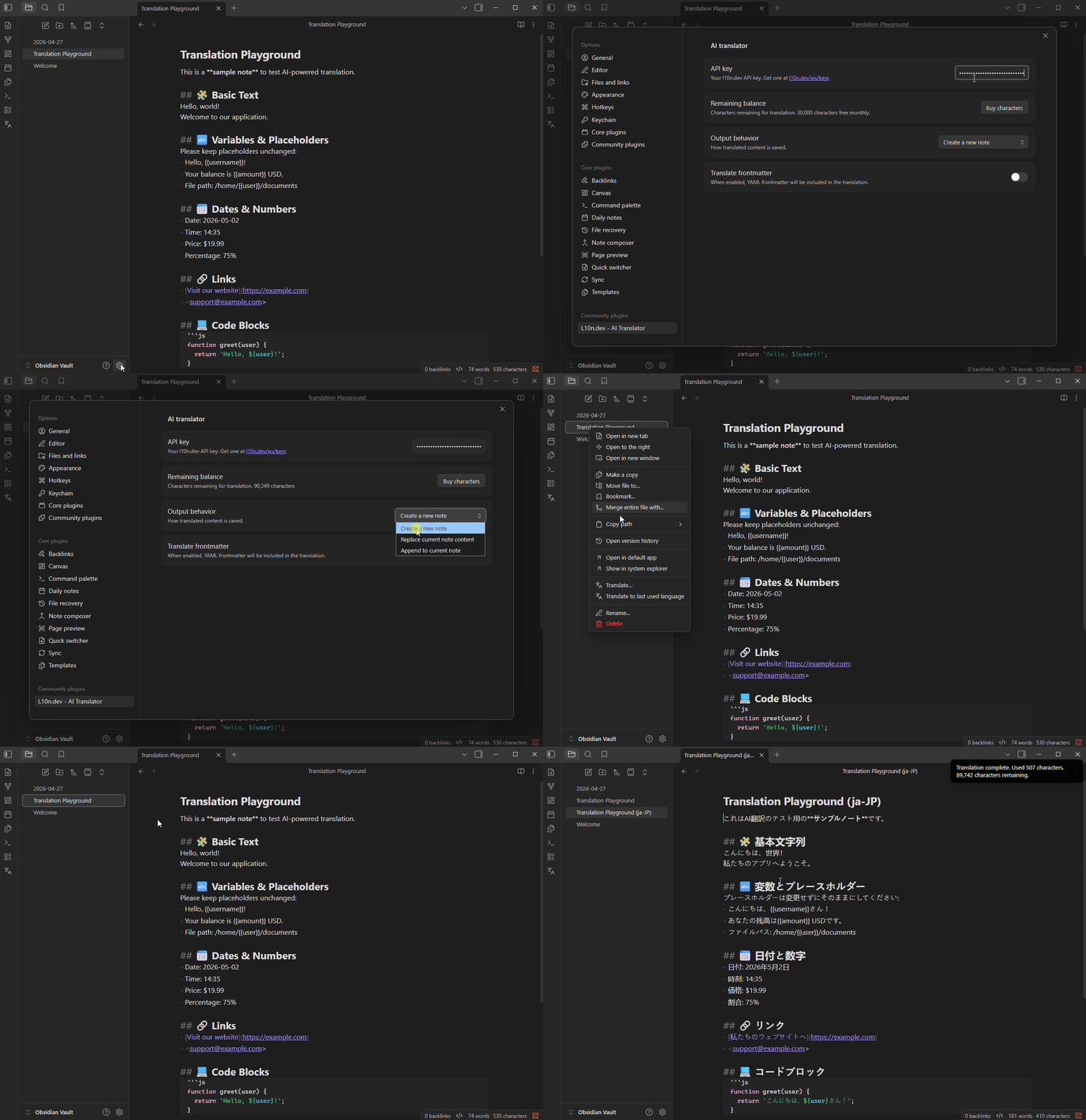
- Translate the active note — or just the selected text — via the command palette, ribbon icon, or right-click context menu.
- Dynamic language search — type a language name to find it instantly (no hardcoded list)
- Remembers your last used language — one keypress to repeat the same translation.
- Three output modes: create a new note, replace the current note, or append the translation.
- Optional YAML frontmatter preservation — translate only the note body if desired.
- Shows characters used and remaining balance after each translation.
- Mobile-compatible — uses Obsidian's native network layer, no Node.js APIs
Requirements
A free l10n.dev account. You receive 10,000 characters free per month after signing up. Get your API key at l10n.dev/ws/keys.
Installation
- Open Settings → Community plugins and select Browse.
- Search for L10n.dev - AI Translator ot note ai translator.
- Select Install, then Enable.
Setup
- Open Settings → L10n.dev - AI Translator.
- Paste your l10n.dev API key into the API key field.
- Choose your preferred Output behavior and toggle Translate frontmatter as needed.
Usage
With a note open, trigger translation in any of these ways:
- Command palette — run
Translate current note - Ribbon — select the globe icon in the left sidebar
- Context menu — right-click a file in the file explorer or inside the editor and select Translate…
A language picker will open. Type a language name (e.g. "Spanish", "German", "Japanese") and select your target language. The translation will be saved according to your output behavior setting.
Translate a selection
Select text in the editor and right-click it — the context menu items become Translate selection… and Translate selection to last used language. The translated text replaces your selection in place; press Ctrl+Z / Cmd+Z to undo. With nothing selected, the same menu items translate the whole note as before.
The Output behavior setting does not apply to selections — a translated selection is always replaced in place.
For a keyboard-driven workflow, assign a hotkey to the Translate selection command in Settings → Hotkeys. The command is only available while text is selected.
Repeat translation to the same language
After your first translation, the last used language is saved automatically. The next time the language picker opens, it pre-selects that language — press Enter to confirm without typing anything.
For even faster repeat translations, use the Translate to last used language command from the command palette. It skips the language picker entirely and translates immediately. Assign a hotkey to it in Settings → Hotkeys for one-keystroke translation.
Output behavior
| Setting | Result |
|---|---|
| Create a new note (default) | Saves translation as {filename} ({lang-code}).md in the same folder |
| Replace current note content | Overwrites the current note with the translation |
| Append to current note | Appends the translation below a horizontal rule |
These modes apply to whole-note translation only. A translated selection always replaces the selection in place.
Translation Glossary
A translation glossary maps specific source-language terms to approved target-language equivalents, ensuring the AI uses your exact terminology instead of valid-but-unintended synonyms. Glossaries are especially valuable for brand names, legal terms, clinical vocabulary, and product-specific concepts.
AI Glossary Generation
When Generate & save glossary is enabled (config) it automatically builds a glossary from the source and translated target content, then save it as the active glossary for this source/target language pair. Once saved, the glossary is applied automatically on all future translations for the same language pair.
Note: Glossary terms consume characters from your balance during translation. The character cost per translation is the combined length of all source terms, target terms, and context hints.
Manage your saved glossaries at l10n.dev/ws/translation-glossary.
Linguistic Instructions
Linguistic Instructions let you guide AI: 📝 "Use formal tone" 📝 "Do not translate product names" 📝 "Use active voice"
Unlike glossaries that control specific terms, Linguistic Instructions control the overall style, tone, and translation behavior. Combined with AI Glossaries, they give much more control over localization quality and brand consistency.
Manage your saved linguistic Instructions at l10n.dev/ws/linguistic-instructions.
AI Localization Agent
Turn your coding agent into a localization specialist. Add our MCP server to GitHub Copilot, Cursor, Claude, Codex, or Windsurf and let your agent translate i18n files without dumping unnecessary data to its context. See AI Localization Agent Setup Guide
Localization
The plugin interface is translated into the following languages:
| Code | Language |
|---|---|
en |
English (default) |
de |
German |
es |
Spanish |
fr |
French |
id |
Indonesian |
it |
Italian |
ja |
Japanese |
ko |
Korean |
pt |
Portuguese (Brazil) |
zh-CN |
Chinese (Simplified) |
zh-TW |
Chinese (Traditional) |
Privacy
Translation requests are sent to the AI translation API over HTTPS. l10n.dev does not store your content after translation. See the l10n.dev terms of service for details.
No telemetry or analytics are collected by this plugin.