Nextcloud Tasks
 Juan Ferranti534 downloads
Read, create, edit and complete your Nextcloud Tasks in a note, over CalDAV. Your tasks stay on the server: no markdown mirror, no checkboxes in your notes, nothing that can drift out of sync.
- Overview
- Scorecard
- Updates3
Read, create, edit and complete your Nextcloud Tasks right inside a note — over CalDAV, with no copy of your data in the vault.
🧠 The one idea
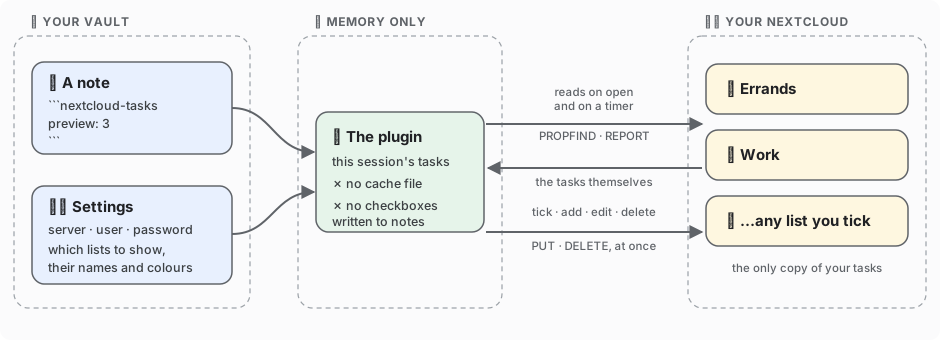
There is exactly one copy of every task, and it lives in Nextcloud.
Other CalDAV plugins mirror markdown checkboxes into your notes and sync them — two copies, forever at risk of drifting apart. This one writes nothing to disk, not even a cache: it fetches, shows, and writes your change straight back.
Plain JavaScript, no dependencies, no native code — the same build runs on desktop and phone. 📱
🚀 Install & set up
From Obsidian: Settings → Community plugins → Browse, search Nextcloud Tasks, install, enable.
Manually: drop main.js, manifest.json and styles.css from the
latest release into
<vault>/.obsidian/plugins/nextcloud-tasks/, then enable it under Settings → Community plugins.
| # | Step | |
|---|---|---|
| 1️⃣ | Make an app password in Nextcloud → Settings → Security | Never your account password. It can be revoked on its own, and it is the only credential stored. |
| 2️⃣ | Fill in the settings in Obsidian → Nextcloud Tasks | Address is the base only: https://cloud.example.com, not /remote.php/dav. |
| 3️⃣ | Press Load | Every list on your account appears. Tick the ones you want, rename the headings, pick colours, drag them into order. No list yet? Create list makes one on the server. |
| 4️⃣ | Set the refresh interval | 5 minutes by default, Never if you prefer by hand. It only runs while a task list is on screen, so it costs nothing while you write. |
| 5️⃣ | Stuck? Press Test connection | It reports every discovery step separately, so a failure points at one line instead of "could not connect". |
🏷️ Any lists, any names. No fixed categories, no folder convention. Each list you tick gets a heading, a colour and a short key — the key is what a note refers to. Two lists or nine, in whatever order you drag them, is all the same to the plugin.
📝 Show tasks in a note
```nextcloud-tasks
all
preview: 3
```
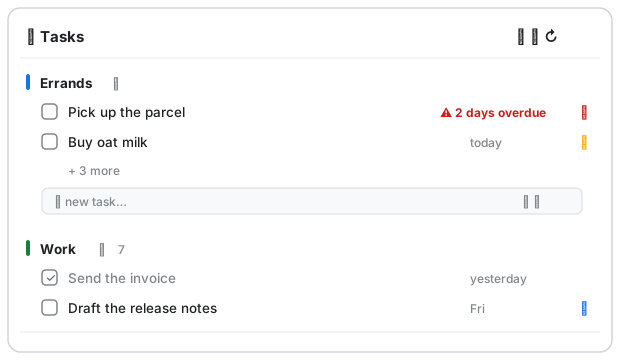
Every ticked list gets its own heading, even when empty. Past preview: rows, the heading grows an
arrow and the number it is holding back — click to unfold, click to fold away.
Each list ends in a blank row: type a title, press Enter, and the task is on the server. The two small buttons on that row set a due date and a priority first; Esc clears it. Nothing you type is lost to a background refresh. ✍️
Every line inside the block is optional:
| Line | What it does |
|---|---|
all (or an empty block) |
📚 every ticked list, grouped by list — the default |
list: errands |
📋 one list only, by its key (os: still works in old notes) |
preview: 3 |
👁️ rows per list before the +n more line; preview: 0 shows everything |
limit: 8 |
✂️ hard ceiling on rows in total, applied before lists are split — a busy list can eat it all, so preview is usually what you want |
due: today |
📅 due today — overdue is always included, or it would vanish silently |
due: week |
🗓️ due within seven days, overdue included |
done: true |
☑️ show completed tasks too |
title: Shopping |
🏷️ your own heading for the panel |
German values (due: heute, due: woche, done: ja) are accepted, so a note keeps its meaning if
you switch Obsidian's language.
Rows sort the way you would triage them: overdue first, then by due date, undated last, ties falling back to your list order. The panel header carries ➕ new task, 📋 new list and ↻ refresh.
👆 Working with a task
- ☑️ Tick the box to complete it — written to the server immediately. The row stays on screen with a line through it until you leave the note, so you can see what you did and undo a misclick.
- ✏️ Click the title to edit title, due date and priority. Only what you actually changed is written, so a repeat rule, reminder, description or subtask the plugin doesn't show stays untouched. (Moving a task to another list happens in Nextcloud, not here.)
- 🗑️ Delete lives in the same dialog, behind one confirmation.
Commands: New task · Refresh tasks · Test connection.
📱 On your phone
Add a CalDAV account with the same address, username and app password to your phone's built-in reminders app: notifications and widgets without Obsidian running, and anything you tick there shows up here on the next refresh. The plugin itself also runs in the Obsidian mobile app.
🌍 Languages: English and German, following Obsidian's setting (or forced in the plugin settings).
🛠️ Development
npm install
npm run lint     # eslint-plugin-obsidianmd — the rules the directory review runs
npm test         # core, render and bundle suites: no install, no network, no credentials
npm run build    # bundles src/ into main.js
VAULT="/path/to/your/vault" bash scripts/deploy-to-vault.sh          # deploy a local build

NC_URL=https://cloud.example.com NC_USER=alice NC_APP_PASSWORD=xxxxx \
  node scripts/live-check.mjs                                        # against a real server
live-check creates, reads, completes and deletes one test task: it proves the server speaks
CalDAV, not that your device passes the verbs through — that's what Test connection is for.
⚠️ main.js is generated. Edit src/, never the bundle.
🔍 Design notes — things that look like details and are not
- Nothing is written to disk, not even as a cache. The fetched list lives in memory for the session. That is what makes "your tasks live in Nextcloud" literally true, and why there is no file that can go stale.
- Completing or editing rewrites the original calendar object line by line, copying every other
byte through. Regenerating from a parsed model would silently drop
RRULE,VALARM,CATEGORIES,RELATED-TOand everyX-property other clients wrote. The tests assert byte identity of untouched lines, for both writers. - An edit sends only the fields you changed. Leaving the date alone differs from clearing it:
the first never mentions
DUE, so a task due at a particular time keeps that time when you fix a typo in its title. The second removes the line. - Completion is judged in the client, because three clients express it three ways:
STATUS, a bareCOMPLETED:, orPERCENT-COMPLETE:100. A server-side filter that gets this wrong hides tasks, which is worse than showing one too many. - Priority follows RFC 5545 — 1 is most urgent, 0 unset: 1–4 high, 5 medium, 6–9 low, each with a coloured flag. Flagging only the top band is what made an earlier version look broken.
- Discovery walks the real chain,
current-user-principal→calendar-home-set→ the collections in it, instead of guessing/remote.php/dav/calendars/<user>/. Fifteen lines, and a whole class of username-casing bug disappears. - XML is read without caring about namespace prefixes. Nextcloud's
d:andcal:are not contractual. - If
REPORTis refused, the client falls back toPROPFINDplus oneGETper object and remembers that for the session, so a platform blocking the verb still works. - Everything goes through
requestUrl, which bypasses CORS and works on iOS.
📄 MIT — see LICENSE.