
- Overview
- Scorecard
- Updates5
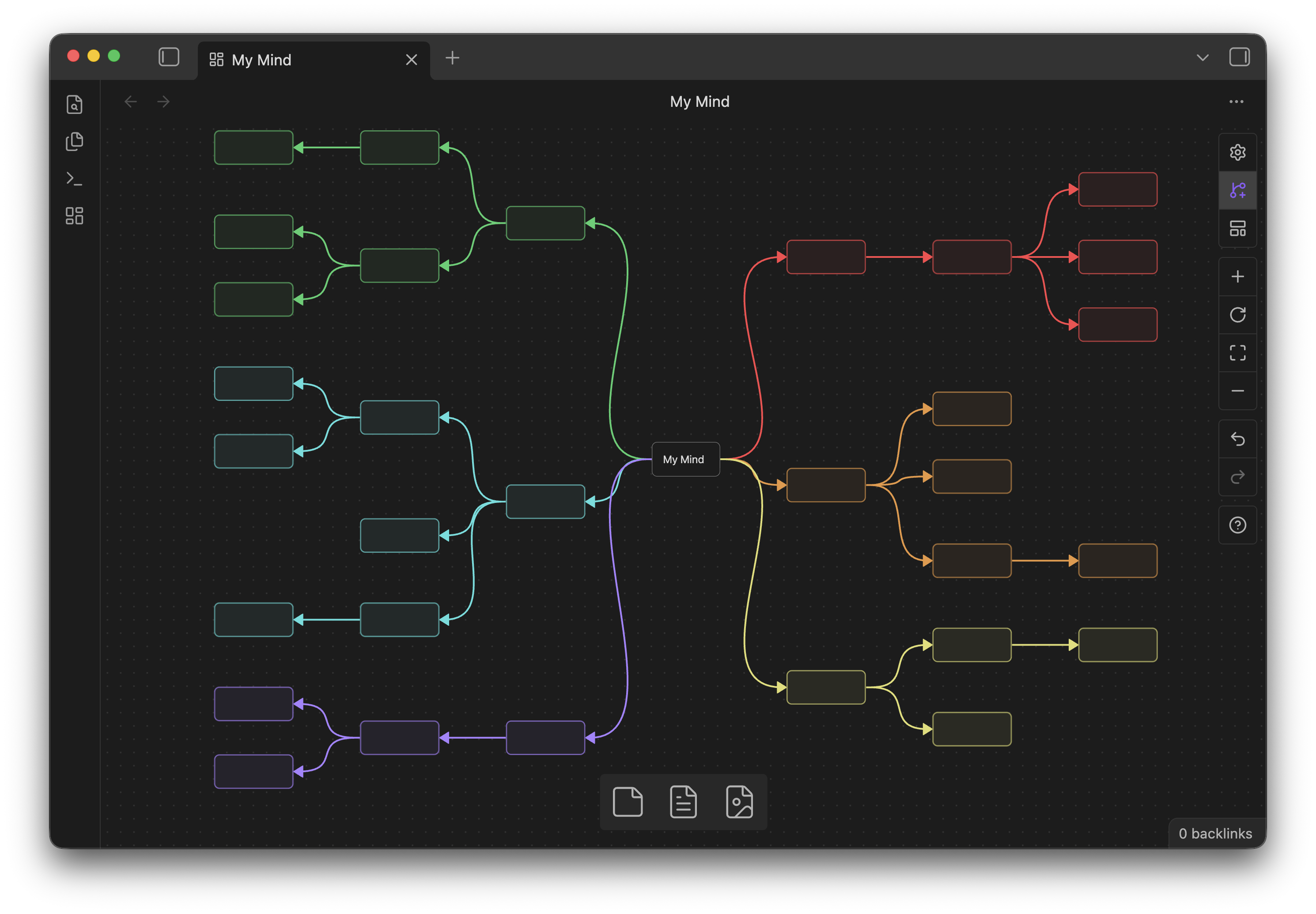
My Mind is an Obsidian plugin that adds an optional mindmap mode to Obsidian Canvas.
My Mind is desktop-only. It uses Obsidian Canvas runtime internals that are not supported on mobile.
When mindmap mode is enabled for a canvas, My Mind only intervenes in Canvas interactions needed for mindmap workflows, such as node creation, navigation, editing, subtree drag, and layout.
Features
Mode toggle: Canvas control toggle for each
.canvasfile. Turn on to activate My Mind's mindmap mode.
Auto layout button: when mindmap mode is enabled, a Canvas control button appears below the toggle to run Auto layout current mindmap canvas.

Basic operations
Tab: create a child text node.Enter: create a sibling text node.Space: enter node editing mode.Esc: leave node editing mode and keep the node selected.
Optional settings
- Keyboard
- Use Arrow keys to navigate.
- Set the Shift + Arrow move distance.
- Node creation
- Edit new nodes automatically.
- Zoom to newly created nodes.
- Colors
- Auto color first-level nodes.
- Customize first-level branch colors.
- Layout
- Turn subtree drag on or off. When on, dragging a selected node also moves its descendants.
- Auto layout siblings after creating nodes.
- Expand root branches left or right from the root connection side.
- Spacing and size
- Set the row gap.
- Set the column gap.
- Set the default new node width.
- Set the default new node height.
How it works
| Feature | Implementation summary | Resource use |
|---|---|---|
| Mindmap mode toggle | Stores enabled state per .canvas file path. My Mind only changes behavior when the current Canvas has mindmap mode enabled. |
Very low. Only updates when Canvas view/layout changes or the toggle is clicked. |
| Keyboard node creation | Tab / Enter create Canvas text nodes and parent-child edges. Edges created by My Mind are marked as structural with myMindStructuralEdge: true. |
Low. Runs only on the key press. |
| Arrow navigation | Uses an Obsidian Scope while mindmap mode is enabled. It reads the structural tree first, then falls back to geometric navigation. |
Low. Runs only on Arrow key presses. |
| Shift + Arrow move | Moves all selected nodes by a configured Canvas-coordinate distance. Moved nodes are marked with myMindManualPosition: true. |
Low. Runs only on the key press and commits one Canvas history entry. |
| Manual position preservation | Nodes moved by drag or Shift + Arrow get myMindManualPosition: true in Canvas node data. Auto layout skips affected subtrees so user-positioned nodes are preserved. Use Return to automatic layout to clear the marker. |
Low. Checks node data during layout and creation. |
| Auto layout | Builds a structural tree from myMindStructuralEdge edges. Cross-links and extra parent edges stay visible but do not affect layout. Root positions are preserved. |
Medium only when layout runs. No continuous layout loop. |
| Root branch left/right direction | Uses the root edge fromSide as the source of truth. Changing branch side updates edge sides and relayouts the tree. |
Low to medium. A lightweight requestSave() hook is active only for enabled Canvas files when this setting is on. |
| Branch coloring | Stores automatic color markers as myMindAutoColor. Manual colors are preserved when they differ from the auto marker. |
Low. Runs when nodes are created or colors are applied. |
| Text node auto-size | On Esc or blur, the node text is measured once with Canvas text measurement and the node is resized. There is no per-character resize and no polling. |
Low to medium on edit finish only. |
| Subtree drag | When enabled, temporarily expands the Canvas selection to include descendants of the highest selected nodes, then restores the original selection after drag. No modifier key is required. | Low. Runs only during drag start/end. |
| Recover selection after deleting | After deleting selected nodes, selects the unique direct parent when the deleted selection has one unambiguous parent. | Low. Uses short delayed checks after Delete. |
| Iframe editor listeners | Canvas text editors live in iframes. My Mind attaches Esc / focusout listeners with a MutationObserver and removes them on detach/unload. |
Low. No fixed polling. |
| Undo batching | Plugin compound actions batch data changes and commit one Canvas history entry where possible. | Low. Reduces extra undo steps. |
Notes
Obsidian does not currently expose a stable public runtime API for Canvas manipulation. My Mind uses a small adapter around Canvas internals, so future Obsidian updates may require maintenance.
This plugin is inspired by ideas and workflows from:
Installation
From Community Plugins
- Open Settings → Community plugins.
- Turn off Restricted mode.
- Select Browse and search for
My Mind. - Select Install, then select Enable.
Manual Installation
- Go to the Releases page.
- Download
main.js,manifest.json, andstyles.cssfrom the latest release. - Create a folder named
my-mindin your vault's plugin folder:<Vault>/.obsidian/plugins/my-mind. - Move the downloaded files into that folder.
- Reload Obsidian and enable the plugin in Settings → Community plugins.
License
Donate
If you find this plugin helpful, please give me a GitHub star ⭐️ or buy me a coffee ☕️!