Search...Search plugins and themes...
⌘K
Sign in
  • Get started
  • Download
  • Pricing
  • Enterprise
  • Account
  • Obsidian
  • Overview
  • Sync
  • Publish
  • Canvas
  • Mobile
  • Web Clipper
  • CLI
  • Learn
  • Help
  • Developers
  • Changelog
  • About
  • Roadmap
  • Blog
  • Resources
  • System status
  • License overview
  • Terms of service
  • Privacy policy
  • Security
  • Community
  • Plugins
  • Themes
  • Discord
  • Forum / 中文论坛
  • Merch store
  • Brand guidelines
Follow us
DiscordTwitterBlueskyThreadsMastodonYouTubeGitHub
© 2026 Obsidian

Multi State CheckBox Switcher

kubamiszczkubamiszcz6k downloads

Click to handle multistate checkboxes.

Add to Obsidian
  • Overview
  • Scorecard
  • Updates3

It works with theme eg. Things which presents states with pretty icons

This is a plugin which handle with 3-state checkbox

  • - [ ] unchecked
  • - [/] partially done
  • - [x] done

and multistate checkboxes (customizable) Quick Reference with defaults as follows: - [!] , - [?], - [i], - [>], - [<], - [f], - [I], - [k], - [u], - [d], - [3], - [6]
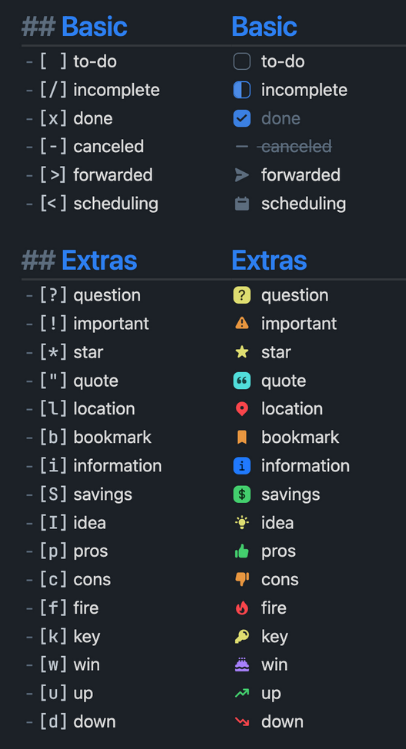
Quick Reference

Features:

  • toggle empty line
  • handle with multiline selection

TODO:

  • add switching reverse
HealthFair
ReviewSatisfactory
About
Toggle and cycle 3-state checkboxes ([ ], [/], [x]) and custom multistate symbols directly in notes. Support multiline selection and toggling of empty lines, and integrate with themes that display state icons.
TasksEditing
Details
Current version
1.0.4
Last updated
3 years ago
Created
3 years ago
Updates
3 releases
Downloads
6k
Compatible with
Obsidian 0.15.0+
Platforms
Desktop, Mobile
License
MIT
Report bugRequest featureReport plugin
Sponsor
Buy Me a Coffee
GitHub Sponsors
Patreon
Author
kubamiszczkubamiszcz
github.com/KubaMiszcz
GitHubkubamiszcz
  1. Community
  2. Plugins
  3. Tasks
  4. Multi State CheckBox Switcher

Related plugins

TaskNotes

Note-based task management with calendar, pomodoro and time-tracking integration.

LanguageTool Integration

Advanced grammar and spell checking, powered by LanguageTool.

Meta Bind

Make your notes interactive with inline input fields, metadata displays, and buttons.

Advanced Tables

Improved table navigation, formatting, and manipulation.

Thino

Quickly capture memos and display them in the sidebar with a heatmap. (Closed source)

Tasks

Track tasks across your vault. Supports due dates, recurring tasks, done dates, sub-set of checklist items, and filtering. Maintained by Clare Macrae and Ilyas Landikov, created by Martin Schenck.

Day Planner

Turn tasks from daily notes, the Tasks plugin, and calendars into time blocks on an editable timeline, with built-in time tracker.

Editing Toolbar

The Editing Toolbar is modified from cMenu, which provides more powerful customization settings and has many built-in editing commands to be a MS Word-like toolbar editing experience.

Outliner

Work with your lists like in Workflowy or Roam Research.

Hover Editor

Transform the Page Preview hover popover into a fully working editor instance.