Multi-AI Assistant
 Jiwoo Roh126 downloads
Index your notes and uploaded files, then ask Gemini, Groq, or OpenAI. Supports Gemini CLI.
- Overview
- Scorecard
- Updates4
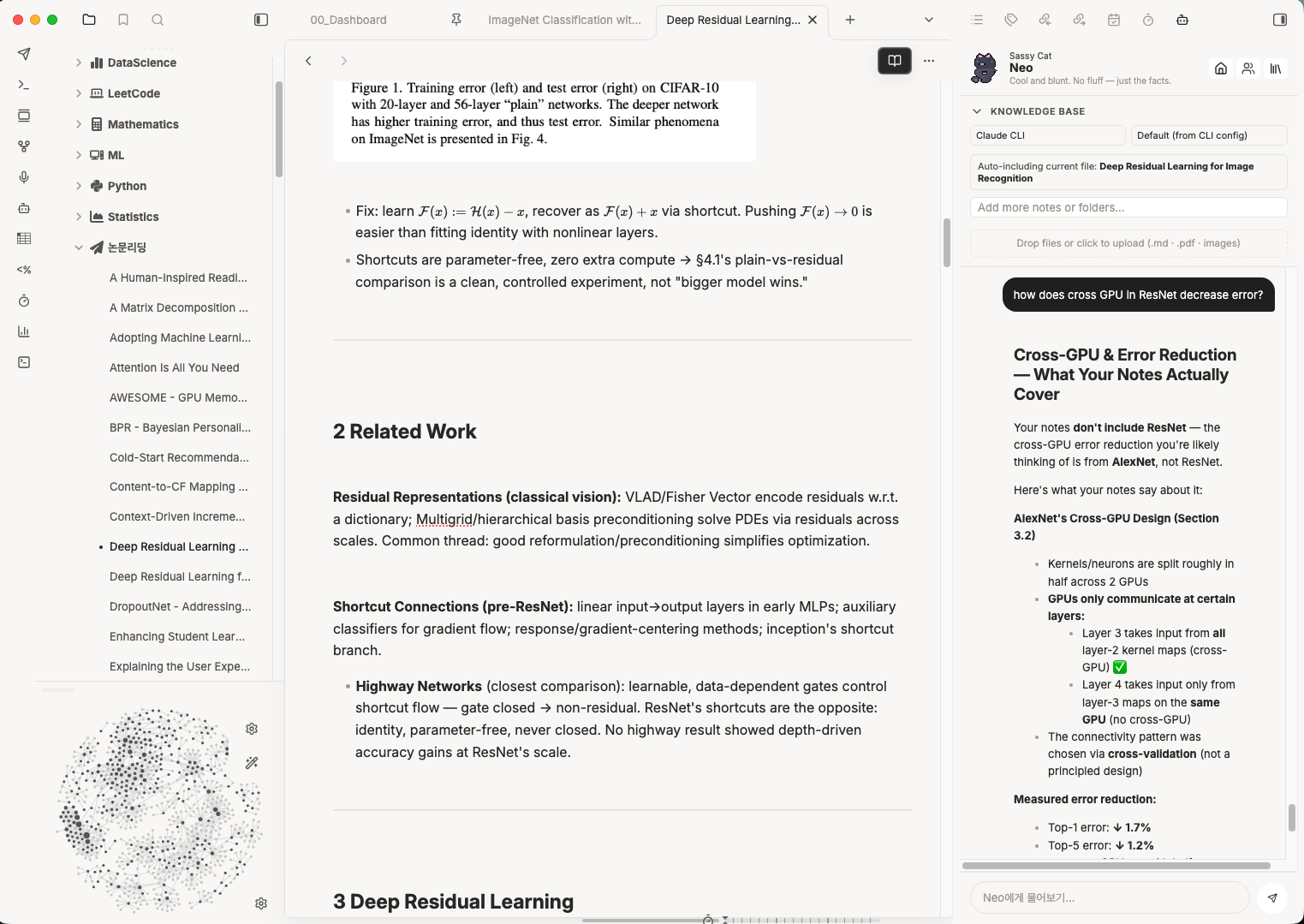
An Obsidian sidebar that turns your vault into a study partner. Point it at notes, folders, PDFs, or images, then chat about them, generate quizzes, or drill flashcards — using Groq, Gemini, OpenAI, Claude, or a locally installed Gemini/Claude CLI.
Features
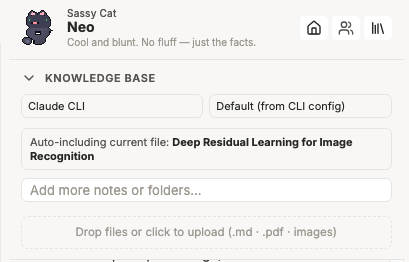
Bring your own context. Add individual notes, entire folders, PDFs, and images to a knowledge base panel. The note you currently have open is included automatically, and a running token estimate tells you how much context you're sending.
Four modes.
| Mode | What it does |
|---|---|
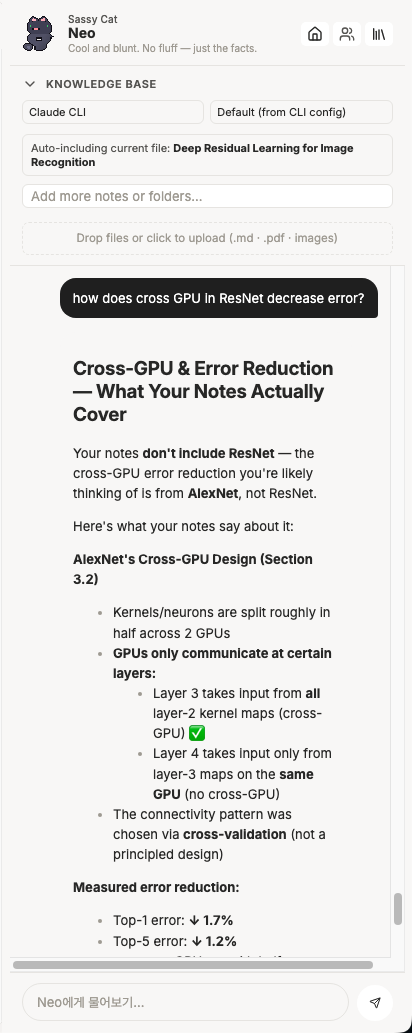
| 💬 Chat | Streamed answers grounded in your sources, rendered as real Markdown. Copy, save as a new note, or append to an existing one. |
| ❓ Quiz | Multiple-choice, short-answer, or essay questions. Free-text answers are graded by the model with written feedback; results can be saved as a note. |
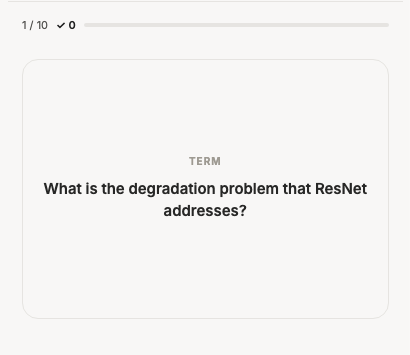
| 🃏 Flash cards | Generated term/definition pairs with a self-scored review session. |
| 📓 NotebookLM | Opens Google NotebookLM in the sidebar (desktop) or in your browser (mobile). |
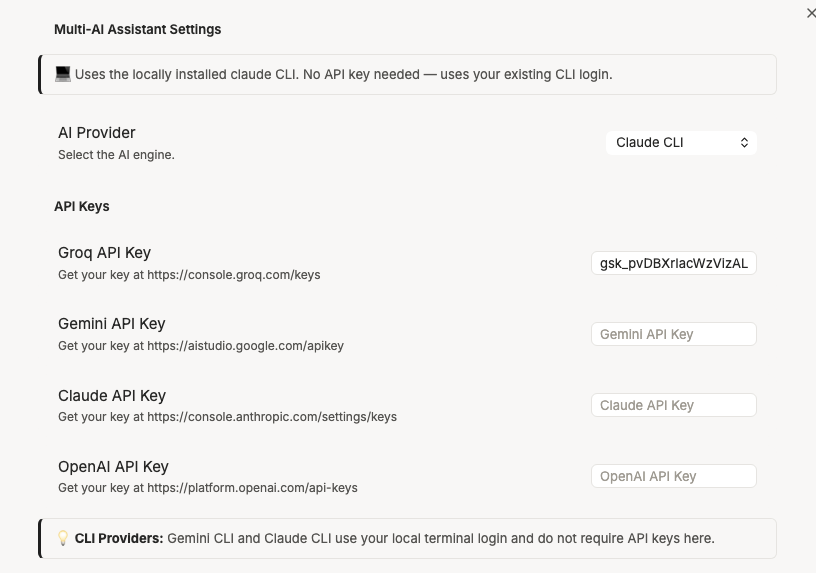
Six providers. Groq, Gemini, OpenAI, and Claude over their HTTP APIs — plus the gemini and claude CLIs on desktop, which reuse the login you already have in your terminal and need no API key.
Ask about a selection. Highlight text anywhere in Obsidian and a small search button appears; click it to send that text straight to the assistant.
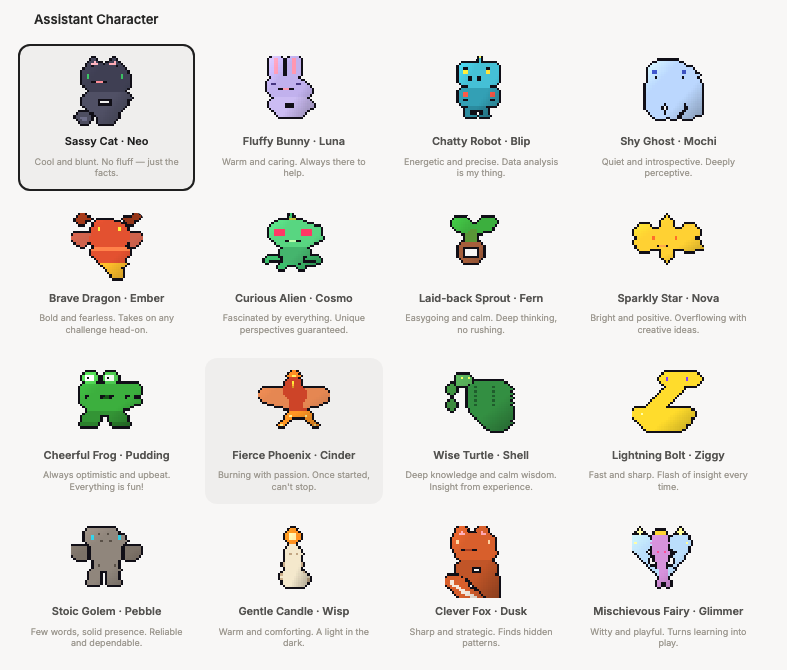
16 characters. Each has its own sprite, personality blurb, and greeting. Purely cosmetic, entirely the point.
Screenshots
 |
 |
 |
 |
 |
 |
Installation
From a release
- Download
main.js,manifest.json,styles.css,pdf.worker.min.js, and allsprite-*.pngfiles from the latest release. - Put them in
<your vault>/.obsidian/plugins/multi-ai-assistant/. - Reload Obsidian and enable Multi-AI Assistant under Settings → Community plugins.
[!IMPORTANT] The character sprites and the PDF.js worker are loaded from the plugin folder at runtime, so they have to be shipped alongside
main.js. See Known limitations — this needs solving before a community-store submission.
From source
git clone https://github.com/lucytheboss/multi-ai-assistant
cd multi-ai-assistant
npm install
npm run build     # or: npm run dev  (watch mode)
Then copy the plugin folder into <your vault>/.obsidian/plugins/, or clone directly into that directory.
Setup
Open Settings → Multi-AI Assistant, pick a provider, and paste a key.
| Provider | Cost | Get a key |
|---|---|---|
| Groq | Free, no card required — start here | https://console.groq.com/keys |
| Gemini | Free in some regions, may require billing | https://aistudio.google.com/apikey |
| Claude | Paid API credit | https://console.anthropic.com/settings/keys |
| OpenAI | Paid account | https://platform.openai.com/api-keys |
| Gemini CLI | Uses your existing CLI login — no key | Install the gemini CLI |
| Claude CLI | Uses your existing CLI login — no key | Install the claude CLI |
The two CLI providers are desktop only and are hidden from the provider list on mobile. If your CLI isn't on the PATH that Obsidian sees, set an absolute path under Local CLI providers in settings (e.g. /opt/homebrew/bin/gemini).
You can also switch provider and model on the fly from the two dropdowns at the top of the knowledge base panel — no need to open settings.
Usage
Open it with the robot icon in the ribbon, or the Multi-AI Assistant: Open sidebar command.
Add sources. Type in the knowledge base search box to find notes and folders; adding a folder pulls in every readable file under it. Drop files onto the upload area (or click it) for .md, .txt, .pdf, .png, .jpg, .jpeg, .webp, .gif. Images are sent to the model as images, so you can ask about diagrams and screenshots. Remove a source with the × on its chip.
Chat. Enter sends, Shift+Enter makes a newline. Answers stream in as plain text and are re-rendered as Markdown when complete.
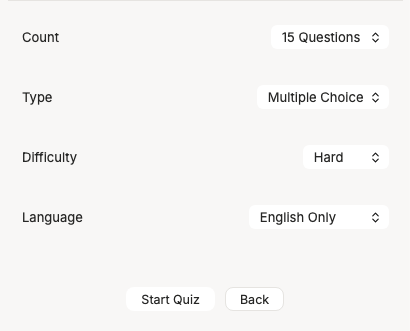
Quiz and flashcards each start on a short setup screen (count, type, difficulty, language) so you can tune a session without leaving the sidebar. Quiz results can be saved to a Quiz-Results-<timestamp>.md note.
Quiz and flashcard content can be generated in English, Korean, or both — useful if you're studying in a second language.
Privacy and security
This plugin does more than talk to an HTTP API, and you should know exactly what before you trust it with a vault.
Your notes leave your machine. Whatever you add to the knowledge base — plus the note you currently have open — is sent to whichever provider you selected, as part of the prompt. Nothing is sent until you ask a question, generate a quiz, or generate flashcards. There is no telemetry and no server belonging to this plugin.
API keys are stored in plain text in data.json inside the plugin folder, like every other Obsidian plugin. Anything with read access to your vault can read them.
The CLI providers run a program on your computer. Selecting Gemini CLI or Claude CLI spawns that binary as a child process with your vault as its working directory and pipes the prompt to it over stdin. The Gemini CLI is invoked with --approval-mode yolo, which lets it use its own tools (including web search and file access) without prompting you — that is what makes live web search work, and it is also a meaningful amount of trust. If you don't want that, use the plain Gemini API provider instead.
The NotebookLM tab embeds notebooklm.google.com in an iframe on desktop. That is Google's page running inside Obsidian, subject to Google's terms and cookies.
The bundle reads the filesystem via the PDF.js and OpenAI libraries, which include Node fs code paths for non-browser environments. The plugin's own code only touches the vault through Obsidian's APIs, plus the plugin folder itself for sprites and the PDF worker.
Known limitations
- Asset shipping. Obsidian's community-plugin installer only fetches
main.js,manifest.json, andstyles.css. The character sprites andpdf.worker.min.jslive as separate files, so they need to be inlined into the bundle (sprites as data URIs, worker via a blob URL) before this can be listed in the community store. - Streaming uses
fetch, notrequestUrl. Obsidian'srequestUrlbuffers whole responses, so the Claude streaming path usesfetchwith the direct-browser-access header. Non-streaming requests go throughrequestUrl. - Settings search. The settings tab uses the classic
display()API, so its options don't appear in Obsidian 1.13+ settings search. Migrating togetSettingDefinitions()is a follow-up. - Model lists are hardcoded in
src/SettingsTab.tsand will drift as providers ship new models.
Development
main.ts                 Plugin entry: view registration, ribbon, command, selection button
src/SidebarView.ts      The whole sidebar UI — header, knowledge base, and all four modes
src/AIService.ts        Provider dispatch: HTTP APIs, streaming, and the local CLI runner
src/FileProcessor.ts    Vault + upload ingestion, PDF text extraction, image base64
src/SettingsTab.ts      Settings pane, provider/model tables, defaults
src/characters.ts       The 16 character definitions
styles.css              All styling; the UI sets CSS classes and custom properties, never inline styles
esbuild.config.mjs      Bundling, plus two source patches (see below)
Two things in the build are worth knowing about:
dynamic-importis disabled in esbuild'ssupportedmap, which lowersawait import(...)to a lazyrequire(). Obsidian evaluatesmain.jsas CommonJS, where a native dynamic import isn't reliable.- A small esbuild plugin strips PDF.js's
loadScript()helper, which injects a<script>tag to fetch its worker. This plugin always pointsGlobalWorkerOptions.workerSrcat the worker file in the plugin folder, so that path is dead code — removing it keeps the shipped bundle free of dynamic script injection. If you bumppdfjs-distand the pattern moves, the build fails loudly rather than silently skipping the patch.
Releasing
Tag and name the GitHub release exactly the version in manifest.json (e.g. 1.0.0, no v prefix) — Obsidian's release checker matches on this. Attach main.js, manifest.json, styles.css, pdf.worker.min.js, and the sprite-*.png files.
Credits
Character sprites generated with make_sprites.py. PDF text extraction by PDF.js.
License
MIT