Search...Search plugins and themes...
⌘K
Sign in
  • Get started
  • Download
  • Pricing
  • Enterprise
  • Account
  • Obsidian
  • Overview
  • Sync
  • Publish
  • Canvas
  • Mobile
  • Web Clipper
  • CLI
  • Learn
  • Help
  • Developers
  • Changelog
  • About
  • Roadmap
  • Blog
  • Resources
  • System status
  • License overview
  • Terms of service
  • Privacy policy
  • Security
  • Community
  • Plugins
  • Themes
  • Discord
  • Forum / 中文论坛
  • Merch store
  • Brand guidelines
Follow us
DiscordTwitterBlueskyThreadsMastodonYouTubeGitHub
© 2026 Obsidian

MindmapMate

droidstreamdroidstream165 downloads

Map ideas and tasks on a freeform mindmap board, saved as a Markdown note.

Add to Obsidian
MindmapMate screenshot
  • Overview
  • Scorecard
  • Updates4

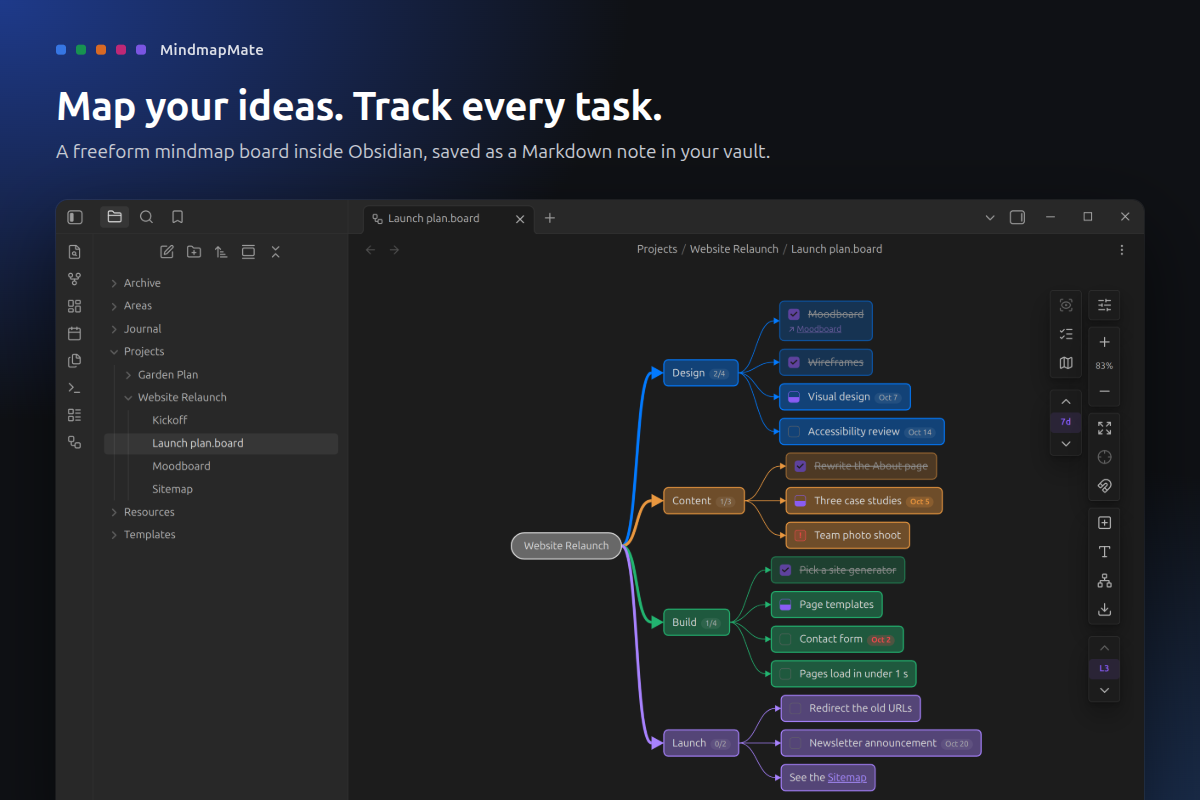
Map your ideas. Track every task.

Canvas gives you space to think but knows nothing about progress, and a task list has structure but no room to sketch. MindmapMate is both: a freeform mindmap board where every branch can be a task list that counts itself up. Tab, type, Enter, done.

A project mindmap in Obsidian opening level by level, then tasks getting ticked off while the Design branch counts up to 4 of 4

MindmapMate showing a website relaunch plan as a mindmap in Obsidian

What it does

  • Think at typing speed. Tab adds a child, Enter a sibling. Lines, colors and layout take care of themselves.
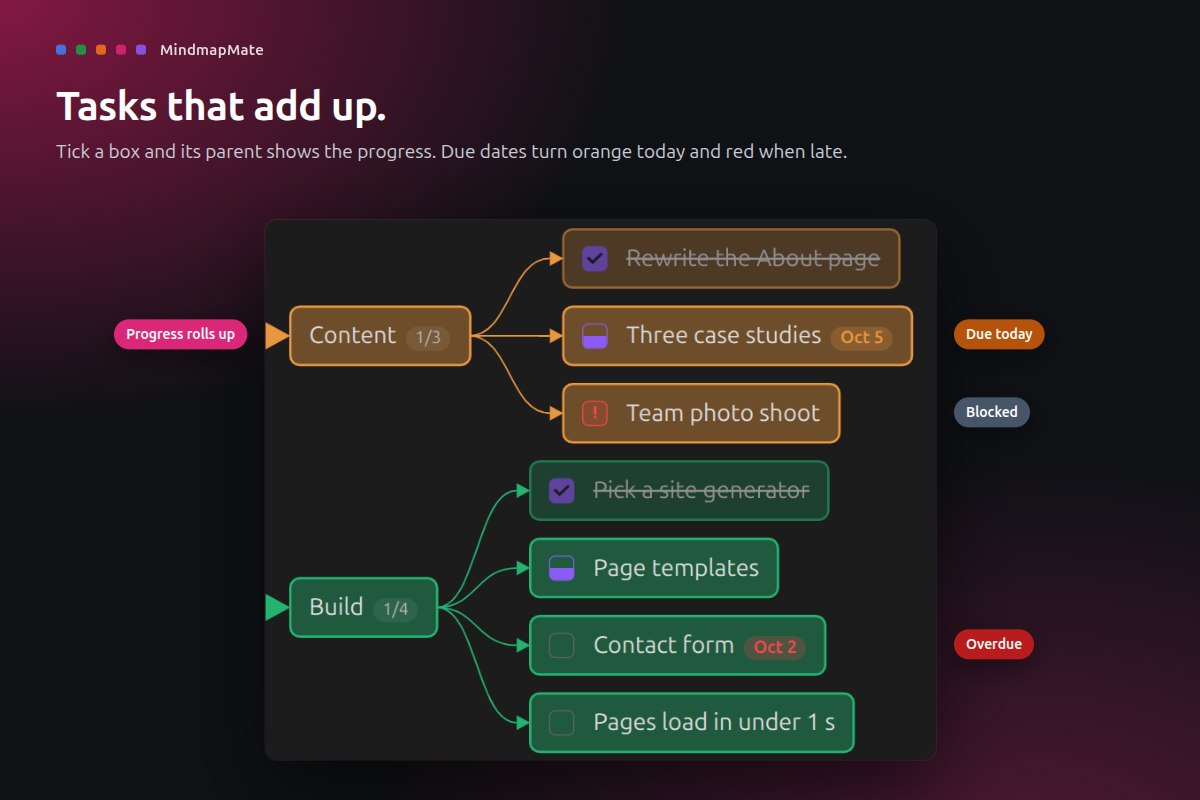
  • Tasks that add up. Any node can be a task: not done, doing, blocked, done or dropped. Parents show their progress, like 2/4.
  • Due dates that nudge. Pick a date from the calendar. Chips turn orange on the day and red when late, and a filter shows what is due soon.
  • Linked to your notes. Type [[ to link a note, hover to preview it, or turn a node into a new note. Renames and moves keep links working.
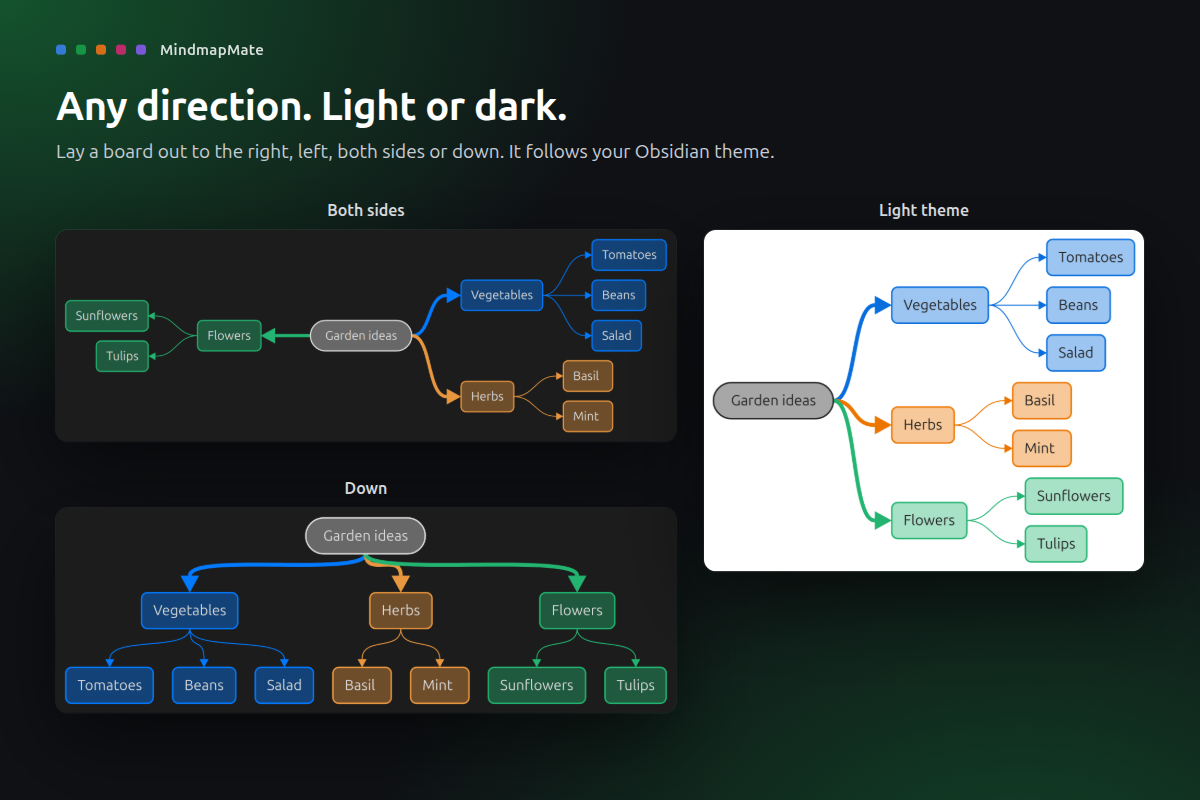
  • Tidy in one click. Lay a board out to the right, left, both sides or down. Fold branches, focus on one, or jump to a level.
  • Share it anywhere. Export a Markdown checklist, a PNG or SVG image, or a single HTML page anyone can open in a browser.
  • It is just a note. Each board is a .board.md file in your vault, with a readable outline that search and backlinks can see.
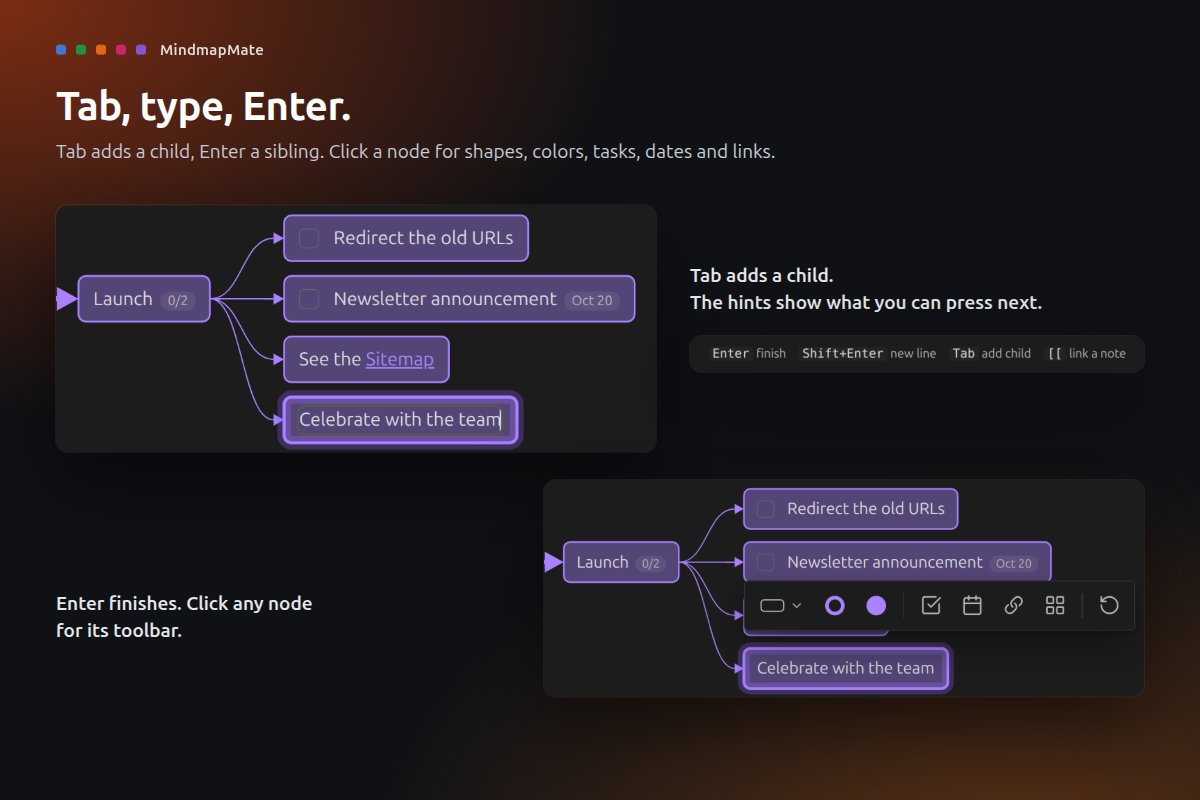
Tab adds a child, Enter finishes, click a node for its toolbar

Progress rolls up to each parent; due dates turn orange today and red when late

One board laid out on both sides, downward, and in a light theme

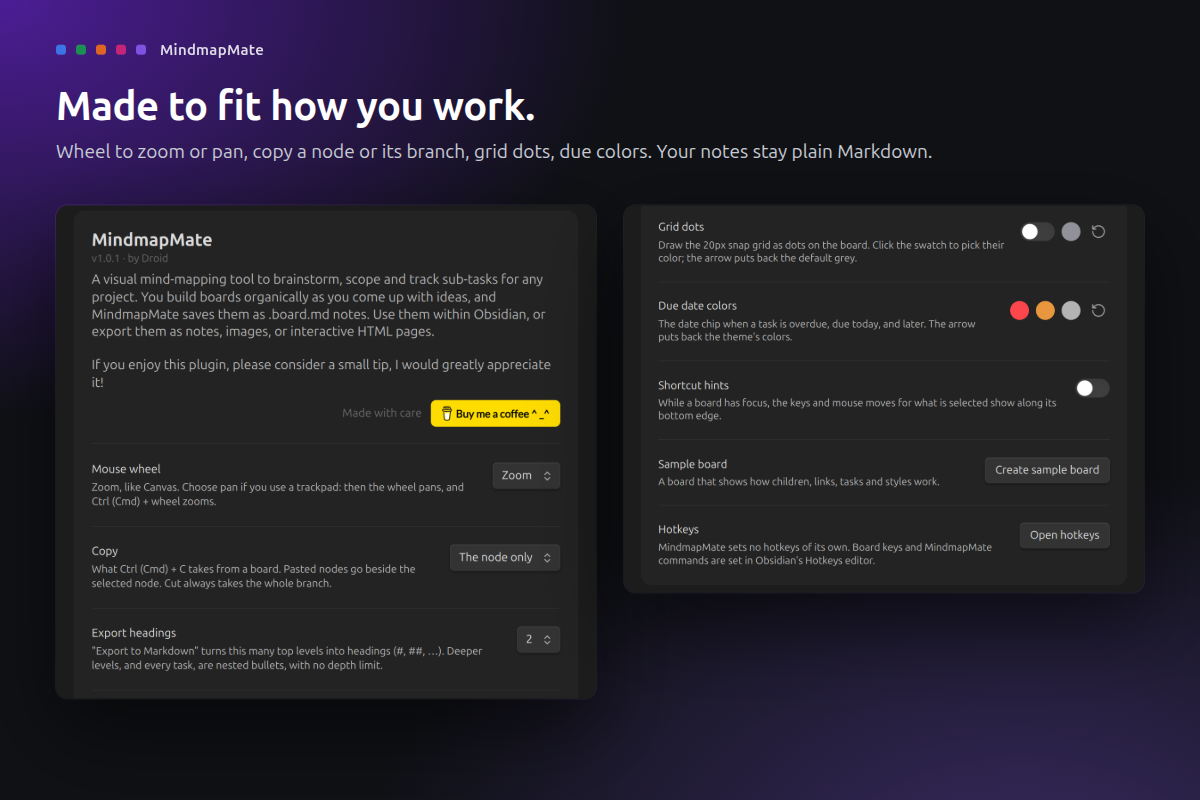
MindmapMate settings: mouse wheel, copy, export headings, grid dots, due date colors

How to use

  1. Install MindmapMate from Settings > Community plugins and enable it. A sample board opens and shows you around.
  2. Make a board from the ribbon button, a folder's right-click menu, or the command MindmapMate: New board.
  3. Double-click empty space for a node, type, then press Tab for a child or Enter for a sibling.
  4. Click a node for its toolbar: shape, colors, checkbox, due date and note link.

Every action is also a command. MindmapMate sets no hotkeys of its own; give any command a key in Settings > Hotkeys. The full guide lists every key and feature.

Privacy and safety

  • Your notes stay yours. Boards are plain Markdown files in your vault. MindmapMate only writes boards, files you ask for (exports, promoted notes, the sample board), and link updates inside boards.
  • No network, no telemetry. Nothing is loaded or sent. Exported HTML pages load nothing either.
  • Safe with bad files. A board it can't read shows an error and is never saved over.
  • Desktop only. Needs Obsidian 1.13 or later.
  • Signed releases. Every release is built by GitHub Actions from this repository and carries a build provenance attestation.

Support

If MindmapMate helps you plan a little clearer, you can buy me a coffee. Thank you!

Develop

npm ci, npm test, npm run lint, npm run build (installs into ../test-vault), npm run obsidian:check (live checks in a real Obsidian), npm run showcase (store screenshots), npm run ship.

MIT licensed. Made by Droid.

HealthExcellent
ReviewPassed
About
Map ideas and track tasks on a freeform mindmap where nodes can be task lists and parent nodes show progress. Link nodes to notes with previews, add due dates that change color when late, fold and focus branches, and export as Markdown, PNG, SVG or standalone HTML.
VisualizationTasks
Details
Current version
1.0.4
Last updated
2 days ago
Created
7 days ago
Updates
4 releases
Downloads
165
Compatible with
Obsidian 1.13.0+
Platforms
Desktop only
License
MIT
Report bugRequest featureReport plugin
Sponsor
Buy Me a Coffee
Author
droidstreamdroidstream
GitHubdroidstreamer
  1. Community
  2. Plugins
  3. Visualization
  4. MindmapMate

Related plugins

Excalidraw

Visual PKM powerhouse. Create and edit Excalidraw drawings.

Advanced Canvas

Supercharge your canvas experience. Create presentations, flowcharts and more.

ExcaliBrain

An interactive, structured mind-map of your Obsidian vault.

Breadcrumbs

Visualise the hierarchy of your vault using a breadcrumb trail or matrix view.

Mermaid Tools

Improved Mermaid.js experience: visual toolbar with common elements and more.

Tasks

Track tasks across your vault. Supports due dates, recurring tasks, done dates, sub-set of checklist items, and filtering. Maintained by Clare Macrae and Ilyas Landikov, created by Martin Schenck.

TaskNotes

Note-based task management with calendar, pomodoro and time-tracking integration.

Day Planner

Turn tasks from daily notes, the Tasks plugin, and calendars into time blocks on an editable timeline, with built-in time tracker.

Maps

Adds a map layout to bases so you can display notes as an interactive map view.

Checklist

Consolidate checklists across all files into a single view.