Search...Search plugins and themes...
⌘K
Sign in
  • Get started
  • Download
  • Pricing
  • Enterprise
  • Account
  • Obsidian
  • Overview
  • Sync
  • Publish
  • Canvas
  • Mobile
  • Web Clipper
  • CLI
  • Learn
  • Help
  • Developers
  • Changelog
  • About
  • Roadmap
  • Blog
  • Resources
  • System status
  • License overview
  • Terms of service
  • Privacy policy
  • Security
  • Community
  • Plugins
  • Themes
  • Discord
  • Forum / 中文论坛
  • Merch store
  • Brand guidelines
Follow us
DiscordTwitterBlueskyThreadsMastodonYouTubeGitHub
© 2026 Obsidian

MFP Player

ashotisashotis2 downloads

Play the Music For Programming series as a playlist in your sidebar, with resume, favourites, themes and an ASCII EQ. Unofficial.

  • Overview
  • Scorecard
  • Updates1

Play the Music For Programming series as a playlist in your Obsidian sidebar.
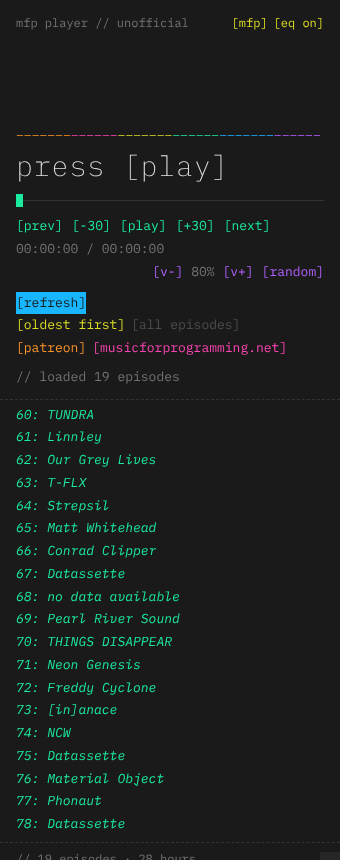
MFP Player in the sidebar

Features

  • Playlist: plays every episode, oldest or newest first, and moves on to the next one automatically.
  • Resume: remembers where you left off in each episode, even after you restart Obsidian.
  • Favourites: right-click an episode to add or remove it, or switch to a favourites-only playlist.
  • [refresh]: checks the official feed for new episodes, only when you press it.
  • Themes: mfp, invert, mono, amber, and "obsidian", which follows your vault's colours.
  • Extras: ASCII EQ, now-playing in the status bar (click to play or pause), and media keys.
  • Commands: play/pause, next, previous, random, skip ±30 s, favourite and more. Assign your own hotkeys in Settings → Hotkeys.

Usage

Click the music-note icon in the left ribbon, or run MFP Player: Open player from the command palette. Press [play].

Network use

This plugin needs the internet to work:

  • It fetches the public RSS feed from musicforprogramming.net on first run, and when you press [refresh].
  • It streams episodes from the official MP3 host (datashat.net). Nothing is downloaded, copied or re-hosted.

There's no telemetry and no account. Progress, favourites and settings are stored in the plugin's data.json in your vault.

Desktop only

Marked desktop only, because background audio on mobile is unreliable.

Support the series

Music For Programming makes no profit and carries no ads. Please consider their Patreon, and buy music from the artists you discover.

If you like the plugin itself, you can buy me a coffee.

Building from source

There are no dependencies. Run python3 build.py to write main.js, styles.css (with IBM Plex Mono embedded) and manifest.json to dist/.

Credits and license

This is an unofficial, fan-made plugin, not affiliated with Music For Programming or Datassette. All music belongs to its artists.

  • Code: MIT © AshOtis
  • Font: IBM Plex Mono, under the SIL Open Font License (see fonts/OFL.txt)
HealthExcellent
ReviewNot scanned
About
Play the Music For Programming series as a continuous playlist in the Obsidian sidebar with auto-advance and oldest/newest ordering. Resume per episode, mark favourites for a favourites-only list, refresh the feed for new episodes, and control playback via status bar, media keys, or commands; includes themes and an ASCII EQ.
AudioSidebarStatus bar
Details
Current version
1.0.0
Last updated
5 hours ago
Created
5 hours ago
Updates
1 release
Downloads
2
Compatible with
Obsidian 1.4.0+
Platforms
Desktop only
License
MIT
Report bugRequest featureReport plugin
Sponsor
Buy Me a Coffee
Author
ashotisashotis
GitHubashotis
  1. Community
  2. Plugins
  3. Audio
  4. MFP Player

Related plugins

Text to Speech

Hear your notes.

Notebook Navigator

A better file browser and calendar inspired by Apple Notes, Bear, Evernote and Day One.

Tag Wrangler

Rename, merge, toggle, and search tags from the tag pane.

Vertical Tabs

Offer an alternative view that displays open tabs vertically, allowing users to group and organize tabs for a better navigation experience.

Flexplorer

Enhance the file explorer with custom sorting, pinning, and hiding.

Checklist

Consolidate checklists across all files into a single view.

Recent Files

Display a list of recently opened files.

YTranscript

Easily fetch transcription for any YouTube video.

Longform

Helps you write and edit novels, screenplays, and other long projects.

Voice

Listen to your notes as natural speech with text-to-speech (TTS). Read notes aloud, play them like an audiobook in the voice player, download MP3 audio and listen offline hands-free on mobile.