Search...Search plugins and themes...
⌘K
Sign in
  • Get started
  • Download
  • Pricing
  • Enterprise
  • Account
  • Obsidian
  • Overview
  • Sync
  • Publish
  • Canvas
  • Mobile
  • Web Clipper
  • CLI
  • Learn
  • Help
  • Developers
  • Changelog
  • About
  • Roadmap
  • Blog
  • Resources
  • System status
  • License overview
  • Terms of service
  • Privacy policy
  • Security
  • Community
  • Plugins
  • Themes
  • Discord
  • Forum / 中文论坛
  • Merch store
  • Brand guidelines
Follow us
DiscordTwitterBlueskyThreadsMastodonYouTubeGitHub
© 2026 Obsidian

Mermaid Node Spacing

isayaisaya28 downloads

Changes mermaid node spacings only.

Add to Obsidian
Mermaid Node Spacing screenshot
  • Overview
  • Scorecard
  • Updates3

An Obsidian plugin that globally adjusts Mermaid flowchart node and rank spacing in every diagram — no need to repeat %%{init: ...}%% in each code block.

Before & After
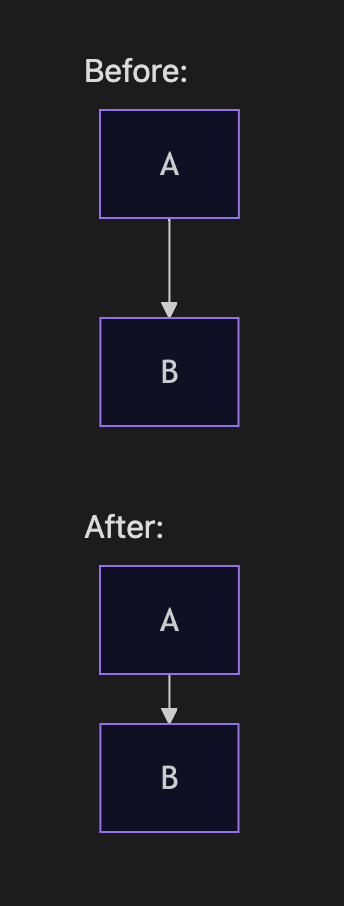
Before and After — tighter vertical spacing between flowchart nodes

The example above uses a simple A → B flowchart. With this plugin, rank spacing (vertical gap between rows) and node spacing (horizontal gap between nodes) are reduced globally, so long vertical charts take up less room in your notes.

Why?

Mermaid's default flowchart layout uses generous spacing (nodeSpacing: 50, rankSpacing: 50). For note-taking workflows with many stacked nodes, that whitespace adds up quickly.

This plugin hooks into Obsidian's Mermaid API and merges your spacing preferences into every render — equivalent to adding this to each diagram:

%%{init: {'flowchart': {'nodeSpacing': 20, 'rankSpacing': 25}}}%%
flowchart TD
    A --> B

Settings

Open Settings → Community plugins → Mermaid Node Spacing:

Setting Description Plugin default Mermaid default
Node spacing Horizontal distance between nodes on the same rank 20 50
Rank spacing Vertical distance between ranks (rows) 25 50

Changes apply immediately and re-render open Markdown preview panes.

Installation

Manual

  1. Download or clone this repo.
  2. Copy the mermaid-spacing folder into your vault's .obsidian/plugins/ directory.
  3. Enable Mermaid Node Spacing under Settings → Community plugins.
  4. Reload Obsidian if prompted.

Your folder should look like:

.obsidian/plugins/mermaid-spacing/
├── main.js
├── manifest.json
└── ...

From source

If you have the TypeScript source, build with your usual Obsidian plugin toolchain and copy the output main.js + manifest.json into the plugin folder.

Compatibility

  • Obsidian: 1.5.0+
  • Platforms: Desktop and mobile (isDesktopOnly: false)

License

MIT

Author

isayaGIT

HealthExcellent
ReviewPassed
Appearance
Details
Current version
1.0.2
Last updated
3 weeks ago
Created
3 weeks ago
Updates
3 releases
Downloads
28
Compatible with
Obsidian 1.5.0+
Platforms
Desktop, Mobile
License
MIT
Report bugRequest featureReport plugin
Author
isayaisayaisayagit
GitHubisayagit
  1. Community
  2. Plugins
  3. Appearance
  4. Mermaid Node Spacing

Related plugins

Minimal Theme Settings

Control the colors and fonts in Minimal Theme.

Hider

Hide interface elements such as tooltips, status bar, titlebar, and more.

Supercharged Links

Add attributes to internal links with the values of target note's frontmatter attributes.

Note Toolbar

Add customizable toolbars to your notes.

Style Settings

Adjust theme, plugin, and snippet CSS variables.

Link Favicons

See the favicon for a linked website.

Chat View

Chat View lets you quickly and easily create elegant Chat UIs in your Markdown Files.

Custom Font Loader

Customize your vault with any font you want (+ Support for Android and iOS).

Pretty Properties

Makes note properties look more fun: adds side image, banners, list property colors and allows to hide specific properties.

Lapel

Show the heading levels in the gutter of the editor.