Matinee
 Ash Otis1 downloads
Plays random public-domain black-and-white films from the Internet Archive in a small screen under your file list.
- Overview
- Scorecard
- Updates1
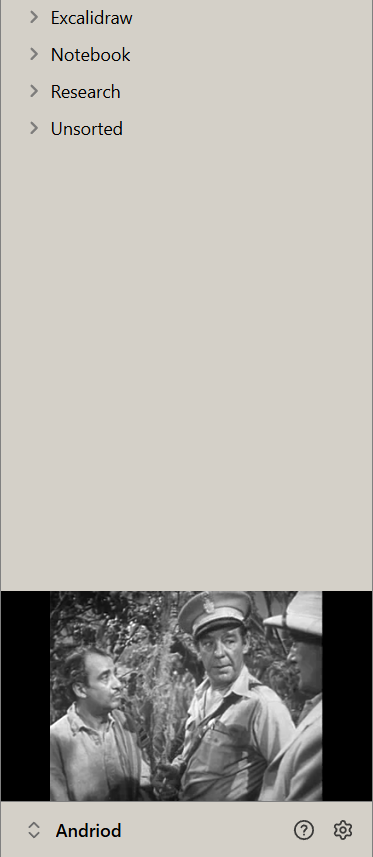
A small black-and-white film screen in your Obsidian sidebar. Matinee plays random public-domain films from the Internet Archive, docked edge to edge under your file list.
Features
- Old films, chosen at random: film noir, sci-fi and horror, the silent era, classic features, newsreels and shorts, and early cartoons. Pick which of these it draws from in settings.
- Always black and white: any colour film is shown in grey so the look stays consistent. You can turn this off.
- Starts part-way through: drops you into a scene instead of the opening credits. You can turn this off.
- Out of the way: the title, year and controls only appear when you hover. Controls: pause, another film, sound on or off, and open the film's page on archive.org.
- Top or bottom: sits at the bottom of the left sidebar above the vault name, or at the top.
- Shape and fit: classic 4:3 or wide 16:9, filling the screen or showing the whole picture.
- Quiet by default: starts muted, with its own volume setting.
- Polite: pauses when you close the sidebar or minimise Obsidian, and doesn't repeat any of your last 40 films.
Commands: Next film, Show or hide the film, and Sound on or off. Set your own hotkeys in Settings → Hotkeys.
Network use
Matinee needs an internet connection. It contacts archive.org only:
https://archive.org/advancedsearch.phpto find films in the chosen collectionshttps://archive.org/metadata/<id>to find a playable video file for the chosen filmhttps://archive.org/download/<id>/<file>to stream the video
No account, no tracking and no other services. Matinee doesn't send anything from your vault anywhere. It saves its settings and a list of the last 40 film IDs it played (to avoid repeats) in the plugin's own data.json.
About the films
The films come from public-domain and freely licensed collections on the Internet Archive. Matinee streams them directly from archive.org and doesn't store or redistribute them. If you enjoy them, consider supporting the Internet Archive.
Install
From Obsidian: Settings → Community plugins → Browse, search for Matinee, then Install and Enable.
Desktop only.
Support
Made by AshOtis. If you like it, you can buy me a coffee.
Licence
MIT