Logseq Style Tasks
 马自立45 downloads
Keyword tasks for Logseq-style journals: todos: blocks, priority shorthand, keyword cycle groups with their own hotkeys, animated keyword icons and task sounds. A fork of TODOseq.
- Overview
- Scorecard
- Updates1
Keyword tasks for Logseq-style journals in Obsidian, with a little sound and motion.
Logseq Style Tasks is a fork of TODOseq by Stephen Cross. Everything TODOseq does is still here: plain TODO / DOING / DONE keywords instead of checkboxes, a vault-wide Task List, natural language dates, embedded task lists, dashboards. On top of that it adds the habits of someone who journals the Logseq way: tasks written as outline items in the daily note, switched with the keyboard many times a day.
This is not the official TODOseq plugin. If you don't need the additions below, use TODOseq.
Contents
- Why this fork exists
- What it adds
- Installing
- Documentation
- Maintenance
- Privacy
- Feedback and updates
- Credits
- License
Why this fork exists
I moved a journal vault from Logseq to Obsidian and use TODOseq every day. Over a few months I patched my copy for how I work: todos: blocks, priority shorthand, a hotkey per group of keywords, and a short sound and animation each time a task changes state, which makes clearing the day's list a bit more fun. Some of these are personal taste rather than something every TODOseq user wants, so they live in a separate plugin. Stephen Cross agreed to a fork under its own name and id. Fixes that suit everyone are sent upstream instead, like the nested-task indentation fix (scross01/obsidian-todoseq#89).
What it adds
Every addition can be turned off in Settings → Logseq Style Tasks → Logseq style.
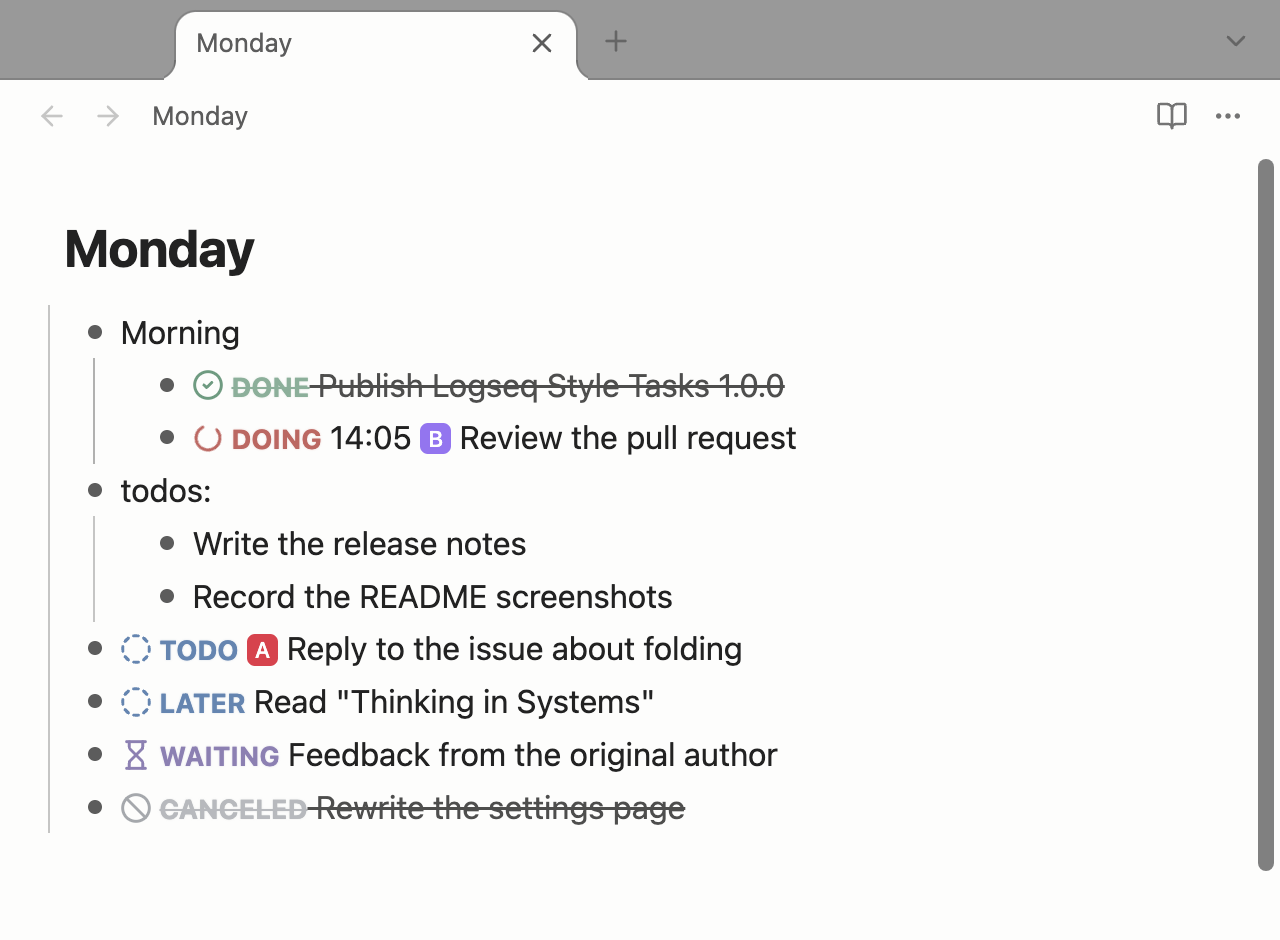
todos:blocks. Direct children of a- todos:list item are tasks even without a keyword. The keyword is written into the line the first time you change its state.- todos: - write the report ← read as TODO - DOING review the PR ← keeps its own keywordToggle on a plain item adds
TODO. Toggle task state on a list item without a keyword turns it into a task, on an empty line it starts- TODO.Keyword cycle groups. Define groups of keywords that cycle in order, for example
MAYBE → YES → NOorTODO4AI → DOING → DONE. Each group gets its own command, so it can have its own hotkey in Settings → Hotkeys. On a line whose keyword is in the group the command moves to the next one; any other line gets the group's first keyword.Priority shorthand. Type
todoa writeortodo a 写稿and it becomesTODO [#A] writewhen the cursor leaves the line, the same way smart dates wait until you are done typing. A time afterDOINGstays in front:doing b 14:05 report→DOING 14:05 [#B] report.Toggle important / urgent. Two commands that treat priorities as an Eisenhower matrix: A = important and urgent, B = urgent, C = important, neither = no priority.
Uppercase keywords. Keywords you list (for example
TODO4AI) are uppercased when typed in lower case.Animated keyword icons. A small icon in front of each keyword in the editor. Each plays a short animation once, right after the line changes state, and then rests: nothing loops, so an idle editor does not keep repainting. Respects reduced motion.
Task sounds. A short, quiet synthesized cue when a task changes state, whoever changed it: a hotkey, a click, the Task List, or typing. Forward steps rise (DONE settles softly), pauses and cancellations fall. No audio files, silent while Obsidian is in the background.
A calmer palette. Lower-saturation keyword colors tuned for light themes, including colors for decision keywords (
YES/NO/MAYBE) and agent session states (TOREVIEW,NEEDOK,ERRORED,HITLIMIT,QUEUED,DELEGATED) if you add them as custom keywords.Click a keyword to open its note (optional). Instead of changing the state, a click opens
Keyword queries/DOING.md, created from a template the first time. The default template is an embedded task list of every task in that state.Fractions are progress. A standalone
2/3on a task line is progress, not February 3rd.Keyword tooltip can be turned off.
Installing
Not in the community plugin directory yet. Until then:
- Download
main.js,manifest.jsonandstyles.cssfrom the latest release. - Put them in
<your vault>/.obsidian/plugins/logseq-style-tasks/. - Enable Logseq Style Tasks in Settings → Community plugins.
Or install with BRAT using MatsuriMW/logseq-style-tasks.
Coming from TODOseq
Don't run both at once: they read the same keywords and the same todoseq code blocks. Disable TODOseq first. To keep your settings, copy .obsidian/plugins/todoseq/data.json to .obsidian/plugins/logseq-style-tasks/data.json before enabling this plugin. Hotkeys are stored per plugin id, so set them again in Settings → Hotkeys. Your notes don't change: embedded lists still use the todoseq code block.
Documentation
For everything inherited from TODOseq (keywords, Task List, search, dates, embedded lists, dashboards) see the TODOseq documentation.
Maintenance
This fork follows upstream. When TODOseq releases a new version (for example 0.22.x), it is merged in. The fork has its own version numbers starting at 1.0.0; each release note says which TODOseq version it is based on. 1.0.0 is based on TODOseq 0.21.2. If a feature from here is adopted by TODOseq, it is removed from the fork.
Bugs in the additions above: report here. Bugs that also happen in TODOseq: please report them upstream.
Privacy
No network requests. Everything runs locally in your vault.
Feedback and updates
To follow new features, send feedback or keep up with progress, follow me on Twitter: @Matsurimywaifu.
Credits
- TODOseq by Stephen Cross, MIT. This plugin is built on it.
- Icons from Lucide, ISC. Animations follow lucide-animated, MIT.