
- Overview
- Scorecard
- Updates9
This is a plugin for Obsidian (https://obsidian.md).
With this plugin, you can write your templates using LiquidJS tags
Disclaimer
This plugin is still under heavy development, so it's not optimized yet and has basic features.
Autocomplete
There is an autocomplete feature that by default is triggered by ;; but can be customized in the options
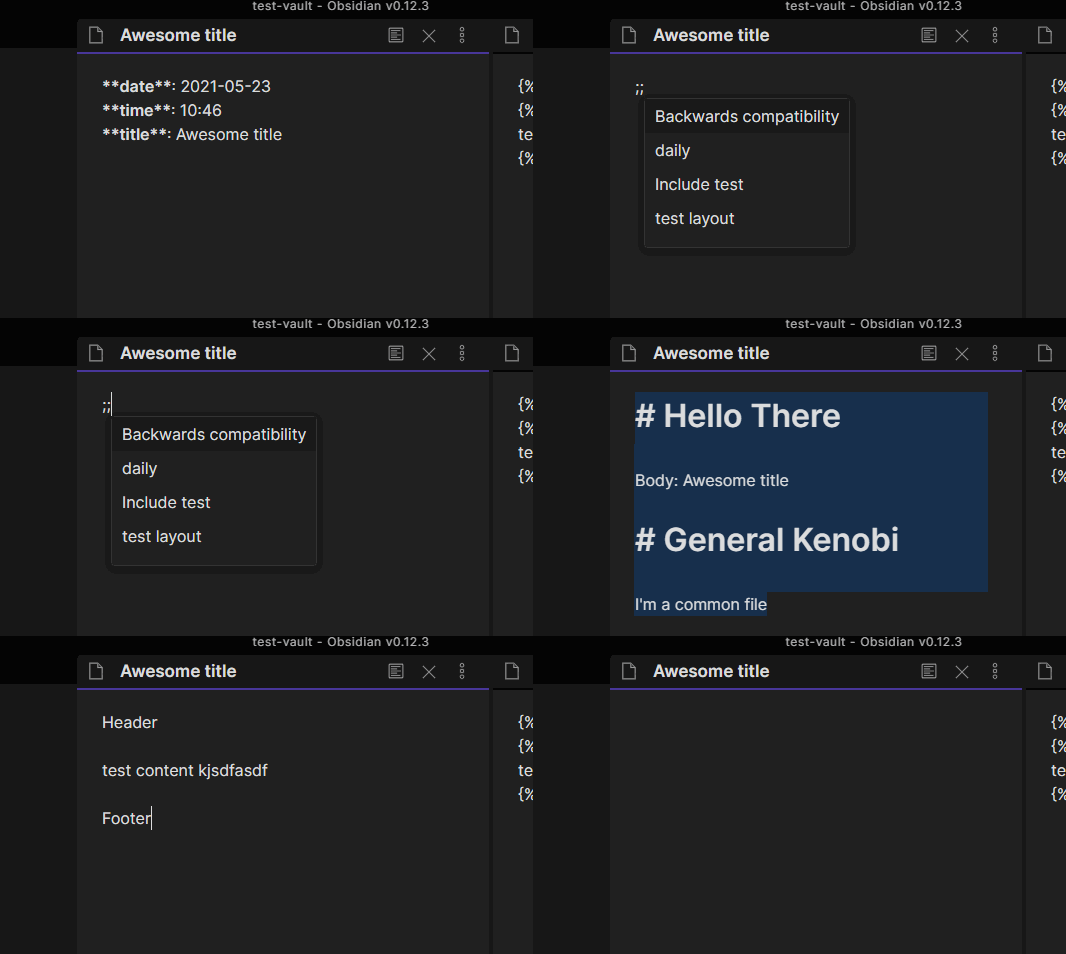
Examples
This means that you can create a template made from smaller ones, for example (assuming that your templates folder is templates):
templates/header.md
# Header

Insert a common header
templates/footer.md
---
I'm just a footer
templates/awesome_template.md
{% include "header" %}

This is the body of my note: {{title}}
link to today note [[{{date}}]]

{% include "footer" %}
When you create a note with the "Awesome template" template, you'll end up with:
A cool title.md
# Header

Insert a common header

This is the body of my note: A cool title
link to today note [[2021-05-21]

---
I'm just a footer
But other than that, you can use all the basic tags and filters
Custom Filters
For now I'll keep the documentation of the filters here, when they become more I'll move it somewhere more convenient
date filter
The LiquidJS built-in date filter has been replaced with a custom one.
For now, if there is a % character in the date format the old filter is used, otherwise the new one will take place.
The new date filter uses date-fns as library to handle dates, and the format strings to use are showed here: date-fns formats
There are also some special words that can be used with this filter:
"now"
{{ "now" | date: "yyyy-MM-dd" }}
Use the date from new Date and formatted with the given format
"today"
{{ "today" | date: "yyyy-MM-dd" }}
same as now
"yesterday"
{{ "yesterday" | date: "yyyy-MM-dd" }}
use the subDays function to subtract 1 from Date.now() and formatted with the given format
"tomorrow"
{{ "tomorrow" | date: "yyyy-MM-dd" }}
use the addDays function to add 1 to Date.now() and formatted with the given format
date Default format
Now you can use the "Date Format" you defined inside the plugin settings in a easier way:
Before: {{ "now" | date: default_date_format }}
Now: {{ "now" | date }} the format you specified in the settings is now used as default
days_ago filter
A simple filter that uses the subDays to subtract days from the current date (Date.now())
Keep in mind that this filter returns a date that needs to be formatted, so needs to be used with the date filter, like this:
{{ 1 | days_ago | date }}same as{{ "yesterday" | date }}{{ 2 | days_ago | date }}return the date from two days ago
This can be used for a "Weekly Review" template, something like:
- [[{{ 7 | days_ago | date }}]]
- [[{{ 6 | days_ago | date }}]]
- [[{{ 5 | days_ago | date }}]]
- [[{{ 4 | days_ago | date }}]]
- [[{{ 3 | days_ago | date }}]]
- [[{{ 2 | days_ago | date }}]]
- [[{{ 1 | days_ago | date }}]]
days_after filter
A simple filter that uses the addDays to add days to the current date (Date.now())
Keep in mind that this filter returns a date that needs to be formatted, so needs to be used with the date filter, like this:
{{ 1 | days_after | date }}same as{{ "tomorrow" | date }}{{ 2 | days_after | date }}return the date from two days from now
Template context
Other than the classic, date, time and title variable you also have:
| Name | Description |
|---|---|
| default_date_format | The date format that you have specified in the plugin settings and can be used like this: {{ "now" | date: default_date_format }} |
| default_time_format | The time format that you have specified in the plugin settings and can be used like this: {{ "now" | date: default_time_format }} |
Roadmap
For now, this plugin just includes the basic version of LiquidJS, but I want to extend it to allow:
- Add autocomplete to the template folder, excluded folder settings
- Implement a fuzzy finder for the autocomplete
- Implement/install a filter that allows you to write
{{ 1 | days_ago | date: default_date_format }} - Parse a selected template string, something like you select
{{ "dQw4w9WgXcQ" | youtube_iframe }}run a command and end up with the parsed result, in this case, the youtube iframe. (theyoutube_iframetag does not exist yet)