Line Breaker
 Ellie Aster Aguilera14 downloads
Line Breaker will make keeping markdown pretty comfier. One enter press and you’ll be writing the next paragraph, one backspace press and you’ll get rid of trailing spaces.
- Overview
- Scorecard
- Updates3
Annoyed of having to repeatedly press enter and backspace all the time? Line Breaker plugin will make keeping markdown pretty comfier. One enter press and you’ll be writing the next paragraph, one backspace press and you’ll get rid of trailing spaces.
Demonstration
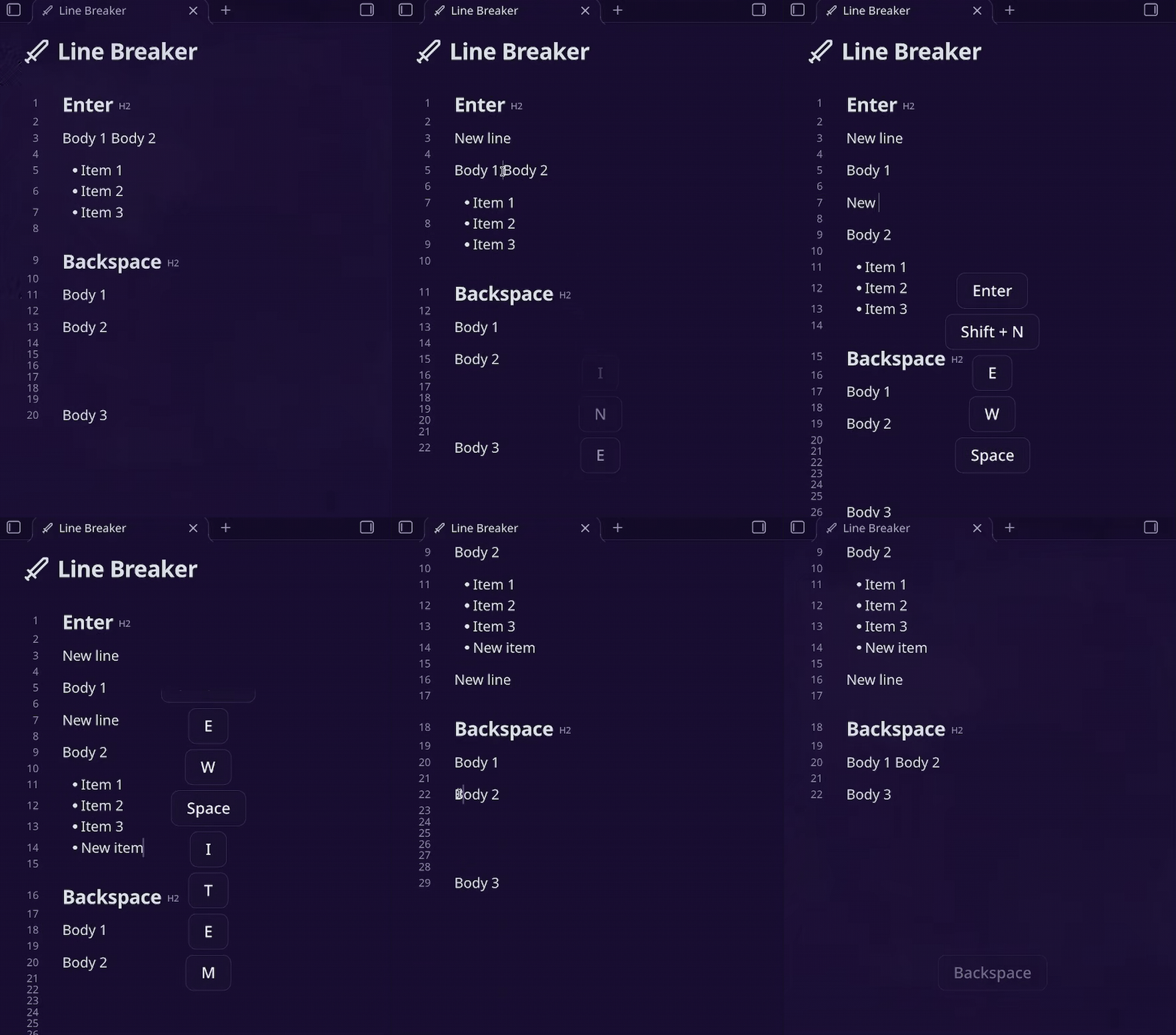
Features
- Enter
- Begin / End of H, P, HR: makes two line breaks.
- In the middle of H or P: breaks the line in two adding one blank line above and below removing spaces or tabs before or after the caret.
- In a blank line between any kind of blocks (except it only has space or tabs) it makes a blank line above and below.
- End of the closing fence of a code block: two line breaks, like a paragraph.
- It ignores: Lists, quotes, callouts, footnotes, code blocks, math blocks, tables.
- Shift + Enter
- Begin / End of H, P, HR: Obsidian default enter behavior.
- Begin / End of lists, quotes, callouts, footnotes: make two line breaks.
- In the middle of lists, quotes, callouts, footnotes: breaks the line in two adding one blank line above and below removing spaces or tabs before or after the caret.
- It ignores: Code blocks, math blocks, tables
- Delete / Shift + Delete
- On an empty line: same as Backspace on that line.
- At the end of a line: joins the line below with a space, same as Backspace at the start of that line.
- Backspace
- On a blank line (even it if has spaces or tabs) removes all blank lines above except one even if they had spaces or tabs.
- On a blank line if there are no blank lines above then joins the above and below line separating them with a space.
- Beginning of any block if there are more than one blank lines above removes all blank lines above except one even if they had spaces or tabs
- Beginning of any block if there are no blank lines above then joins the above and below line separating them with a space but removing any other spaces or tabs if any.
- Shift + Backspace
- Obsidian default backspace behavior.
Support me!
HealthExcellent
ReviewSatisfactory
About
Make Markdown line breaks consistent and trim trailing spaces with single Enter and Backspace presses. Use Enter to split paragraphs or add blank lines (ignores lists, code/math blocks, tables); use Backspace to collapse extra blank lines or join adjacent lines, while Shift+Enter/Shift+Backspace keep default behavior.Details
Current version
0.2.1
Last updated
2 days ago
Created
Last week
Updates
3 releases
Downloads
14
Compatible with
Obsidian 1.4.0+
Platforms
Desktop, Mobile
License
MIT
Sponsor