LaC.Roadmap
 sin558 downloads
Plan and record trips as structured data with map views, days grouping, and routes.
- Overview
- Scorecard
- Updates12
English | 简体中文
Life as Code - Roadmap is a travel planning and journaling plugin for Obsidian. Trips are stored as TOML inside Markdown — no database, no proprietary format, fully readable and editable on their own. Render them as a journal-style timeline with maps, day grouping, route segments, and a heatmap.
Features
🎯 Core Features
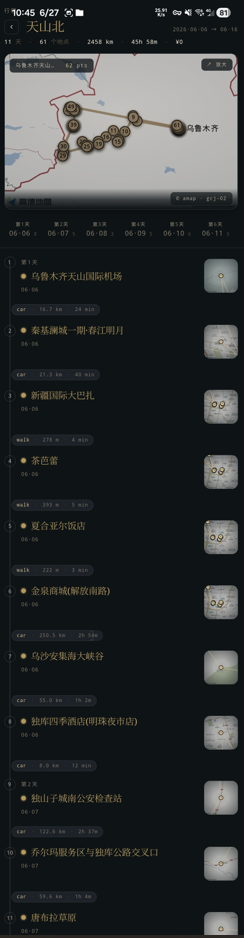
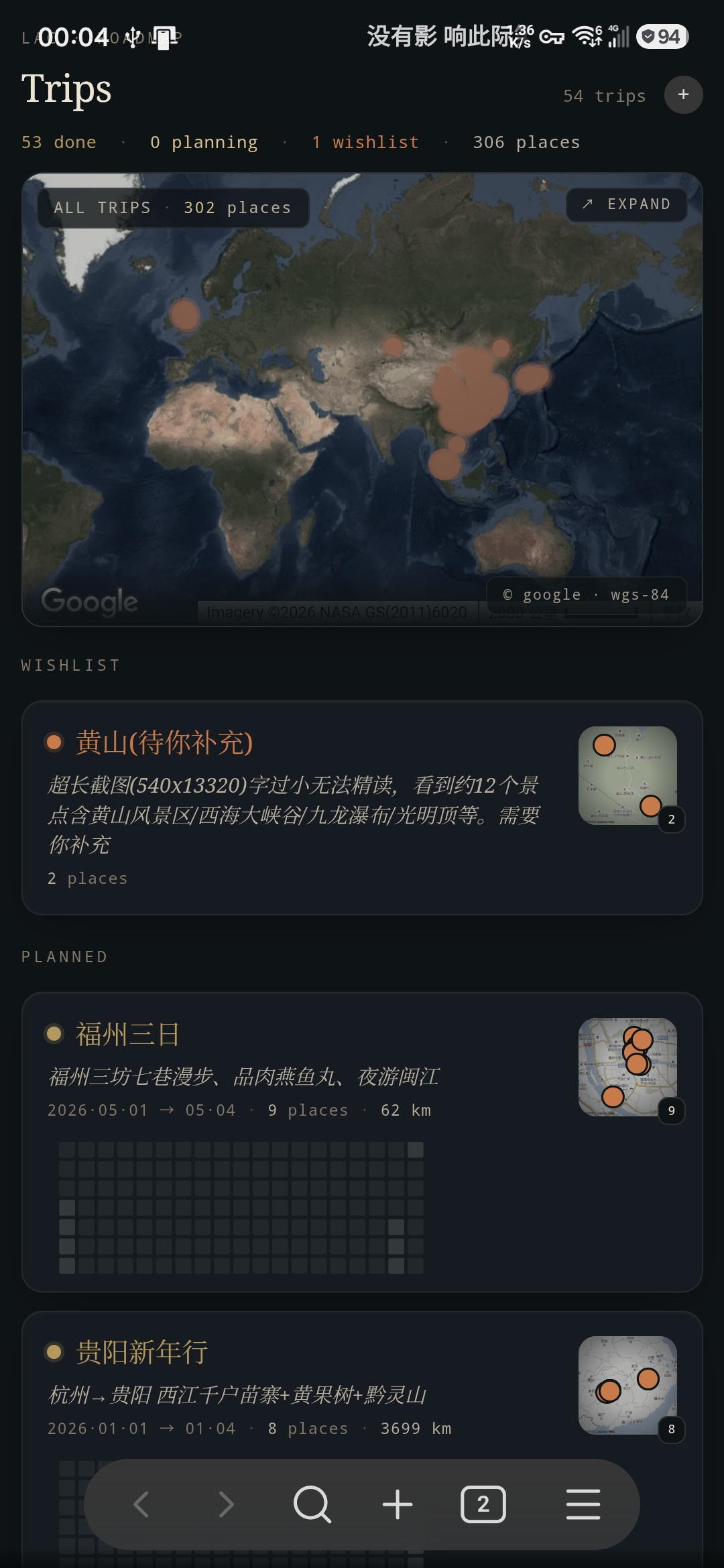
- Trip List + Trip Detail Views: a roadmapset (collection) renders all trips with status dots, stats line, and per-trip cards; each trip opens into a vertical Field-Journal-style timeline
- Day Grouping: places are auto-grouped by date, with a quiet
DAY n / 11·01 / counttab strip; multi-select tabs filter the timeline - Route Segments: a
+ transitchip between places opens an editor for travel mode (walk / bicycle / motorcycle / drive / transit), distance, duration, and tolls — with an "auto-calculate" button that calls Google Directions or AMap routing - Calendar Heatmap: per-trip monochromatic-gold density strip showing where the trip's activity falls in time
- Aggregate Map: a hero map at the top of each page; click to expand into a pan/zoom-able read-only viewer
- Recursive Structure: a place file can simultaneously be the entry of a sub-roadmap (
type = "root",renders = ["roadmap"]), so a trip can contain nested trips - Place Reuse: the same place file can be referenced by multiple trips; generic fields (name / description / address) live in the place file, while per-trip times live as overrides in the roadmap file
- Drag & Drop: reorder places within a day; drag across day tabs to reassign date; auto-recompute affected route segments
🗺️ Dual Map Provider
- Google Maps for international trips (WGS84 coordinates)
- AMap (高德) for trips inside China (GCJ-02 coordinates)
- Per-trip
map_provideroverrides the global default — same vault can mix both seamlessly - Coordinates auto-convert between WGS84 ↔ GCJ-02 based on the active provider
📊 Data Format
All data is TOML at the top of regular Markdown files, with [[Wikilink]] references for relationships. The plugin only rewrites the keys it owns and preserves leading comments.
Roadmap collection root (roadmap.md):
type = "root"
renders = ["roadmapset"]

[[Tokyo Trip]]
[[Kyoto Adventure]]
Roadmap file (Tokyo Trip.md):
name = "Tokyo Trip"

[detail]
description = "Akihabara + Asakusa"
start_time = "2025-11-01"
end_time = "2025-11-02"
map_provider = "google"

[[Akihabara]]
travelMode = "transit"
distance = 4800
duration = 1080
tolls = 240

[[Senso-ji Temple]]
The lines between two [[wikilink]] rows describe a route segment between those two places. The travelMode decides the polyline style (walk / bicycle render dashed; the rest solid) and colour.
Place file (Akihabara.md):
name = "Akihabara"

[detail]
start_time = "2025-11-01 10:00"
end_time = "2025-11-01 12:30"
description = "Electronics, anime, retro games"

[detail.address]
name = "Akihabara Station"
address = "1 Chome Sotokanda, Chiyoda City, Tokyo"
longitude = 139.7741
latitude = 35.6985
coordinate_system = "WGS84"
When a place is referenced by multiple trips, its own start_time / end_time are dropped and per-trip times live as override lines next to the wikilink in the roadmap file:
[[Akihabara]]
start_time = "2025-11-01 10:00"
end_time = "2025-11-01 12:30"
Sub-roadmap as a place (Day 2 in Kyoto.md):
type = "root"
renders = ["roadmap"]
name = "Day 2 in Kyoto"

[detail]
description = "Fushimi Inari + Gion"

[[Fushimi Inari Shrine]]
[[Gion District]]
The parent trip references this file as a regular [[Day 2 in Kyoto]] place; clicking the card navigates into it as a nested timeline.
🔧 Plugin Commands
- Open LaC.Roadmap — open the trip list. The plugin will scaffold a sample roadmap collection on first run if the configured entry file does not exist.
- File Context Menu — right-click any Markdown file → "Open with LaC.Roadmap" to open it as a roadmap entry (toggle in Settings).
📁 File Structure
LaC/Roadmap/
├── roadmap.md          # collection root: lists every trip
├── Tokyo Trip.md       # trip 1
├── Akihabara.md        # place referenced by Tokyo Trip
├── Senso-ji Temple.md
├── Kyoto Adventure.md  # trip 2
├── Day 2 in Kyoto.md   # sub-roadmap, also referenced as a place
├── Fushimi Inari Shrine.md
└── ...
⚙️ Settings
- Entry File: path to the roadmap collection root (default:
LaC/Roadmap/roadmap.md). - Enable Context Menu: show "Open with LaC.Roadmap" in Markdown file context menus.
- Always Separate Place Schedule: when a place is added to a trip, write its
start_time/end_timeas override lines on the roadmap file instead of into the place file. Defaulttrue— keeps place files reusable across trips. - Map API Provider:
None/Google Maps/AMap (高德).Nonedisables map widgets and falls back to plain text address fields. - AMap JS API Key: required for the interactive map widget when AMap is selected. Get one from AMap Open Platform — apply for the "Web 端 (JS API)" platform.
- AMap Web Service Key: required for address search, geocoding, route calculation, and coordinate conversion. Apply for the "Web 服务" platform.
- Google Maps API Key: required when Google Maps is selected. Get one from Google Cloud Console and enable Maps JavaScript API, Places API, Directions API, and Geocoding API.
- Language: Auto / 中文 / English.
Installation
This plugin does not go through the Obsidian Community Plugin review.
Method 1: BRAT (recommended)
- Install the BRAT plugin from Community Plugins.
- Open BRAT settings.
- Click "Add Beta plugin" and enter the repository:
alvinfunborn/lac-roadmap. - Enable LaC.Roadmap in Community Plugins; BRAT will pull the latest release automatically and keep it updated.
Method 2: Manual installation
- Download the latest release archive from GitHub Releases.
- Extract
main.js,manifest.json, andstyles.cssinto<vault>/.obsidian/plugins/lac-roadmap/(create the folder if missing). - Enable LaC.Roadmap in Settings → Community Plugins.
Usage
1. First Open
Run "Open LaC.Roadmap" from the command palette. If the configured entry file is missing, the plugin scaffolds LaC/Roadmap/roadmap.md plus sample places so you can see the UI immediately.
2. Manage Trips
On the trip list page:
- Add Trip: click the bottom
+ NEW TRIPbutton. A modal asks for name / description / dates / map provider. - Open Trip: click any card. The same tab navigates into the trip detail (use the back button or
←to return). - Reorder Wishlist: trips without dates can be dragged to reorder; planned trips are sorted by date automatically.
- Context Menu: right-click (or long-press on touch) for "Remove from collection / Duplicate / Delete file (move to trash)".
3. Manage Places
On a trip detail page:
- Add Place:
+ ADD PLACE. Pick name, time range, address. Address picker uses your configured map provider. - Add Nested Trip:
+ ADD TRIPcreates a sub-roadmap that the parent references as a place. - Edit Route Segment: click any chip between places (
walk · 4.8 km · 18 min) to edit travel mode / distance / duration / tolls. Theauto-calculatebutton uses your map provider's routing API. - Add Missing Segment: chips marked
+ transitbetween two consecutive places have no segment yet — click to create one. - Drag Places: drag within a day to reorder; drag onto a day tab to move to that day; segments to/from the moved place are recomputed.
4. Day Tabs
DAY 1 / 11·01 / 3— DAY ordinal, calendar date, place count.- Click to multi-select; an empty selection or all-selected shows everything.
+ DAYadds a session-only placeholder day (not persisted; for previewing how a future day's places would group).wishlistcollects places without a date.
5. Hero Map
The map at the top of trip / trip-list pages is a preview. Click it to open a full read-only map viewer where you can pan / zoom / inspect markers. The hero is intentionally a preview because the warm-ink visual treatment doesn't pass through pointer events under Chromium — see docs/PROGRESS.md for the trade-off.
Technical Implementation
- Obsidian Plugin API for file operations and view registration.
- React + TypeScript for the UI; Sortable.js for drag-drop.
- Lightweight TOML reader / writer that preserves leading comments and supports
[[wikilinks]]inside the body. - Provider abstraction (
IMapProvider+GoogleMapProvider/AmapProvider) so all map widgets work identically against either provider. - Coordinate conversion (WGS84 ↔ GCJ-02) applied at the provider boundary so place files keep their declared coordinate system.
- Field-Journal redesign tokens live in
styles/_variables.scss; falls back to system serif / sans / mono fonts so no font assets are bundled and no network requests are made. - 220+ Jest tests covering repositories, hooks, services, and integration paths.
Architecture
Main components:
RoadmapPlugin— plugin entry, view registration, settings tab.RoadmapView— ObsidianItemViewhost; dispatches toRoadmapSetPage(collection root) orRoadmapPage(single trip) based on the file'srendersfield.RoadmapSetPage— trip list with hero aggregate map, status counts, drag-reorder for wishlist trips.RoadmapPage— trip detail with header / day tabs / timeline / actions.RoadmapHeader— back button + serif title + stats + hero map.DayTabsStrip— three-tier mono day tabs with long-press reorder.Timeline— spine + numbered bullets + place cards + route chips.RoadmapActions—+ add place / + add triprow.
RoadmapRepository— TOML parsing, place CRUD, sub-roadmap detection, route segment writes.RouteCalculationService— Google Directions / AMap routing wrapper.MapSelector— full-screen map modal (interactive picker + read-only viewer).AggregatedMap— hero map widget with warm-ink filter and overlay chrome.
License
MIT License
Privacy and network use
Maps are optional. With provider None, no map service is requested. Enabling Google Maps or AMap loads that provider's remote JavaScript SDK and map tiles, and sends place search queries and coordinates to the selected provider for search, geocoding and route calculation. These features require your own provider account and API key and may incur provider charges. Notes stay in your vault; map queries are processed by the provider. API keys are saved in local plugin settings (data.json); do not commit or share that file. The plugin does not collect analytics.