Kotoba Vault
 lain75 downloads
Organize Japanese vocabulary notes into gojuon folders from a reading property.
- Overview
- Scorecard
- Updates3
Local-first tools for organizing Japanese language-learning notes in Obsidian.
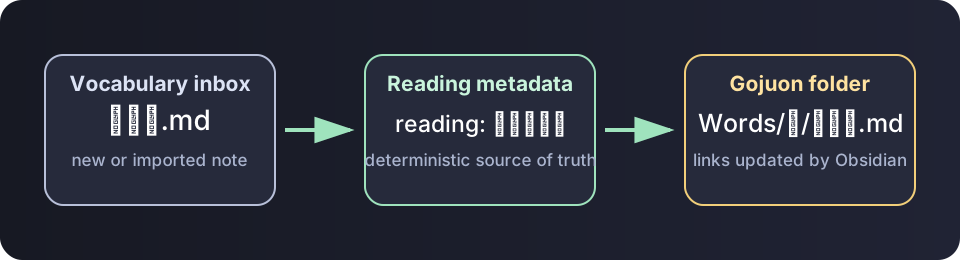
Kotoba Vault turns a reading property into predictable gojūon
folders, keeps Obsidian links intact while notes move, and offers a dry-run-first
migration CLI for existing Markdown vocabulary collections.
Current release: 0.1.2.
Why this exists
Large language-learning vaults can become slow to browse when many notes share one folder, and kanji filenames cannot be filed by pronunciation without explicit reading metadata. This project treats the reading as the source of truth:
---
reading: あたためる
aliases:
  - 温め
---
The note is placed in Japanese/Words/あ/ because its normalized reading starts
with あ. Dakuten, handakuten, small kana, and katakana are normalized to the
matching base gojūon folder.
Every public example and regression fixture is synthetic. The repository does not contain or require a learner's notes, books, subtitles, audio, or video.
Included tools
Obsidian plugin
- Watches only the configured vocabulary root and inbox.
- Moves a note after its
readingproperty changes. - Uses Obsidian's file manager so internal links are updated normally.
- Debounces metadata events and scans only the inbox at startup.
- Offers a non-mutating inbox preview with movable, unresolved, and collision counts.
- Provides commands to sort the current note or the whole inbox.
- Has no telemetry, network calls, or external runtime dependencies.
Migration CLI
- Reads existing
reading, kana filenames, bracket readings, or kana aliases. - Adds missing
readingproperties without rewriting note bodies. - Plans gojūon moves and reports unresolved notes and collisions.
- Detects duplicate planned destinations before the first write.
- Writes metadata atomically and can fail closed on any unresolved note.
- Does nothing unless
--applyis supplied. - Uses only the Python standard library.
Install the plugin manually
- Download
main.jsandmanifest.jsonfrom the latest release. - Create
.obsidian/plugins/kotoba-vault/in your vault and copy both files into it. - Reload Obsidian and enable Kotoba Vault.
- Set your vocabulary root, inbox, and reading-property name in settings.
Install the public beta with BRAT
- Install and enable BRAT.
- Run BRAT: Add a beta plugin for testing from the command palette.
- Enter
https://github.com/saegusa1996/kotoba-vault. - Enable Kotoba Vault under Settings → Community plugins.
BRAT installs the same release artifacts used by Obsidian's Community plugin directory. Back up a test vault before evaluating automatic file moves.
The default layout is:
Japanese/
├── Inbox/
└── Words/
    ├── あ/
    ├── い/
    └── ...
Migrate an existing collection
Always preview first:
python tools/migrate_word_notes.py --root "/path/to/vault/Japanese/Words"
Save the plan for review:
python tools/migrate_word_notes.py \
  --root "/path/to/vault/Japanese/Words" \
  --json migration-plan.json
Apply only after resolving reported collisions:
python tools/migrate_word_notes.py \
  --root "/path/to/vault/Japanese/Words" \
  --apply
Back up the vault before any bulk migration.
For an all-or-nothing review gate, add --fail-on-unresolved. See
Migration safety for the complete preflight
workflow.
To reproduce a non-personal scale test, use the synthetic vault generator.
Test
pnpm test
python -m unittest discover -s tests -p "test_*.py"
For a contributor build, run pnpm install --frozen-lockfile followed by
pnpm build.
Project principles
- Local-first and offline by default.
- Deterministic transformations with a dry run.
- Synthetic test fixtures only.
- No redistribution of source books, media, or third-party subtitles.
- Human review before bulk changes.
See Getting started, Architecture, Compatibility, Synthetic scale testing, Privacy and copyright, and the Roadmap.
Contributing
Issues and pull requests are welcome. Read CONTRIBUTING.md and CODE_OF_CONDUCT.md first.