KnowStruct
 jackyun61k downloads
Turn documents into Markdown flashcards, reviews, and connected Canvas mind maps.
- Overview
- Scorecard
- Updates8
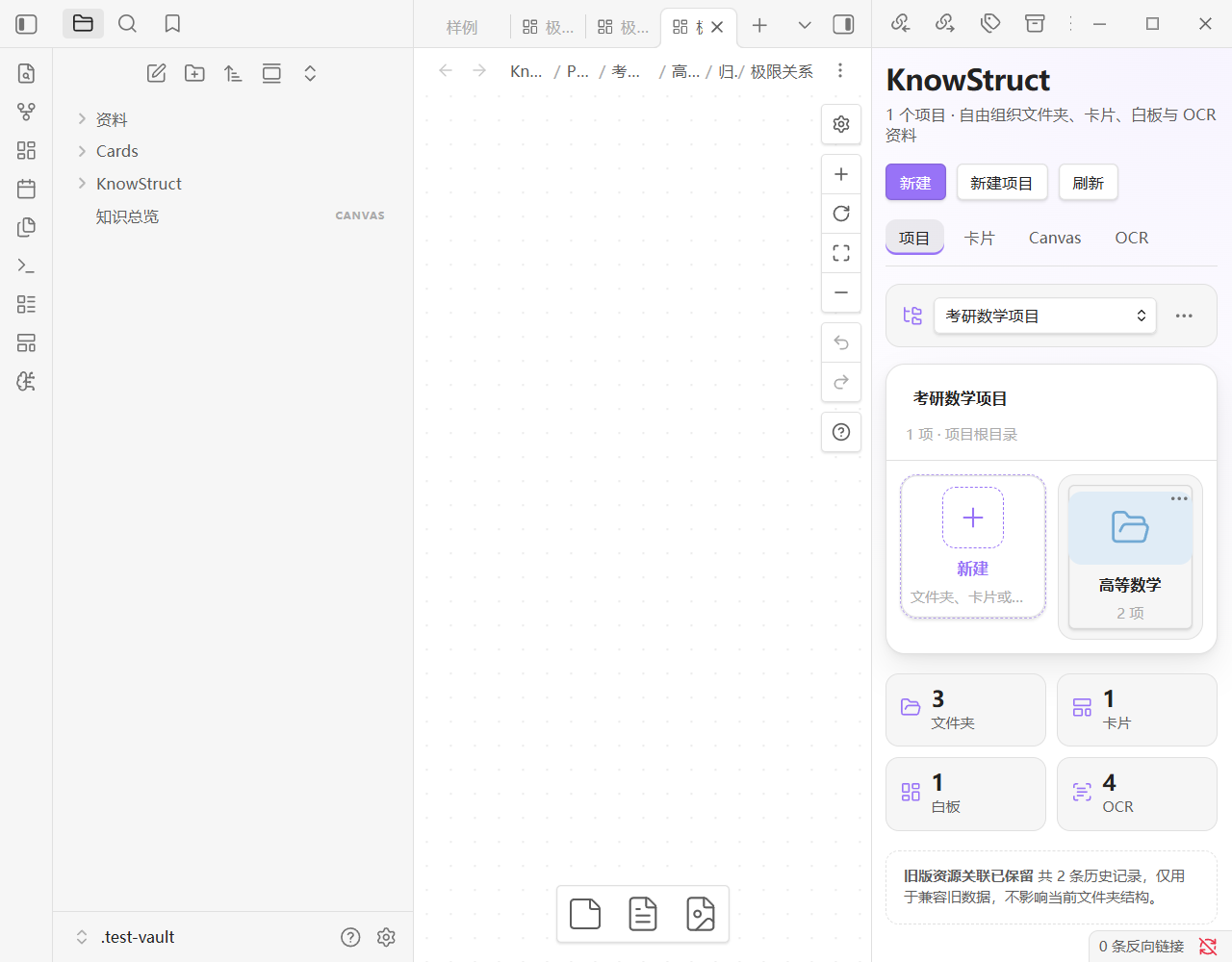
KnowStruct is a local-first Obsidian plugin for organizing simple cards, native Canvas boards, and OCR documents in flexible project folders.
Highlights
- Manage each knowledge project through switchable Documents, Cards, and Whiteboards tabs, with rename, move, and trash actions.
- Switch project resources between cover grid and cover list layouts, select items in batches, or import files from the add menu.
- Create Markdown documents, standalone
.sccardcards, and native.canvasboards directly in their project libraries. - Standalone
.sccardfiles open in Obsidian's native Markdown editor with full Live Preview, multi-line selection, undo/redo, keyboard navigation, and editor-plugin compatibility. - The native editor remains wrapped in the KnowStruct card shell, including its colored header, border, radius, shadow, and color control.
- Move the KnowStruct home between the right sidebar and a main-area tab at any time.
- Import cards into native Canvas nodes that remain connectable and support collapse/expand operations.
- Create folders inside each Documents, Cards, or Whiteboards library and browse them with breadcrumbs.
- Optionally import a newly created card into a chosen whiteboard, or choose a target board later for one or multiple cards.
- Split large knowledge maps into a main whiteboard and infinitely nested child whiteboards, with node entries, a global hierarchy panel, and per-board viewport restoration.
- Highlight selected Markdown with native
==mark==syntax, select text directly in PDFs, or drag rectangular highlights over image-only scanned PDFs. - Keep PDF highlights persistent without modifying the PDF binary, with five colors, adjustable opacity, recoloring, and deletion controls.
- Select text or capture a PDF area into a titleless Canvas card with a backlink to the exact PDF region, then add a title only when needed.
- Drop one KnowStruct card onto another in Canvas to create an arrow automatically.
- Move an existing parent card together with its complete descendant subtree and nested framework containers.
- Keep PDF documents in the main workspace and linked Canvas boards in the right sidebar during two-way region navigation.
- Convert PDFs and images to Markdown through MinerU precision parsing, MinerU Agent, or a local compatible endpoint.
- Keep all project content as ordinary files in the vault. Removing a project record does not delete its project folder.
Installation
After marketplace approval, install KnowStruct from Settings → Community plugins. Until then, download main.js, manifest.json, and styles.css from the matching GitHub release and place them in:
<your-vault>/.obsidian/plugins/knowstruct/
Network and privacy
- KnowStruct contains no telemetry, analytics, or advertising.
- KnowStruct itself requires no account or payment. Optional MinerU cloud OCR may require a third-party account or token and is governed by that provider's terms and pricing.
- Cards, projects, Canvas management, and local editing work without network access.
- A PDF or image is sent only when you explicitly run OCR, and only to the MinerU or compatible endpoint configured in the plugin settings.
- MinerU tokens and plugin settings remain in Obsidian's local plugin data and are not included in this repository.
- The source is publicly reviewable under PolyForm Noncommercial 1.0.0; commercial use is prohibited.
Development
npm ci
npm run check
GitHub release tags must exactly match the version in manifest.json. Release assets are main.js, manifest.json, and styles.css.
中文说明
KnowStruct 是一个以知识项目为顶层的 Obsidian 卡片、Canvas 与 OCR 资料管理插件。
管理结构
知识项目
└─ 项目目录
   ├─ 新建:文件夹 / 卡片 / 白板
   ├─ 文件夹
   │  └─ 新建:文件夹 / 卡片 / 白板
   └─ 任意层级内容
每个项目对应仓库中的真实文件夹,默认位于 KnowStruct/<项目名称>。项目主页采用类似系统文件管理器的当前层网格:点击文件夹进入下一级,通过面包屑或返回按钮导航;首个网格始终是“新建”,可创建文件夹、卡片或白板。层级与分类完全由用户决定。
主要功能
卡片
- 标题、分割线、Markdown 正文的极简卡片。
- 8 个预设色和十六进制自定义颜色。
- 独立
.sccard直接使用 Obsidian 原生 Markdown 编辑器与 Live Preview,支持跨行选择、拖拽选区、撤销/重做、键盘导航和编辑器插件。 - 原生编辑器继续保留 KnowStruct 卡片的彩色标题栏、描边、圆角、阴影和调色按钮。
- 卡片以 Markdown + 隐藏 frontmatter 保存;旧版 JSON 卡片首次加载时自动迁移,永久 ID、颜色、正文与 Canvas 关联保持不变。
- 支持 Markdown、公式、列表、链接、图片与代码。
- 独立
.sccard文件,不依赖 Markdown 容器。
Canvas
- 使用原生 JSON Canvas 文本节点,可继续连接边和参与 Canvas 布局。
- 移除卡片节点外层视觉框,但保留原生连接能力。
- 独立卡片与所有 Canvas 实例双向同步。
- 全部折叠 / 展开一次点击生效,并保留每个节点的展开高度。
- 在 Markdown、阅读视图或 PDF 中选中文本后,点击选区旁的“生成卡片”,即可把内容写入最近使用的 Canvas;编辑器右键菜单和“将所选文本生成 Canvas 卡片”命令也可执行同一操作。
- 点击 PDF 工具栏中的 KnowStruct“框选”按钮后拖动黄色虚线区域;也可运行“框选 PDF 截图生成 Canvas 卡片”、按住
Alt拖动或使用 PDF++ 的矩形框选。截图与page + rect深链会写入无标题卡片,PDF 区域持续显示双链框和 Canvas 返回按钮;铅笔按钮可再次拖动/缩放标记并同步重截卡片图片,删除按钮会删除标记及对应 Canvas 卡片,卡片标题栏的 PDF 按钮可跳回原区域。 - 空标题卡片悬停标题栏时显示“添加标题”,可按需补写;已有标题也可以全部删除。
- 将一张 KnowStruct 卡片拖到另一张卡片上,出现“成为子卡片”提示后松开,会从目标父卡片向拖动的子卡片自动创建箭头并整理位置。父卡片标题栏的导图按钮提供右/左/上/下、双向、放射、组织、时间轴、鱼骨和“框架”图库;“框架”是可编辑标题/Markdown 正文、可显示图片、可折叠内部节点且不显示直连子级箭头的容器,嵌套框架创建后外层会自动扩边,所有样式可混合使用。
- 所有 Canvas 卡片的标题栏都会显示“打开原卡片”按钮:已关联卡片直接跳转;未关联卡片首次点击时自动在卡片目录创建对应
.sccard、写回关联并打开。 - 折叠 Canvas 卡片固定使用紧凑高度,四边外框完整闭合且内层滚动条隐藏;展开卡片会依据真实正文、图片、Wiki 嵌入和 PDF 截图高度自动增高,并在渲染稳定后回落到实际高度,不再裁切底部内容或保留过多空白。
文档荧光笔
- Markdown 编辑器中选中文字后,可使用“使用荧光笔标记所选文字”命令或编辑器右键菜单,写入 Obsidian 原生
==高亮==语法;再次执行可取消标记,多行选择会逐行处理。 - PDF 工具栏提供 KnowStruct 荧光笔按钮。文本型 PDF 直接拖选文字即可生成按行贴合的标记;扫描件、图片型 PDF 或空白位置可直接拖动框选矩形区域,文字上按住 Shift 可强制框选。
- PDF 标记保存为独立 PDF 坐标数据,不修改原始 PDF 文件;重新打开、缩放、切换页面后仍会恢复。
- 支持柠檬黄、荧光绿、玫瑰粉、天空蓝、柔雾紫五种颜色及透明度调节;每组标记可改色或删除,工具栏按钮右键可切换默认颜色或清除当前 PDF 标记。
- 双链框选和荧光标记的操作按钮仅在鼠标移入对应区域时显示;框选截图会同步合成区域内已有的荧光标记。
知识项目
- 创建项目时生成独立的真实项目目录,并自动建立同级“文档 / 卡片 / 白板”分类目录。
- 项目首页使用顶部“文档 / 卡片 / 白板”标签切换,一次只显示当前分类窗口;OCR 保持为独立入口。
- 文档、卡片、白板三个分类均支持在任意层级新建文件夹;面包屑显示当前位置,新建和导入内容直接写入当前文件夹。
- 文档支持带封面的方形与列表排列;三个分类窗口均可进入选择模式进行全选、批量移动或删除,“+”菜单可新建或导入文件。
- 在分类窗口中直接新建、打开、重命名、移动或删除 Markdown 文档、独立
.sccard卡片和原生 Canvas 白板。 - 从项目文档选中文字或框选项目 PDF 生成 Canvas 卡片时,对应
.sccard原卡片自动保存到该项目“卡片”目录。 - 项目 PDF 框选截图默认保存到该项目根目录下的
Captures,卡片窗口直接显示卡片外观与正文摘要。 - 白板窗口保留每个 Canvas 的打开、全部折叠和全部展开按钮,并显示卡片引用与同步状态。
- 新建卡片时可选“同时导入白板”;已有卡片和批量选择也可打开白板选择器,将卡片导入指定项目白板。
- 白板可设置为主白板或任意层级的子白板;普通卡片与框架卡片均可新建/绑定子白板,绑定入口单击直达,右键可更换或解除。
- Canvas 左上角“白板层级”面板按树形列出主白板和全部多级子白板,支持任意层级互跳、返回上一级及一键返回主白板。
- 层级跳转在同一 Canvas 窗口内完成,每张白板独立保存缩放比例与浏览位置,返回时恢复原视图。
- 全部折叠与全部展开同时作用于普通卡片和框架容器;自由布局框架重新展开时恢复手动尺寸。
- 删除项目仅移除管理记录,项目根目录及其中全部文件保持不变。
OCR / MinerU
支持把仓库中的 PDF、PNG、JPG、WebP、BMP 和 TIFF 转换为 Markdown:
- MinerU 精准解析:
https://mineru.net/api/v4/file-urls/batch- Token 鉴权。
- 签名 URL 上传、异步轮询、下载并解压结果包。
- 保存 Markdown 及结果包中的图片资源。
- MinerU Agent 轻量解析:
https://mineru.net/api/v1/agent/parse/file- 无 Token,采用签名上传与异步轮询。
- 默认开启 OCR、表格和公式识别。
- 本地或自定义接口:默认预设
http://127.0.0.1:8000/file_parse- multipart 文件上传。
- 支持自定义文件字段、Bearer Token 和附加 JSON 参数。
官方接口说明:MinerU 文档解析 API。
转换结果默认保存到:
KnowStruct/OCR/<项目名称>/<资料名称>.md
输出 Markdown 会记录:
knowstruct: ocr
ks-project-id: <永久项目 ID>
ks-project-name: <项目名称>
ks-ocr-source: <来源文件路径>
ks-ocr-created-at: <转换时间>
ks-ocr-engine: <解析引擎>
可通过以下入口执行:
- 命令面板:
KnowStruct:使用 MinerU OCR 转换 PDF 或图片 - PDF 或图片的文件右键菜单:
KnowStruct:使用 MinerU OCR - 管理右侧栏的“项目 → OCR 资料”
- 全局“OCR”页
侧栏与主窗口
KnowStruct 默认在右侧栏打开。点击首页右上角的“主窗口/侧栏”按钮可随时迁移到主窗口标签页或移回右侧栏;设置页也可选择默认打开位置。侧栏宽度完全使用 Obsidian 原生行为,可拖拽调整并由工作区记忆,没有固定最大宽度。
设置
- 默认卡片颜色、圆角、阴影和调色按钮。
- KnowStruct 默认打开位置(右侧栏或主窗口标签页)。
- 新建项目的根目录。
- MinerU 接口预设与自定义地址。
- MinerU Token、multipart 文件字段和附加 JSON 参数。
- OCR 输出目录。
本地构建
npm install
npm run check
npm run check 会执行单元测试、TypeScript 类型检查和生产构建。
源码结构
src/main.ts:Obsidian 生命周期、工作区与功能编排。src/settings.ts:设置默认值、持久化数据分离和输入规范化。src/canvas-link.ts:Canvas 连线、导图、框架与布局纯逻辑。src/canvas-hierarchy.ts:多级白板关系、循环检测与视口状态。src/mind-map-style-modal.ts:导图样式选择和 SVG 预览界面。src/pdf-capture.ts:PDF 坐标、截图区域和双链解析。src/document-highlight.ts:PDF 荧光标记模型、坐标裁剪和路径迁移。src/ocr-*.ts:OCR 界面、服务和导入工具。
安装
将下列三个文件放入仓库的 .obsidian/plugins/knowstruct/:
main.js
manifest.json
styles.css
然后在 Obsidian 的“第三方插件”中启用 KnowStruct。
License
KnowStruct is source-available under the PolyForm Noncommercial License 1.0.0. Personal, educational, research, and other noncommercial use is permitted under its terms. Commercial use is prohibited.
KnowStruct 采用 PolyForm Noncommercial License 1.0.0 源码可见许可。个人、教育、研究及其他非商业用途可依照协议使用;商业使用被禁止。转载、修改或分发时必须保留 LICENSE 与 NOTICE。