Japan Work Secretary
 rexxall59 downloads
Track part-time shifts in Japan: pay by time band and store, a warning before any 7 days go over the 28-hour student limit, calendar sync, and rosters read from text or photos.
- Overview
- Scorecard
- Updates8


Start in three steps
- Install Japan Work Secretary from Settings → Community plugins → Browse, enable it and run Japan Work Secretary: Open dashboard.
- In Settings → Japan Work Secretary, set your stores and their hourly rates.
- Double-click a day to add a shift.
Want to look first? Click Load a sample week on the empty dashboard.
Needs Obsidian 1.13 or later on desktop; Calendar sync uses macOS Calendar. Costs nothing; reading rosters with AI is optional and uses your own key.
Everything else
Every feature
Track part-time shifts in Japan: see your pay by time band and get warned before a week goes over the 28-hour student limit.
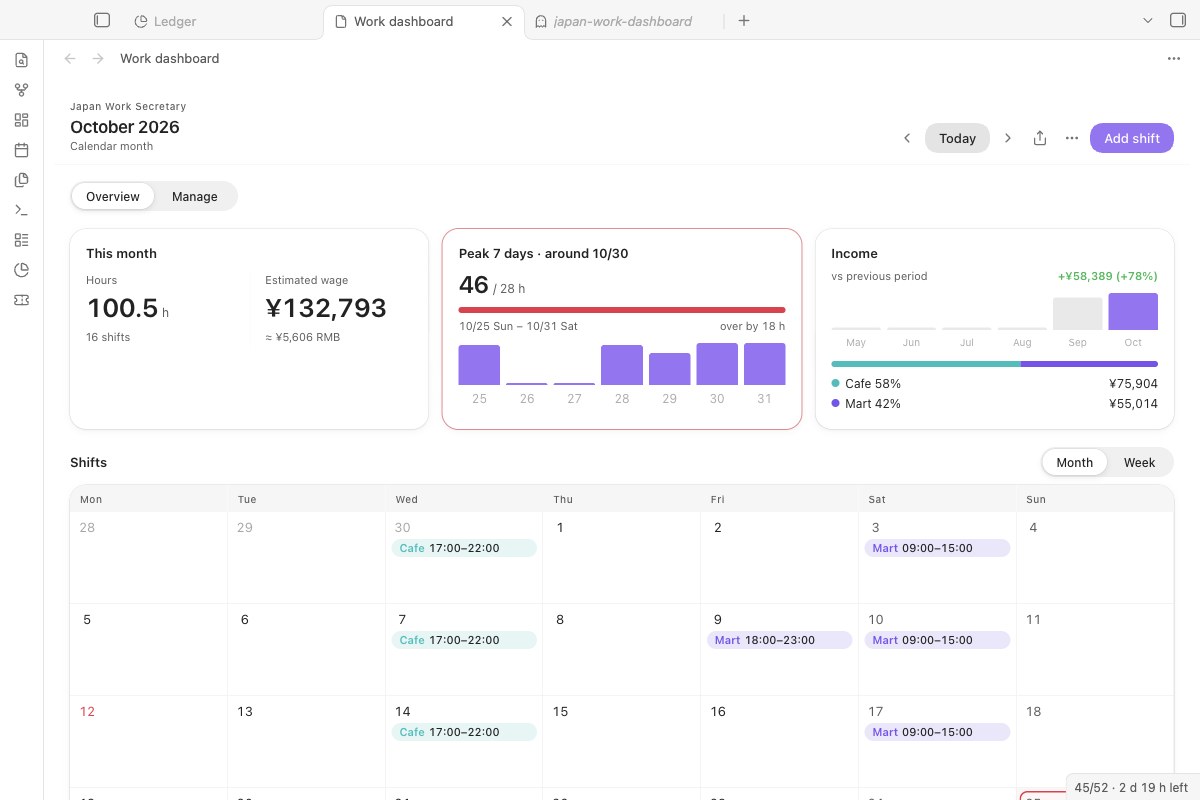
- Works out your pay the way a Japanese payslip does: morning, day, evening and late-night rates per store, overtime, holiday bonus and breaks you actually took.
- Checks every 7-day window as you add shifts, and tells you before you save if a shift pushes a week over 28 hours (8 hours a day during your school's long vacation).
- Keeps the schedule in your vault, syncs it to macOS Calendar or exports .ics, and can read a roster from a message or a photo.
Schedule, pay and limits
- Month and week views, one colour per store; recurring shifts and weekly templates.
- Wage bands with start dates: when your rate goes up, add a band from that date; earlier shifts keep the old rate.
- Breaks you actually took. Each shift's break is Not confirmed or Confirmed. Until you confirm it, nothing is deducted: the shift counts as scheduled toward the 28 hours, and the hours and pay with the break deducted are shown beside it (your planned break, or the legal minimum). The law says the employer must give 45 minutes over 6 hours and 60 minutes over 8 hours (Labour Standards Act art. 34); that is not proof you had one.
- Late night is 22:00–05:00 (art. 37), counted minute by minute, so a 21:00–06:00 shift splits into evening, late-night and morning rates.
- Overtime over 8 hours a day or 40 a week, the store's Sunday and holiday bonus by calendar day, the statutory rest day premium (off until you name the day), commuting allowance, and a payroll month starting on any day.
- 28 hours in any 7 days, with the busiest window marked on the calendar. Long vacations from your school's calendar are checked at 8 hours a day; a week mixing term and vacation days is marked Needs checking and held to 28 hours with all its hours, because the official page does not say how such a week is counted.
- Income alert lines you set yourself, monthly or yearly. The plugin does not decide tax.
Calendar and pay notes
- Sync to macOS Calendar from the ⋯ menu: smart sync writes only changed shifts, events carry a hidden marker and are updated in place, and events for deleted shifts are removed.
- Export .ics for Google Calendar, Outlook or a phone.
- Deadline view for Bases. In a base of application notes (entry sheets, interviews, a residence card renewal), switch the view to Deadlines: overdue, today, this week, next week and later, each with the working days left, skipping weekends and Japanese public holidays. Pick a checkbox property such as
submittedto hide what is done. With Bases turned off nothing changes. - Save pay note: a Markdown note with every shift, totals by store and overtime, to check against your payslip (給与明細).

Start here, step by step
- Install and enable Japan Work Secretary, then run Japan Work Secretary: Open dashboard.
- On an empty dashboard, click Load a sample week. Five made-up shifts at Sample store show hours, estimated pay and the 28-hour check. They are never synced or exported, and Remove samples deletes them.
- In Settings → Japan Work Secretary, set your stores and their hourly rates, then double-click a day to add a real shift.
- Optional: to read rosters from text or photos, choose an AI service under AI for reading schedules and click Test.
Reading a roster with AI
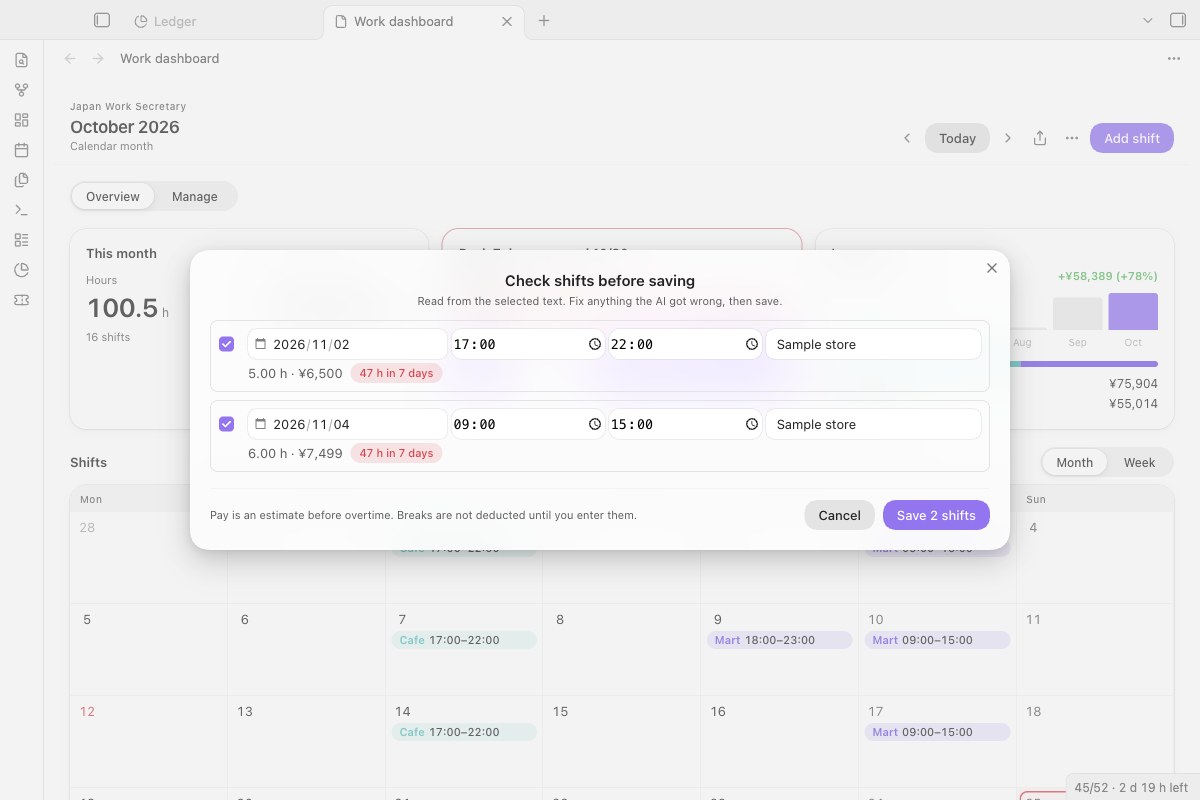
Shifts the AI found open in a check list. Fix a date or time, untick a row, see which rows would break the 28-hour rule. Nothing is saved until you press Save.
- Progress, Cancel and Retry. While a roster is read, a notice shows the step; Cancel drops the reply. On failure it says why (no key, key rejected, out of balance, model not found, no reply in time) and offers Retry, or Open settings when the key is missing or rejected.
- With several images, the ones that worked still reach the check list; the notice names the ones that did not.
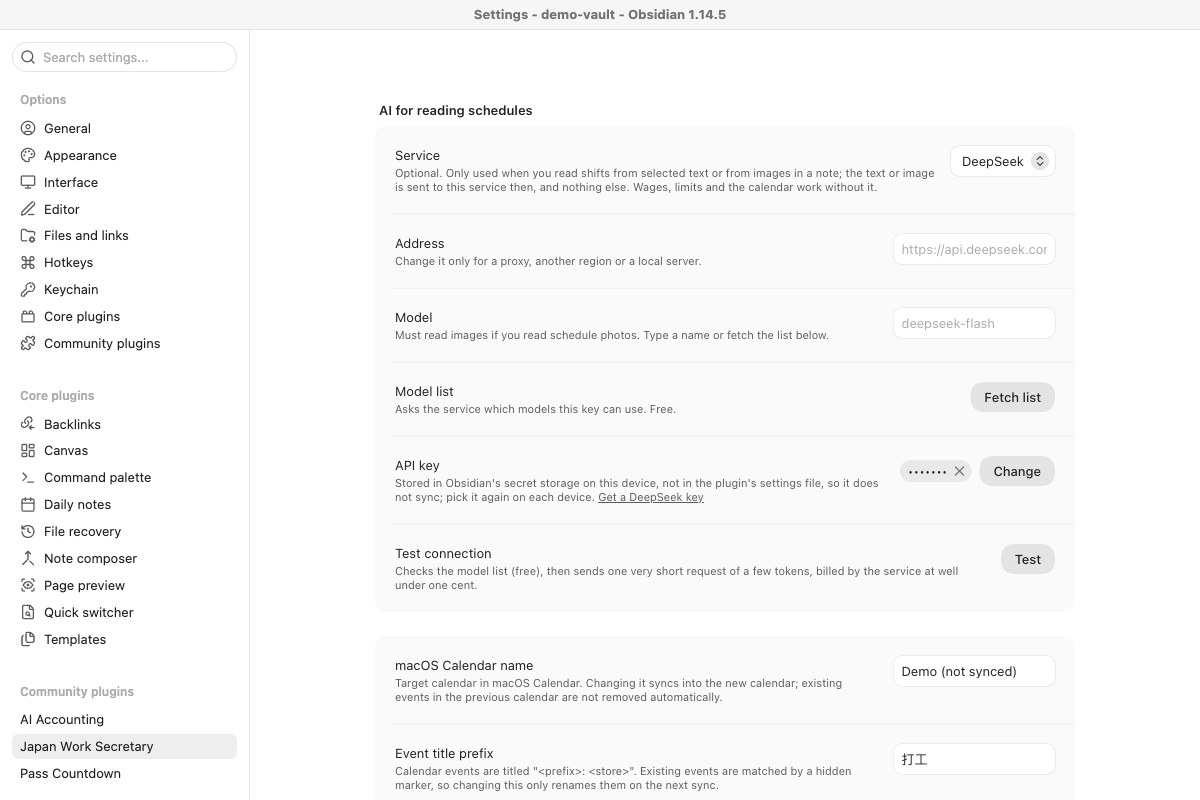
- Presets: DeepSeek (default), Qwen, SiliconFlow, Kimi, Zhipu GLM, Google Gemini, OpenAI, or any OpenAI-compatible or local server. For roster photos, pick a model that reads images.
- Model list asks the service which models your key can use (free).
- Test connection checks the model list (free), then sends one very short request (a few tokens, well under one cent).
What it needs, where your data goes, what the plugin touches
| Obsidian | 1.13 or later, desktop only |
| Calendar sync | macOS Calendar. The .ics export works anywhere. |
| The plugin | Free, MIT licence. No account, no server of ours. |
| AI for rosters | Optional. Your own key; you pay your AI provider for what you send. One roster photo is a few thousand tokens. Everything else works without it. |
| What | Sent to | When |
|---|---|---|
| The selected text or the images in the open note | The AI service you chose | Only when you run Read shifts from selected text or Read shifts from images in the current note |
| A tiny "reply with ok" request | The AI service | Only when you click Test |
| Shift events | Your local macOS Calendar (AppleScript) | When you sync |
| Nothing (downloads only) | holidays-jp.github.io for public holidays; exchangerate-api.com or frankfurter.dev for the yen-to-yuan rate shown next to pay |
About once a week |
- The API key lives in Obsidian's secret storage on this device. The plugin's settings keep only its name, so the key does not sync: on a new device, choose it again.
- Shifts, stores, wages and settings stay in the plugin's
data.jsonin your vault. - Diagnostics from the test contain the service, address, model and error, but no key and no shift content.
What the plugin touches
- One program:
/usr/bin/osascript(the directory's "Shell Execution" note), only to add, update and remove your shift events in macOS Calendar when you add, edit or delete shifts and when you sync. The AppleScript is fixed in the plugin; shift details are passed to it as arguments, never built into a command. No other program is started. - Clipboard: write only. Copy in the export window copies the schedule text; the copy button next to Test copies the diagnostics. It never reads the clipboard.
- Network: three kinds of request, nothing else. The AI service at the address in your settings, only when you read a roster, fetch the model list or click Test;
holidays-jp.github.iofor public holidays;frankfurter.dev, orexchangerate-api.comif that fails, for the exchange rate. No analytics, no server of ours.
Install by hand, and upgrading
From Obsidian (once listed): Settings → Community plugins → Browse, search for Japan Work Secretary.
Manually: download main.js, manifest.json and styles.css from the latest release into <vault>/.obsidian/plugins/japan-work-secretary/, reload Obsidian and enable the plugin.
Checking a download: from 1.7.1 on, GitHub Actions builds the release files and signs where they came from. Check one with gh attestation verify main.js --repo Rexxall/japan-work-secretary.
From 1.4.x: your Gemini key and settings carry over; Gemini is now one of the services under AI for reading schedules. A key kept in the macOS Keychain by versions before 1.4.0 is no longer read: choose or enter it again under AI for reading schedules, then delete the Keychain entry (service obsidian-japan-work-secretary).
How it works
- 28-hour check: the Immigration Services Agency's page on work permission for students says "1週について28時間以内(教育機関の長期休業期間にあっては、1日について8時間以内)" (source, checked 2 November 2026). It does not say which day a week starts, so for the selected day the plugin looks at all seven 7-day windows that include it and reports the largest. Paid leave is not counted.
- Wage bands: each store keeps rate tables with an
effectiveFromdate; a shift uses the newest one that started on or before its date. - Calendar sync: a shift's fingerprint covers only what appears in the event, so changing a wage does not rewrite your calendar. AppleScript receives values as arguments, so store names with quotes are safe.
- AI requests go through Obsidian's
requestUrl, with the key in a header, never in the URL.
Limits
- Rules about hours and income are for reference only. Check your school and the official pages linked in the dashboard (ⓘ).
- Calendar sync works with the macOS Calendar app only.
Development and changelog
npm install
npm run build
npm test      # 28-hour windows, vacations, wages, calendar sync planning, pay notes, .ics, AI replies, migration
styles.css is generated: edit styles/plugin.css and run npm run styles.
1.8.0: a Deadlines view for Bases with working days left, skipping weekends and Japanese holidays; the holiday list is refreshed after Obsidian has started.
1.7.0: every shift has a break status; until it is confirmed, hours and pay are shown both with and without the break, and mixed vacation weeks are marked Needs checking.
1.6.0: no findings left in the community directory's review: typed moment and shell calls, no !important, all or :has() in the styles, the same look.
1.5.0: AI for reading rosters with Chinese and other service presets, a model list and a test that names the problem; progress with Cancel and Retry; a sample week for an empty dashboard; pay figures stay inside their card at any width. Full history in CHANGELOG.md.
日本語
日本でアルバイトをする留学生向けに、シフト・給与・週28時間の上限を Obsidian の中で管理します。時間帯別の時給、残業、祝日手当、実際に取った休憩で給与を計算し、シフトを追加する前に連続7日間で28時間(長期休業中は1日8時間)を超えないか確認します。macOS カレンダーへの同期と .ics の書き出しに対応。シフト表の文章や写真の読み取りは任意で、DeepSeek、通義、SiliconFlow、Kimi、智譜、Gemini、OpenAI、ローカルサーバーから選べます。API キーはこの端末の Obsidian シークレット保存にあり、同期されません。読み取りを実行したときだけ、選んだ文章や画像が AI サービスに送られます。
MIT License