- Overview
- Scorecard
- Updates26
A comfortable WYSIWYG editor for creating structured documents.
Inscriptum lets you create and edit rich documents without having to write Markdown.
Work in single notes or in notepads — one file that keeps many related pages together.
Write structured documents with headings, lists, todo items, tables, images, links, code blocks, and more — using a familiar visual editor.
Your documents stay local and under your control. No cloud storage, no account, and no lock-in.
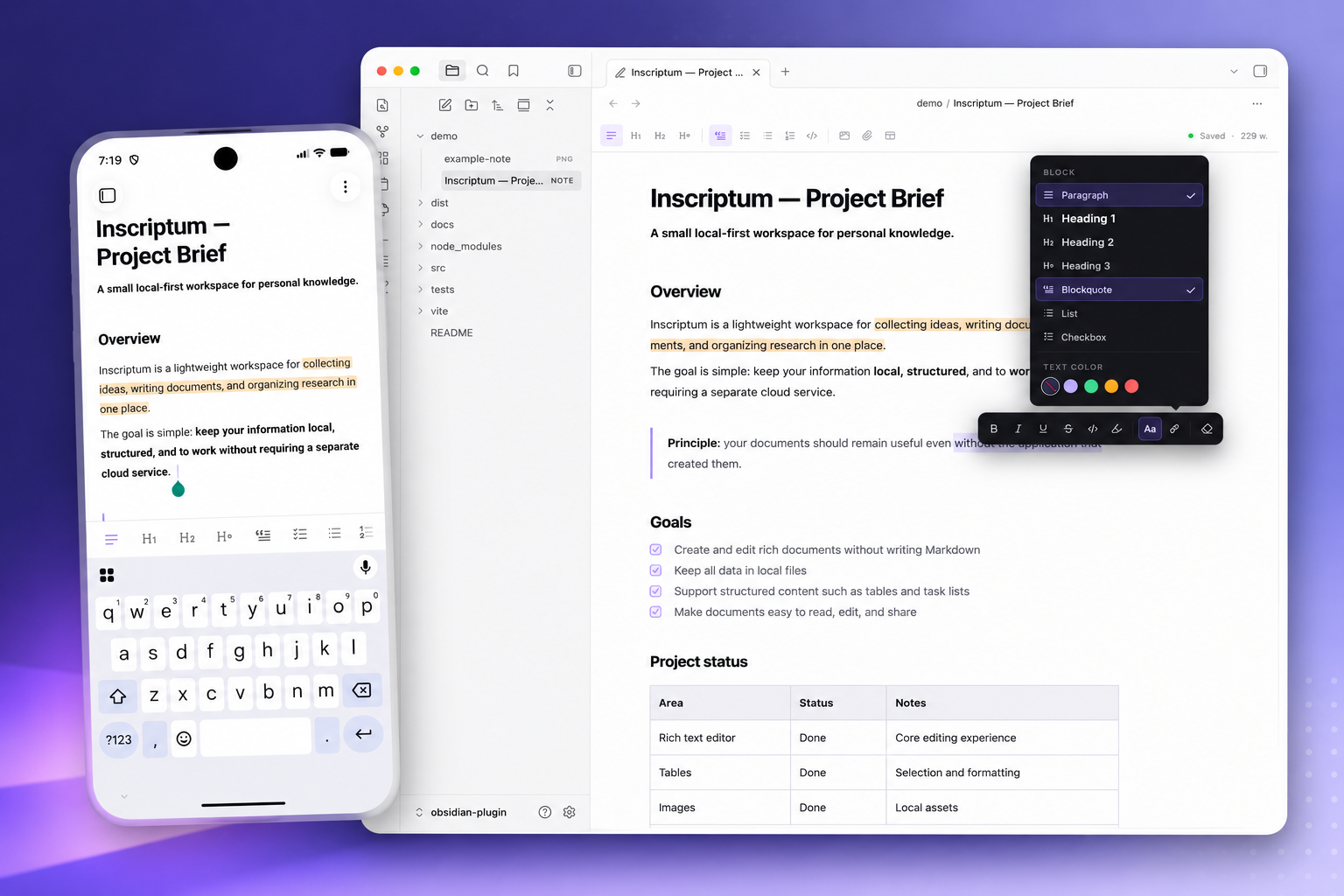
The Obsidian plugin brings Inscriptum to your Obsidian vault, allowing you to use the editor alongside your existing notes and workflow.
Features
- WYSIWYG rich text editing
- Notepads (
.um): many pages in one file, with a cover page, a pages drawer and notebook-wide search - Cover properties: add fields (description, tags, status, any name) to a notepad's cover, as text or lists
- Headings and structured documents, with foldable sections
- Todo lists and regular lists, including nested subtasks
- Blockquotes
- Tables: cell selection, cell fill, Word-style borders and images inside cells
- Images: resizing, text wrap layouts, and a gallery viewer with zoom and pan
- Mermaid diagrams: insert from the toolbar, edit the source with live syntax checks, render as theme-aware images
- Links and automatic URL/email linking
- Attachments: link vault files in place or copy them into the note
- Code blocks with syntax highlighting
- Switchable syntax highlighting themes
- Bubble menu for quick formatting
- In-note search
- Export a note — or a whole notepad — as a self-contained static website
- Works on desktop, phones and tablets
Local-first
Inscriptum keeps your documents in your Obsidian vault.
There is no cloud service, no account, and no external storage required. Your documents and data remain on your device and under your control.
Installation
Via Community Plugins (recommended)
- Open Settings → Community plugins in Obsidian.
- Disable Restricted mode if it is on.
- Click Browse and search for Inscriptum.
- Install and enable it.
Alternatively, open the plugin page directly: Inscriptum on Obsidian Plugins.
Via BRAT
If you want to try the latest development versions before they are released, install Inscriptum using BRAT.
Install BRAT in Obsidian.
Open BRAT → Add Beta Plugin.
Add:
inscriptum/obsidian-pluginInstall and enable Inscriptum.
Manually
Download
main.js,manifest.json, andstyles.cssfrom the latest release.Create the plugin directory:
.obsidian/plugins/inscriptum/Copy the downloaded files into it.
Reload Obsidian.
Enable Inscriptum under Settings → Community plugins.
Development
Clone the repository and install dependencies:
git clone https://github.com/inscriptum/obsidian-plugin.git
cd obsidian-plugin
npm ci
Start the development build:
npm run dev
The development build runs in watch mode and automatically deploys the plugin to:
.obsidian/plugins/inscriptum/
Create a production build:
npm run build
Run tests:
npm test
E2E tests
Browser tests run the real editor (ProseMirror + extensions) in Chromium via
Playwright, against a harness page with a shimmed obsidian module
(src/browser-harness/). Install the browser once, then run:
npx playwright install chromium
npm run test:e2e
Useful variants: npm run test:e2e:headed (visible browser) and
npm run test:e2e:ui (Playwright UI mode). CI runs the same suite on every
push (see .github/workflows/ci.yml).
Type-check the codebase (vite build does not check types; CI runs this on
every push, so keep it clean):
npm run typecheck
For a continuous check while refactoring:
npm run typecheck:watch
Release
Releases are built automatically by GitHub Actions.
Create a new version and push the tag:
npm version patch
git push --follow-tags
The workflow builds the plugin, takes the release notes for the new version from CHANGELOG.md, and publishes the release automatically.
Before pushing the tag, add a ## [x.y.z] section to CHANGELOG.md describing
the changes — the release will be created only if that section exists.
License
MIT © 2026 sumbad