Search...Search plugins and themes...
⌘K
Sign in
  • Get started
  • Download
  • Pricing
  • Enterprise
  • Account
  • Obsidian
  • Overview
  • Sync
  • Publish
  • Canvas
  • Mobile
  • Web Clipper
  • CLI
  • Learn
  • Help
  • Developers
  • Changelog
  • About
  • Roadmap
  • Blog
  • Resources
  • System status
  • License overview
  • Terms of service
  • Privacy policy
  • Security
  • Community
  • Plugins
  • Themes
  • Discord
  • Forum / 中文论坛
  • Merch store
  • Brand guidelines
Follow us
DiscordTwitterBlueskyThreadsMastodonYouTubeGitHub
© 2026 Obsidian

In-place Diff View

glechglech92 downloads

Renders {old | new} and {note|...} correction markers with a hover tooltip to accept, reject, or delete them.

Add to Obsidian
  • Overview
  • Scorecard
  • Updates2

Renders inline review markers from the writing-inplace-diff workflow inside Obsidian:

  • {old | new} — corrections render inline as struck-through old (red) → new (green)
  • {note|observation} — notes render as blue chips
  • Insertions {|word} (green) and deletions {word|} (struck-through red)

Hover a marker for a tooltip with actions:
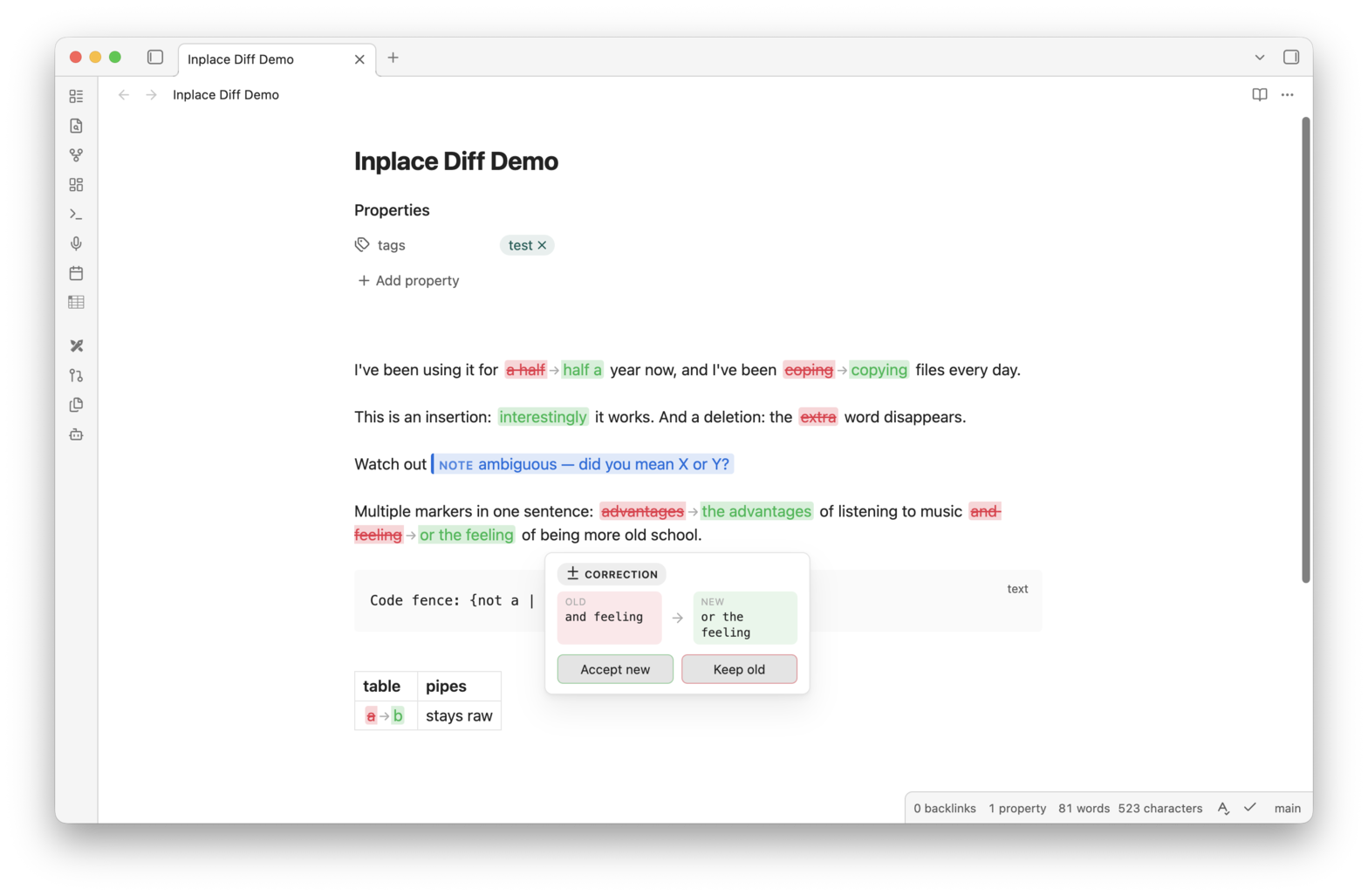
Demo: markers in Live Preview with the hover tooltip

  • Corrections: Accept new / Keep old
  • Notes: Delete note

Applied changes are written through the editor as a single undoable transaction (⌘Z reverts them). Frontmatter and code fences are never touched; markdown table pipes and trivial {I | I} markers are left raw.

Commands:

  • Accept all corrections
  • Keep original text for all corrections
  • Delete all notes

Works in both Reading view and Live Preview (markers under the cursor stay raw in Live Preview so they remain editable).

Development

npm install
npm run build   # typecheck + production bundle (src/main.ts -> main.js, styles.scss -> styles.css)
npm run dev     # watch mode with inline sourcemaps

Install into a vault by copying main.js, manifest.json, and styles.css into <vault>/.obsidian/plugins/inplace-diff-view/.

Pairing with an AI agent

The plugin only renders the markers — they're meant to be written by an AI agent (or a careful human) proofreading a copy of your note. This section is the full syntax contract, so you can reproduce the workflow anywhere.

HealthExcellent
ReviewPassed
About
Render inline review markers from the in-place diff workflow directly in notes, showing struck-through deletions (red), inserted text (green), and blue note chips for observations. Apply or revert edits via hover actions or bulk commands, write changes back as a single undoable transaction, and preserve frontmatter and code fences while working in Reading view and Live Preview.
ReviewEditingAnnotation
Details
Current version
0.1.1
Last updated
2 weeks ago
Created
2 weeks ago
Updates
2 releases
Downloads
92
Compatible with
Obsidian 1.5.0+
Platforms
Desktop, Mobile
License
MIT
Report bugRequest featureReport plugin
Author
glechglechglechic
GitHubglechic
  1. Community
  2. Plugins
  3. Review
  4. In-place Diff View

Related plugins

LanguageTool Integration

Advanced grammar and spell checking, powered by LanguageTool.

Meta Bind

Make your notes interactive with inline input fields, metadata displays, and buttons.

Advanced Tables

Improved table navigation, formatting, and manipulation.

Thino

Quickly capture memos and display them in the sidebar with a heatmap. (Closed source)

Admonition

Admonition block-styled content.

Editing Toolbar

The Editing Toolbar is modified from cMenu, which provides more powerful customization settings and has many built-in editing commands to be a MS Word-like toolbar editing experience.

Outliner

Work with your lists like in Workflowy or Roam Research.

Hover Editor

Transform the Page Preview hover popover into a fully working editor instance.

Sort and Permute lines

Sort and Permute lines in whole file or selection.

Creases

Tools for effectively folding Markdown sections.