
- Overview
- Scorecard
- Updates3
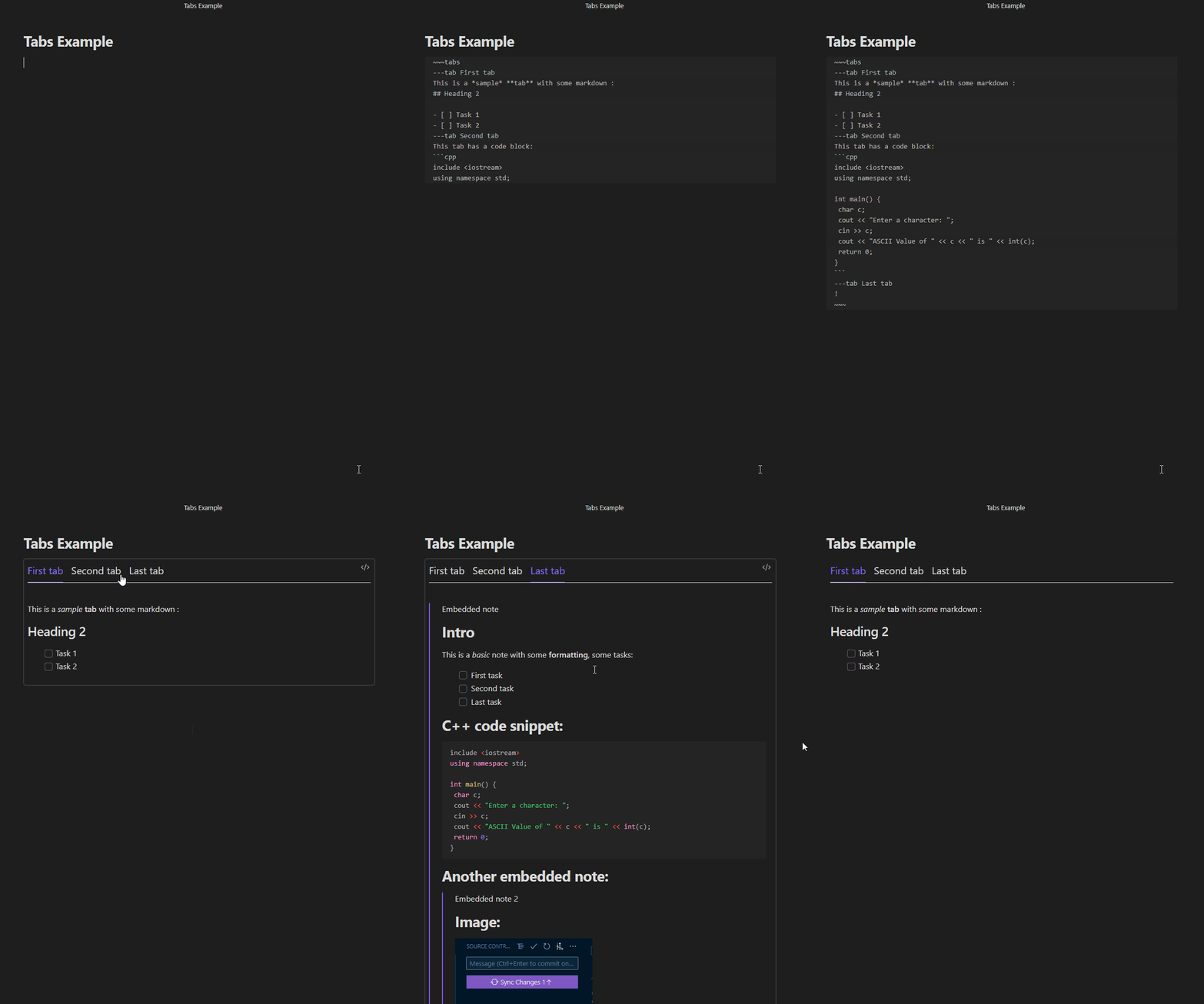
This plugin allows you to easily embed tab controls in your notes.
Example
Installation
Download from Github
This is the only way to install the plugin pending its validation to appear on the list of official community plugins:
- Go to https://github.com/ptournet/obsidian-html-tabs/releases
- Download the latest release.
- Extract and put the three files (
main.js,style.css,manifest.json) to folder{{obsidian_vault}}/.obsidian/plugins/html-tabs - In
Settings > Community plugins, activate HTML Tabs
Install from Plugin Store
Follow the steps below to install HTML Tabs:
- Open
Settings > Community plugins - Click
Browsein the Community plugins section - Search for
HTML Tabs - Clink
Installand thenEnable
Usage
The definition of a tab control containing 3 tabs has the following structure:
~~~tabs
---tab <label-of-first-tab>
<content-of-first-tab>
---tab <label-of-second-tab>
<content-of-second-tab>
---tab <label-of-third-tab>
<content-of-third-tab>
~~~
or:
```tabs
---tab <label-of-first-tab>
<content-of-first-tab>
---tab <label-of-second-tab>
<content-of-second-tab>
---tab <label-of-third-tab>
<content-of-third-tab>
```
The <label> of a tab is in plain text (no markdown allowed), while its <content> can use the full Obsidian Markdown syntax. It's particularly possible to embed antother note (with the syntax ![[Note-to-embed]]) or have a fenced code block.
In this case, you have to be careful not to use the same characters as the ones for defining your tabs: if you used
~~~tabs
~~~
the code blocks in your tabs should be defined as:
```<lang>
```
but if you're used to defining you code blocks as:
~~~<lang>
~~~
then you should define your tabs as:
```tabs
```
Customization
For the time being, if you want to change the way your tabs look, you have to use a CSS Snippet.
For that, you'll first need to create a html-tabs.css file in your snippets directory. If you don't know where it lives on your hard drive, you can locate it at the bottom of the Appearance page in your Obsidian Settings.
You can then ovveride the html-tab* classes defined in the styles.css file in the plugin directory.
Contributing
You are welcome to contribute to this plugin via bug reports, bug fixes, documentation, or general improvements. For a major feature, please make an issue about your idea / reach out to me so I can decide if and how to best implement it.
Pricing
This plugin is provided to everyone for free, however if you would like to say thanks or help support continued development, feel free to send a little my way through one of the following methods:
Credits
Thanks to gapmiss/obsidian-alpinejs which helped me integrating Alpine.js to get the tab switching working.
Limitations
As of now, there is no interaction between Obsidian and the content of the tabs. For instance, if there is a task in a tab and you check it, its status won't persist if you switch to another tab and come back... And this task won't be found by a query (datatview or tasks plugin). A heading on a tab won't show in the note Outline either.
Todo
- First version of README
- Validate on Android
- Create a test-vault and modify dev script
- Releasing v1.0.0
- Markdown rendering of label
- Updating Obsidian cache
- for Links (in order to have backlinks working)
- for Headings (in order to have the note Outline working)
- for Lists (in order to have Tasks woring)
- for Tags
- for Embeds
- for Sections
- Create first Settings
- Integrate labels in note outline
- Ability to open note on a specific label/tab
- Improve standard editing experience (place cursor in the right place in the right tab)
- Improve embedded editing experience (if tab content is in another note, allow editing that note instead)
- Buttons to easily create/edit tabs
- More visual configuration (for people who don't master CSS)