Search...Search plugins and themes...
⌘K
Sign in
  • Get started
  • Download
  • Pricing
  • Enterprise
  • Account
  • Obsidian
  • Overview
  • Sync
  • Publish
  • Canvas
  • Mobile
  • Web Clipper
  • CLI
  • Learn
  • Help
  • Developers
  • Changelog
  • About
  • Roadmap
  • Blog
  • Resources
  • System status
  • License overview
  • Terms of service
  • Privacy policy
  • Security
  • Community
  • Plugins
  • Themes
  • Discord
  • Forum / 中文论坛
  • Merch store
  • Brand guidelines
Follow us
DiscordTwitterBlueskyThreadsMastodonYouTubeGitHub
© 2026 Obsidian

HTML Fetcher

dewskiidewskii209 downloads

Plugin to Fetch and convert webpages to formatted markdown.

  • Overview
  • Scorecard
  • Updates9

An Obsidian Plugin for generating a note with a reader like view from external URLs using an inline flag.

Project bootstrapped from obsidian-sample-plugin.

Demo
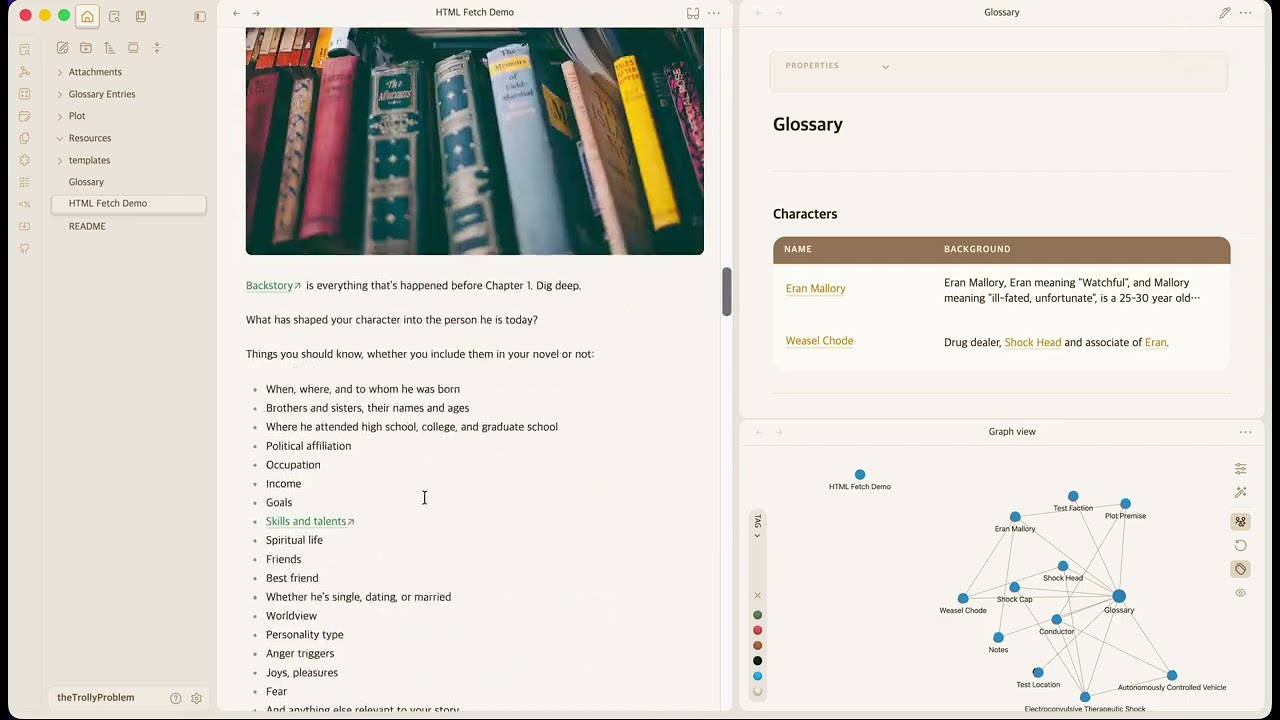
Final video of fixing issues in your code in VS Code

Usage

To use the plugin, simply prepend a URL string with the [!html-fetch] tag.

[!html-fetch] https://site.com/you/wanna/fetch/this

The plugin should then attempt to fetch a reader view of the site along with any images, and proceed to convert it to markdown.

Installation

[!NOTE] plugin link is a place holder, is still under review This note will be removed after publication

Install from Obsidian Community Plugins

Install from Release

wget && \
'https://github.com/dewskii/obsidian-html-fetcher/releases/download/{version}/html-fetcher.zip' && \
unzip html-fetcher.zip && \
mv html-fetcher/ /path/to/your/vault/.obsidian/plugins/

To install from source

git clone https://github.com/dewskii/obsidian-html-fetcher && cd obsidian-html-fetcher/
npm install
npm run build
mkdir /path/to/your/vault/.obsidian/plugins/html-fetcher && \
mv main.js manifest.json /path/to/your/vault/.obsidian/plugins/html-fetcher
HealthExcellent
ReviewRisks
About
Fetch a reader-style copy of any webpage by prepending its URL with the [!html-fetch] inline tag. Download images and convert the reader view into Markdown to create a clean, note-ready version.
ImportMarkdownImages
Details
Current version
0.5.2
Last updated
8 months ago
Created
10 months ago
Updates
9 releases
Downloads
209
Compatible with
Obsidian 1.11.0+
Platforms
Desktop, Mobile
License
0BSD
Report bugRequest featureReport plugin
Author
dewskiidewskii
github.com/dewskii
GitHubdewskii
  1. Community
  2. Plugins
  3. Import
  4. HTML Fetcher

Related plugins

Image Captions

Add captions to images with inline Markdown and link support. The caption format is compatible with the Commonmark spec and other Markdown applications.

Docxer

Import Word files easily. Adds a preview mode for .docx files and the ability to convert them to markdown (.md) files.

Local Images Plus

A reincarnation of Local Images to download images in Markdown notes to local storage.

Importer

Convert your data to Markdown files you can use in Obsidian. Works with Apple Notes, OneNote, Evernote, Notion, Google Keep, and many other formats.

Linter

Format and style your notes. Linter can be used to format YAML tags, aliases, arrays, and metadata; footnotes; headings; spacing; math blocks; regular Markdown contents like list, italics, and bold styles; and more with the use of custom rule options.

Custom Frames

Turn web apps into panes using iframes with custom styling. Also comes with presets for Google Keep, Todoist and more.

Consistent Attachments and Links

Move note attachments and update links automatically.

Text Format

Format selected text upper/lower/capitalize.

TTRPG Tools - Maps

A toolbox for interactive fantasy maps.

YTranscript

Easily fetch transcription for any YouTube video.