HN Reader
 Anton Liberant98 downloads
Browse top Hacker News stories and save them to your reading list
- Overview
- Scorecard
- Updates2
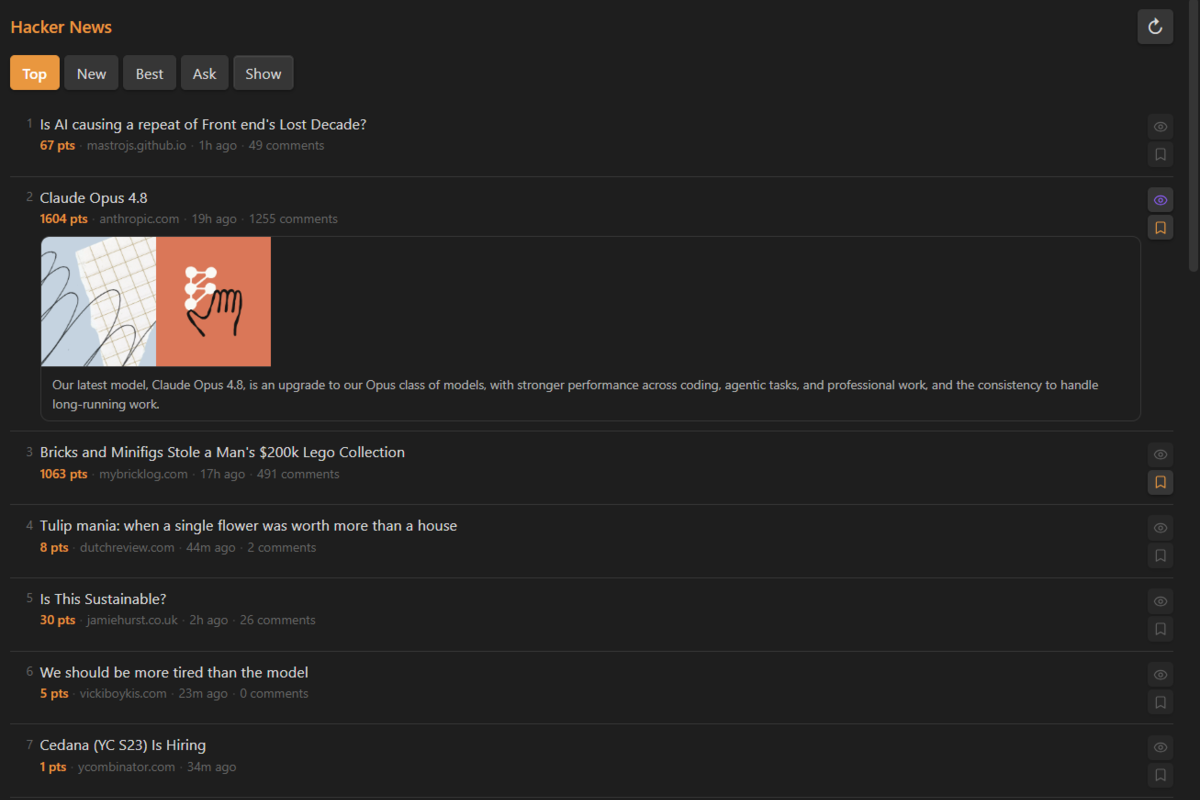
Browse Hacker News top stories directly inside Obsidian. Save interesting links to your reading list with one click.
Website: https://hn.jsdev.space/plugins/obsidian/
Features
- Browse Top, New, Best, Ask HN, Show HN, Jobs feeds
- Open as a sidebar panel or a new tab
- Save stories to a reading list note with one click
- Optional site favicons next to story titles
- Daily notes mode — creates a new file per day with YAML frontmatter
- Tags — automatically append tags to every saved story
- Configurable number of stories (10 / 20 / 30 / 50)
- Respects Obsidian's light and dark themes
Installation
Community plugin
HN Reader is available in the Obsidian community plugin directory:
https://community.obsidian.md/plugins/hn-reader
- Open Settings → Community plugins in Obsidian.
- Disable Restricted mode if needed.
- Click Browse, search for HN Reader, then install and enable it.
Manual installation
You can also install a release manually.
Download the latest release from the Releases page:
main.jsmanifest.jsonstyles.css
In your vault, create the folder:
<your-vault>/.obsidian/plugins/hn-reader/Copy the three downloaded files into that folder.
In Obsidian go to Settings → Community plugins, disable Restricted mode, then find HN Reader in the list and enable it.
BRAT
BRAT is a plugin that lets you install and auto-update plugins that are not yet in the official list.
- Install BRAT from the Obsidian community plugin list.
- Open Settings → BRAT → Add Beta Plugin.
- Paste this URL:
https://github.com/anliberant/hn-obsidian-plugin - Click Add Plugin — BRAT will install it automatically.
Settings
| Setting | Description |
|---|---|
| Display mode | Open in sidebar panel or new tab |
| Default feed | Feed shown when plugin opens (Top / New / Best / Ask / Show / Jobs) |
| Stories per page | How many stories to load: 10, 20, 30, or 50 |
| Show site favicons | Toggle small favicons next to story titles |
| Save mode | Single file or a new daily note per day |
| File path | Path to the reading list note (single file mode) |
| Daily notes folder | Folder for daily HN notes, named YYYY-MM-DD-hn.md |
| Add tags | Toggle to append tags to every saved story |
| Tags | Space-separated tags, e.g. #hn #reading |
Usage
- Click the HN icon in the left ribbon to open the reader
- Use Ctrl+P →
Open HN Readerto open via command palette - Switch feeds with the Top / New / Best / Ask / Show / Jobs buttons
- Click 🔖 next to any story to save it to your reading list
- Click ↻ to refresh stories
Release notes
1.0.1
- Added the Jobs feed.
- Added optional site favicons next to story titles.
Reading List format
Single file mode:
# HN Reading List

- [ ] [Story title](https://example.com) | 312 pts | [HN](https://news.ycombinator.com/item?id=...) | 2026-05-28
Daily note mode (HN/2026-05-28-hn.md):
---
date: 2026-05-28
tags: [hn, reading]
---

# HN Reading List 2026-05-28

- [ ] [Story title](https://example.com) | 312 pts | [HN](https://news.ycombinator.com/item?id=...) | 2026-05-28 #hn #reading
License
MIT